Maptool: Stats sheet and Notes sheets should be displayed on top of overlays
Is your feature request related to a problem? Please describe.
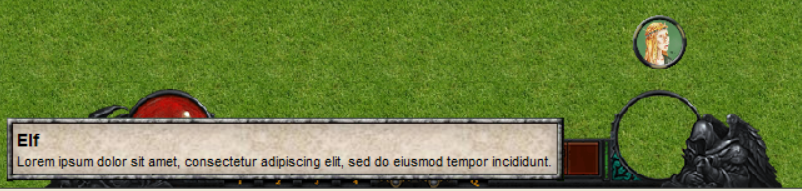
Currently, the stats sheet (displayed when hovering the mouse on a token) and the notes sheets (displayed when clicking on a token on the background/object layer) are drawn behind the overlay.
This means that overlays can hide and obscure these two sheets.
Describe the solution you'd like
These sheets should be drawn above overlays so they are never obscured by them.
Additional context
Screenshot from Jamz:

 Merudo
All 17 comments
The easiest (UI wise) would be to just pop statsheet, portrait, and notes above overlays.
Being able to detect/fire event on click of stamps (on hidden/object/background layer) would be nice but may fall under another issue. If we had that I would just roll with my own overlay to display room descriptions using markdown and HTML5.
Another option is to replace or option to replace these popups and route them to a defined overlay? Having them in an HTML5 frame would be nice.
 JamzTheMan
on 5 Jun 2020
JamzTheMan
on 5 Jun 2020
The easiest (UI wise) would be to just pop statsheet, portrait, and notes above overlays.
Should probably go for this in short term as other options are already planned as part of #1420 and #1424
 cwisniew
on 5 Jun 2020
cwisniew
on 5 Jun 2020
The easiest (UI wise) would be to just pop statsheet, portrait, and notes above overlays.
Should probably go for this in short term as other options are already planned as part of #1420 and #1424
Yep, if that one is in the pipeline I'm ok with the "easy" way, provided it is the easier way.
JamzTheMan
on 5 Jun 2020
Ummm... no.
I consider your base assumption to be flawed regarding the visibility priority.
 bubblobill
on 6 Jun 2020
bubblobill
on 6 Jun 2020
Ummm... no.
I consider your base assumption to be flawed regarding the visibility priority.
That doesn't help anyone without any reasoning.
Right now there is no way to control overlays with the same events that drive statsheet, portraits and notes and until we get to #1424 it makes using them in combination with overlays difficult to say the least. I see no compelling reason to not make this change.
@Merudo an additional thought, since overlays have a z-order, maybe any z-order less than, say, 0, or some other number, show up under statsheets? Or is that difficult considering how the zone renderer is less than efficient. Thoughts?
JamzTheMan
on 6 Jun 2020
@Merudo an additional thought, since overlays have a z-order, maybe any z-order less than, say, 0, or some other number, show up under statsheets? Or is that difficult considering how the zone renderer is less than efficient. Thoughts?
Giving the statsheet & notes a z-order would not be more difficult to implement than drawing them be in front of every overlay.
So far though nobody has been able to give a reason why the overlays should be displayed in front of the statsheet and notes, so I don't see the point.
Merudo
on 6 Jun 2020
@Merudo an additional thought, since overlays have a z-order, maybe any z-order less than, say, 0, or some other number, show up under statsheets? Or is that difficult considering how the zone renderer is less than efficient. Thoughts?
Giving the statsheet & notes a z-order would not be more difficult to implement than drawing them be in front of every overlay.
So far though nobody has been able to give a reason why the overlays should be displayed behind the statsheet and notes, so I don't see the point.
Unless someone has developed an overlay that fits over and around a given statsheet/portrait as a frame? But I doubt it and it seems silly/unlikely. I can't think of any use cases off and.
IF someone has a compelling reason, I figured the z-order should suffice but unless someone gives us a compelling reason, I tend to agree with you and don't see a point.
JamzTheMan
on 6 Jun 2020
So far though nobody has been able to give a reason why the overlays should be displayed behind the statsheet and notes, so I don't see the point.
Because the Notes popup and the Statsheet/Portrait are temporary in response to user actions whereas the overlays are static. Once you are no longer hovering over a token or interact in some way with the map, the popups go away.
 Phergus
on 6 Jun 2020
Phergus
on 6 Jun 2020
So far though nobody has been able to give a reason why the overlays should be displayed behind the statsheet and notes, so I don't see the point.
Because the Notes popup and the Statsheet/Portrait are temporary in response to user actions whereas the overlays are static. Once you are no longer hovering over a token or interact in some way with the map, the popups go away.
I think you are in agreement then that the popup should go over the overlays then, which we all are except @bubblobill ?
JamzTheMan
on 6 Jun 2020
If you look at @Merudo last statement he said, "_nobody has been able to give a reason the overlays should be displayed behind the stat sheet and notes._" Which is in direct contradiction to the original premise of the issue. Perhaps he meant to say _shouldn't_.
Phergus
on 7 Jun 2020
If you look at @Merudo last statement he said, "nobody has been able to give a reason the overlays should be displayed behind the stat sheet and notes." Which is in direct contradiction to the original premise of the issue. Perhaps he meant to say shouldn't.
Yep it was a typo on my part, thanks for the heads-up!
Merudo
on 7 Jun 2020
I cannot control the display of stat sheets on a client. I can however cover it with my own replacement pop-up on an overlay
bubblobill
on 7 Jun 2020
I cannot control the display of stat sheets on a client. I can however cover it with my own replacement pop-up on an overlay
You can control the stat sheets on a client by not putting properties with an * on them or put a # so they only show on GM client. So stat sheets are 100% controllable by the GM.
If you don't want a portrait to show ever, don't put one on. You could instead put it on handout and show via an overlay.
2a. You could never truly cover a portrait with an overlay as well. As a client, I have control over portrait size. So with a larger monitor I may be using 200px or 1000px portraits.You can't force overlays either. I as a client can turn off your overlay.
You can't dynamically show an Overlay onClick of stamps (tokens not on token layer) so it's either always on or not for those, or your overlay only covers stat sheet/portrait and not PC/GM notes on stamps as my screen shot in the issue shows.
As you can see, you have a lot more control over "not" showing stat sheets/gm notes over an overlay vs the other way around.
JamzTheMan
on 7 Jun 2020
Yep it was a typo on my part, thanks for the heads-up!
Good. Had me confused.
Phergus
on 7 Jun 2020
PR #2063 implements this.
Merudo
on 2 Jul 2020
Tested. Stat sheet and token notes now appear above overlays.
Phergus
on 4 Jul 2020
@JamzTheMan So, I have found a valid reason to be in opposition to this.
In designing an overlay for accessibility purposes that enables touchscreen control, there are only two places you can sensibly put "joypad" controls (excuse dodgy WIP graphics).
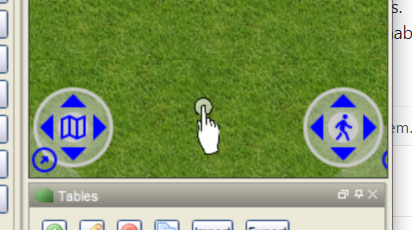
Corners are in fact the sensible place to put most on-screen controls, for the same reason the stat-sheet/object notes live in the corner.
So whilst the easy fix was just to jigger the z-order, a better fix would be the ability to move the pop-ups in preferences and code until we have a genuine discussion on how to implement touch controls and thrash out a better option.
Overlay information that interferes with pop-ups as provided in the earlier examples is solvable through better design of the overlays.
bubblobill
on 17 Nov 2020
Related issues
 mrkwnzl
·
9Comments
cwisniew
·
6Comments
mrkwnzl
·
9Comments
cwisniew
·
6Comments
 melek
·
8Comments
melek
·
8Comments
 jfranciscoap
·
8Comments
jfranciscoap
·
8Comments
 dstein766
·
7Comments
dstein766
·
7Comments