Maptool: MapTool on macOS has a non-native window frame
Describe the bug
MapTool on macOS has a non-native window frame (is it called that?). It might have something to do with #1635, but I’m not sure.
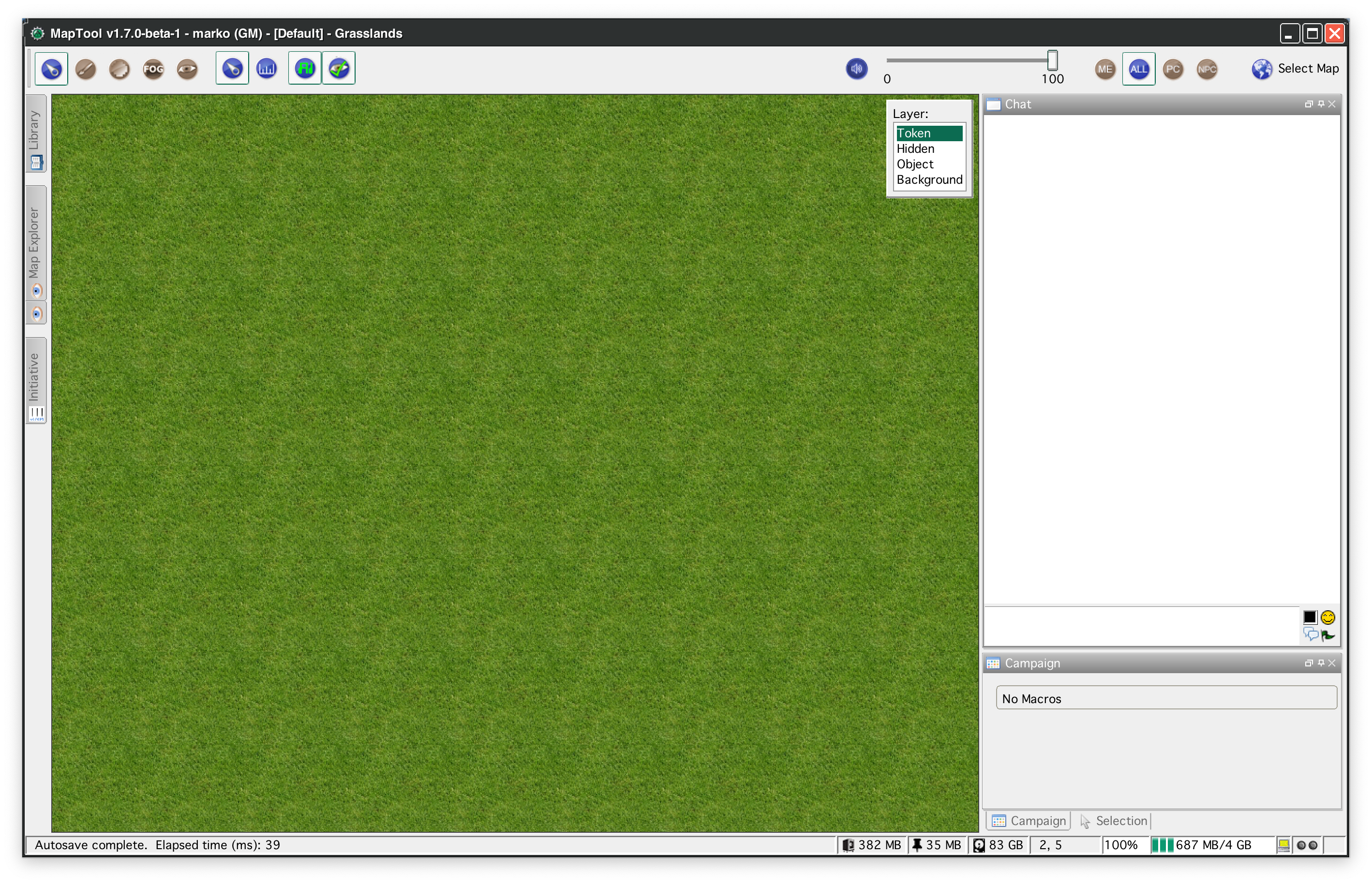
To Reproduce
Open MapTool on macOS
Expected behavior

MapTool Info
- Version: 1.7.0 Beta 1
- Install: New
Desktop (please complete the following information):
- OS: macOS
- Version 10.15.4
 mrkwnzl
All 29 comments
That's very likely related. This looks different from what was reported here.
Can you confirm your selected theme?
 nmeier
on 4 May 2020
nmeier
on 4 May 2020
I was using RT Flat Default Green.
Here’s Default:

Here’s RT Default Dark:

mrkwnzl
on 4 May 2020
This is on Windows too, I was thinking about that same github issue and was about to post the bug - but it is likely the same issue as this one. Anyone let me know if I should post separately.
On Windows, this also means a loss of window-snapping and dragging the window is very jerky (at least on my system). I am using the default theme.
 melek
on 4 May 2020
melek
on 4 May 2020
ok, just realized you're the person as https://github.com/RPTools/maptool/issues/1635#issuecomment-621682589
So to confirm - when you tested i1636-test-build you got the mac native titlebar, now with 1.7.0 Beta 1 you see a titlebar change to 'always java look&feel'.
I'll check what else has changed since. When doing the look changes I was already considering not setting setDefaultLookAndFeelDecorated (platform based switch).
nmeier
on 4 May 2020
On windows the change was on purpose to support the look and feel theme, but that can be reconsidered of course.
nmeier
on 4 May 2020
So to confirm - when you tested i1636-test-build you got the mac native titlebar, now with 1.7.0 Beta 1 you see a titlebar change to 'always java look&feel'.
That’s right.
On windows the change was on purpose to support the look and feel theme, but that can be reconsidered of course.
If this interferes with the native window handling, as @melek says, I don’t think the cosmetic change is worth it.
mrkwnzl
on 4 May 2020
Some people may want the visual update at any cost, but I'd say if there was an option in Preferences, native window handling should be the default.
A 'Enhanced theme support' option with a warning to the user about performance issues is yet another preference, but might be worth it for some users who are seeking that sweet dark mode experience.
melek
on 4 May 2020
It's definitely made window dragging very laggy. Alpha 2 had no issues with dragging.
 Phergus
on 4 May 2020
Phergus
on 4 May 2020
Just in case it’s relevant. I have just tested 1.7.0 Alpha 2 and the title bar is correct there.
mrkwnzl
on 4 May 2020
Hmm, if the user experience is worse re dragging that's not good either. I'm not as positive about the change anymore as before - the titlebar is not always visible after all. One could just tweak the dialogs but the same lag, 50/50 user experience might apply.
nmeier
on 4 May 2020
Will likely need to undo the changes to the title bar.
Phergus
on 4 May 2020
There are three changes in here
1) the titlebar decoration in swing l&f
2) hiding the splash screen from the taskbar
3) removing the titlebar when using the toolbar 'hide' button for max screen space without losing dockables
I still like 2+3. Can someone on a mac comment on how the OS experience is for hiding the titlebar when toolbar-hide action is clicked?
@Phergus, how do you want to undo - revert and discuss 2+3 or should I create a new pull request that for starters removes the uncertainty around 1?
nmeier
on 4 May 2020
@nmeier was just looking at this.
- So both the main frame and the dialogs show the performance issue which means taking out the call to
SwingUtil.setDefaultLookAndFeelDecorated(true);inMapTool.java. As that restores performance at the cost of the title bars going back to the OS set color. I'm tempted to leave theSwingUtil.javafunction there with some added comments about the performance hit as well as the MacOS issue. - Unless this is causing an issue on MacOS, we'll leave it.
- Same.
@mrkwnzl You want to update your local develop branch and then find that line above in MapTool.java. Comment it out and see how it runs like that. Check out the performance and also the behavior in regards to 2 & 3.
Phergus
on 4 May 2020
@nmeier As far as the revert goes, would be easiest to just do a PR for the change to MapTool.java & SwingUtil.java referencing this issue.
Phergus
on 4 May 2020
@Phergus I’ll get to it after work today!
mrkwnzl
on 5 May 2020
@mrkwnzl Great! Looking forward to seeing the results of your tests.
Phergus
on 5 May 2020
pull request is out - maybe we can do something about a fullscreen mode that allows to show docking panes for the DM so they don't have to look at the OS title bar. Another time.
nmeier
on 5 May 2020
Thanks @nmeier !
Perhaps the move to Java 14 will bring some other options that are more cross-platform compatible.
Phergus
on 5 May 2020
I was just going to test this. Is it still needed or should I wait until the PR is merged?
mrkwnzl
on 5 May 2020
PR merged so if you can do a sanity check to make sure you have normal functionality with the MT frame and other dialogs that would be great. Thanks!
Phergus
on 5 May 2020
Sorry, a work thing came up. I’ll get to it first thing in the morning.
mrkwnzl
on 5 May 2020
Everything seems to be back to normal. Windows is responsive and the native controls work as expected.
@nmeier
I still like 2+3. Can someone on a mac comment on how the OS experience is for hiding the titlebar when toolbar-hide action is clicked?
On macOS, there is no toolbar-hide action. It’s supposed to be a little arrow button on the right side of the toolbar, right? There’s nothing there.
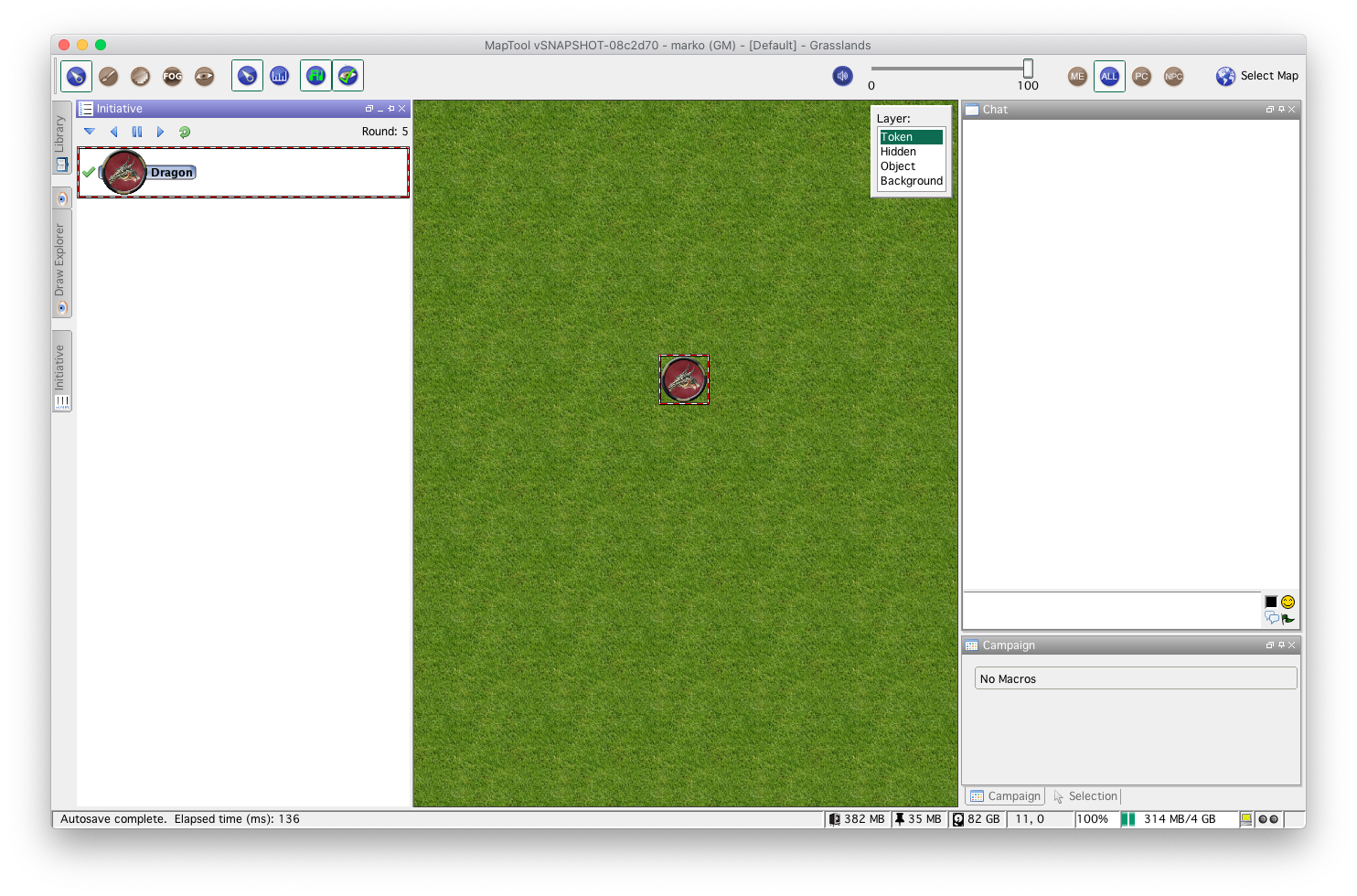
But it would’t make sense to hide the title bar on macOS, in my opinion. If I understand you correctly, this is supposed to save space with maximised windows. macOS has a native fullscreen mode for all apps (as opposed to maximised windows). I’ve used MapTool the way you described it here for years. (Fullscreen without title bar.)
I have made screenshots of all this here. I can make a screencast, if that would help to clear up how MapTool works on macOS.
To summarize: A button to hide the toolbar can be useful for mac-users. Hiding the title bar or menu bar is not. It will make the mac-experience worse, as there are OS-specific functions to already do that.
[Sidenote: I don’t think that hiding the menu bar is even possible on mac, as it’s not part of the application window. The menu bar is part of the OS menu bar, and hiding it outside the controls of the OS could lead to problems. It’s like hiding the task bar on windows.]
mrkwnzl
on 6 May 2020
The _hide toolbar button_ is on the Menu bar for Windows as that doesn't go away when maximized.
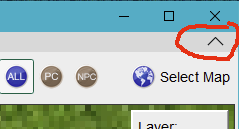
On Windows, in fullscreen, everything but the Map and Layer selection widget is hidden.
Don't know if there is a place to put the _hide toolbar button_ on MacOS where it wouldn't also get hidden.
Phergus
on 6 May 2020
I see. The equivalent spot on a mac (in the menu bar) would be inappropriate. To be honest, I’m not sure if this is even needed. Menu bar and title bar can be hidden anyway (as part of the native window management).
I think the most appropriate way on a mac would be a “Hide Toolbar” button in the view menu. Or (or in addition to that) a keyboard shortcut.
But actually, I’m not even missing a feature to hide the toolbar. Hiding the menu bar and title bar is enough.
mrkwnzl
on 6 May 2020
Yeah, I gave up on that as well, as with native window decorations we fell back on you can't remove the titlebar without disposing the frame first. Ultimately too hacky.
Let's leave as is and sorry for the detour.
nmeier
on 6 May 2020
Some times you have to try stuff out to really see how it is going to work.
We'll stick with this.
Tested and working as expected under Windows/MacOS.
Phergus
on 6 May 2020
@mrkwnzl Good enough to close issue?
Phergus
on 9 May 2020
@Phergus Yeah, no problems with this in 1.7.0b2. Hiding the toolbar on macOS should be moved to its own issue if someone deems it important.
mrkwnzl
on 9 May 2020
Agreed. Closing as complete.
Phergus
on 9 May 2020
Related issues
 JakeVDTS
·
4Comments
mrkwnzl
·
9Comments
melek
·
8Comments
JakeVDTS
·
4Comments
mrkwnzl
·
9Comments
melek
·
8Comments
 dstein766
·
7Comments
Phergus
·
9Comments
dstein766
·
7Comments
Phergus
·
9Comments