Maptool: Make it possible to hide/gray out the 'Next' button in the initiative window
Is your feature request related to a problem? Please describe.
Some frameworks/systems need specific things to happen when initiative changes. This is commonly handled by using one's macros to do such things as 'next', 'add to initiative', etc.
It would be handy to be able to hide/gray out the buttons on the initiative window. This way one can keep using the window, without accidentally messing up the framework's initiative handling.
Describe the solution you'd like
A new Application preference to hide/gray out the 'next' button on the initiative window.
Describe alternatives you've considered
Don't show the initiative window, handle everything in the framework.
Vaguely related to #180, #287, #987, #1366.
Additional context
None really. I just keep forgetting to not click the initiative window buttons. Even if I host the campaign. :)
 xdy
xdy
All 14 comments
Sounds like a server setting to me. Does it belong in Preference -> Application?
 Merudo
on 5 Apr 2020
Merudo
on 5 Apr 2020
Agreed. More of a server setting.
Or is it more of a Campaign Setting? If this is something that when playing RPG X you want the initiative panel but playing RPG Z you don't?
 Phergus
on 5 Apr 2020
Phergus
on 5 Apr 2020
Wouldn’t that be more along the lines of allowing the GM to decide which panels can/can’t be opened by players? Ditto for the tools (like the drawing or template tools)? Of course, some of them — like templates — should be available on the players turn so they can put down spell templates, but the player should be allowed to plan the site of the template without dropping it when it’s NOT their turn.
Those sound like features that GM will want to turn on/off on the fly, but maybe there’s a server setting for “enforce UI restrictions”? Seems silly though, as long as the default is to not enforce them and let the GM choose (and save the settings in the campaign).
 Azhrei
on 5 Apr 2020
Azhrei
on 5 Apr 2020
Hiding the panel from players probably may not always be desirable, since the panel is probably still viewed by players - it is more the ability for players to hit 'next' on their turn when Owner Permission is enabled in the Initiative panel (and for GMs to accidentally hit the button early without thinking... ).
Emitting an OnInitiativeChange event has been discussed before (#987, #720). Then the default behavior could be reversed or stopped without any UI changes.
- I think a good implementation that follows the pattern of other events would be to run hooked macros before initiative is actually changed and pass all the relevant data to the
macro.args. - A mechanism like
token.denymovecould allow macros to prevent an unwanted change from happening. - To safeguard against loops (easy to do if you're trying to reverse changes manually), you could suppress further
onInitChangeevents from within called macros - either always as a rule, or as a new parameter innextInitative()andprevInitiative()(e.g.nextInitiative( suppressEvent = 0 )).
I think the variables passed to an 'onInitChange' event would be a json or string prop list with keys (some of these are shortcuts to existing functions or easy operations, so could be shorter)
newRound- The new round #.newCurrent- The last token ID that had initiative, null/blank if initiative was just cleared. Alternatively, the new index ofgetInitiativeList()or -1,lastRound- The round # before the change (same asgetInitiativeRound())lastToken- The last token ID that had initiative, null/blank if initiative just started (same asgetInitiativeToken()). Alternatively, the current index ofgetInitiativeList()or -1.changetype- The way/command by which initiative was changed - the four I can think of next, previous, set current, and clearing/resetting the round.player- The player name which executed the command or macro that triggered the event.method- the calling Macro ID OR the string "default".newGroupandlastGroupfor grouped tokens in initiative (or similar) could be added if we implement something like #1366 .
There could be a companion event, onInitiativeRoundChange, which fires less often for round-only macro code to run. Similar to checking if 'newRound == lastRound', so really optional since initiative is not changing too often.
This way, you could have a simple 'onInitChange' library macro that reverses any initiative changes done with "default" change methods (or for players who aren't the GM, for added flexibility). Trying to think of solutions that are durable for many people that can allow the same thing.
 melek
on 5 Apr 2020
melek
on 5 Apr 2020
@melek is this morphing this issue into another issue? And to morph it more, you may want/need an option for phases or basically, have it fire every phase/init. e.g maybe the system has 12 phases and tokens are only on phases 1, 6, 7, & 9. You may want an event to fire on all 12 regardless if a token has that init or not.
All in all, there's a lot that needs be done to create a new init system...
 JamzTheMan
on 5 Apr 2020
JamzTheMan
on 5 Apr 2020
@melek is this morphing this issue into another issue?
It is. 😉
Let's do the "gray out the button when not GM and not Player's turn" feature in this issue and discuss initiative events in a separate one (perhaps in #987 because it's specifically initiative-related, and because #720 has been postponed until MTscript 2.0 is available).
We can close #180, I think.
Azhrei
on 5 Apr 2020
I guess I jumped the gun, sorry! My goal was to think about ways to add broad functionality without fiddly UI options to solve a specific problem.
My testing of current behavior is that the button is already grayed out for non-GMs; it is only ever available to players if it is their token's turn and 'Owner Permissions' is checked, so I think this feature request is to guard to GM against advancing the initiative themselves.
melek
on 5 Apr 2020
this feature request is to guard to GM against advancing the initiative themselves.
That's pretty much what I intended, yeah.
xdy
on 5 Apr 2020
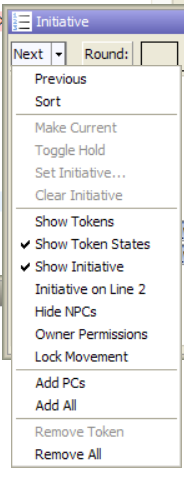
If you ghost the "Next" button, you are also ghosting all the dropdown options. Is this desirable behaviour or should some/all the dropdown options move to a separate button?
 bubblobill
on 10 Apr 2020
bubblobill
on 10 Apr 2020
this feature request is to guard to GM against advancing the initiative themselves.
That's pretty much what I intended, yeah.
So back to the question of is this a Server option?
If Players can't advance accidentally as long as Owner Permissions is off (I think) then it could just be a disable option in the menu. (Note changes in #1758 ).
Phergus
on 11 May 2020
If Players can't advance accidentally as long as Owner Permissions is off (I think) then it could just be a disable option in the menu. (Note changes in #1758 ).
Agreed - I think adding an option to that drop-down menu to "Disable Panel Buttons" is good enough. I'm going to try and work on some incremental changes to Initiative this weekend, and this one seems like an easy addition.
 selquest
on 27 Aug 2020
selquest
on 27 Aug 2020
Added Initiative Panel menu option to Disable Panel Buttons (saved as a campaign property), preventing GMs or players from accidentally using the plain panel buttons when intending to use alternative macros to manage initiative advancement instead. When the panel buttons are disabled, an alternative tooltip is set to help avoid confusion.
selquest
on 31 Aug 2020
Tested. Using Disable Panel Buttons disables the Next/Previous buttons. Reset and Pause are still active.
Phergus
on 6 Sep 2020
Included the Disable Panel Buttons menu option on the new http://lmwcs.com/rptools/wiki/Introduction_to_Initiative (still a WIP)
selquest
on 7 Sep 2020
Related issues
 mrkwnzl
·
9Comments
melek
·
8Comments
mrkwnzl
·
9Comments
melek
·
8Comments
 nmeier
·
9Comments
nmeier
·
9Comments
 si-lang
·
4Comments
si-lang
·
4Comments
 Lovewyrm
·
4Comments
Lovewyrm
·
4Comments
Most helpful comment
It is. 😉
Let's do the "gray out the button when not GM and not Player's turn" feature in this issue and discuss initiative events in a separate one (perhaps in #987 because it's specifically initiative-related, and because #720 has been postponed until MTscript 2.0 is available).
We can close #180, I think.