Describe the bug
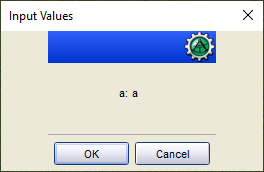
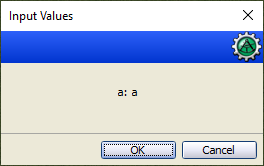
Since PR #1289, the input dialog is displayed incorrectly when minimal input prompts or restricted widths are used.
To Reproduce
Steps to reproduce the behavior:
- type
[H: input("junk|a|a")] - Compare the output of the macro in 1.6.0 to 1.5.14.
Expected behavior
The input is not displayed worse than in 1.5.14.
Screenshots
From aliasmask:
1.6.0 beta 1:
1.5.14:
MapTool Info
- Version: 1.6.0 beta 1, develop
- Install: New
Desktop (please complete the following information):
- OS: Windows
- Version 10
 Merudo
All 46 comments
From what I can tell this is dependent on the overall length of the input field which is somewhat dependent on prompt. The example above shows the issue but this does not.
[input("junk|a|bbbb|TEXT")]
Change it to:
[input("junk|a|bbbb|TEXT|WIDTH=4")]
And it does.
So it appears that the container for the input fields is not filling the minimum window size horizontally.
 Phergus
on 1 Apr 2020
Phergus
on 1 Apr 2020
@emmebi You want to take a look at this?
Phergus
on 1 Apr 2020
Yeah sure, assign it to me.
 emmebi
on 1 Apr 2020
emmebi
on 1 Apr 2020
Tested against known error test cases. Issue no longer seen. Existing macros using input tested and still working without issue.
Phergus
on 3 Apr 2020
Great job!
Merudo
on 3 Apr 2020
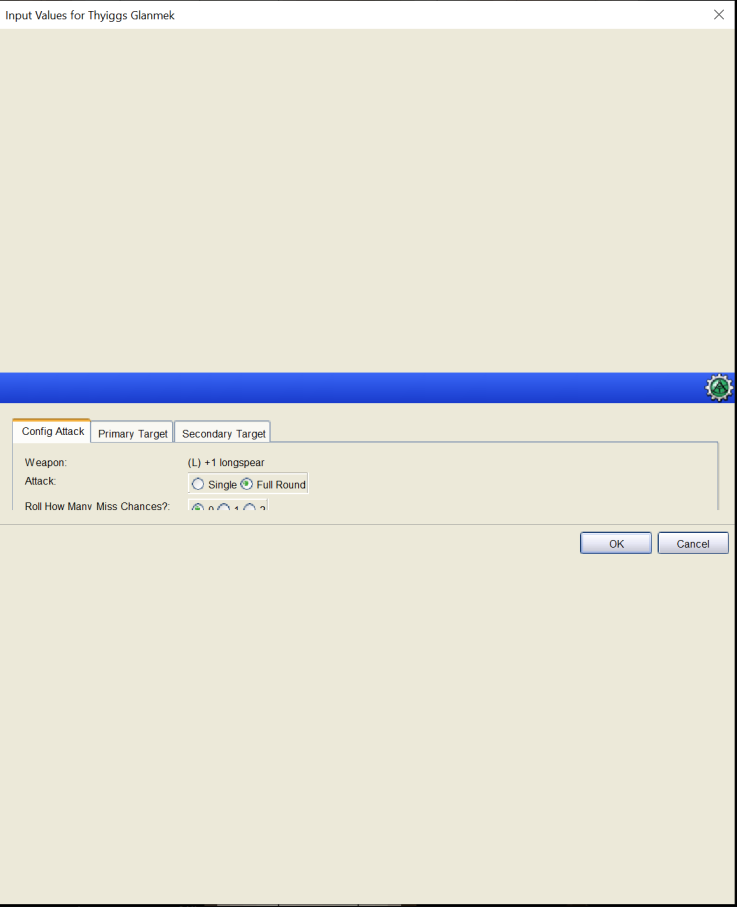
Looks like a similar issue. With 150% windows display scaling, dialog breaks. Turning display scaling off and dialog displays ok.
 JamzTheMan
on 11 Apr 2020
JamzTheMan
on 11 Apr 2020
Two questions:
- what do you mean with windows display scaling?
- does the bug reproduces with the following input()? If not, can you share a macro showing the bug?
[H: input("tab|tab|tab|tab","label|A really wide label to show how the bottom space changes.|tab|label",
"tab|tab|tab|tab",
"tab|tab|tab|tab",
"tab|tab|tab|tab",
"tab|tab|tab|tab",
"tab|tab|tab|tab",
"tab|tab|tab|tab",
"tab|tab|tab|tab",
"tab|tab|tab|tab",
"tab|tab|tab|tab",
"tab|tab|tab|tab",
"tab|tab|tab|tab",
"tab|tab|tab|tab",
"tab|tab|tab|tab",
"tab|tab|tab|tab",
"tab|tab|tab|tab",
"tab|tab|tab|tab",
"tab|tab|tab|tab",
"tab|tab|tab|tab",
"tab|tab|tab|tab",
"tab|tab|tab|tab"
)]
emmebi
on 11 Apr 2020
Under Display Settings on Windows there is a setting to scale the UI. This is used on Hi DPI displays to increase the size of the UIs for not only Windows but other applications.

The screenshots Jamz posted were from a user on Discord. The working was version was huge. Must have been 50 different input fields and check boxes.
Phergus
on 11 Apr 2020
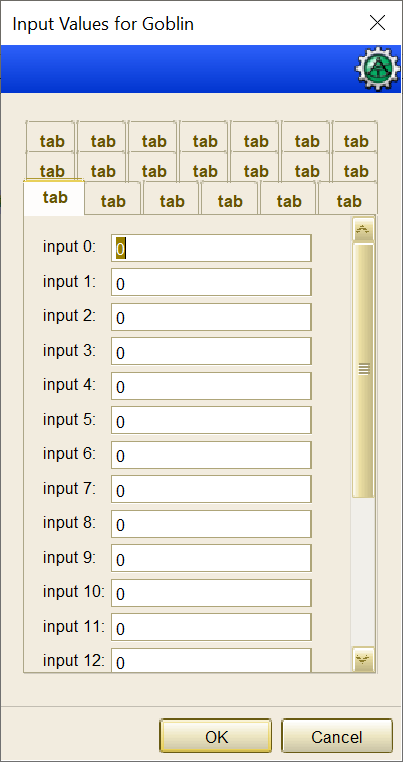
Checking on the latest development release, screen at 150% zoom:
[h: m_l = ""]
[for(i, 0, 20), code: {
    [h: m_l = listAppend(m_l, "tab|tab|tab|tab", "##")]
    [for(j, i * 20, i * 20 + 20), code: {
        [h: m_l = listAppend(m_l, "i_"+ j + "|0|input " + j + "|text", "##")]

    }]

}]
[h: input(m_l)]
This creates 20 tabs, each with 20 controls inside.
emmebi
on 11 Apr 2020
Yeah. I can't reproduce it here on 1.5.14, 1.6.1 or dev.
Phergus
on 11 Apr 2020
@JamzTheMan can you provide more context here?
emmebi
on 14 Apr 2020
I'm unable to replicate this myself on my HDPI so not sure. I contacted the user to see if I can get details...
JamzTheMan
on 14 Apr 2020
Ok, got some more details. The user does have multiple monitors, one is a 1080p and the other is HiDPI with the display scaling at 150%. Maybe multiple monitors is key? (no idea why)
I'll continue to see if I can replicate on my end.
JamzTheMan
on 14 Apr 2020
From the user:
So, as long as my Samsung is not the main monitor scaling doesn't matter.
If the LG 1080p is the main I can have them both scaling and it works fine, If I have the Samsung as the main it has to have no scaling or it causes the issue.
The above macro worked fine btw (didn't break). So, if you can, download my First Edition campaign from http://maptool.nerps.net
On first map 0. Camp I put a token Thyiggs Glanmek on it.
On the token, there is a macro Click me then click link in chat that will bring up the dialog that breaks. (It's also on the character sheet Attack tab/sheet, clicking any weapon brings up the same dialog)
JamzTheMan
on 14 Apr 2020
Has he tried the HiDPI settings on the MapTool.exe properties?
Phergus
on 15 Apr 2020
@Wolph42 is having the same issue:
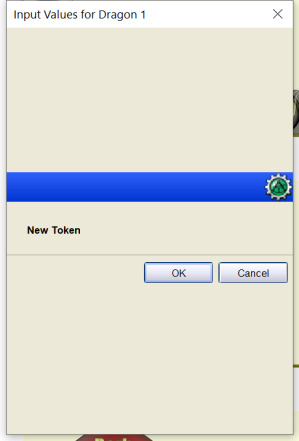
Merudo
on 17 Apr 2020
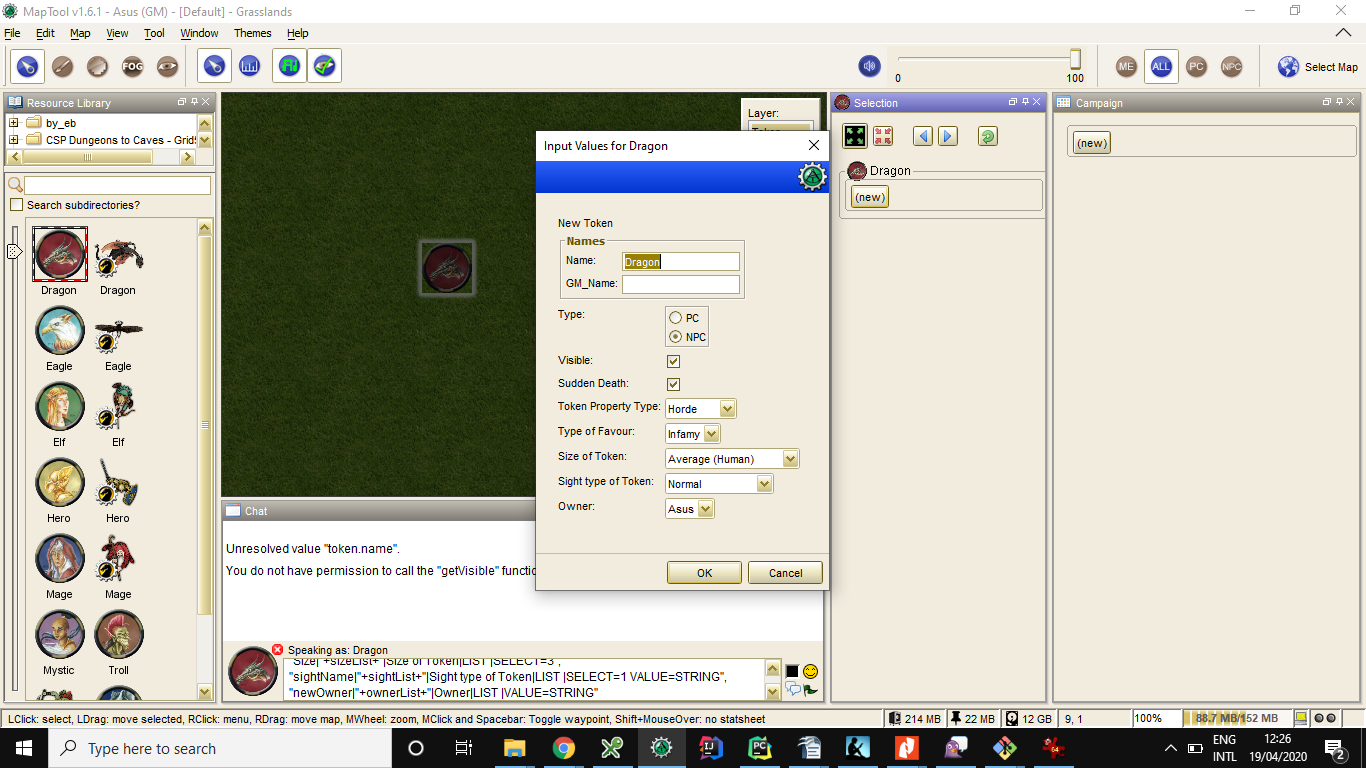
Here's the corresponding code:
[h:status = input(
"junk|New Token|-|LABEL|SPAN=TRUE",
nameList+"||PROPS|SPAN=TRUE SETVARS=UNSUFFIXED",
"isNPC|PC, NPC|Type|RADIO |SELECT="+isNPC(),
"token.visible|"+token.visible+"|Visible|CHECK",
"SuddenDeath|"+if(suddenDeathRule && isNPC(), 1, 0)+"|Sudden Death|CHECK",
"propertyType|"+typeList+"|Token Property Type|LIST| VALUE=STRING SELECT="+listFind(typeList,getPropertyType()),
"fateType|"+fateList+"|Type of Favour|LIST |SELECT="+getLibProperty('hasFate','lib:DH')+" VALUE=STRING",
"Size|"+sizeList+"|Size of Token|LIST |SELECT=3",
"sightName|"+sightList+"|Sight type of Token|LIST |SELECT=1 VALUE=STRING",
"newOwner|"+ownerList+"|Owner|LIST |VALUE=STRING"
)]
[h:InitToken = if(status,0,1)]
[h:abort(status)]
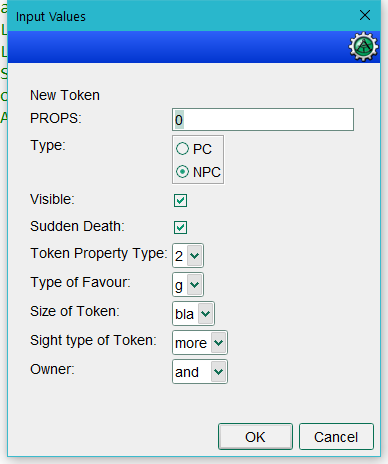
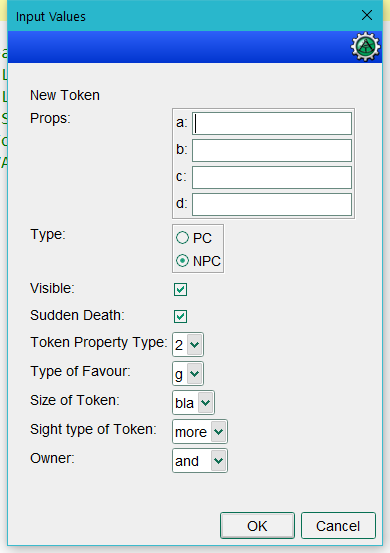
Here a test macro for quick use:
[h:abort(input(
"junk|New Token|-|LABEL|SPAN=TRUE",
"a,b,c,d||PROPS",
"isNPC|PC, NPC|Type|RADIO |SELECT=1",
"token.visible|1|Visible|CHECK", "SuddenDeath|1| Sudden Death|CHECK",
"propertyType|1,2,3,4|Token Property Type|LIST| VALUE=STRING SELECT=1",
"fateType|f,g,t,y,|Type of Favour|LIST |SELECT=1 VALUE=STRING",
"Size|bla,bla,bla,bla|Size of Token|LIST |SELECT=3",
"sightName|even,more,lists|Sight type of Token|LIST |SELECT=1 VALUE=STRING",
"newOwner|and,yet,more,lists|Owner|LIST |VALUE=STRING"
))]
This is on a HP laptop 1920x1080 (if that matters
 wolph42
on 17 Apr 2020
wolph42
on 17 Apr 2020
With malformed PROPS line:
With fixed PROPS line:
Phergus
on 17 Apr 2020
Looking into this. I wonder if SPAN could have something to do with it.
emmebi
on 18 Apr 2020
Tried this up to 300% with Nerps campaign, but I was unable to reproduce this.
Checking the HiDPI settings, if this could help.
emmebi
on 18 Apr 2020
I don't have any specific DPI for Maptool (so both Program DPI and High DPI scaling override are unset).
@wolph42 @JamzTheMan what are your settings here?
Next test for me: changing the main display and see if this changes anything.
emmebi
on 18 Apr 2020
Switching the main display doesn't show the issue (tested with wolph42 macro)
emmebi
on 18 Apr 2020
Another thing I noticed is that comma , is not longer allowed in the option of input().
For example, this works in 1.5.14 but not in 1.6.1:
[h:status=input("feature|Hunter's Quarry, Sneak Attack, Warlock's Curse|Type of Striker Damage|LIST|SELECT=0, VALUE=STRING")]
The wiki docs specify spaces to separate the items in the Options list.
Phergus
on 18 Apr 2020
edit: deleted entire post as its pointless to read. The issue was with GITHUB!! (definitely not with me!! nor with my lack of use of code tags!) see my post here below.
wolph42
on 19 Apr 2020
Still not able to reproduce the issue, apparently:
As for the settings:
Right click on MapTool (from the Task bar) -> right click on MapTool again -> Properties -> Compatibility -> Change high DPI settings
emmebi
on 19 Apr 2020
@emmebi you were too quick, I edited the post read the bottom part!!
as for the dpi settings: everything in there is checked off.
Im currently pin point the issue
and I think I got it. The issue is with html code tags and github don't show those, so when you copy pasted the example code, they did not show the issue!!
I guess I should have used code tags...
[h:abort(input(
"sightName|1,2,3,4,5|<html>Sight type of Token</html>|LIST |SELECT=1 VALUE=STRING",
"sightName|1,2,3,4,5|<html>Sight type of Token</html>|LIST |SELECT=1 VALUE=STRING",
"sightName|1,2,3,4,5|<html>Sight type of Token</html>|LIST |SELECT=1 VALUE=STRING",
"sightName|1,2,3,4,5|<html>Sight type of Token</html>|LIST |SELECT=1 VALUE=STRING"
))]
that one shows the issue
wolph42
on 19 Apr 2020
I am trying with and without HTML tags, but I am still unable to reproduce the issue. Checking if on a second monitor something changes.
emmebi
on 19 Apr 2020
This is the sample campaign I have used. Extension changed to make github happy.
emmebi
on 19 Apr 2020
@wolph42 ^^
emmebi
on 19 Apr 2020
If I copy paste that above code in the chat of a clean session in maptool 1.6.1 I get
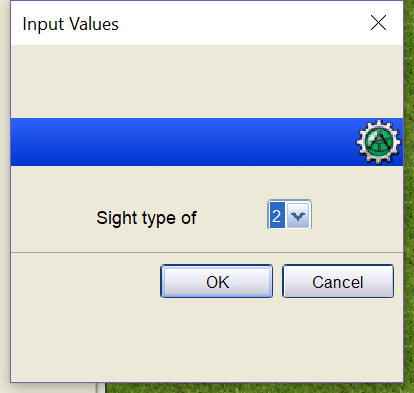
so this one defintately is reproducable!!
Edit: tried the same in 1.5.14 and I get:
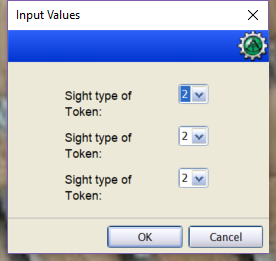
pls note that I have 4 input entries, but only 3 are shown!!
edit: @emmebi : tested your campaign file. The 'no html' showed 4 input entries. The 'html' version showed up exactly as in the previous screenshot: only 1 entry!
wolph42
on 19 Apr 2020
FWIW for my player it only happen with the right config of multiple monitors and which one was primary doing with one being hidpi and the other just s 1080p monitor. Def a strange animal to fix.
JamzTheMan
on 19 Apr 2020
Wild ideas here: is it possible that Direct3D/OpenGL has something to do? I can't reproduce the issue so far (I have only one monitor + laptop, however).
emmebi
on 19 Apr 2020
reminds me of the issue with macro errors in MT. Nested macro errors were ignored by MT on my PC, but not on another PC. meaning that I was convinced it was working and then got all kinds of error reports that puzzled me...until I learned about the console...old days...
I still don't know btw why this happened, it was really weird. It also wasn't mac/ms related...
wolph42
on 19 Apr 2020
Using code posted above I get:
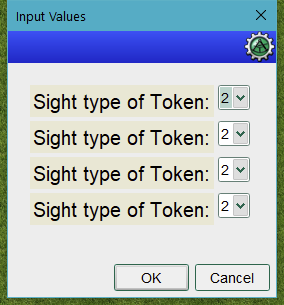
This is on a HiDPI (3840x2160) display. Display scaling set at 100%.
Phergus
on 19 Apr 2020
ok, so its a local dependent issue...nice... note that i have this issue and im also behind a 3840x2160 screen. so not sure that's the issue. I do have a dual screen setup with a small screen next to the big one.
wolph42
on 19 Apr 2020
@phergus hmm jave version related maybe?? what version do you have?
I have 1.8.0_231
wolph42
on 19 Apr 2020
I am using 10.0.1 (the one bundled with MapTool)
emmebi
on 19 Apr 2020
ah right...its bundled, never mind, pointless question
wolph42
on 19 Apr 2020
what Gather Debug Information reports?
emmebi
on 19 Apr 2020
Here is my idea: let's create a new version with this patch reverted; if the issue still shows, then it's this patch, and even if we don't understand why for the moment, we can try to create a workaround; if it isn't, we can continue looking.
emmebi
on 19 Apr 2020
was already starting up to check it ;)
==== MapTool Information ====
MapTool Version: 1.6.1
Max mem avail..: 3 GB
Max mem used...: 308 MB
Custom Property: -DMAPTOOL_DATADIR=.maptool-rptools
==== Java Information ====
Java Vendor.: Oracle Corporation
Java Version: 10.0.1
==== OS Information ====
OS Name........: Windows 10
OS Version.....: 10.0
OS Architecture: amd64
Processor......: AMD64 Family 23 Model 8 Stepping 2, AuthenticAMD
PATH...........: Number of Procs: 16
==== User Information ====
User Name: Rolph
User Home: C:\Users\Rolph
==== Network Interfaces ====
Display Name..: Software Loopback Interface 1
Interface Name: lo
Address...: 127.0.0.1
Address...: 0:0:0:0:0:0:0:1
==== Locale Information ====
Country.: United Kingdom
Language: English
Locale..: English (United Kingdom)
Variant.:
==== Encoding Information ====
Default Locale: en_GB
Default Charset: UTF-8
file.encoding: UTF-8
sun.jnu.encoding: Cp1252
Default Encoding: UTF8
==== Display Information ====
Number of Displays: 2
Display 1: 3840x2160(32)
Display 2: 1280x1024(32)
==== Internet Gateway Devices ====
No IGDs Found!
wolph42
on 19 Apr 2020
Tested with 1.4.0.5 and 1.5.0. Get same expected result.
Weirdly, when I did the 1.5.0 test and then closed MT, the display freaked out, leaving like partial images of windows behind. Had to reboot. Now can't reproduce the graphics glitch. input dialog was fine.
This is so weird.
Phergus
on 19 Apr 2020
This also came up in Discord today and removing the HTML tags in use in the input() fixed it for the person there.
https://discordapp.com/channels/296230822262865920/296657960720007169/705542939174240319
This was also a situation with multiple monitors.
Phergus
on 1 May 2020
And apparently this fixed it.

Phergus
on 1 May 2020
The layout issue appears to be a OS/Display Drivers issue that can be fixed on the user side as noted above.
Tested and working as expected.
Phergus
on 3 May 2020
Related issues
 mrkwnzl
·
9Comments
mrkwnzl
·
9Comments
 cwisniew
·
9Comments
cwisniew
·
9Comments
 dstein766
·
7Comments
Phergus
·
9Comments
mrkwnzl
·
9Comments
dstein766
·
7Comments
Phergus
·
9Comments
mrkwnzl
·
9Comments
Most helpful comment
Yeah sure, assign it to me.