I cannot get an feature click event to work. I tried adding a button on top. Later i saw a post about MapInfo. Which is nice it gives me the position of where the user clicked but can I request the feature on that? I tried checking the label of the feature but this returns empty. Only the world position is being sent:
  private void MapOnInfo(object sender, MapInfoEventArgs args)
        {

            var layername = args.MapInfo.Layer?.Style.ToString();
            var featureLabel = args.MapInfo.Feature?["Label"]?.ToString();
            var featureType = args.MapInfo.Feature?["Type"]?.ToString();

            Debug.WriteLine("Info Event was invoked.");
            Debug.WriteLine("Layername: " + layername);
            Debug.WriteLine("Feature Label: " + featureLabel);
            Debug.WriteLine("World Postion: {0:F4} , {1:F4}", args.MapInfo.WorldPosition?.X, args.MapInfo.WorldPosition?.Y);
            Debug.WriteLine("Screen Postion: {0:F4} , {1:F4}", args.MapInfo.ScreenPosition?.X, args.MapInfo.ScreenPosition?.Y);

        }
How can one get the specific feature being clicked? Or like the label of the feature?
 jessedegans
All 17 comments
You have to show the label yourself. Perhaps by adding a Mapsui label and disabling and enabling this. A custom theme is also an option.
 pauldendulk
on 27 Nov 2018
pauldendulk
on 27 Nov 2018
Sorry my question was not right. What i actually try to do is give some ID to the feature. So i have a point layer and each point need to have an id. Onclick I want to get a record from my database with this ID. So i was like okay i will save this ID into the label and then read the label on click but the label seems to be empty... How can i archieve this?
jessedegans
on 27 Nov 2018
For the Layer name use Layer.Name instead of Layer.Style.
Than, could you show, how you created the Feature? Perhaps a typo ("label" instead of "Label")?
 charlenni
on 27 Nov 2018
charlenni
on 27 Nov 2018
Changed the Style to Name
 public void CreateTwitterPointOnMap(double lat, double lon, string twitterName, string tweet)
        {
            WritableLayer t = MapUtils.CreatePointTwitterLayer();
            Point point = Mapsui.Projection.SphericalMercator.FromLonLat(lon, lat);
            t.Add(new Feature { Geometry = point, ["Label"] = "TESTID" });


            Map.Layers.Add(t);
        }
Did you marked the Layer as IsInfoLayer?
charlenni
on 27 Nov 2018
How can i mark a layer as an infolayer?
jessedegans
on 27 Nov 2018
See ILayer
charlenni
on 27 Nov 2018
To be a little be more verbose: If you don't set this flag, than the Features of this Layer aren't checked while GetMapInfo. I assume, that your args.MapInfo.Feature is null. Perhaps you should check, if you get a Feature. Should possible while debuging.
charlenni
on 27 Nov 2018
Well the problem is that i use a WriteableLayer which inherits from BaseLayer (which should following the docs implement ILayer and IsMapInfoLayer) But there is no such thing. Should i try creating my own layer? Copying the BaseLayer and WriteableLayer and do implement the bool?
jessedegans
on 27 Nov 2018
I tried creating my own Layer and Implementing ILayer and the IsInfoMapLayer. but that didnt work either Feature is still null. Does anyone have a click example?
jessedegans
on 27 Nov 2018
You could find an example in the sample section. If you run the samples, use "Demo"-"2 Map Info". The code is at InfoLayerSample.cs. The code handling the click event is platform dependent, because popups are used. For Android you could find it at the MainActivitiy.cs. For WPF you could find it at Window1.xaml.cs.
charlenni
on 28 Nov 2018
Hi I am working together with @jessedegans. We are making an UWP app and with Mapsui 1.4.8. In this version ILayer does not have the field IsInfoMapLayer. And MapControl does not have the method GetMapInfo. Is there a different way to make a layer clickable?
 ChristiaanG
on 28 Nov 2018
ChristiaanG
on 28 Nov 2018
Ah, thats are very useful informations ;)
If you use 1.4.8, you should use Map.InfoLayers and add your layer, which contains the Feature to this list. You could find an example here. For getting and handling the created MapInfo event see here and here.
charlenni
on 28 Nov 2018
@charlenni thanks for the quick response. I will try it out.
ChristiaanG
on 28 Nov 2018
How is this going? I find the discussion very confusing. There is a MapInfo sample. You can click the map and get a MapControlOnInfo. In the UI the property is shown.
Can you create this yourself? If yes, then what else is your problem? If no, where do you get stuck?
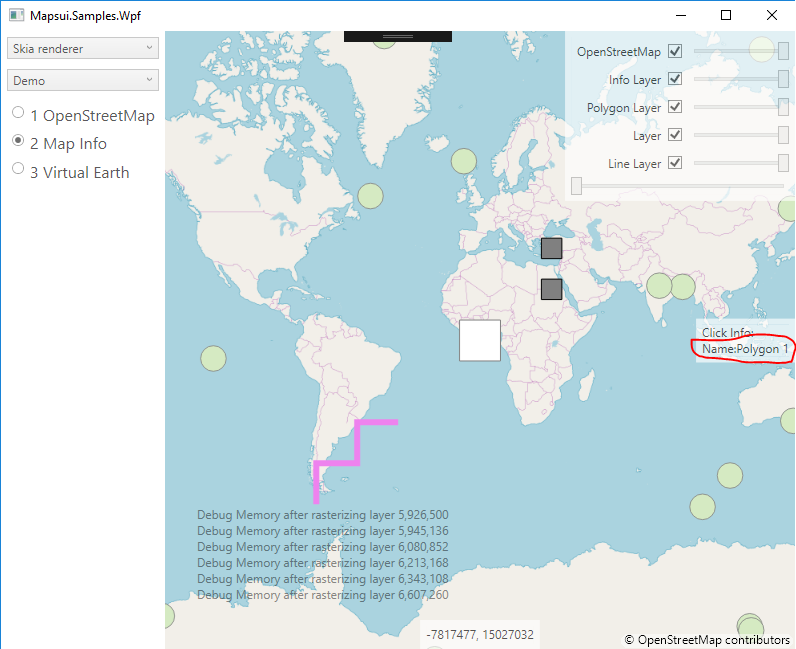
pauldendulk
on 29 Nov 2018
btw, the screenshot is from master, but in the 1.4 branch there is a similar sample.
pauldendulk
on 29 Nov 2018
Hi @pauldendulk. The problem has been solved with the last resoinse from @charlenni. Thanks for the help.
ChristiaanG
on 29 Nov 2018
Related issues
 Wil69
·
5Comments
Wil69
·
5Comments
 JesrigPineda
·
5Comments
charlenni
·
3Comments
JesrigPineda
·
4Comments
JesrigPineda
·
5Comments
charlenni
·
3Comments
JesrigPineda
·
4Comments
 TheProme
·
4Comments
TheProme
·
4Comments
Most helpful comment
Hi @pauldendulk. The problem has been solved with the last resoinse from @charlenni. Thanks for the help.