Mapsui: Center alignment of labels is off for some strings
Try it with a label text of '11CD'.
Affects Skia only
 spaddlewit
All 32 comments
My pull request reduces the problem, but it still doesn't seem to fix it entirely. I will try to create a repro project.
spaddlewit
on 8 Jul 2017
The problem could also be caused by the fact that it is drawn as bitmap first. We could also try to draw directly on canvas to see if this fixes it. The bitmap is for performance and I think will be necessary.
 pauldendulk
on 8 Jul 2017
pauldendulk
on 8 Jul 2017
Yeah, definitely need the performance -- not getting great results, currently. Despite my pull request, the issue seems to still persist on point layers that have labels of varying font size... so the bitmap caching might not be remeasuring each individual label properly??
spaddlewit
on 8 Jul 2017
What I was thinking is that the extra step of first caching causes some rounding error.
I don't know yet what problem you see. Could you post a screen shot? You can just copy-paste in github comments.
pauldendulk
on 9 Jul 2017
I just update the Skia version and it seems it improves the labels https://github.com/pauldendulk/Mapsui/releases/tag/1.0.10. Could you check if this improves it in your case?
pauldendulk
on 9 Jul 2017
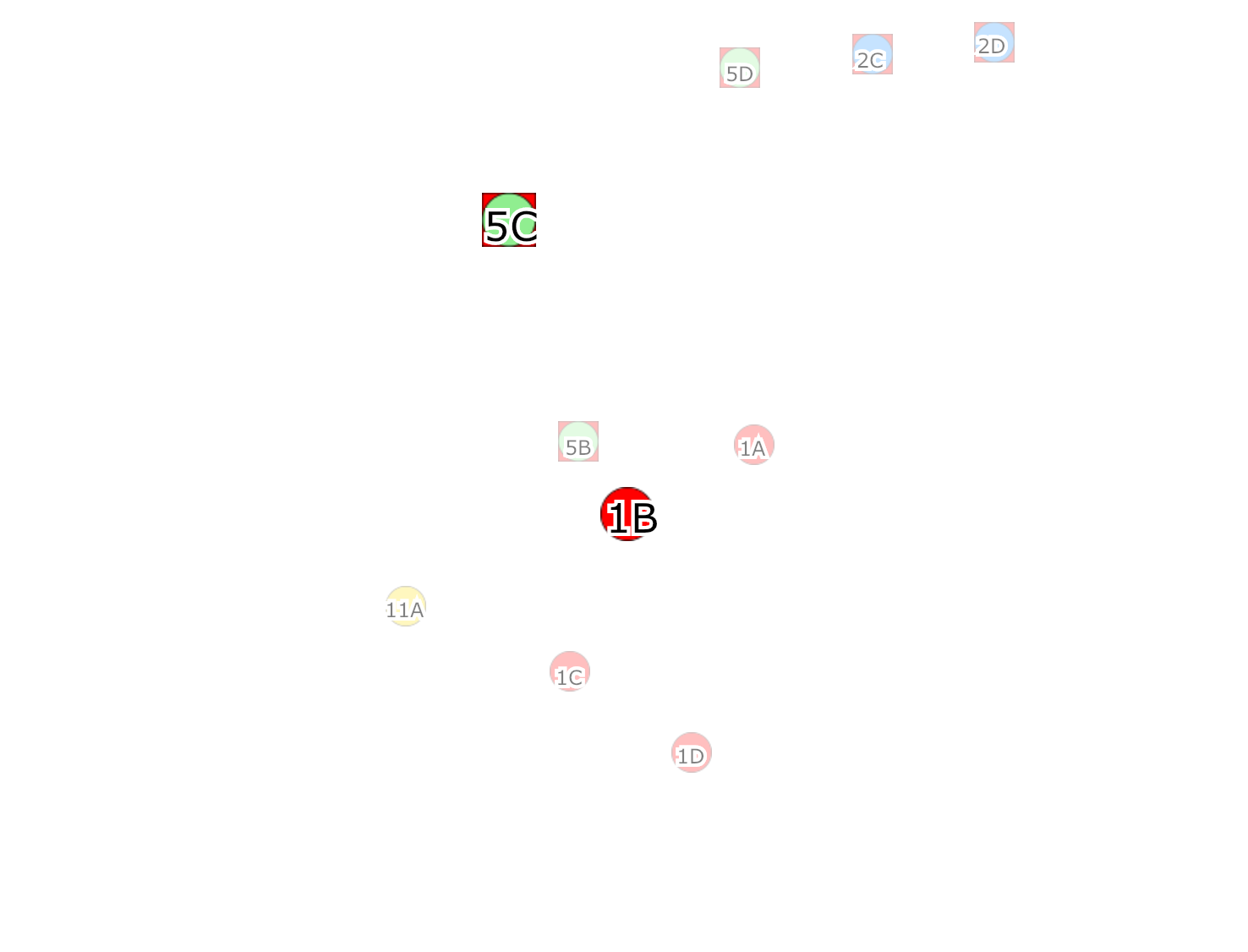
Here's a screenshot of the problem using my pull requests. Without the pull requests on 1.0.9, it is even more off-center.
These points are on a single layer, with varying LabelStyles. Both LabelStyles have horizontal and vertical alignment set to center. The symbols are bitmaps, however I also tried using the built-in circle and square symbols and got the same result.
I will try with 1.0.10 next.
spaddlewit
on 9 Jul 2017
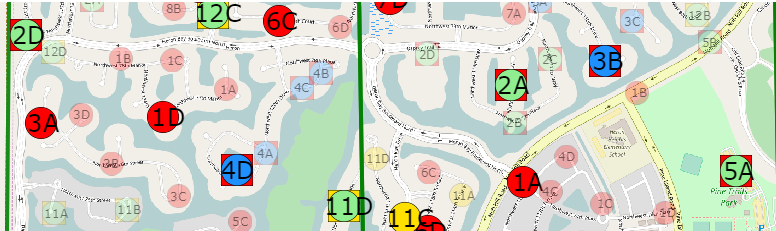
Using 1.0.10, this is what I get. It's better, but still not quite there. The vertical centering looks to be fixed:
spaddlewit
on 9 Jul 2017
Could it be, that this problem exists, because you use a monospaced font (https://en.wikipedia.org/wiki/Monospaced_font)? Labels with a "1" seem to get worther than that with a "2" or "3", which are both widther than a "1".
 charlenni
on 10 Jul 2017
charlenni
on 10 Jul 2017
@charlenni The size SKPaint.MeasureText should take into account the font. So this should be correct. Could be a bug in SkiaSharp though.
pauldendulk
on 10 Jul 2017
@spaddlewit Perhaps the images are not the correct size. The 12C top-left, for instance, may have part of the bitmap before the 1. This could be checked by setting a background color for the bitmap.
The result of MeasureText is more complicated than I initially expected. Perhaps I did not interpret it correctly.
pauldendulk
on 10 Jul 2017
Your last answer was, what I assume. There are empty space before the "1", which is transparent, while the characters often use the whole size.
The idea with background color is very good to test this. Or drawing a rect instead of text with calculated width and height.
charlenni
on 10 Jul 2017
@charlenni Yes, that is what I meant.
pauldendulk
on 10 Jul 2017
The images are 32x32, and they take up the entire space of the image. I also tried this with the built-in Rectangle and Ellipse symbols, and it looks exactly the same. I'll set a background image and try to get you some screenshots.
spaddlewit
on 10 Jul 2017
@spaddlewit What font do you use?
pauldendulk
on 10 Jul 2017
I committed something what I think should fix it. Is it easy for you to check this without the new nuget package?
pauldendulk
on 10 Jul 2017
Verdana.
Maybe -- is there a way I can merge the changes you've made since I forked into my own branch? (I'm new to GitHub... mostly experienced with SVN)
spaddlewit
on 10 Jul 2017
Something like this: https://stackoverflow.com/a/11583019/85325
You could also manually make the change. A single minus is removed. You will have to revert your own changes with respect to this issue though.
pauldendulk
on 11 Jul 2017
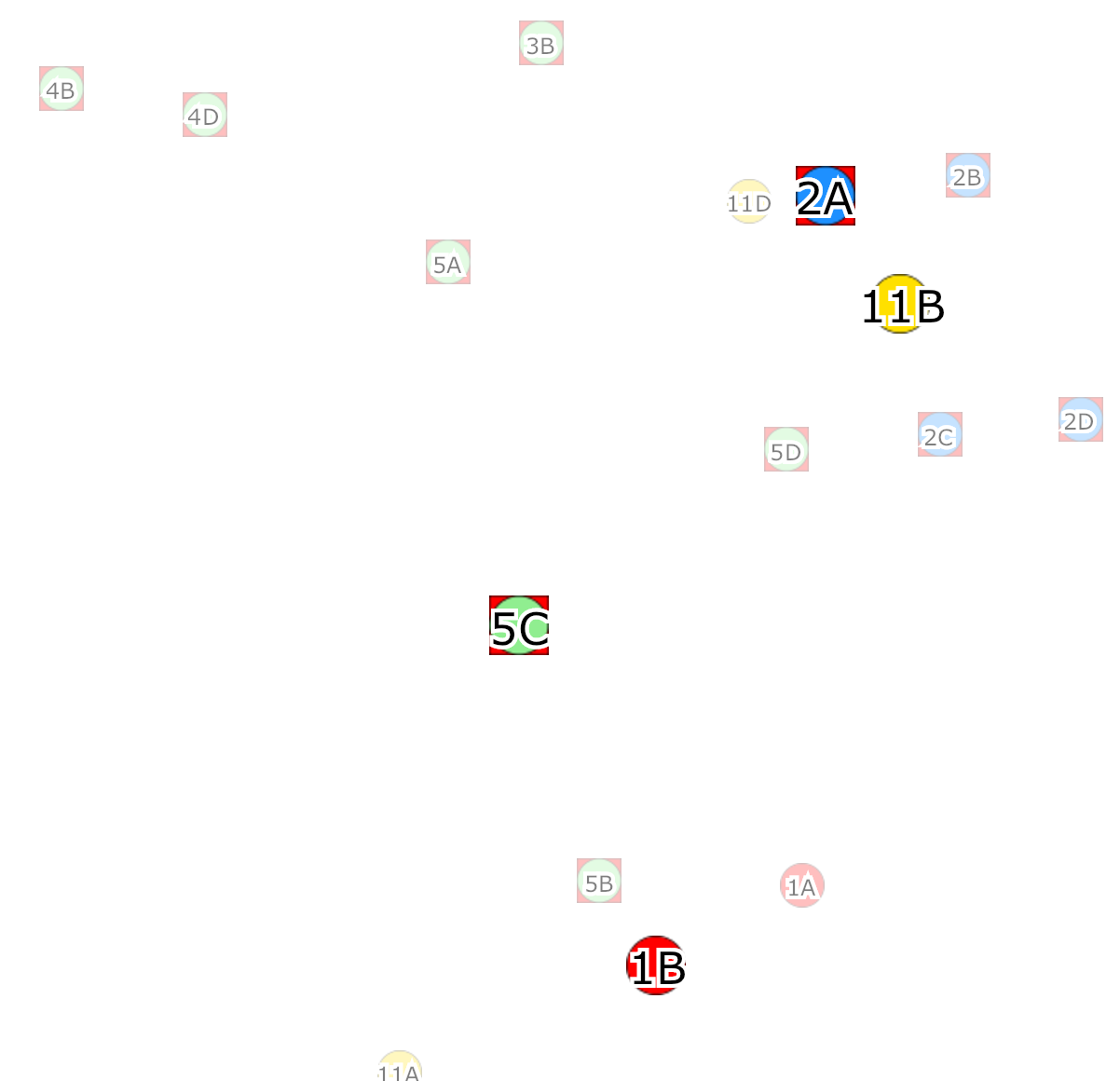
Getting closer.. ohhh so closer... almost not even noticable:
spaddlewit
on 11 Jul 2017
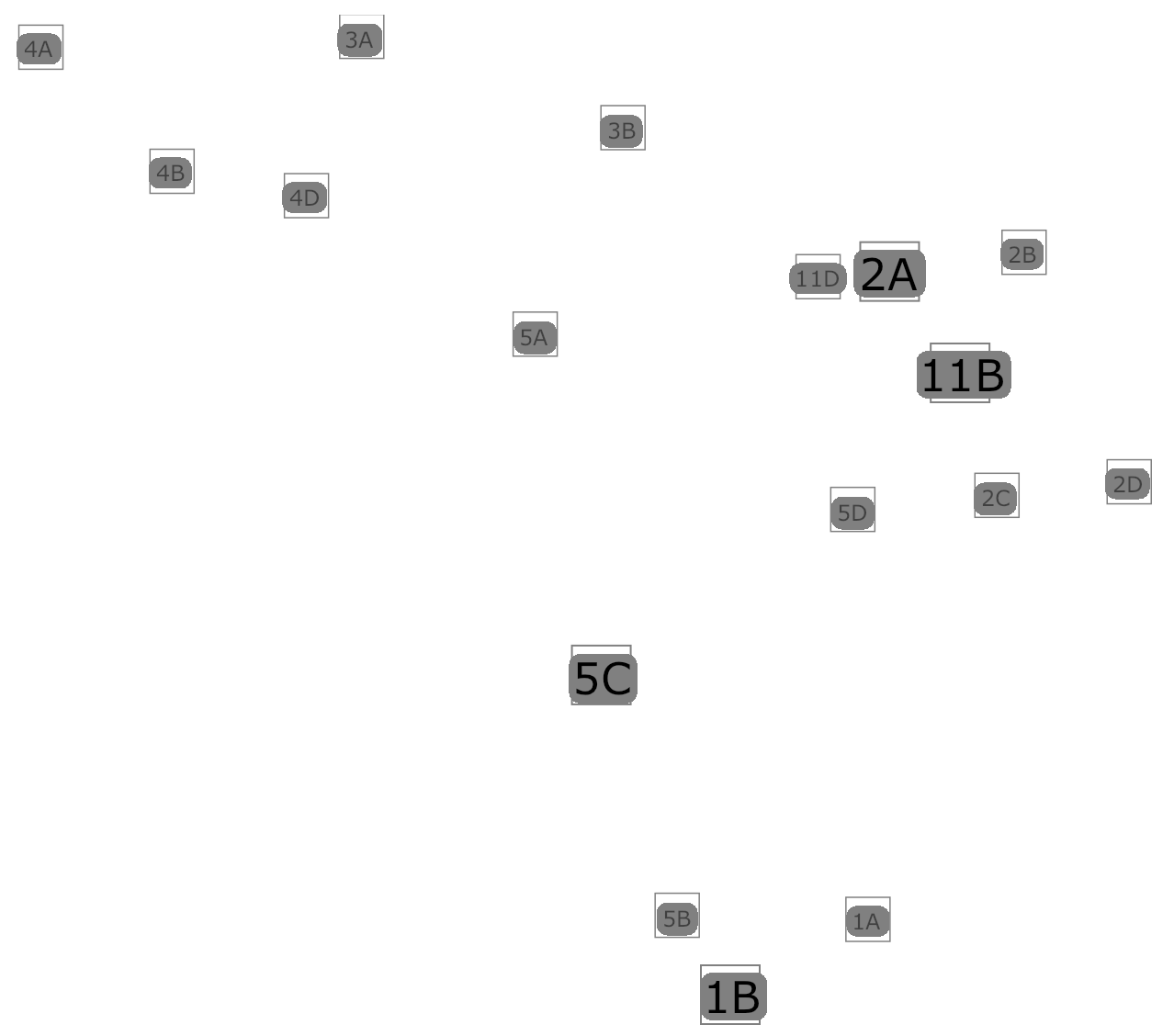
As you can see, sometimes the text is still slightly too far to the right (big size), or too far to the left (small size).
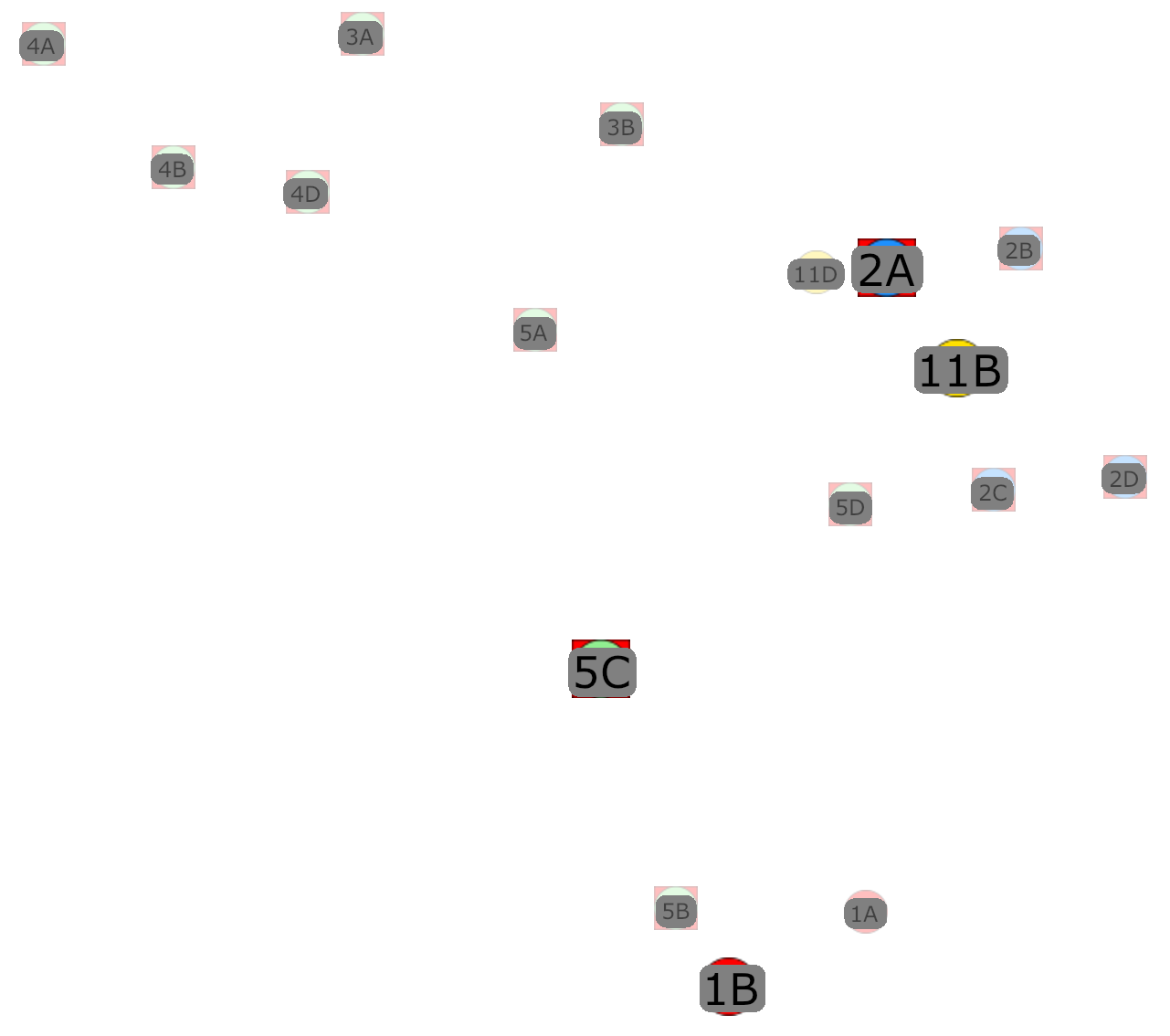
Maybe an issue with scaling coordinates relative to the size of the font? Dunno, grasping at straws here. Going to get you more screenshots with background, halo removed, etc. to try and coax out a better visual.
spaddlewit
on 11 Jul 2017
Here we go. This demonstrates the problem clearer:
spaddlewit
on 11 Jul 2017
And just to prove it's not the bitmap... Here it is, using the built-in Rectangle SymbolStyle:
spaddlewit
on 11 Jul 2017
The picture clearly demonstrates a problem. It is not what I see with the samples in master. I would say they are not more than one pixel off. Font size also does not seem to affect my sample like yours.
In your repository the minus in var backRectXOffset = -rect.Left; is still there: https://github.com/spaddlewit/Mapsui/blob/f64388e4c0a20b26ae0d29049387cd81970a9ba4/Mapsui.Rendering.Skia-PCL/LabelRenderer.cs, but perhaps you fixed that locally.
pauldendulk
on 11 Jul 2017
Yeah, I fixed it locally, since I found it easier to just edit that instead.
What I'll do next is see if I can spin up a sample project that easily reproduces the problem, so you can try it yourself and experiment with fixes.
spaddlewit
on 11 Jul 2017
Yes, that will be great.
pauldendulk
on 11 Jul 2017
here you go, this is a modification of the Label sample:
    public static ILayer CreateLayer()
    {
        var memoryProvider = new MemoryProvider();

        var featureWithDefaultStyle = new Feature {Geometry = new Point(0, 0)};
        featureWithDefaultStyle.Styles.Add(new LabelStyle { Text = "Default Label" });
        memoryProvider.Features.Add(featureWithDefaultStyle);

        var featureWithBottomAlignedStyle = new Feature { Geometry = new Point(0, -4000000) };
        featureWithBottomAlignedStyle.Styles.Add(new LabelStyle
        {
            Text = "11C",
            Font = new Font { FontFamily = "Verdana", Size = 24 },
            BackColor = null,
            VerticalAlignment = LabelStyle.VerticalAlignmentEnum.Center,
            HorizontalAlignment = LabelStyle.HorizontalAlignmentEnum.Center,
        });
        memoryProvider.Features.Add(featureWithBottomAlignedStyle);

        var featureWithRightAlignedStyle = new Feature { Geometry = new Point(1121120, -2000000) };
        featureWithRightAlignedStyle.Styles.Clear();
        featureWithRightAlignedStyle.Styles.Add(new SymbolStyle { SymbolType = SymbolType.Ellipse, SymbolScale = 0.75, Fill = new Brush(Color.Green) });
        featureWithRightAlignedStyle.Styles.Add(new LabelStyle
        {
            Text = "4B",
            Font = new Font { FontFamily = "Verdana", Size = 12 },
            BackColor = null,
            VerticalAlignment = LabelStyle.VerticalAlignmentEnum.Center,
            HorizontalAlignment = LabelStyle.HorizontalAlignmentEnum.Center,
        });
        memoryProvider.Features.Add(featureWithRightAlignedStyle);


        var featureWithColors = new Feature {Geometry = new Point(0, -6000000)};
        featureWithColors.Styles.Add(CreateColoredLabelStyle());
        memoryProvider.Features.Add(featureWithColors);

        return new MemoryLayer {Name = "Points with labels", DataSource = memoryProvider};
    }
Thanks! I could paste that right in my sample
pauldendulk
on 11 Jul 2017
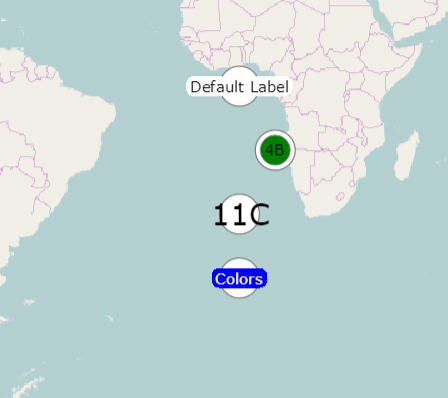
When I run it it looks okay to me. It is displace wrt wpf by one pixel at the most. Could it be your project was not fully updated to the latest SkiaSharp? You could try checkout my project and paste your code into it. Don't you see the same as this:
pauldendulk
on 11 Jul 2017
Yep, that's the same result I get in the sample. It's possible that Skia was not updated on the iOS project, where I took the screenshots from.. It's getting a bit unweidly having all of these DLLs flying around. I need the halo in Skia, so I'm having to jump back and forth between NuGets and custom built DLLs.
That aside, it does still look slightly off, but this may be due to text measuring in Skia still not being completely correct.
spaddlewit
on 11 Jul 2017
With an error this small it becomes too hard for me to determine what is right and what is wrong. Please check if you can fix your own project if you create a new fork. Also, it could be something in iOS. I only use WPF to test Skia.
pauldendulk
on 11 Jul 2017
Gotcha. I'll clean things up in the next day or so and report back. Thanks for merging the halo stuff... that'll make it easier to go back to 100% NuGets and ensure the versions are correct.
spaddlewit
on 11 Jul 2017
Considering this fixed for now.
pauldendulk
on 17 Jul 2017
Sounds good. Haven't had time to test. Will let you know if it persists.
spaddlewit
on 17 Jul 2017
Related issues
 ricardoboss
·
5Comments
ricardoboss
·
5Comments
 JesrigPineda
·
5Comments
JesrigPineda
·
5Comments
 lukaszpitulski
·
8Comments
lukaszpitulski
·
8Comments
 kisslori
·
8Comments
kisslori
·
8Comments
 Kayumiy
·
9Comments
Kayumiy
·
9Comments