Maps: Adding custom map tiles - Openmaptiles
Describe the bug
Hi all,
If anyone could help I'd be grateful. I have tried to configure custom map tiles by using openmaptiles. I get my style.json from the external server and gets only blank screen.
To Reproduce
My example component:
import React from "react"
import { observer } from "mobx-react-lite"
import { StyleSheet, View, ViewStyle, Text, TextStyle } from "react-native"
import { Screen } from "../../components"
import MapboxGL from "@react-native-mapbox-gl/maps"

MapboxGL.setAccessToken('myToken')

const ROOT: ViewStyle = {
  backgroundColor: color.palette.white,
  flex: 1,
  justifyContent: 'flex-start',
  alignItems: 'center',
}

export const MapBoxScreen = observer(function MapBoxScreen(props) {
  return (
    <Screen style={ROOT}>
        <MapboxGL.MapView
          styleURL={'https://myURL.com/style.json'}
        >
        </MapboxGL.MapView>
    </Screen>
  )
})
Part of my style.json file, but it is the same as an example from:
https://github.com/openmaptiles/osm-bright-gl-style/blob/master/style.json
{
  "version": 8,
  "name": "Bright",
  "metadata": {
    "mapbox:autocomposite": false,
    "mapbox:groups": {
      "1444849242106.713": {"collapsed": false, "name": "Places"},
      "1444849334699.1902": {"collapsed": true, "name": "Bridges"},
      "1444849345966.4436": {"collapsed": false, "name": "Roads"},
      "1444849354174.1904": {"collapsed": true, "name": "Tunnels"},
      "1444849364238.8171": {"collapsed": false, "name": "Buildings"},
      "1444849382550.77": {"collapsed": false, "name": "Water"},
      "1444849388993.3071": {"collapsed": false, "name": "Land"}
    },
    "mapbox:type": "template",
    "openmaptiles:mapbox:owner": "openmaptiles",
    "openmaptiles:mapbox:source:url": "mapbox://openmaptiles.4qljc88t",
    "openmaptiles:version": "3.x"
  },
  "center": [0, 0],
  "zoom": 1,
  "bearing": 0,
  "pitch": 0,
  "sources": {
    "openmaptiles": {
      "type": "vector",
      "url": "https://myURL/spec.json?{key}"
    }
  },
  "sprite": "https://openmaptiles.github.io/osm-bright-gl-style/sprite",
  "glyphs": "https://myURL.com/fonts/{fontstack}/{range}.pbf?{key}",
  "layers": [
    {
      "id": "background",
      "type": "background",
      "paint": {"background-color": "#f8f4f0"}
    },
    {
      "id": "landcover-glacier",
      "type": "fill",
      "metadata": {"mapbox:group": "1444849388993.3071"},
      "source": "openmaptiles",
      "source-layer": "landcover",
      "filter": ["==", "subclass", "glacier"],
      "layout": {"visibility": "visible"},
      "paint": {
        "fill-color": "#fff",
        "fill-opacity": {"base": 1, "stops": [[0, 0.9], [10, 0.3]]}
      }
    },
    {
      "id": "landuse-residential",
      "type": "fill",
      "metadata": {"mapbox:group": "1444849388993.3071"},
      "source": "openmaptiles",
      "source-layer": "landuse",
      "filter": [
        "all",
        ["in", "class", "residential", "suburb", "neighbourhood"]
      ],
      "layout": {"visibility": "visible"},
      "paint": {
        "fill-color": {
          "base": 1,
          "stops": [
            [12, "hsla(30, 19%, 90%, 0.4)"],
            [16, "hsla(30, 19%, 90%, 0.2)"]
          ]
        }
      }
    },
  ],
  "id": "bright"
}
Expected behavior
Maps should be visible on mobile platforms.
Actual behavior
On android and iOS, I just get the blank screen.
Screenshots

The same on Android
Versions:
- Platform: Android, iOS
- Platform OS: iOS14, Android 10
- Device: OnePlus 5, iPhone 11 Pro and simulators
- Emulator/ Simulator: Yes
- Dev OS: MacOS Big Sur
- react-native-mapbox-gl Version 8.1.0
- React Native Version 0.63.4
Additional context
JSON works perfect on React Web with library react-mapbox-gl
 miihauu
All 8 comments
It could be possible that the minZoom, maxZoom in the tilespec of openmaptiles are encoded as strings instead of plain JSON numbers.
 maxammann
on 16 Mar 2021
maxammann
on 16 Mar 2021
It could be possible that the minZoom, maxZoom in the tilespec of openmaptiles are encoded as strings instead of plain JSON numbers.
I have JSON numbers there, so that's not the case.
miihauu
on 17 Mar 2021
Does anyone have any idea for a solution? The problem is still actual.
miihauu
on 24 Mar 2021
@miihauu, can you please try to replicate this on the example app - preferably with no external dependencies (except the style.json obviously).
I'm talking about import { Screen } from "../../components" and stuff like that for example.
I'll try to squeeze it in on friday
 ferdicus
on 24 Mar 2021
ferdicus
on 24 Mar 2021
Hi @ferdicus
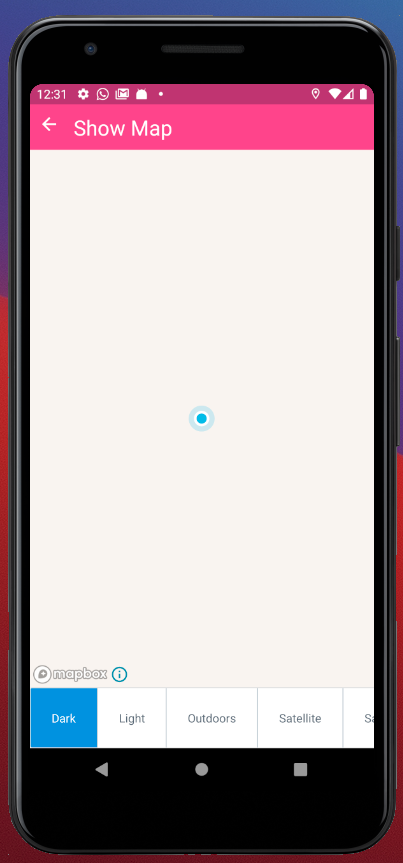
I have just checked my style.json with an example app and it is still not working. I put my styleURL inside ShowMap component and it looks like this:
```import React, {FC, useState, useEffect} from 'react';
import {Alert} from 'react-native';
import MapboxGL from '@react-native-mapbox-gl/maps';
import sheet from '../../styles/sheet';
import {onSortOptions} from '../../utils';
import TabBarPage from '../common/TabBarPage';
const ShowMap: FC
const _mapOptions = Object.keys(MapboxGL.StyleURL)
.map((key) => {
return {
label: key,
data: (MapboxGL.StyleURL as any)[key], // bad any, because enums
};
})
.sort(onSortOptions);
const [styleURL, setStyleURL] = useState({styleURL: _mapOptions[0].data});
useEffect(() => {
MapboxGL.locationManager.start();
return (): void => {
  MapboxGL.locationManager.stop();
};
}, []);
const onMapChange = (index: number, newStyleURL: MapboxGL.StyleURL): void => {
setStyleURL({styleURL: newStyleURL});
};
const onUserMarkerPress = (): void => {
Alert.alert('You pressed on the user location annotation');
};
return (
scrollable
options={_mapOptions}
onOptionPress={onMapChange}>
styleURL={'https://myURL.com/style.json'}
>
    <MapboxGL.UserLocation onPress={onUserMarkerPress} />
  </MapboxGL.MapView>
</TabBarPage>
);
};
export default ShowMap;
```
The result:
miihauu
on 25 Mar 2021
Works fine for me (current master within the example demo app):

I've used the style.json you linked to,
created a free account and replaced instances of key with my apiKey.
Before that, I got an 403 error (curious, that you didn't get any error when trying it on your end 🤔 )
Steps to reproduce:
- go within the
exampledirectory - create this file
example/src/assets/style.json - its content should be this: https://raw.githubusercontent.com/openmaptiles/osm-bright-gl-style/master/style.json
- replace the two
{key}instances withinstyle.jsonwith your api key: https://cloud.maptiler.com/account/keys/ - use this example within the
exampleapp:example/src/examples/Map/ShowMapLocalStyle.tsx - replace
const style = JSON.stringify(require('../../assets/map-styleURL-style.json'));withconst style = JSON.stringify(require('../../assets/style.json')); - when you open the example app navigate to
Map=>Show Map With Local Style JSON
Notice, I've used local style.json, however this should also just work fine with linking styleURL to a url that serves the style.json.
ferdicus
on 26 Mar 2021
@miihauu feel free to post your findings, I'm closing this for now
ferdicus
on 26 Mar 2021
@ferdicus Thank you for your support. I have checked it and you are right. Everything is ok, because I reproduced your instructions and it works! I found that is an issue with my JSON, so that is the case that it doesn't work.
miihauu
on 1 Apr 2021
Related issues
 alexisrougnant
·
3Comments
alexisrougnant
·
3Comments
 arnaudambro
·
5Comments
arnaudambro
·
5Comments
 lukemcgregor
·
5Comments
lukemcgregor
·
5Comments
 ivari
·
3Comments
ivari
·
3Comments
 bartolkaruza
·
3Comments
bartolkaruza
·
3Comments