Maps: SymbolLayer heavy flickering on coordinate updates of parent ShapeSource
Describe the bug
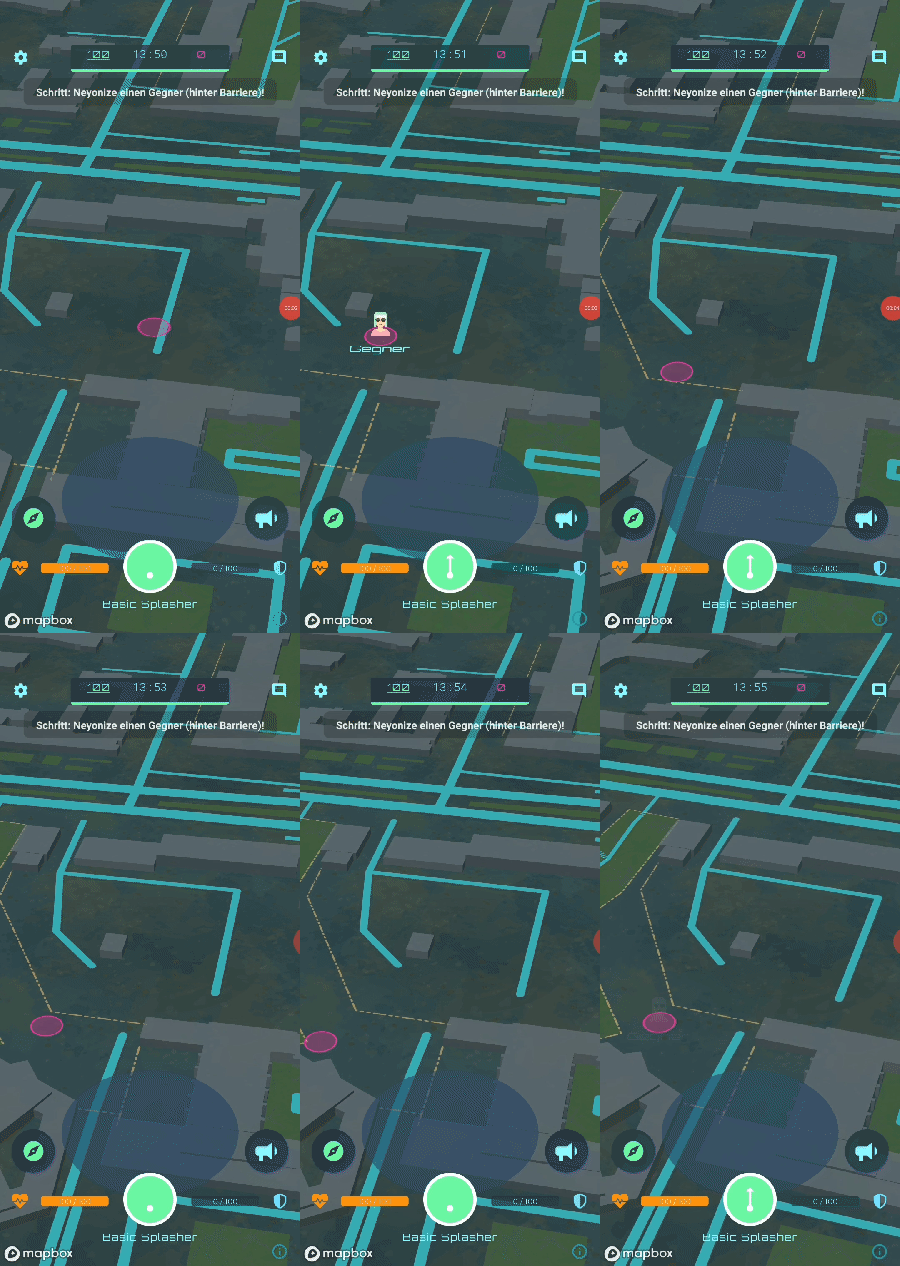
The content of a SymbolLayer flickers heavily when when the coordinates of the parent ShapeSource shape property are updated.
See the attached gif for a demonstration of the bug.
The flickering also occurs when non animated SymbolLayers appear on the viewport. E.g. the viewport is rotated so that the SymbolLayer is not in the viewport anymore. Everytime the viewport changes again so that the SymbolLayer reappears, it is faded in as if it was loaded for the first time. No matter if the iconOpacityTransition is set to 0 or not.
To Reproduce
- Create a ShapeSource or an Animated.ShapeSource and add a SymbolLayer or Animated.SymbolLayer as child.
- Set the iconImage property of the SymbolLayer to an image.
- dynamically update the coordinates of the ShapeSource shape property
- the SymbolLayer content flickers
- if also a textfield is added to the SymbolLayer the flickering gets even worse
import React, { useEffect, useState } from "react";
import MapboxGL from "@react-native-mapbox-gl/maps";
import { point } from "@turf/turf";
import pinIcon from "src/assets/pin.png";

const initialCoordinate = [13.411807, 52.5008788];

const SymbolLayerAnimationTest = () => {
    const [currentCoordinate, setCurrentCoordinate] = useState(
        initialCoordinate
    );

    useEffect(() => {
        const interval = setInterval(() => {
            setCurrentCoordinate((co) => [co[0], co[1] + 0.0001]);
        }, 1000);

        return () => {
            clearInterval(interval);
        };
    }, []);

    return (
        <MapboxGL.MapView style={{ flex: 1 }}>
            <MapboxGL.Camera
                zoomLevel={18}
                centerCoordinate={initialCoordinate}
            />
            <MapboxGL.Images images={{ pinIcon }} />
            <MapboxGL.Animated.ShapeSource
                id="shapeSource"
                shape={point(currentCoordinate)}
            >
                <MapboxGL.Animated.SymbolLayer
                    id="shapePoint"
                    style={{
                        iconImage: "pinIcon",
                        iconOpacityTransition: { duration: 0, delay: 0 },
                        textField: "Test",
                    }}
                />
            </MapboxGL.Animated.ShapeSource>
        </MapboxGL.MapView>
    );
};
export default SymbolLayerAnimationTest;
(edit ferdicus for code example rendering)
Expected behavior
SymbolLayer content should not flicker when coordinate properties of the ShapeSource update.
Screenshots
Versions (please complete the following information):
- Android
- Samsung Galaxy S10e
- Emulator/ Simulator: [no]
- react-native-mapbox-gl Version 8.1.0-rc.5
- React Native Version 0.62.2
Additional context
The problem exist on all tested real Devices and Simulators at least on Android. Not yet tested on iOS.
This is a real show stopper makes SymbolLayers and therefore the complete Mapbox implementation useless for dynamic content.
 janweigel
All 21 comments
might be related to this: https://github.com/mapbox/mapbox-gl-native/issues/16473
 ferdicus
on 12 Oct 2020
ferdicus
on 12 Oct 2020
Hi @janweigel have you tried adding iconAllowOverlap: true. The attached screenshot looks like the icon is colliding with other elements
 Gnative
on 12 Oct 2020
Gnative
on 12 Oct 2020
@Gnative I tested with both, overlapping true and false.
It doesn't make any difference. There are no other elements it could collide with.
janweigel
on 12 Oct 2020
@ferdicus in the native issue you mentioned is a comment that the issue should be resolved at least partially in the native verions 9.3.0 Android and 6.0.0 iOS.
Are there any plans or estimates when react-native-mapbox will be updated to the latest native versions?
janweigel
on 12 Oct 2020
hey @janweigel, there is no timeline yet, one thing that was holding us back to publish a new release was the changes in updating the iOS version, which was fixed via 15e75900847046883df09f9da96dbb113a1cbaa8.
We're currently at 8.1.0.rc5, I guess the next step could be to upgrade the android and iOS versions, check for breaking changes and increase/ publish a new version.
Having said that, we're basically just a few people doing this in our spare time... so timing may vary.
ferdicus
on 12 Oct 2020
Hey @ferdicus, thanks for your feedback and your effort on this project.
It would be great to have the upgrades integrated and that bug fixed.
Right now it is a show stopper and we would have to let mapbox go for our products.
janweigel
on 14 Oct 2020
@janweigel on iOS you can use different framework version than the default in 8.1.0.rc5 or later
Plese check:
https://github.com/react-native-mapbox-gl/maps/blob/master/CHANGELOG.md#810rc2
https://github.com/react-native-mapbox-gl/maps/pull/940
 mfazekas
on 14 Oct 2020
mfazekas
on 14 Oct 2020
Hi @janweigel !
Same for me...
Did you find a workaround to fix this issue ? (while waiting for potential future fix in the next updates)
 jordan-tpz
on 27 Oct 2020
jordan-tpz
on 27 Oct 2020
@janweigel, did you try with an Annotation instead of ShapeSource?
I know, that it is using ShapeSource and SymbolLayer internally as well, however that is how we're using it in our project, and we didn't get any flickering of the icon (Android)
ferdicus
on 28 Oct 2020
I came into the same issue,when use the example drive the line and create a realtime point move , sometimes, the label and river come flickering when the point move .( ps:I use MapboxGL.Animated.ShapeSource )
 lishuo0710
on 22 Nov 2020
lishuo0710
on 22 Nov 2020
Hi,
Always the same issue for me.
It still exists using latest release ? If yes, did you find a temporary hack ?
jordan-tpz
on 16 Dec 2020
I came into the same issue,when use the example
drive the lineand create a realtime point move , sometimes, the label and river come flickering when the point move .( ps:I use MapboxGL.Animated.ShapeSource )
i repalce it with markview but came into another issue ,when markview move few steps it will back to origin location while the camera begin animation (ps: when camera animation duration is 0ms,the issue disappear but the move is ugly)
lishuo0710
on 17 Dec 2020
Hi @lishuo0710,
Thank you for your quickly feedback. I continue to investigate about it.
jordan-tpz
on 17 Dec 2020
@ferdicus from what I've seen in the code, Annotation is used internally to display the location of the user. The reason why it's not flickering is that you're passing custom children (in this case a CircleLayer) and SymbolLayer is never used
 VladMatvei
on 22 Jan 2021
VladMatvei
on 22 Jan 2021
@VladMatvei Did you find a workaround for this issue by using SymbolLayer ?
jordan-tpz
on 22 Jan 2021
@VladMatvei, when I said we in our project, I meant in a personal project:
const myStyles = {
iconAllowOverlap: true,
iconSize: [
'interpolate',
['exponential', 1.5],
['zoom'],
10,
0.15,
16,
0.4,
],
iconImage: require('../images/myImage.png'),
iconPitchAlignment: 'map',
iconRotationAlignment: 'viewport',
};
<MapboxGL.Annotation
id="my-Source"
coordinates={myCoords}
animated={true}
>
<MapboxGL.SymbolLayer
id="myMarker"
style={layerStyles}
/>
</MapboxGL.Annotation>
Something like this
ferdicus
on 22 Jan 2021
@ferdicus sorry for that. I have the same configuration and icon flickering still occurs.
As @janweigel mentioned, this issue is related to the native library we're using and will be fixed after updating to 9.3.0 for Android and 6.0.0 for iOS.
@jordan-tpz Unfortunately, I didn't. I will post here a workaround or hack if I'll manage to find one.
VladMatvei
on 24 Jan 2021
@jordan-tpz
After trying several ways to temporary fix this bug, I came up to the conclusion that the best option is to locally update Mapbox SDK to the latest version for both platforms (Android and iOS).
I'm not sure about consequences, but this solution works perfectly for me. If you decide to make this change in your app, then I recommend to run heavy smoke tests on the Mapbox component (just to make sure it didn't break any functionality).
How to locally update Mapbox SDK?
iOS:
https://github.com/react-native-mapbox-gl/maps/blob/master/ios/install.md
Android:
In _android/build.gradle_ in the _allprojects > repositories_ block add the following configuration:
maven {
            url 'https://api.mapbox.com/downloads/v2/releases/maven'
            authentication {
                basic(BasicAuthentication)
            }
            credentials {
                // Do not change the username below.
                // This should always be `mapbox` (not your username).
                username = 'mapbox'
                // Use the secret token you stored in gradle.properties as the password
                password = project.properties['MAPBOX_DOWNLOADS_TOKEN'] ?: ""
            }
        }
and then in _android/app/build.gradle_ in the dependencies block add:
implementation 'com.mapbox.mapboxsdk:mapbox-sdk-services:5.6.0'
implementation 'com.mapbox.mapboxsdk:mapbox-android-sdk:9.5.0'
implementation 'com.mapbox.mapboxsdk:mapbox-android-plugin-annotation-v9:0.9.0'
Clear your gradle cache and then re-build the app.
(for more info visit https://docs.mapbox.com/android/maps/guides/install/)
VladMatvei
on 30 Jan 2021
Closing this, as the issue at hand seems to be an upstream issue - which seems solvable by updating the lib SDKs
ferdicus
on 19 Feb 2021
I was experiencing the flickering in another project now as well.
project without flickering => raster tiles
project with flickering => vector tiles
Not sure if that is the cause, however I thought it's a relevant enough datapoint.
I can verify @VladMatvei solution - an upgrade to a later Android SDK removes the flickering.
I will update the installation this coming friday.
ferdicus
on 10 Mar 2021
I was experiencing the flickering in another project now as well.
project without flickering => raster tiles
project with flickering => vector tiles
Not sure if that is the cause, however I thought it's a relevant enough datapoint.I can verify @VladMatvei solution - an upgrade to a later Android SDK removes the flickering.
I will update the installation this coming friday.
@ferdicus I tried to update to the latest Android SDK by following @VladMatvei solution, but this is still an issue for me. For information I use the latest release 8.1.0
jordan-tpz
on 16 Mar 2021
Related issues
 andrei-tofan
·
5Comments
andrei-tofan
·
5Comments
 jayhaluska
·
5Comments
jayhaluska
·
5Comments
 gmaclennan
·
3Comments
gmaclennan
·
3Comments
 alexisrougnant
·
3Comments
alexisrougnant
·
3Comments
 arnaudambro
·
5Comments
arnaudambro
·
5Comments
Most helpful comment
@jordan-tpz
After trying several ways to temporary fix this bug, I came up to the conclusion that the best option is to locally update Mapbox SDK to the latest version for both platforms (Android and iOS).
I'm not sure about consequences, but this solution works perfectly for me. If you decide to make this change in your app, then I recommend to run heavy smoke tests on the Mapbox component (just to make sure it didn't break any functionality).
How to locally update Mapbox SDK?
iOS:
https://github.com/react-native-mapbox-gl/maps/blob/master/ios/install.md
Android:
In _android/build.gradle_ in the _allprojects > repositories_ block add the following configuration:
and then in _android/app/build.gradle_ in the dependencies block add:
Clear your gradle cache and then re-build the app.
(for more info visit https://docs.mapbox.com/android/maps/guides/install/)