Maps: MarkerView, PointAnnotation & Callout doesn't render points on Android, works fine on iOS.
Describe the bug
I am using Mapbox to display Point on the map and using Callout to show additional information.
It's working fine in iOS but I'm not able to see the same in android.
I can see the points and Callout is working fine but didn't render anything on the Android device.
To Reproduce
Example:
import React from 'react';
import {
  View,
  Image,
} from 'react-native';
import MapboxGL from '@react-native-mapbox-gl/maps';

const currentLatLng = [
    [-74.00597, 40.71427]
  ];

class BugReportExample extends React.Component {
  render() {
    return (
    View style={{flex: 1}}>
        <MapboxGL.MapView
          ref={c => (this._map = c)}
          logoEnabled={false}
          style={{flex: 1}}>
          <MapboxGL.Camera
            ref={c => (this.camera = c)}
            zoomLevel={14}
            centerCoordinate={currentLatLng}
          />
          {/* User location */}
          <MapboxGL.PointAnnotation
            key={'9090'}
            ref={ref => (this.userAnnotationRef = ref)}
            id={'9090'}
            coordinate={currentLatLng}
            title="">
            <View style={{ width: 45,height: 45,alignItems: 'center',justifyContent: 'center',overflow: 'hidden',}}>
              <Image
                source={{uri:'https://reactnative.dev/img/tiny_logo.png'}}
                resizeMode={'contain'}
                style={{height: wp('10%'), width: wp('10%')}}
               onLoad={() => this.userAnnotationRef.refresh()}
              />
            </View>
            <MapboxGL.Callout title={'You'} />
          </MapboxGL.PointAnnotation>
        </MapboxGL.MapView>
      </View>
    );
  }
}
Expected behavior
It should work the same on Android devices as well.
Screenshots
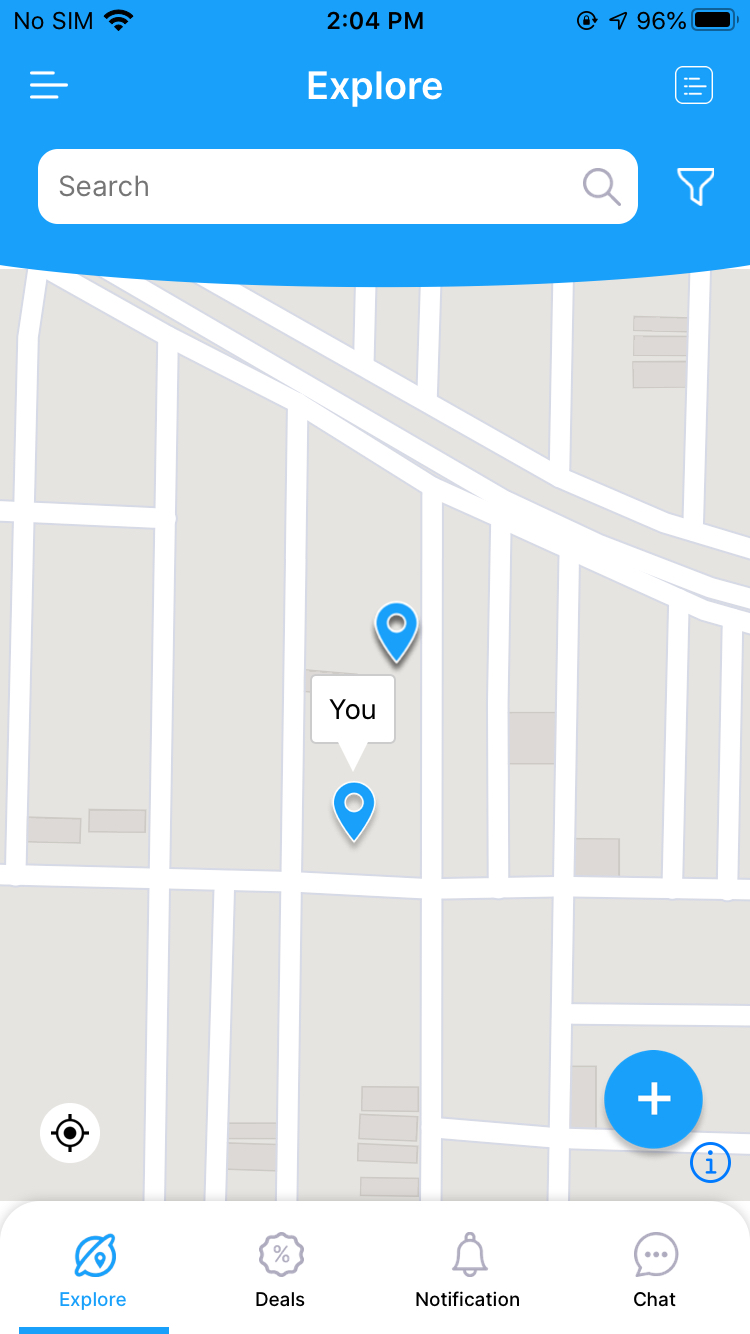
iOS working example -
Versions:
- Platform: Android
- Device: Redmi 7s
- Emulator/ Simulator: no
- OS: Android 9 Pie
- react-native-mapbox-gl Version ^8.1.0-rc.2
- React Native Version 0.62.2
Edit: Updated code with onLoad/Refresh
 raazatul7
All 33 comments
The same issue. and for the android devices. MarkerView render with a Flickering, it's not like iOS
 taduyde
on 4 Sep 2020
taduyde
on 4 Sep 2020
@raazatul7, you probably saw the issue template - please edit the description and fill out _all_ mandatory points.
You expect voluntary devs to look at your issue, please take the time to fill out the required info.
Thanks 🙇
 ferdicus
on 4 Sep 2020
ferdicus
on 4 Sep 2020
@raazatul7, you probably saw the issue template - please edit the description and fill out _all_ mandatory points.
You expect voluntary devs to look at your issue, please take the time to fill out the required info.Thanks 🙇
Done.
raazatul7
on 4 Sep 2020
@ferdicus Any update?
Will anyone checks this?
raazatul7
on 9 Sep 2020
Look into this. Maybe it'll give you an alternative way to do it. Let me know if it helps @raazatul7 https://medium.com/javascript-in-plain-english/mark-a-coordinate-on-mapbox-map-in-react-native-5d21c71ed46e
 johnneuland
on 13 Sep 2020
johnneuland
on 13 Sep 2020
Look into this. Maybe it'll give you an alternative way to do it. Let me know if it helps @raazatul7 https://medium.com/javascript-in-plain-english/mark-a-coordinate-on-mapbox-map-in-react-native-5d21c71ed46e
I am using the same code from examples
 <MapboxGL.PointAnnotation
        id={id}
        coordinate={coordinate}
        title={title}
        ref={(ref) => (this.annotationRef = ref)}>
        <View style={styles.annotationContainer}>
          <Image
            source={{uri: 'https://reactnative.dev/img/tiny_logo.png'}}
            style={{width: 45, height: 45}}
            onLoad={() => this.annotationRef.refresh()}
          />
        </View>
        <MapboxGL.Callout title="This is a sample" />
      </MapboxGL.PointAnnotation>
But the image is not loading in my project but when I run the example app it works.
Don't know what's wrong in this, it's not working on android.
raazatul7
on 13 Sep 2020
@raazatul7 it's working on the example app for Android and iOS but not for your app? Is it possible you missed a step or don't have the correct versions of something installed?
 ClayC-WeatherBug
on 15 Sep 2020
ClayC-WeatherBug
on 15 Sep 2020
@raazatul7 it's working on the example app for Android and iOS but not for your app? Is it possible you missed a step or don't have the correct versions of something installed?
I tried everything, only the image is not rendering in Android, it's working fine in iOS.
raazatul7
on 15 Sep 2020
Is it working in the example app?
ClayC-WeatherBug
on 15 Sep 2020
Is it working in the example app?
Yes, I'll check with the latest version as well.
raazatul7
on 15 Sep 2020
@raazatul7 do you use the onload/refresh to refresh PointAnnotation when image loaded?! If so pls edit the code in the initial comment https://github.com/react-native-mapbox-gl/maps/issues/1014#issue-691763079
 mfazekas
on 15 Sep 2020
mfazekas
on 15 Sep 2020
@raazatul7 do you use the onload/refresh to refresh PointAnnotation when image loaded?! If so pls edit the code in the initial comment #1014 (comment)
I tried with and without onload, still not getting image.
raazatul7
on 16 Sep 2020
@raazatul7 do you use the onload/refresh to refresh PointAnnotation when image loaded?! If so pls edit the code in the initial comment #1014 (comment)
I tried with and without onload, still not getting image.
Have a look :
 raazatul7
on 16 Sep 2020
raazatul7
on 16 Sep 2020
@raazatul7 i understand, that you've tried with onload but we need to see the full code. As reported without onload/refresh it will not work, as PointAnnotation on android captures the RN view to a bitmap. So refresh needs to be called to recapture the RN view once the image has fully loaded.
Will reopen once you corrected code in initial comment.
mfazekas
on 16 Sep 2020
@raazatul7 i understand, that you've tried with onload but we need to see the full code. As reported without onload/refresh it will not work, as PointAnnotation on android captures the RN view to a bitmap. So refresh needs to be called to recapture the RN view once the image has fully loaded.
Will reopen once you corrected code in initial comment.
Changes are done!
Please re-open the issue.
raazatul7
on 17 Sep 2020
The same issue. and for the android devices. MarkerView render with a Flickering, it's not like iOS
@taduyde Was the flickering occurring on an emulator? I've seen flickering, but I think that I've only ever seen it on an emulator.
ClayC-WeatherBug
on 17 Sep 2020
@raazatul7 I think I misunderstood and thought you were saying the callout was not working. So the issue is that your image pins aren't showing up on the map? Do they need to come from a remote URI, or could you use a local image? If the pins don't need to change dynamically you could ship the image with the app which I know will work for certain. Alternately, you could try the approach that I used in this PR which shows an example of a custom callout using MarkerView. I know this works on android and iOS both in the sample app and in the app that I work on.
https://github.com/react-native-mapbox-gl/maps/pull/1028/files
ClayC-WeatherBug
on 17 Sep 2020
@raazatul7 I think I misunderstood and thought you were saying the callout was not working. So the issue is that your image pins aren't showing up on the map? Do they need to come from a remote URI, or could you use a local image? If the pins don't need to change dynamically you could ship the image with the app which I know will work for certain. Alternately, you could try the approach that I used in this PR which shows an example of a custom callout using MarkerView. I know this works on android and iOS both in the sample app and in the app that I work on.
https://github.com/react-native-mapbox-gl/maps/pull/1028/files
I tried using both Uri and local images still not getting any image on the Andorid device.
Tried using your Custom callout but still not able to find out how images will render.
raazatul7
on 18 Sep 2020
I'm closing this, sorry @raazatul7, we can't help you with this, unless you can provide a repo with a project that shows the behaviour you observed.
With all the evidence we have to assume, that the issue is on your end:
- no one else mentioned this issue
- example app works for you and everyone else
- the url you posted into your image does not directly link to a png
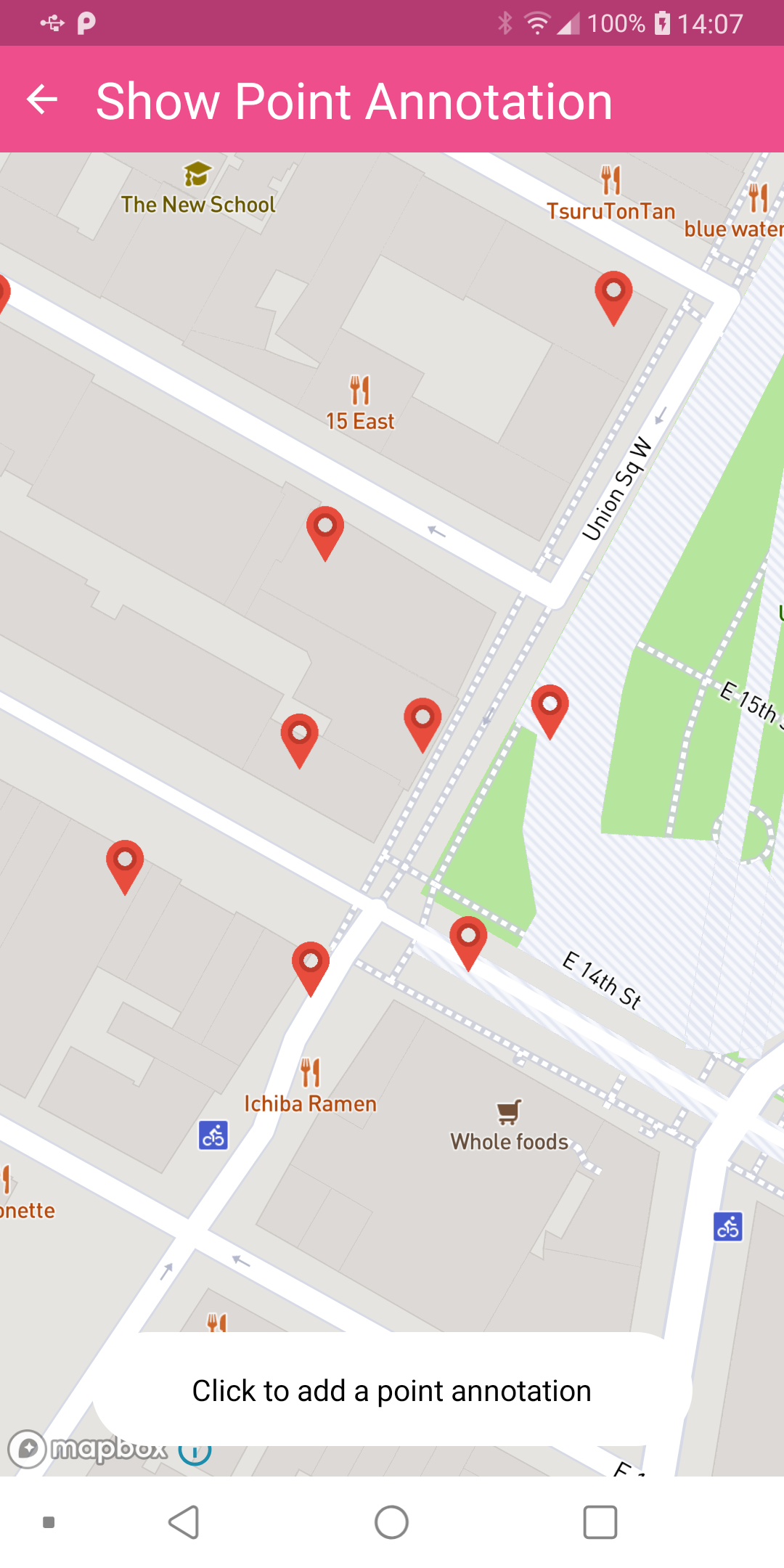
I've tested with this link
and it worked just fine on Android physical device:
Again, I don't know what the issues are on your end, and there very well could be a valid problem,
however please understand, that with the info at hand there is not much we can do to help.
Thanks
Edit: will reopen if repo with bug is provided
ferdicus
on 18 Sep 2020
How can I change the Callout image, since the custom Image is not loading? @ferdicus
Also, custom View in Callout is not showing images and are not touchable!
All these issues are in Android, iOS is working fine.
raazatul7
on 24 Sep 2020
How can I change the Callout image, since the custom Image is not loading? @ferdicus
Also, custom View in Callout is not showing images and are not touchable!
All these issues are in Android, iOS is working fine.
Hi @raazatul7, I am also facing the same issue. If the resolve the issue can you please help me.
Thanks in advance.
 udaysagartammina
on 24 Sep 2020
udaysagartammina
on 24 Sep 2020
I'm sharing something that I discovered recently for PointAnnotation and I don't know if it is the case. When I need to update anything in my PointAnnotations (I use useState hook) I also have to generate a new id/key for them. I was trying to update an image after an interaction and it was not being correctly rendered. Somehow I thought this could be related to the id and I tried and worked.
 leonamjlpaula
on 24 Sep 2020
leonamjlpaula
on 24 Sep 2020
How can I change the Callout image, since the custom Image is not loading? @ferdicus
Also, custom View in Callout is not showing images and are not touchable!
All these issues are in Android, iOS is working fine.
@raazatul7, those are other issues though.
The issue you mentioned in this ticket is different from what you are asking here.
Feel free to open another ticket with those issues/ questions and we can discuss over there.
I would also ask you to be very precise with your description as to not confuse readers.
ferdicus
on 25 Sep 2020
Look into this. Maybe it'll give you an alternative way to do it. Let me know if it helps @raazatul7 https://medium.com/javascript-in-plain-english/mark-a-coordinate-on-mapbox-map-in-react-native-5d21c71ed46e
I am using the same code from examples
 <MapboxGL.PointAnnotation
        id={id}
        coordinate={coordinate}
        title={title}
        ref={(ref) => (this.annotationRef = ref)}>
        <View style={styles.annotationContainer}>
          <Image
            source={{uri: 'https://reactnative.dev/img/tiny_logo.png'}}
            style={{width: 45, height: 45}}
            onLoad={() => this.annotationRef.refresh()}
          />
        </View>
        <MapboxGL.Callout title="This is a sample" />
      </MapboxGL.PointAnnotation>
But the image is not loading in my project but when I run the example app it works.
Don't know what's wrong in this, it's not working on android.
Hi @raazatul7 , this code working on android 7 below versions.
udaysagartammina
on 29 Sep 2020
Look into this. Maybe it'll give you an alternative way to do it. Let me know if it helps @raazatul7 https://medium.com/javascript-in-plain-english/mark-a-coordinate-on-mapbox-map-in-react-native-5d21c71ed46e
I am using the same code from examples
 <MapboxGL.PointAnnotation
        id={id}
        coordinate={coordinate}
        title={title}
        ref={(ref) => (this.annotationRef = ref)}>
        <View style={styles.annotationContainer}>
          <Image
            source={{uri: 'https://reactnative.dev/img/tiny_logo.png'}}
            style={{width: 45, height: 45}}
            onLoad={() => this.annotationRef.refresh()}
          />
        </View>
        <MapboxGL.Callout title="This is a sample" />
      </MapboxGL.PointAnnotation>
But the image is not loading in my project but when I run the example app it works.
Don't know what's wrong in this, it's not working on android.Hi @raazatul7 , this code working on android 7 below versions.
Thanks for the information mate!
raazatul7
on 29 Sep 2020
Look into this. Maybe it'll give you an alternative way to do it. Let me know if it helps @raazatul7 https://medium.com/javascript-in-plain-english/mark-a-coordinate-on-mapbox-map-in-react-native-5d21c71ed46e
I am using the same code from examples
 <MapboxGL.PointAnnotation
        id={id}
        coordinate={coordinate}
        title={title}
        ref={(ref) => (this.annotationRef = ref)}>
        <View style={styles.annotationContainer}>
          <Image
            source={{uri: 'https://reactnative.dev/img/tiny_logo.png'}}
            style={{width: 45, height: 45}}
            onLoad={() => this.annotationRef.refresh()}
          />
        </View>
        <MapboxGL.Callout title="This is a sample" />
      </MapboxGL.PointAnnotation>
But the image is not loading in my project but when I run the example app it works.
Don't know what's wrong in this, it's not working on android.Hi @raazatul7 , this code working on android 7 below versions.
Thanks for the information mate!
@raazatul7 any update this issue?
Thanks in advance.
udaysagartammina
on 8 Oct 2020
Look into this. Maybe it'll give you an alternative way to do it. Let me know if it helps @raazatul7 https://medium.com/javascript-in-plain-english/mark-a-coordinate-on-mapbox-map-in-react-native-5d21c71ed46e
I am using the same code from examples
 <MapboxGL.PointAnnotation
        id={id}
        coordinate={coordinate}
        title={title}
        ref={(ref) => (this.annotationRef = ref)}>
        <View style={styles.annotationContainer}>
          <Image
            source={{uri: 'https://reactnative.dev/img/tiny_logo.png'}}
            style={{width: 45, height: 45}}
            onLoad={() => this.annotationRef.refresh()}
          />
        </View>
        <MapboxGL.Callout title="This is a sample" />
      </MapboxGL.PointAnnotation>
But the image is not loading in my project but when I run the example app it works.
Don't know what's wrong in this, it's not working on android.Hi @raazatul7 , this code working on android 7 below versions.
Thanks for the information mate!
@raazatul7 any update this issue?
Thanks in advance.
No, Still same issue, not able to change pin icon, using the default one. Also, no image is rendering on custom callouts in android only.
raazatul7
on 8 Oct 2020
Can you try with branch: mfazekas/point-ann-refresh - #1062
npm install react-native-mapbox-gl/maps#mfazekas/point-ann-refresh
mfazekas
on 8 Oct 2020
@raazatul7 Render annotations when the map finish loading using onDidFinishLoadingMap.
 nomaanp
on 31 Dec 2020
nomaanp
on 31 Dec 2020
This issue still appears to be in release 8.1.0. Strangely, the image loads sometime but fails to load at other times. Can someone else give this snippet a try on Android?
```
export default function MapboxPointAnnotationWithImage(props: {children?: React.ReactNode} & MapViewProps) {
const [annotationRef, setAnnotationRef] = useState
return (
coordinate={[-75.55, 45.45]}
title={"test"}
ref={ref => (setAnnotationRef(ref))}>
style={{
alignSelf: "center",
borderRadius:50,
width:"100%",
height:"100%"
}}
onLoad={annotationRef ? () => annotationRef.refresh():() => {}}
/>
);
}
````
 dpeters1
on 15 Mar 2021
dpeters1
on 15 Mar 2021
I'm Having the same issue as @raazatul7 . Image is not getting rendered in PointAnnotation Android. Here's my code snipped.
<MapboxGL.PointAnnotation
      id={props.id}
      coordinate={props.coordinate}
      onSelected={props.onSelected}>
      <Image
        style={{width: 22, height: 30, backgroundColor: 'green'}}
        source={require('../../assets/marker.png')}
      />
      <View
        style={{
          backgroundColor: '#ffffff',
          paddingLeft: 4,
          paddingRight: 4,
          marginTop: 4,
          borderRadius: 4,
        }}>
        <Text>{props.title}</Text>
      </View>
    </MapboxGL.PointAnnotation>
 jungRoit
on 18 Mar 2021
jungRoit
on 18 Mar 2021
Im having the same issue the image is not render
```
const renderAnnotations = () => {
return (
id="pointAnnotation"
coordinate={coordinate}>
            <View
             style={{
                height: 30,
                width: 30,
                backgroundColor: '#00cccc',
                borderRadius: 50,
                borderColor: '#fff',
                borderWidth: 3
            }}
            // style={{ width: 45, height: 45, alignItems: 'center', justifyContent: 'center', overflow: 'hidden', }}
            >
                <Image
                    source={require('../../../assets/map-marker-icon.png')}
                    resizeMode={'contain'}
                    style={{ height: 50, width: 50 }}
                // onLoad={() => this.userAnnotationRef.refresh()}
                />
            </View>
            <MapboxGL.Callout title={'You'} />

            {/* <View style={{
                height: 30,
                width: 30,
                backgroundColor: '#00cccc',
                borderRadius: 50,
                borderColor: '#fff',
                borderWidth: 3
            }} /> */}
        </MapboxGL.PointAnnotation>
    );
}
```
 michaelVictoriaDev
on 19 May 2021
michaelVictoriaDev
on 19 May 2021
I had the same issue. PointAnnotation on Android will render only the last element of the children. Including them all in View does not help. What I effectively did was to render a single SVG image using react-native-svg. So having a 'template' XML, and override specific values in it via string interpolation and then render a single SvgXml component.
 killerchip
on 7 Jun 2021
killerchip
on 7 Jun 2021
Related issues
 bllanos
·
3Comments
bllanos
·
3Comments
 DroidZed
·
4Comments
DroidZed
·
4Comments
 alexisrougnant
·
3Comments
alexisrougnant
·
3Comments
 dorthwein
·
3Comments
dorthwein
·
3Comments
 magnusburton
·
3Comments
magnusburton
·
3Comments