Maps: [iOS] onRegionDidChange is not called if you swipe and stop the animation
Describe the bug
This happens on iOS (both device and simulator). If you swipe/pan the map in one big motion, and then stop it by pressing down before the animation finishes, onRegionDidChange is not called.
To Reproduce
- Swipe the map
- Stop the animation before it finishes by clicking/pressing on the map to hold it
- Let go (without moving the map)
- Notice that
onRegionDidChangeis not called (the coordinates from the example is not updated)
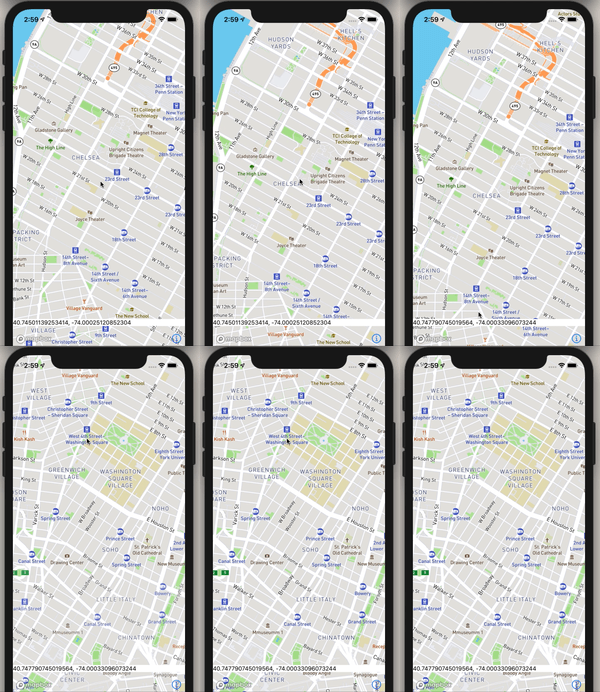
I've included an example screen here where I print out the coordinates after region changes. Notice that the coordinates do not update if you follow the above reproduction steps:
Example:
import React, {useState} from 'react';
import {View, Text} from 'react-native';
import MapboxGL from '@react-native-mapbox-gl/maps';

const BugReportExample = () => {
  const [region, setRegion] = useState();
  return (
    <View style={{flex: 1}}>
      <MapboxGL.MapView style={{flex: 1}} onRegionDidChange={setRegion}>
        <MapboxGL.Camera
          centerCoordinate={[-74.00597, 40.71427]}
          zoomLevel={14}
        />
      </MapboxGL.MapView>
      <View
        style={{
          position: 'absolute',
          bottom: 50,
          width: '100%',
          backgroundColor: 'white',
        }}>
        <Text>
          {region
            ? region.geometry.coordinates[1] +
              ', ' +
              region.geometry.coordinates[0]
            : 'No region'}{' '}
        </Text>
      </View>
    </View>
  );
};
export default BugReportExample;
Expected behavior
onDidRegionChange should be called. This works fine on Android.
Screenshots
In the example, if you move the region normally the coordinates in the lower white box will be updated.
But if you swipe fast and then press to hold, as noted in the reproduction, the coordinates will not update:
Versions (please complete the following information):
- Platform: iOS
- Device: iPhone XS
- Emulator/ Simulator: yes
- OS: iOS 13.6.1
- react-native-mapbox-gl Version: 8.1.0-rc.2
- React Native Version: 0.63.2
Additional context
None
 cbrevik
All 15 comments
This issue has been automatically marked as stale because it has not had recent activity. It will be closed if no further activity occurs. Thank you for your contributions.
![stale[bot] picture](https://avatars.githubusercontent.com/in/1724?v=4&s=40) stale[bot]
on 28 Oct 2020
stale[bot]
on 28 Oct 2020
Still an issue
cbrevik
on 31 Oct 2020
@cbrevik, can you please verify that you have the whole source for you BugExample.
It's throwing for me - I don't want to debug the example itself.
Thanks in advance 🙇🏿
 ferdicus
on 13 Nov 2020
ferdicus
on 13 Nov 2020
Sure! I'll look into it
cbrevik
on 13 Nov 2020
I've updated the example with working code @ferdicus
cbrevik
on 13 Nov 2020
Sorry, I didn't get to this today - will have to postpone to a later date :(
This is my reminder
ferdicus
on 20 Nov 2020
hey @cbrevik, I've done some digging and have found, that the event is not triggered due to this if check in our iOS code:
https://github.com/react-native-mapbox-gl/maps/blob/000616c742aebfe83409857f49f5e924d790f3d4/ios/RCTMGL/RCTMGLMapViewManager.m#L493
On an interrupted pan reason is MGLCameraChangeReasonGesturePan | MGLCameraChangeReasonTransitionCancelled and that seems to somehow been caught in this clause.
Now, I'm no Obj-C pro and I'm not sure about the consequences a change here might be to other logic (like programmatically changing the viewPort with camera actions instead of user interactions).
However, till we figure that part out, could you do me a favor and comment out that line in your node_modules/react-native-mapbox-gl folder and give it a try?
Cheers 🍻
ferdicus
on 27 Nov 2020
Hey @ferdicus. I tested it out now, and removing that check did indeed fix the issue.
It seems to have been introduced in this PR; https://github.com/react-native-mapbox-gl/maps/pull/363
Corresponding issue: https://github.com/react-native-mapbox-gl/maps/issues/348
It seems to be related to programmatic camera interaction being wrong without the check, as you said.
Maybe there is some way to rather check before the interaction starts if it is a user interaction or programmatic?
cbrevik
on 30 Nov 2020
Seems like isUserInteraction is set on regionWillChangeWithReason: https://github.com/react-native-mapbox-gl/maps/blob/000616c742aebfe83409857f49f5e924d790f3d4/ios/RCTMGL/RCTMGLMapViewManager.m#L480
Does it need to be set in regionDidChangeWithReason at all?: https://github.com/react-native-mapbox-gl/maps/blob/000616c742aebfe83409857f49f5e924d790f3d4/ios/RCTMGL/RCTMGLMapViewManager.m#L495
Will not the correct value carry over to every regionDidChangeWithReason call from every regionWillChangeWithReason call? Or are there possible race conditions where the payload from didChange will be sent with values from "another" willChange.
Maybe @kristfal who introduced the check knows?
cbrevik
on 30 Nov 2020
This issue can be reproduced on Android as well
 VladMatvei
on 7 Dec 2020
VladMatvei
on 7 Dec 2020
@ferdicus
I have debugged the code on iOS and found out that the if-statement (line 493) returns not only when user stops the animation, therefore, it's not safe to completely comment out the line (this caused some issues on my side).
I have slightly modified the if-statement and now it works perfectly:
if (((reason & MGLCameraChangeReasonTransitionCancelled) == MGLCameraChangeReasonTransitionCancelled) && ((reason & MGLCameraChangeReasonGesturePan) != MGLCameraChangeReasonGesturePan)) return;
_(I'm not an Objective-C expert, so excuse my code)_
VladMatvei
on 3 Feb 2021
thanks @cbrevik, @VladMatvei for looking into this.
@cbrevik, can you verify, that @VladMatvei solution works for you?
Then I'd be grateful if either one could open a PR fixing the issue at hand and we could merge this :)
Thanks in advance
ferdicus
on 19 Feb 2021
Yeah that fixed it for me as well. Thanks for researching further @VladMatvei!
By narrowing it down to checking if it's a user pan-interaction (MGLCameraChangeReasonGesturePan) will avoid any issues with programmatic camera interaction. So that's a good idea!
I've taken the liberty to open a PR at #1226
cbrevik
on 19 Feb 2021
@VladMatvei , you mentioned, that you were able to verify this on Android as well.
Do you still stand by that statement, because neither @cbrevik and myself were able to reproduce it on there.
I'm asking, because #1226 only accounts for an iOS fix.
Cheers 🍻
ferdicus
on 22 Feb 2021
@cbrevik thanks and I'm glad this works for you
@ferdicus Yes, I was able to reproduce this bug on Android, but I can't give you the concrete steps yet (on Android it's more difficult to reproduce). I will investigate further and then will open a new issue with all the necessary information. In the meantime I think we can close this issue and merge #1226
VladMatvei
on 28 Feb 2021
Related issues
 fvieira
·
4Comments
fvieira
·
4Comments
 atomheartother
·
3Comments
atomheartother
·
3Comments
 bartolkaruza
·
3Comments
bartolkaruza
·
3Comments
 andrei-tofan
·
5Comments
andrei-tofan
·
5Comments
 gmaclennan
·
3Comments
gmaclennan
·
3Comments