Maps: Markerview is visible outside of map view
Describe the bug
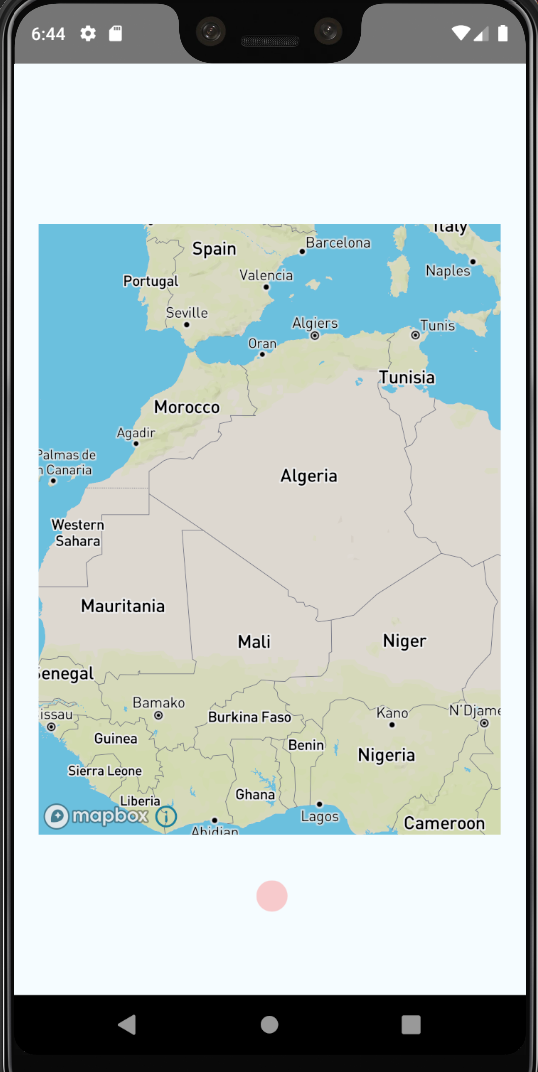
The Markerview component renders outside of map. If the map doesn't cover the entire screen, the Markerview can still be seen when the map is moved so the dot is outside the visible map.
I have checked on a physical device, and the problem remains.
To Reproduce
Create a map that isn't fullscreen, and then add a Markerview component that has some styling.
_(A sidenote: I could not get your example to work, it would not install or start, so I used the basic React Native starter project instead)_
Code:
import React from 'react';
import {Dimensions, StyleSheet, View} from 'react-native';
import MapboxGL from '@react-native-mapbox-gl/maps';

MapboxGL.setAccessToken('<TOKEN>');
MapboxGL.setConnected(true);

const App = () => {
  return (
    <>
      <View style={styles.page}>
        <View style={styles.container}>
          <MapboxGL.MapView style={styles.map}>
            <MapboxGL.MarkerView coordinate={[0, 0]}>
              <View style={styles.dot} />
            </MapboxGL.MarkerView>
          </MapboxGL.MapView>
        </View>
      </View>
    </>
  );
};

const styles = StyleSheet.create({
  page: {
    flex: 1,
    justifyContent: 'center',
    alignItems: 'center',
    backgroundColor: '#F5FCFF',
  },
  container: {
    height: Dimensions.get('window').height - 198 - 60,
    width: Dimensions.get('window').width - 40,
    backgroundColor: 'tomato',
  },
  map: {
    flex: 1,
  },
  dot: {
    width: 25,
    height: 25,
    backgroundColor: 'red',
    borderRadius: 25,
    opacity: 0.2,
  },
});

export default App;
Expected behavior
I only want the Markerview to be visible on the map.
Screenshots

Versions:
- Platform: Android
- Device:
- Emulator: Pixel 3 XL, API level 28
- Physical Phone: Samsung Galaxy s9+
- Emulator/ Simulator: both
- OS:
- Emulator: Android 9
- Physical Phone: Android 10
- react-native-mapbox-gl Version: 8.1.0-beta.1
- React Native Version: 0.62.2
Additional context
I also kind of finds that the Markerview component drags behind when quickly moving the map. Like it is not actually "stuck" to the map. I can be okay with that, just saying.
 Glassig
All 7 comments
I'm also having these issues, did you find any workarounds or solutions?
 rickklaasboer
on 16 Jun 2020
rickklaasboer
on 16 Jun 2020
Nope. I am hoping that a dev might have some insights.
Glassig
on 18 Jun 2020
So by definition marker view is not part of the map, but on top of the map.
We can add logic to only display a markerview if the coordinates the are attached to are within the visible map bounds. But that still means some part of marker can render outside of the map, and in some cases that might be desirable and in other cases not.
 mfazekas
on 18 Jun 2020
mfazekas
on 18 Jun 2020
This issue has been automatically marked as stale because it has not had recent activity. It will be closed if no further activity occurs. Thank you for your contributions.
![stale[bot] picture](https://avatars.githubusercontent.com/in/1724?v=4&s=40) stale[bot]
on 17 Aug 2020
stale[bot]
on 17 Aug 2020
Add overflow: 'hidden' to MapView container styles.
 snuuve
on 5 Nov 2020
snuuve
on 5 Nov 2020
@snuuve 's solution fixed the issue
 Ashna-softlets
on 27 Nov 2020
Ashna-softlets
on 27 Nov 2020
@snuuve
I am using markerview, but the markers are still visible during dragging.
            <MapboxGL.MapView
              ref={map => { this.map = map; }}
              style={{overflow: 'hidden'}}
              styleURL={mapType}
              compassEnabled={false}
              zoomEnabled={true}
              onPress={() => { this.setState({ followUserLocation: false }) }}
            >
                    <MapboxGL.MarkerView
                      coordinate={[parseFloat(item.longitude), parseFloat(item.latitude)]}
                      anchor={{ x: 0.5, y: 0.5 }}
                    >
Pointannotiation doesnt visible during dragging.
How could I fix it?
 FashionCStar
on 14 May 2021
FashionCStar
on 14 May 2021
Related issues
 mustafaskyer
·
3Comments
mustafaskyer
·
3Comments
 jayhaluska
·
5Comments
jayhaluska
·
5Comments
 andrei-tofan
·
5Comments
andrei-tofan
·
5Comments
 bllanos
·
3Comments
bllanos
·
3Comments
 RichardLindhout
·
4Comments
RichardLindhout
·
4Comments
Most helpful comment
Add
overflow: 'hidden'to MapView container styles.