Maps: [iOS] High CPU usage
Describe the bug
The example app uses 80-90% cpu while user tracking mode is set to follow.
To Reproduce
Build and install the example app.
Expected behavior
The cpu usage to be lower.
Versions (please complete the following information):
- Platfrom: iOS
- Device: iPhone Xs
- OS: iOS 13.2.2
- SDK Version 7.0.8
- React Native Version 0.61.1
 andrei-tofan
All 15 comments
Is this using live reload / fast refresh?
https://github.com/react-native-mapbox-gl/maps/issues/383
 RichardLindhout
on 20 Nov 2019
RichardLindhout
on 20 Nov 2019
This issue has been automatically marked as stale because it has not had recent activity. It will be closed if no further activity occurs. Thank you for your contributions.
![stale[bot] picture](https://avatars.githubusercontent.com/in/1724?v=4&s=40) stale[bot]
on 19 Jan 2020
stale[bot]
on 19 Jan 2020
This issue is still present in 8.1. This happens when the MapboxGL.UserLocation is added to the Map and the user is driving with the app in the background. We've implemented a workaround that hides the MapboxGL.UserLocation when the app is in the background (so the iOS won't kill the app due to high CPU usage).
andrei-tofan
on 16 Dec 2020
This issue is still present in 8.1. This happens when the MapboxGL.UserLocation is added to the Map and the user is driving with the app in the background. We've implemented a workaround that hides the MapboxGL.UserLocation when the app is in the background (so the iOS won't kill the app due to high CPU usage).
I mean, the gps sensor of the device is used like crazy, especially when driving/ moving fast.
If you are fine with a slightly less accurate reading of the current position, then look into the minDisplacement prop.
 ferdicus
on 4 Jan 2021
ferdicus
on 4 Jan 2021
Hi @ferdicus.
I am commenting on this since I work with @andrei-tofan and he is on holiday for a few more days.
I think the initial description of the problem was a bit vauge, so I will explain what the problem is/how to reproduce it.
Background
- We have an app that shows a mapbox map.
- We show the UserLocation component on the map, and the user tracking mode is set to 'follow'.
- The app is also running in bg mode (we are continously tracing the users movement so this is needed)
Scenario
- App is running in foreground rendering the map and the UserLocation.
- The CPU is high as is to be expected when using the userlocation. This is not an issue when the app is in foreground.
- User places the app in background mode (e.g. switching to another app or powering off the screen)
Expected outcome
- The app should continue running in background (as previously mentioned, we need this for user movement tracking)
Actual outcome
- The CPU usage of the app is extremely high even when the app is in the background
- Due to the high CPU usage apple kills the app after a while (as is expected for apps that are too resource intensive in bg)
Reason for app shutdown
- We realised that the reason for the high CPU usage is that the UserLocation component still consumes CPU resources when app is in background, and this is why the app is killed.
- We have made a temporary fix for this so that when app goes in to bg mode, we then remove the UserLocation component from the map (a state prop that we update when the app goes into bg). The fix reduces the CPU usage almost completely, and therefore Apple no longer terminates the app in bg.
The fix we have applied works, but it is a duct-tape fix that I suppose should be handled by react-native-mapbox-gl package. Ideally the logic we have applied should be done in the react-native-mapbox-gl package, or if this is a bug that shouldn't happen, fixed.
I hope my explanation makes sense, but if you need more info just let me know.
 jaltin
on 4 Jan 2021
jaltin
on 4 Jan 2021
Thanks for the detailed explanation @jaltin 🙇🏿
Can you please share some code, how are you processing the incoming userlocation, and what does the component order/setup look like within MapView
ferdicus
on 4 Jan 2021
Hi @ferdicus, this is a sample code reproducing the issue: https://github.com/lineinspector/mapbox-performance-issues.
We found out that listening for location updates while the app is in the background creates the issue.
Let me know if I can help somehow.
andrei-tofan
on 11 Feb 2021
@andrei-tofan , @jaltin , sorry for being so late with this...
I've tried your repo and was running it on the device while debugging it with Instruments > Time Profiler.
Is the issue still relevant?
This is what I've perceived:
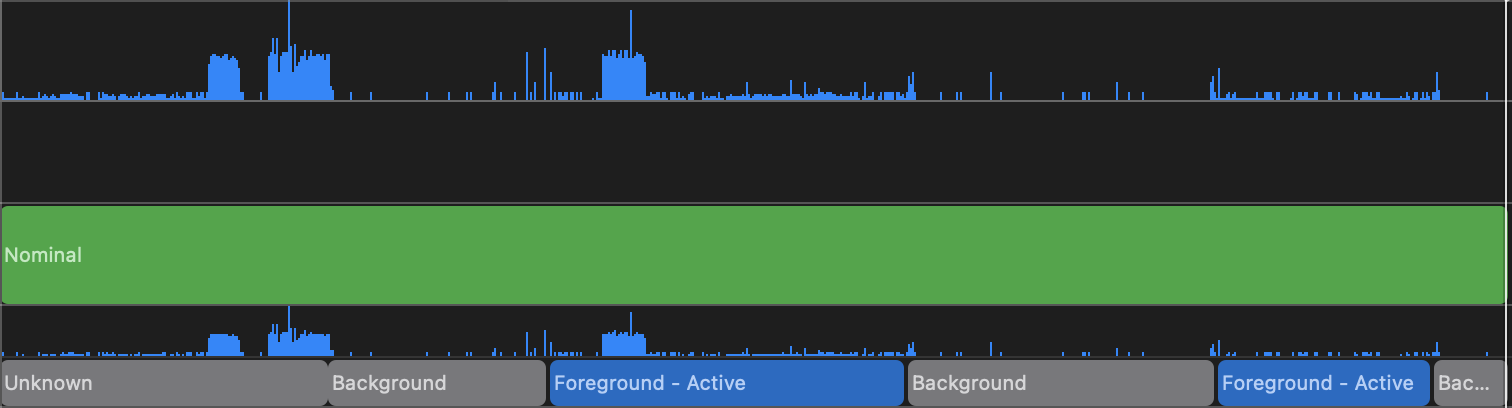
Is there some form of reproduction case you can give me to observe the issue?
Is this also happening on Simulator? Or only on physical devices?
Thanks again 🙇🏿
ferdicus
on 7 May 2021
Hi @ferdicus, thanks for looking into this, yes the issue is still relevant.
To reproduce the issue, you need to:
- Run the app on a device
- Simulate a driving session using the locations file mapstogpx20200512_055155.gpx included in the project (Simulate Location).
- Send the app in the background and monitor the CPU usage in code.
Let me know if I can help with anything in reproducing this issue.

andrei-tofan
on 12 May 2021
hey @andrei-tofan , I've taken a jab at this again today.
I've:
- run on device (I'm working with an iPad mini here, but I guess the specs should be on par, if not even worse than a phone)
- I've edited the scheme, allowed Location Simulation and set the
Default Location=>mapstogpx20200512_055155.gpx - I've let it run on the device and can in fact see, that the position is moving around in
Iasi - I've monitored the CPU usage with
Instruments=>Activity Monitorand I could perceive that the CPU usage when the app is in background is around 70-80 percent.
Please see attached screenshot of tests (marked area is in background):
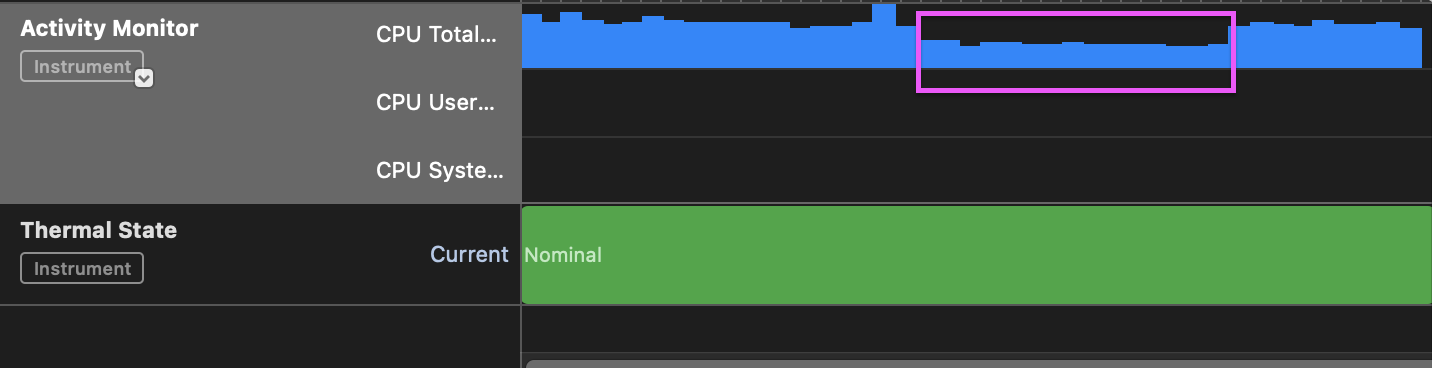
Is that the actual issue, that it's _still_ using up to 80% of CPU although it's in background?
I'm by no means an iOS dev so I might be using the wrong debugging tool.
Sorry to be such a pain in the ass, however can you walk me through again how you debugged this issue.
Maybe also let me know what your workaround is to mitigate the CPU issue on your end.
Thanks
ferdicus
on 21 May 2021
Additional info: I've also removed the component render by listening to the AppState:
    this.appStateSubscription = AppState.addEventListener(
      "change",
      (state) => {
        if (state === 'active') {
          this.state.appState !== 'active' && this.setState({ appState: 'active' })
        } else {
          this.setState({ appState: 'inactive' })
        }
      }
    );
and then in render:
if (this.state.appState !== 'active') return null;
is this your current setup?
I didn't see any change compared to the previous test without rendering though.

Looking forward to your reply for further debugging.
Thanks
ferdicus
on 21 May 2021
Hi @ferdicus, and thanks so much for looking into this!
Is that the actual issue, that it's _still_ using up to 80% of CPU although it's in background?
Yes, the fact that the CPU is that high even when the app is in the background is the issue. Apple will terminate apps that run CPU over 80% in background after about 3 minutes (see for example this explanation on SO https://stackoverflow.com/a/59034393/991694).
In our app we have made a fix to get around this problem. This quote from an earlier comment I made in this issue explains how we solved it:
Reason for app shutdown
- We realised that the reason for the high CPU usage is that the UserLocation component still consumes CPU resources when app is in background, and this is why the app is killed.
- We have made a temporary fix for this so that when app goes in to bg mode, we then remove the UserLocation component from the map (a state prop that we update when the app goes into bg). The fix reduces the CPU usage almost completely, and therefore Apple no longer terminates the app in bg.
The fix we have applied works, but it is a duct-tape fix that I suppose should be handled by react-native-mapbox-gl package. Ideally the logic we have applied should be done in the react-native-mapbox-gl package, or if this is a bug that shouldn't happen, fixed.
jaltin
on 25 May 2021
Thanks for further clarifying @jaltin 👍🏿
It's interesting, that your solution is reducing the CPU usage by unmounting the UserLocation, when I didn't see any decrease when not rendering the whole map.... 🤔
I'll invest more time in this in the coming days/ friday - and will update you on my findings.
In general I'm in agreement with you - this should be handled by us.
Thanks
ferdicus
on 25 May 2021
It's interesting, that your solution is reducing the CPU usage by unmounting the
UserLocation, when I didn't see any decrease when not rendering the whole map.... 🤔
@ferdicus Without actually checking into how it works in native, this is my guess as to what is going on:
- the map is still existing when you return null instead of the map when app is in bg. And the user location is then still listening for location updates and consuming the cpu, even though it is not rendered.
- In our fix, the user location is removed, and therefore the location update listening is removed too, and this reduces the cpu.
Let us know if we can help any further.
jaltin
on 25 May 2021
@jaltin @andrei-tofan can you please try with PR https://github.com/react-native-mapbox-gl/maps/pull/1365
thanks
ferdicus
on 28 May 2021
Related issues
 bllanos
·
3Comments
bllanos
·
3Comments
 gmaclennan
·
3Comments
gmaclennan
·
3Comments
 mustafaskyer
·
3Comments
mustafaskyer
·
3Comments
 peterleng
·
4Comments
peterleng
·
4Comments
 fvieira
·
4Comments
fvieira
·
4Comments
Most helpful comment
Hi @ferdicus.
I am commenting on this since I work with @andrei-tofan and he is on holiday for a few more days.
I think the initial description of the problem was a bit vauge, so I will explain what the problem is/how to reproduce it.
Background
Scenario
Expected outcome
Actual outcome
Reason for app shutdown
The fix we have applied works, but it is a duct-tape fix that I suppose should be handled by react-native-mapbox-gl package. Ideally the logic we have applied should be done in the react-native-mapbox-gl package, or if this is a bug that shouldn't happen, fixed.
I hope my explanation makes sense, but if you need more info just let me know.