Maps: Callout component doesn't work anymore!
I tried to display an image and touchable button within Callout, but the image doesn't appear and the touchable button doesn't react on touch (onPress method is not invoked).
 momirkostic
All 8 comments
Yeah, I am experiencing the same issue. I have a TouchableOpacity inside Callout and onPress stopped working after 7.0.5 release (https://github.com/react-native-mapbox-gl/maps/releases/tag/7.0.5). The problem is that before that release, PointAnnotation was having issues, for example you couldn't use icon instead of default pin. So it is either PointAnnotation or Callout... This issue is happening on Android device, I haven't tested on iOS yet.
 DejanBesic
on 19 Nov 2019
DejanBesic
on 19 Nov 2019
Hi Guys,
I may have a related issue, not sure... I can display point annotations and their callouts, but when the point is pressed the styling that had been applied to points vanishes, and the styling I am passing to the callout doesnt gets applied to the callout. So, point annotations render well first time, but after a point is pressed they go all black, and call out displays black, too.
Do you guys know whether Callout can be used as children for other components, since PointAnnotation has been deprecated? Or a way to achieve the same look?
Basically I want to show a tooltip with some components within the call out, I tried wrapping my point annotation on a Tooltip from React Native Elements for example, but the onPress of the tooltip is not fired. It only fires the onSelected from Point Annotation.
I have asked similar question in the Gitter for this project, but havent seen anyone answering questions there for a month or so, not sure whether it is still the right place to ask questions.
 lrpinto
on 17 Jan 2020
lrpinto
on 17 Jan 2020
Just passing here to let you know that I finally managed to achieve a Callout effect on clicking a map marker. To achieve this I used ShapeSource and SymbolLayer for markers. Then added a conditional render of a PointAnnotation component which is added to the map on selecting a Symbol (onPressLayer).This point annotation allows to pass children to it, and thus I am passing a custom view that is styled to look like a callout. The click handler passes the feature that is selected, from which I extract the properties for may custom call out component. This works both in Android device and in iOS device. On Android emulator on pressing a marker the styles vanish and everything goes dark, but that is an emulator only issue as mentioned in some other issue by the maintainers. Thank you that helped me get to where I am now.
lrpinto
on 30 Jan 2020
FWIW there is a new MarkerView #648 in the works that lets you put an actual view to the map at the specified position on android too. The PointAnnotation renders an image there, so stuff like touchableopacity will not work.
 mfazekas
on 6 Feb 2020
mfazekas
on 6 Feb 2020
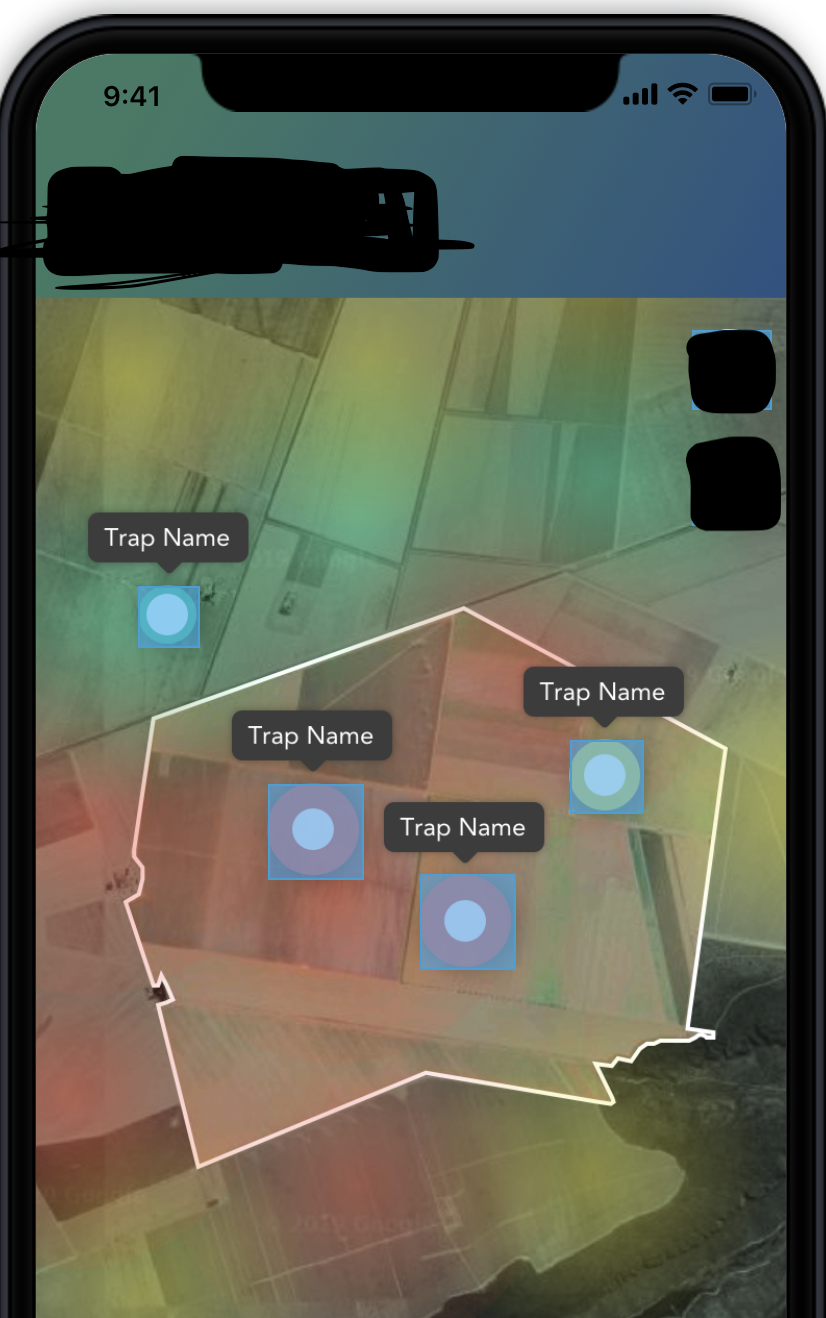
I am trying to show annotations (_Popup with name Trap Name_) above the circular points but facing with multiple issues,can anyone help with this please! Any workaround or alternate solutions for this is appreciated.
I used <MapboxGL.Callout for this ,did anyone have any success implementing similar to my use case as above screenshot ,I read in other forums that Annotations in Mapbox is no longer working,can anyone please confirm if this is the case.
 adityareddyav
on 10 Feb 2020
adityareddyav
on 10 Feb 2020
Just passing here to let you know that I finally managed to achieve a Callout effect on clicking a map marker. To achieve this I used ShapeSource and SymbolLayer for markers. Then added a conditional render of a PointAnnotation component which is added to the map on selecting a Symbol (onPressLayer).This point annotation allows to pass children to it, and thus I am passing a custom view that is styled to look like a callout. The click handler passes the feature that is selected, from which I extract the properties for may custom call out component. This works both in Android device and in iOS device. On Android emulator on pressing a marker the styles vanish and everything goes dark, but that is an emulator only issue as mentioned in some other issue by the maintainers. Thank you that helped me get to where I am now.
Can you share your code?
 raazatul7
on 24 Sep 2020
raazatul7
on 24 Sep 2020
I am trying to show annotations (_Popup with name Trap Name_) above the circular points but facing with multiple issues,can anyone help with this please! Any workaround or alternate solutions for this is appreciated.
I used
<MapboxGL.Calloutfor this ,did anyone have any success implementing similar to my use case as above screenshot ,I read in other forums that Annotations in Mapbox is no longer working,can anyone please confirm if this is the case.
You can do this easily with ShapeSource and SymbolLayer.
- From the coordinates of the circles create a array to Points Feature Collection (Turf has nice utilities to aid this).
- Pass this collection to the ShapeSource.
- Nest a SymbolLayer
- Pass a icon (the call out) as the icon via styles to the SymbolLayer.
- Define the text for the symbol as well in the styles passed to SymbolLayer in the property textField.
- Look at offset and text fit properties for styles in order to shift your text up/down
There is a lot you can do combining Feature Collections with ShapeSources, Layers and Styles.
It helped me to follow the styles tutorial for the JS library, because when you understand these, then you will more easily understand the React Native Mapbox components documentation.
https://docs.mapbox.com/mapbox-gl-js/example/cluster/
Also if you go to MapBox Studio, create a Map, and then style to add some icons and customize the style, you will see the options of the UI that you can pass to the CSS styles, the names and value are pretty much the same.
lrpinto
on 26 Sep 2020
Hey @lrpinto, thank you for the detailed description.
Please consider contributing to the repository :)
Thanks 🙇
 ferdicus
on 26 Sep 2020
ferdicus
on 26 Sep 2020
Related issues
 magnusburton
·
3Comments
magnusburton
·
3Comments
 andrei-tofan
·
5Comments
andrei-tofan
·
5Comments
 bllanos
·
3Comments
bllanos
·
3Comments
 lukemcgregor
·
5Comments
lukemcgregor
·
5Comments
 SethArchambault
·
3Comments
SethArchambault
·
3Comments
Most helpful comment
Hey @lrpinto, thank you for the detailed description.
Please consider contributing to the repository :)
Thanks 🙇