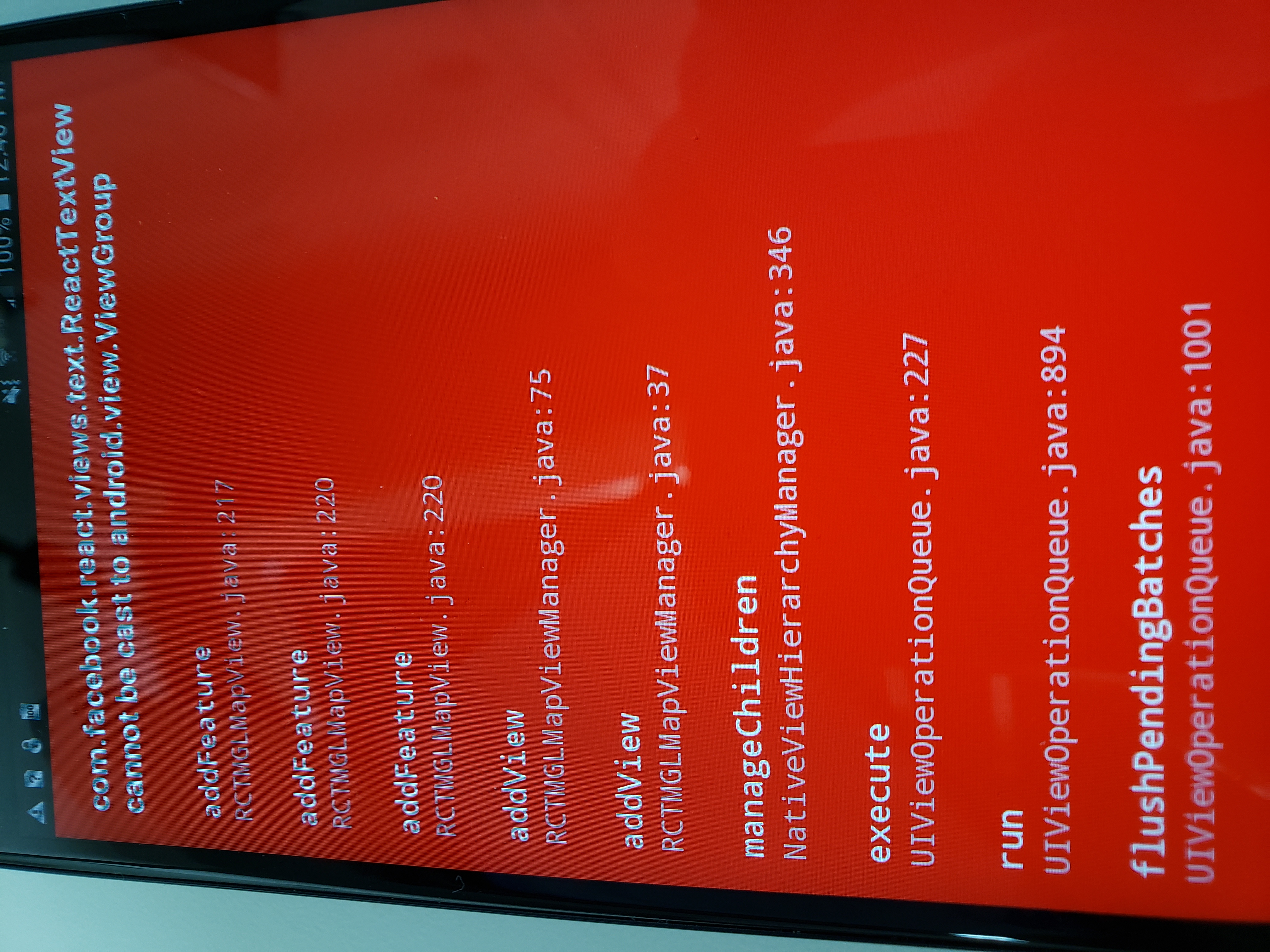
Maps: ReactTextView cannot be cast to android.view.ViewGroup
Hello Guys,
I am currently running into an 'ReactTextView cannot be cast to android.view.ViewGroup' error when trying to build on Android ( I do not have this issue with the iOS side). There is a previous reference to this: https://github.com/nitaliano/react-native-mapbox-gl/issues/953 however I do not see a fix to this.
I have tried to reposition the Views from within my MapView to outside and elsewhere but the map does not show up on my screen. I was wondering if anyone else had this issue and/or were able to fix? Any leads would be helpful! Thanks for your time.
 DavidKHahn
All 8 comments
Any chance you are nesting non-mapbox components inside your <MapboxGL.MapView>? Can you share some code that you are using to render the map?
 mattijsf
on 15 Jul 2019
mattijsf
on 15 Jul 2019
export default class FoundDriver extends Component {
static navigationOptions = {
tabBarVisible: false,
header: null
};
state = {
disabled: false,
currentLocation: "",
location: [-117.83, 33.69],
coordinates: [-117.83, 33.69],
customerLocation: "9281, Research Dr. Irvine, CA",
shape: {}
};
renderPointer = () => {
return (
id={"1"}
title="Test"
coordinate={[-117.744076, 33.65173]}
>
style={{
flex: 1,
resizeMode: "contain",
zIndex: 3,
width: 60,
height: 60
}}
/>
);
};
componentDidMount = async () => {
let { status } = await Permissions.askAsync(Permissions.LOCATION);
console.log(status, "statsus");
if (status !== "granted") {
Linking.openURL("app-settings:");
this.setState({
errorMessage: "Permission to access location was denied"
});
}
let location = await Location.getCurrentPositionAsync({});
console.log(location, "location");
this.setState({
  coordinates: [location.coords.longitude, location.coords.latitude]
});

await this._geocode1(location.coords.latitude, location.coords.longitude);

//hardcoding shape
const shape = await getShape(
  this.state.coordinates[0],
  this.state.coordinates[1],
  -117.744076, //irvine spectrum coordinates
  33.65173
);
this.setState({ shape });
//end harcodig shape
};
_geocode1 = async (lat, lon) => {
try {
const code = await Geocoder.from(lat, lon);
console.log(code.results[0].formatted_address);
this.setState({
customerLocation: code.results[0].formatted_address,
coordinates: [
code.results[0].geometry.location.lng,
code.results[0].geometry.location.lat
]
});
} catch (ex) {
Alert.alert("asdfffasfdasfds");
console.log(ex, "ex<--");
}
};
onMenuPress = () => {
this.props.navigation.dispatch(DrawerActions.toggleDrawer())
//console.log("Menu Pressed")
}
renderLine = () => {
return (
style={{ lineWidth: 6, lineColor: "#64dc9f", lineOpacity: 0.9 }}
/>
);
};
render() {
return (
placement="center"
// leftComponent={
      //   }
      centerComponent={{
        text: "We found you a driver!",
        style: commonStyles.MapHeaderText
      }}
      rightComponent={
        <TouchableOpacity
        onPress={this.onMenuPress.bind(this)}

        // onPress={() => {
        //   this.props.navigation.dispatch(DrawerActions.toggleDrawer())
        // }}

        >
          <Image
           style={{
            flex: 1,
            resizeMode: "contain",
            width: 25,
            height: 25
          }}
          source={require("../../assets/images/greenmenu.png")}

        />
        </TouchableOpacity>

      }
      containerStyle={{ backgroundColor: "#FFF" }}
    />
    <MapboxGL.MapView
      ref={c => (this.c = c)}
      // style={{ flex: 1, flexDirection: "column" }}
      zoomLevel={12}
      logoEnabled={false}
      showUserLocation={true}
      centerCoordinate={this.state.coordinates}
      onUpdateUserLocation={this.onUpdateUserLocation}
    >
      {this.renderPointer()}
      {this.renderLine()}
      <MapboxGL.PointAnnotation
        key={1}
        id={"1"}
        title="Test"
        coordinate={this.state.coordinates}
      >
        <Image
          source={require("../../assets/images/check.png")}
          style={{
            flex: 1,
            resizeMode: "contain",
            width: 25,
            height: 25
          }}
        />
      </MapboxGL.PointAnnotation>

      {/** <-------------- ESTIMATED COST & TIME ---------------> */}
      <View style={{ flex: 0.8  }} />

      <View
        style={{
          flex: 0.3,
          // backgroundColor: 'purple',
          flexDirection: "row",
          justifyContent: "center"
        }}
      >

          <TouchableOpacity disabled
                //  onPress={() => {
                //   this.setState({ autoCompleteVisible: false });
                // }}
          style={{
            flex: 0.9,
            // backgroundColor: "#FFF",
            borderRadius: 7,
            flexDirection: "column" }}>
            <View
              style={{
                flex: 0.6,
                borderTopLeftRadius: 8,
                borderTopRightRadius: 8,
                // borderRadius: 7,
                backgroundColor: '#FFF',
                justifyContent: "space-between",
                flexDirection: "row"
              }}
            >
              <View
                style={{
                  flex: 0.4,
                  flexDirection: "column",
                  justifyContent: "center"
                }}
              >
                <Text
                  style={{
                    color: "#a6a6a6",
                    paddingLeft: 10,
                    textAlign: "center",
                    alignContent: "center",
                    fontSize: 16,
                    fontWeight: "200"
                  }}
                >
                  Estimated Costs
                </Text>

                <Text
                  style={{
                    paddingLeft: 10,
                    textAlign: "center",
                    alignItems: "center",
                    fontSize: 22,
                    fontWeight: "500"
                  }}
                >
                  $70.00
                </Text>
              </View>

              <View
                style={{
                  flexDirection: "column",
                  justifyContent: "center"
                }}
              >
                <View
                  style={{
                    borderLeftWidth: 1,
                    borderLeftColor: "#92e7bb",
                    flex: 0.7
                  }}
                />
              </View>

              <View
                style={{
                  flex: 0.4,
                  flexDirection: "column",
                  justifyContent: "center"
                }}
              >
                <Text
                  style={{
                    color: "#a6a6a6",
                    paddingRight: 10,
                    textAlign: "center",
                    fontSize: 16,
                    fontWeight: "200"
                  }}
                >
                  Estimated Time
                </Text>
                <Text
                  style={{
                    paddingRight: 10,
                    textAlign: "center",
                    alignItems: "center",
                    fontSize: 22,
                    fontWeight: "500"
                  }}
                >
                  9:00
                </Text>
              </View>
            </View>


      <View
        style={{
          flexDirection: "row",
          justifyContent: "center",
          flex: 0.4
        }}
      >

          <View
            style={{
              flex: 1,
              borderBottomLeftRadius: 8,
              borderBottomRightRadius: 8,
              justifyContent: "space-around",
              //   flexDirection: "row",
              alignItems: "center",
              backgroundColor: "#6ADFAA",
            }}
          >
            <Text
              style={{ fontSize: 21, fontWeight: "300", color: "#000" }}
            >
              Your driver has arrived
            </Text>
          </View>
        </View>
          </TouchableOpacity>


        </View>

      {/**<----------------------- Route Distance -------------------------> */}


      {/** <--------------------- BOTTOM --------------------> */}
      <View style={{ flex: 0.03 }} />
    </MapboxGL.MapView>

    <View
      style={{
        flex: 0.2,
        backgroundColor: "#FFF",
        justifyContent: "center",
        alignItems: "center",
        flexDirection: "row"
      }}
    >
      <View style={{ flex: 1 }}>
        {list.map((l, i) => (
          <ListItem
            key={i}
            leftAvatar={{ source: { uri: l.avatar_url } }}
            subtitle={
              <View>
                <View
                  style={{
                    flexDirection: "row",
                    alignItems: "center"
                  }}
                >
                  <Text style={{ fontSize: 23, fontWeight: "400" }}>
                    John Morgan
                  </Text>
                  <Image
                    style={{
                      width: heightPercentageToDP("2.5%"),
                      height: widthPercentageToDP("3.5%"),
                      resizeMode: "contain"
                      // flex: 1
                    }}
                    source={require("../../../src/assets/images/star.png")}
                  />
                  <Text style={{ fontSize: 15, fontWeight: "300" }}>
                    4.8
                  </Text>
                </View>
                <Text style={{ fontSize: 16, fontWeight: "300",color: "#919191" }}>
                  Toyota Tundra - Black
                </Text>
                <View style={{ flexDirection: "row" }}>
                  <View
                    style={{
                      flex: 0.3,
                      borderColor: "#c5c5c5",
                      borderWidth: 0.5,
                      flexWrap: 'wrap'
                    }}
                  >
                    <Text style={{ fontWeight: "400" }}>7WEY876</Text>
                  </View>
                </View>
              </View>
            }
          />
        ))}
      </View>
      <View
        style={{
          flexDirection: "row",
          flex: 0.35,
          justifyContent: "space-evenly"
        }}
      >
        <TouchableOpacity style={styles.circle}>
          <Image
            style={{
              width: heightPercentageToDP("2.5%"),
              height: widthPercentageToDP("3.5%"),
              resizeMode: "contain",
              flex: 1
            }}
            source={require("../../../src/assets/images/message.png")}
          />
        </TouchableOpacity>

        <TouchableOpacity style={styles.circle}>
          <Image
            style={{
              width: heightPercentageToDP("2.5%"),
              height: widthPercentageToDP("3.5%"),
              resizeMode: "contain",
              flex: 1
            }}
            source={require("../../../src/assets/images/phone.png")}
          />
        </TouchableOpacity>
      </View>
    </View>
  </View>
);
}
}
DavidKHahn
on 15 Jul 2019
@mattijsf Thanks for the super quick response! I tried removing some of the views and other added code but the 'mapview' still isn't showing up on my android hardware after the build is set up. I could possibly be missing something but any lead would be helpful.
DavidKHahn
on 15 Jul 2019
Yeah putting views inside the MapView component is not supported.
mattijsf
on 15 Jul 2019
Try adding flex: 1 it's commented on the above sample.
mattijsf
on 15 Jul 2019
@mattijsf THANK YOU! It worked! As far as the views I need to show within the actual map, do I position them outside the mapview and use styling to show within?
DavidKHahn
on 15 Jul 2019
Yes I'd create an outer view with flex:1 and other positioning attributes if needed. Then inside of that the <MapView style={StyleSheet.absoluteFill}> and then your other views as siblings of that MapView.
mattijsf
on 15 Jul 2019
@mattijsf thanks for your help sir! you have saved so much time :)
DavidKHahn
on 15 Jul 2019
Related issues
 bllanos
·
3Comments
bllanos
·
3Comments
 bartolkaruza
·
3Comments
bartolkaruza
·
3Comments
 ivari
·
3Comments
ivari
·
3Comments
 DroidZed
·
4Comments
DroidZed
·
4Comments
 arnaudambro
·
5Comments
arnaudambro
·
5Comments
Most helpful comment
Yes I'd create an outer view with
flex:1and other positioning attributes if needed. Then inside of that the<MapView style={StyleSheet.absoluteFill}>and then your other views as siblings of that MapView.