Maps: Post-Expressions Update: Initial Map Zoom and Coords Not Correct
Describe the bug
Initial Map Zoom and Coords Not Correct
Reference #4
To Reproduce
With newest expression merged on master installed, load map with initial center and coordinates defined:
      <Mapbox.MapView
        zoomLevel={8}
        centerCoordinate={[-111.8678, 40.2866]}
        style={styles.map}
        showUserLocation={true}
>
Expected behavior
Map zoom/center coords should load initially as before.
Screenshots
Resulting map regardless of center/coords defined:

Versions (please complete the following information):
- Platfrom: iOS
- Device: Simulator Xr
- React Native Version 0.59
Additional context
A big thank you and shoutout to @mfazekas for the recent expressions updates. The good news is we have the newest custom maps in Mapbox Studio working and displaying:

 systemlevel
All 8 comments
@systemlevel thanks for trying out the new branch.
We need a doc update/rewrite, on how to migrate code for the new mapbox.
As mentioned in https://github.com/react-native-mapbox/maps/pull/4#issue-270304205
<Mapbox.MapView
        zoomLevel={8}
        centerCoordinate={[-111.8678, 40.2866]}
        style={styles.map}
        showUserLocation={true}
...
<Mapbox.MapView>
is now
````jsx
>
centerCoordinate={[-111.8678, 40.2866]}
/>
/>
...
```
 mfazekas
on 1 May 2019
mfazekas
on 1 May 2019
@mfazekas Thank you! I'll work on some doc updates to reflect these changes as well.
systemlevel
on 1 May 2019
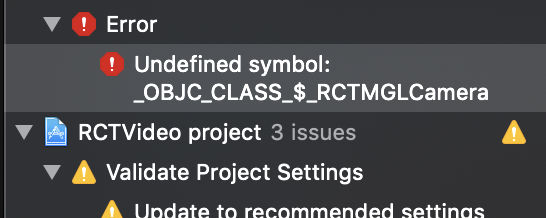
@mfazekas getting an issue with RCTMGLCamera after installing react-native-mapbox/maps on another machine and running the app. Is this related to the above changes?

Adding additional details from xcode:

systemlevel
on 1 May 2019
RCTMGLCamera should be in the project, generated by cocoapods. Are you using the workspace to build?

mfazekas
on 1 May 2019
RCTMGLCamera should be in the project, generated by cocoapods. Are you using the workspace to build?
@mfazekas I have tried running it with react-native run-ios in the terminal as well as in xcode by building and running it there. If I misunderstood your question let me know.
Both of those approaches result in a failed build:
info Undefined symbols for architecture x86_64:
  "_OBJC_CLASS_$_RCTMGLCamera", referenced from:

info       objc-class-ref in libRCTMGL.a(RCTMGLMapView.o)

info ld: symbol(s) not found for architecture x86_64

info clang: error: linker command failed with exit code 1 (use -v to see invocation)
I'v attempted to clear out node_modules and do a clean npm install but the same error results still.
systemlevel
on 1 May 2019
@systemlevel sorry i thought you're using cocapods, but it appears you're not.
Does your RCTMGL.xcodeproj contains the RCTMLCamera?
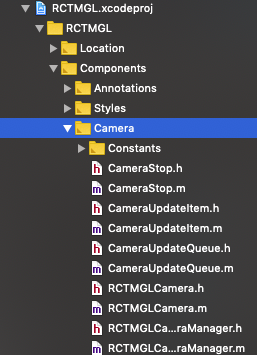
It did for a project i've started with
react-native init
npm install react-native-mapbox/maps --save
react-native link
# add Mapbox.framework to the project
it builds/run fine, it's also in the github project, so not sure how your version has it missing.
mfazekas
on 1 May 2019
@mfazekas Yes I see that as well. So strange... I ended up deleting my project and then pulling a fresh copy down from my git repository and everything started working. I wish I knew what the exact issue was but I couldn't determine why that happened.
Things are working now after installing everything again from a clean clone of our repo.
Thanks again for your help.
systemlevel
on 1 May 2019
All issues have been addressed and updated docs to follow. Closing this out for now...
systemlevel
on 1 May 2019
Related issues
 MariaSyed
·
4Comments
MariaSyed
·
4Comments
 arnaudambro
·
5Comments
arnaudambro
·
5Comments
 calypsow777
·
5Comments
calypsow777
·
5Comments
 bartolkaruza
·
3Comments
bartolkaruza
·
3Comments
 mustafaskyer
·
3Comments
mustafaskyer
·
3Comments
Most helpful comment
@systemlevel thanks for trying out the new branch.
We need a doc update/rewrite, on how to migrate code for the new mapbox.
As mentioned in https://github.com/react-native-mapbox/maps/pull/4#issue-270304205
is now
````jsx
>
centerCoordinate={[-111.8678, 40.2866]}
/>
/>
...
```