Mapbox-gl-native: Scale Bar is broken on zoom levels 1/2/3/4
Steps to reproduce
- Open the map
- Zoom
Expected behavior
- Scale Bar is showing all zoom leves
Actual behavior
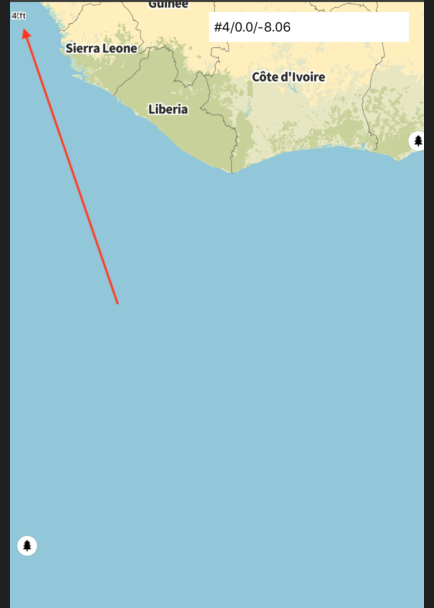
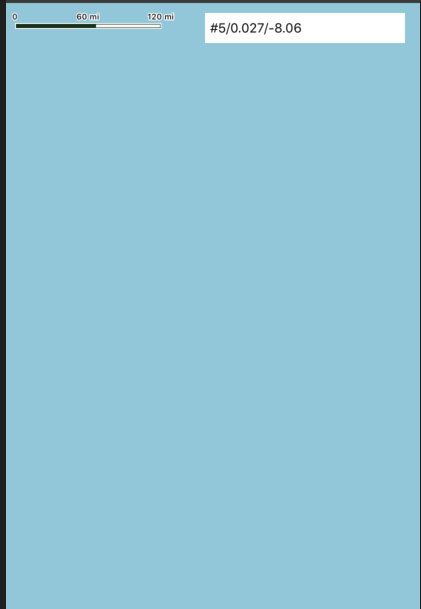
- Scale Bars is broken on zoom levels 1/2/3/4
Configuration
Mapbox SDK versions: 5.1.1
 racer1988
All 11 comments
Thanks @racer1988!
 julianrex
on 3 Jul 2019
julianrex
on 3 Jul 2019
Automatically hiding the scale bar at ~z1-z4 is actually intentional and is mildly documented:
The scale bar may not be shown at all zoom levels.
Here’s the logic that controls the allowable range of distances the scale bar can show:
 friedbunny
on 3 Jul 2019
friedbunny
on 3 Jul 2019
We can consider this as a feature request, though — much as we’re adding visibility customization to the compass (https://github.com/mapbox/mapbox-gl-native/issues/9562#issuecomment-316772669), we could follow MapKit’s lead again and add a similar configuration option to the scale bar.
friedbunny
on 3 Jul 2019
@friedbunny I am happy to it not be shown at zoom 1-4.
However this is a Bug.
The Scale Bar is shown Squashed.
check the screenshot. the arrow points to what is the visible scalebar
racer1988
on 3 Jul 2019
Ah, I see, apologies @racer1988... I can’t reproduce this bug, in that case. 😄 The labels do bunch up after the bar disappears (which isn’t great), but they also disappear very quickly (~hundreds of milliseconds) soon after.
Could you say more about how’re you’re using the scale bar? Is it enabled via MGLMapView.showsScale or more directly via MGLMapView.scaleBar.hidden?
friedbunny
on 3 Jul 2019
I Hide the scalebar with a timer when the user stop zooming:
UIView.animate(withDuration: 0.3, delay: 0.0, options: .beginFromCurrentState, animations: { [weak self] in
            self?.mapView.scaleBar.alpha = 0.0
        }) { [weak self] _ in
            self?.mapView.showsScale = false
        }
and when the zoom starts I show it
mapView.scaleBar.alpha = 1.0
        mapView.showsScale = true
@friedbunny Found a way to reproduce consistently.
for me the squashed labels are disappearing only after the gesture is finished completely.
So if I zoom back and keep my fingers on the map, the labels stay squashed.
In that case the label and the bar should disappear together and not be indipendentely hidden (at different times)
racer1988
on 12 Aug 2019
racer1988
on 13 Aug 2019
private func handleZoomOnScale() {
        guard configuration.showsScale else {
            return
        }

        mapView.scaleBar.alpha = 1.0
        mapView.showsScale = true

        hideScaleTimer?.invalidate()
        hideScaleTimer = Timer.scheduledTimer(withTimeInterval: 2.0, repeats: false, block: { [weak self] (timer) in
            guard timer.isValid else {
                return
            }

            self?.hideScale()
        })
    }

    private func hideScale(animated: Bool = true) {
        hideScaleTimer?.invalidate()
        hideScaleTimer = nil
        guard animated == true else {
            mapView.showsScale = false
            return
        }
        UIView.animate(withDuration: 0.3, delay: 0.0, options: .beginFromCurrentState, animations: { [weak self] in
            self?.mapView.scaleBar.alpha = 0.0
        }) { [weak self] _ in
            self?.mapView.showsScale = false
        }
    }
func mapView(_ mapView: MGLMapView, regionIsChangingWith reason: MGLCameraChangeReason) {

        if reason.contains(.gesturePinch) ||
            reason.contains(.gestureZoomIn) ||
            reason.contains(.gestureZoomOut) {
            handleZoomOnScale()
        }
}
This issue has been automatically detected as stale because it has not had recent activity and will be archived. Thank you for your contributions.
![stale[bot] picture](https://avatars.githubusercontent.com/in/1724?v=4&s=40) stale[bot]
on 9 Feb 2020
stale[bot]
on 9 Feb 2020
Related issues
 fousa
·
3Comments
friedbunny
·
3Comments
fousa
·
3Comments
friedbunny
·
3Comments
 melihcolpan
·
3Comments
melihcolpan
·
3Comments
 lamhuynh96
·
3Comments
lamhuynh96
·
3Comments
 xrayed
·
4Comments
xrayed
·
4Comments