Mapbox-gl-native: Geometries provided by a MGLComputedDataSource are changed when rendered
We have a problem in our iOS app where geometries change when zooming on the map. Using a MGLComputedSource, the features' geometry are often modified when rendered. It happens when providing MGLPolylines or MGLPolygons. The features returned by the data source have the correct coordinates. However, after rendering and getting the features using mapView.visibleFeaturesInRect: the coordinates are modified and often differ in number. The problem seems to be related to the tile rendering.
The problem occurs when zooming at different zoom levels.
Steps to reproduce
- Add a MGLComputedSource
- Provide MGLPolygons or MGLPolylines
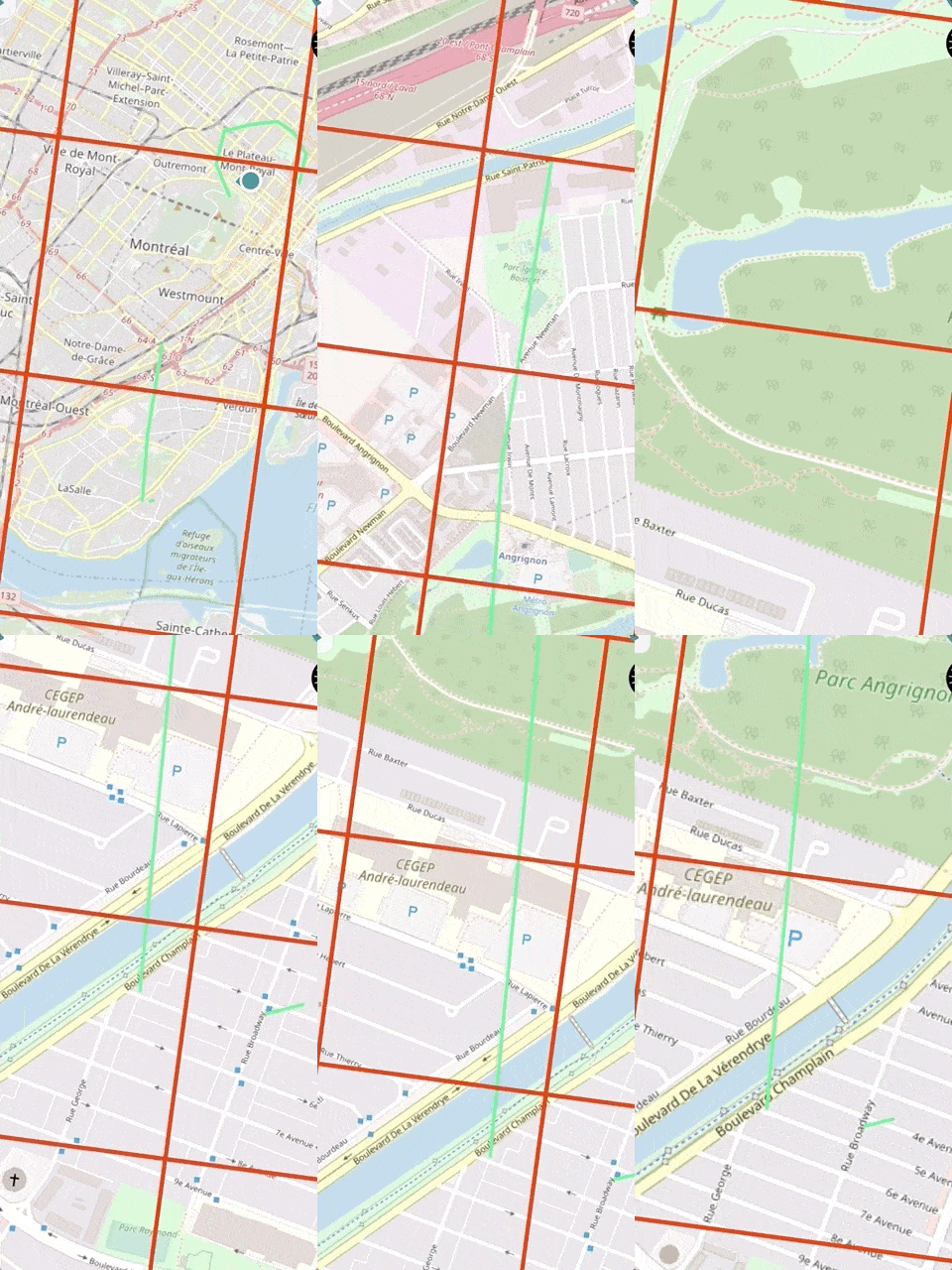
- Zoom in and out and the shapes will change (see gif below - tileBoundariesMask on)
In the gif, the line should be straight. When zooming, the geometry is changed and becomes two different lines.
Configuration
Mapbox SDK versions:4.9.0
iOS/macOS versions: 12.0
Device/simulator models:iPhone X MQAC2VC
Xcode version: 10.2
 AlexandreBoyerLaporte
All 11 comments
@AlexandreBoyerLaporte Could you provide a minimal test case that reproduces this problem
 asheemmamoowala
on 26 Mar 2019
asheemmamoowala
on 26 Mar 2019
Yes. You can recreate the problem using the following data source:
func features(in bounds: MGLCoordinateBounds, zoomLevel: UInt) -> [MGLShape & MGLFeature] {
        let coordinates = [CLLocationCoordinate2D(latitude: 45.431993483023177, longitude: -73.604016447864581),
                           CLLocationCoordinate2D(latitude: 45.439849333246109, longitude: -73.604442357931987),
                           CLLocationCoordinate2D(latitude: 45.449101849956634, longitude: -73.605333783164554),
                           CLLocationCoordinate2D(latitude: 45.462611958614929, longitude: -73.604789395821172),
                           CLLocationCoordinate2D(latitude: 45.472067909389381, longitude: -73.604374542348012)]
        return [MGLPolylineFeature(coordinates: coordinates, count: UInt(coordinates.count))]
    }
By zooming in and out you can see that the polyline will change according to the different zoom levels. Getting the feature using mapView.visibleFeaturesInRect: will also show that the coordinates differ from the original coordinates. Let me know if you need more info.
AlexandreBoyerLaporte
on 28 Mar 2019
@AlexandreBoyerLaporte Thank you for providing the feature data and sorry for the slow response.
I used the provided code in a sample project, but was not able to reproduce the issue. Could you provide a minimal self-contained project that demonstrates this issue?
The MGLComputedDataSource is an advanced API that requires the developer to tile their data and create zoom-dependent representations. Internally, the API does clip the geometries provided in mapView.visibleFeaturesInRect: to the tile requested, but not much else.
MGLShapeSource is the more appropriate source type where the full feature geometry is known in advance.
asheemmamoowala
on 24 Apr 2019
@asheemmamoowala Thanks for the response.
I created a minimal project (attached to the comment) to showcase the behavior. Here we use a MGLLineStyleLayer along with a MGLComputedShapeSource to provide the line geometry. If the zoom level is 14+, you will see the line being weirdly clipped and changing shape.
In our main project, we use the MGLComputedShapeSource because the data set is too big to fit in memory.
To build the project, the Mapbox SDK and the MGLMapboxAccessToken will need to be provided.
Mapbox SDK versions:4.9.0
I hope this is enough information.
Cheers,
AlexandreBoyerLaporte
on 7 May 2019
Any update on that issue?
 jrhaddad
on 23 May 2019
jrhaddad
on 23 May 2019
@AlexandreBoyerLaporte thank you for the project.
Just a quick update to let you know that I was able to use your project to reproduce the issue using the following setup:
- iPhone Xr (simulated)
- iOs 12.2
- Mapbox SDK 5.1.0
We're continuing to investigate.
 brandihaskins
on 25 Jun 2019
brandihaskins
on 25 Jun 2019
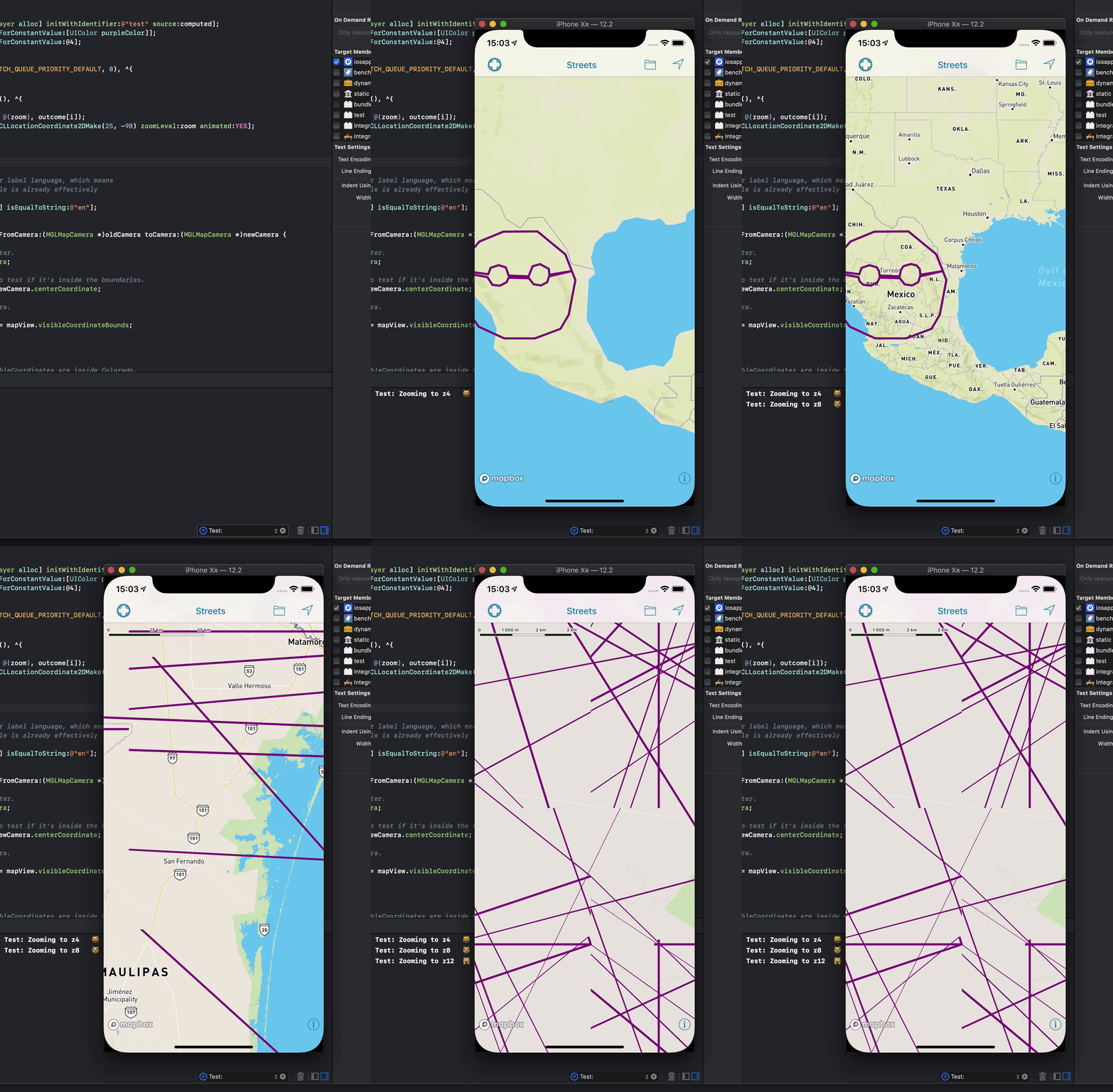
I think we're seeing this bug as well.. Reproducible on master, e.g. https://github.com/peroper/pp-mapbox-gl-native/commit/8b6df2405b9b8efc8c787a9c6e538977d0c30f3f
Seems like the geometry clipping goes haywire..?
 jonkan
on 17 Jul 2019
jonkan
on 17 Jul 2019
Hello!
Any updates on this issue? This is affecting our application severely and we can't release an update with this version of mapbox. I wonder if we should downgrade mapbox to an older version without this bug or if you possibly have a work around.
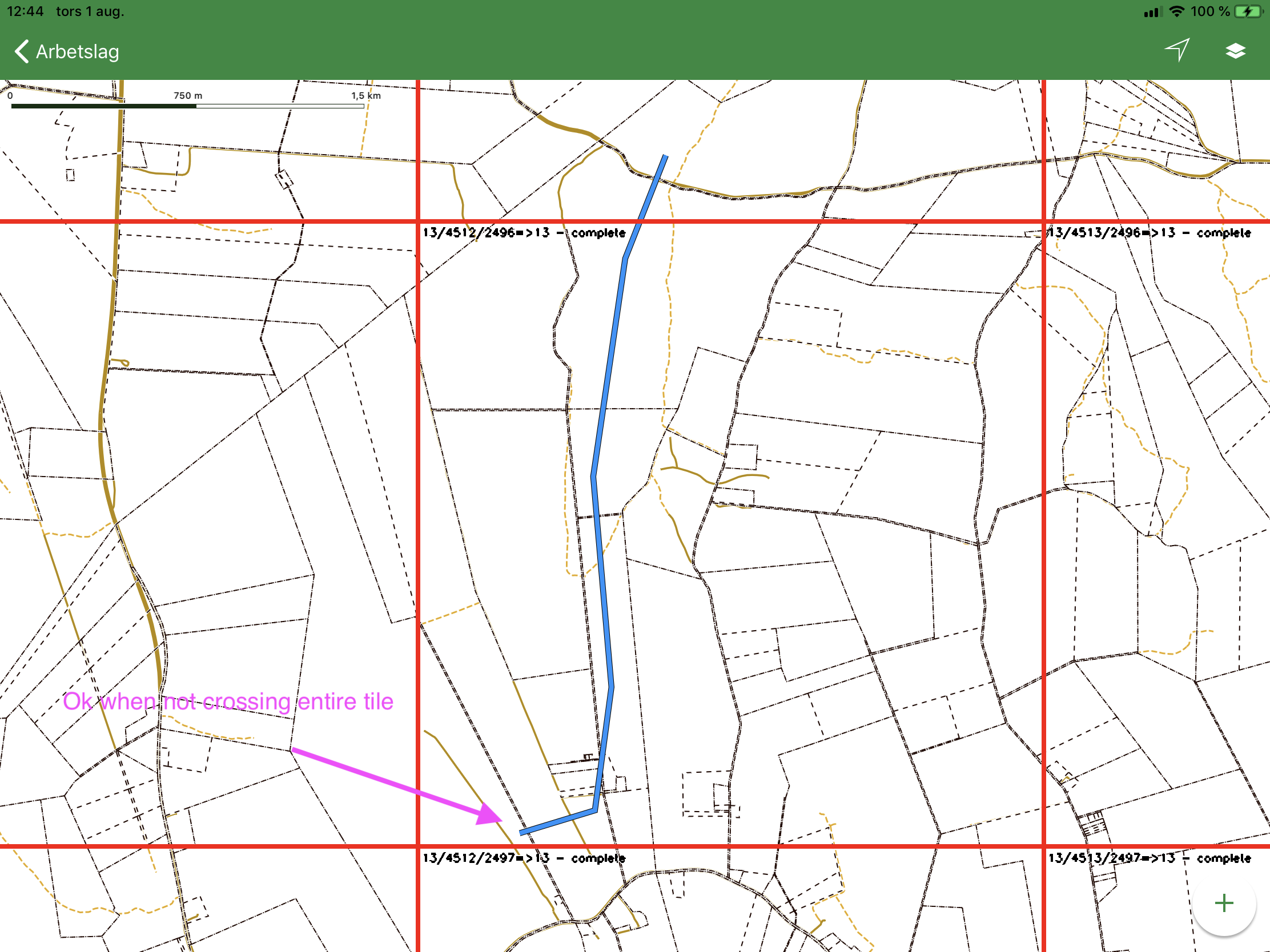
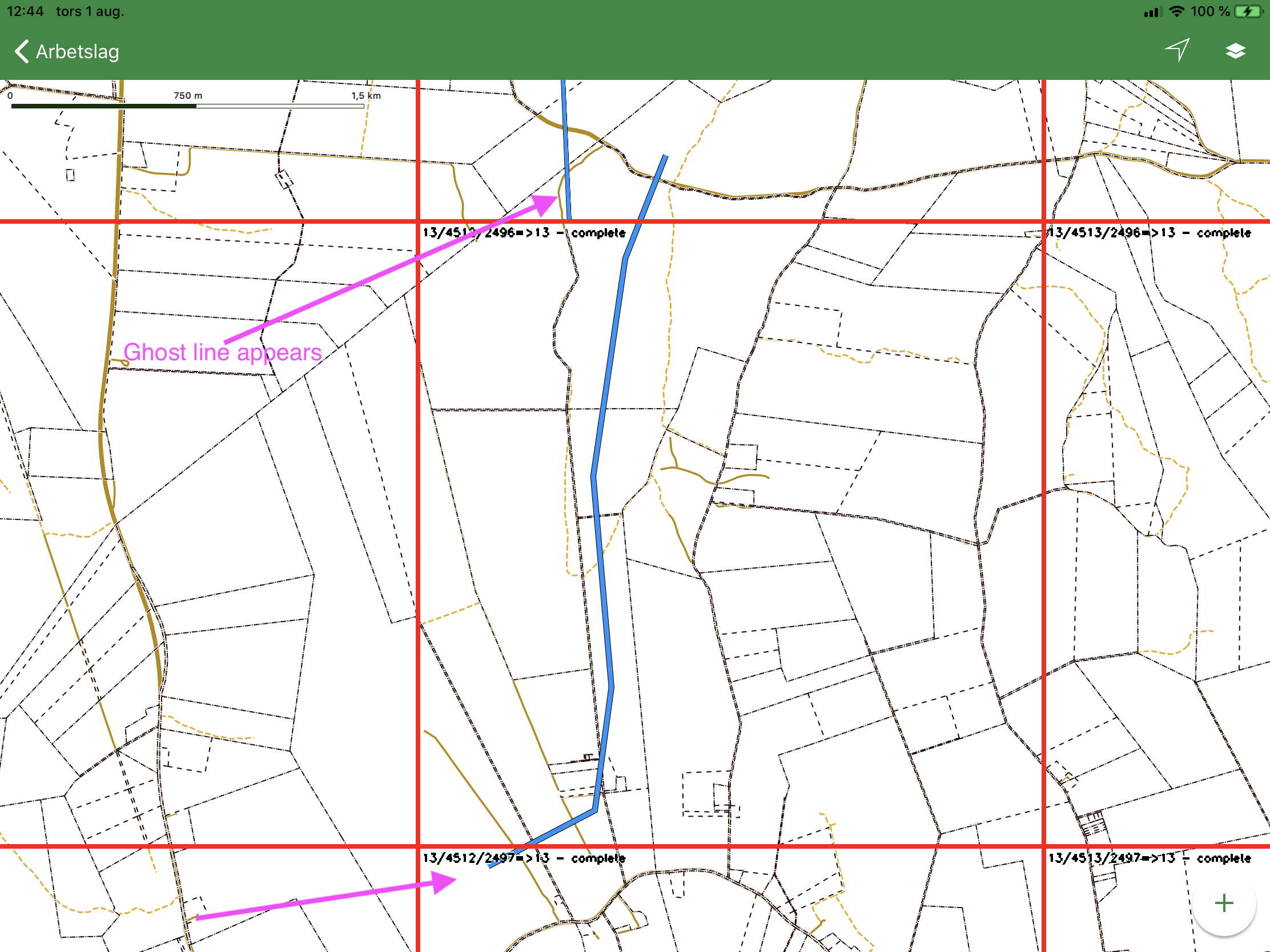
I can add some more information as well. The "ghost lines" starts appearing when a line crosses an entire tile on zoom z13. The longer the line is the more ghost lines you get.
 WilliamSundqvist
on 1 Aug 2019
WilliamSundqvist
on 1 Aug 2019
Any updates on this issue? :)
WilliamSundqvist
on 7 Oct 2019
Manually clipping the geometries to tile boundaries before giving them to the computed shape source does work as a workaround for this issue.
jonkan
on 31 Oct 2019
This issue has been automatically detected as stale because it has not had recent activity and will be archived. Thank you for your contributions.
![stale[bot] picture](https://avatars.githubusercontent.com/in/1724?v=4&s=40) stale[bot]
on 28 Apr 2020
stale[bot]
on 28 Apr 2020
Related issues
 tobrun
·
3Comments
tobrun
·
3Comments
 fousa
·
3Comments
fousa
·
3Comments
 cmxyzx
·
3Comments
cmxyzx
·
3Comments
 xrayed
·
4Comments
xrayed
·
4Comments
 13kz
·
3Comments
13kz
·
3Comments
Most helpful comment
I think we're seeing this bug as well.. Reproducible on master, e.g. https://github.com/peroper/pp-mapbox-gl-native/commit/8b6df2405b9b8efc8c787a9c6e538977d0c30f3f
Seems like the geometry clipping goes haywire..?