Mapbox-gl-native: loading style failed: SSL connect error: Unknown SSL protocol error in connection to api.mapbox.com:443
Steps to reproduce
1.I successfully compiled mapbox-gl-native on linux(unbuntu 16.04)
2.make run-glfw-app
3.The run result is only a black screen.
Expected behavior
I expect it display streets map.
Actual behavior
The run result is only a black screen.
Configuration
Android versions:
Device models:
Mapbox SDK versions:
The lastest master branch
 leedejun
All 10 comments
Seems like maybe wherever you are api.mapbox.com isn't resolving to the expected location? What do you get if you try curl https://api.mapbox.com:443? Are you accessing from within China?
 ChrisLoer
on 23 Oct 2018
ChrisLoer
on 23 Oct 2018
@ChrisLoer , Thank you lots!
yes , I,m in china now.
sometime mbgl-glfw can load style successful! It may be caused by the bad state of the network.
so, thank you very much for your help.
And other question: mapbox-gl-native ,how can it extend the custom layer, for example, how do it display 3d mode data: .DAE, .DXF, .FBX, .geoTIFF, .glTF data format , etc.
leedejun
on 24 Oct 2018
@leedejun OK, sounds like it's probably a network connectivity issue. It might be better to get an access token that allows you to connect to api.mapbox.cn inside of China -- you would have to contact Mapbox sales/support for that.
And other question: mapbox-gl-native ,how can it extend the custom layer, for example, how do it display 3d mode data: .DAE, .DXF, .FBX, .geoTIFF, .glTF data format , etc.
That's a really broad question, and unfortunately we can't provide general support through GitHub issues. The shortest answer I can think of is: (1) try importing the data into vector tiles (maybe using a tool like tippecanoe) and use our "fill-extrusion" layer to display it, or (2) draw 3d items directly into the GL context that the mapbox uses (we don't provide any official support for doing this, and it will be difficult).
ChrisLoer
on 24 Oct 2018
@ChrisLoer
Thank you very much!
I just want to extend a mapbox fuction by modifying the code of mapbox-gl-native, so as to display 3d model data.
Could you give me a direction on how to start implementing this functionality on a mapbox basis?
leedejun
on 25 Oct 2018
Hi, @ChrisLoer,
Do you know what coordinate system the mapbox render data is?
leedejun
on 23 Aug 2019
I is doing that I want to render the 3d model to the mapbox, the center of the 3d model is (0,0), but its coordinate in the real world is longitude and latitude.
@astojilj
I want to convert the world coordinates of the model to the coordinates used for mapbox rendering.
leedejun
on 23 Aug 2019
@leedejun 你好!请问你有解决mapbox添加3D模型支持的功能吗?能否提供代码片段或demo?最近我也在尝试,但因对opengl es了解的不深,未成功。
 luoyechendian
on 11 Dec 2019
luoyechendian
on 11 Dec 2019
@luoyechendian https://docs.mapbox.com/mapbox-gl-js/example/add-3d-model/你看一下官网这个添加3d模型的demo,是否可以帮你解决问题?
 baoluojian123
on 11 Dec 2019
baoluojian123
on 11 Dec 2019
多谢!有没有Android 环境的?
------------------ 原始邮件 ------------------
发件人: "bai jian"<[email protected]>;
发送时间: 2019年12月11日(星期三) 上午9:27
收件人: "mapbox/mapbox-gl-native"<[email protected]>;
抄送: "落夜"<[email protected]>;"Mention"<[email protected]>;
主题: Re: [mapbox/mapbox-gl-native] loading style failed: SSL connect error: Unknown SSL protocol error in connection to api.mapbox.com:443 (#13157)
@luoyechendian https://docs.mapbox.com/mapbox-gl-js/example/add-3d-model/你看一下官网这个添加3d模型的demo,是否可以帮你解决问题?
—
You are receiving this because you were mentioned.
Reply to this email directly, view it on GitHub, or unsubscribe.
luoyechendian
on 13 Dec 2019
@luoyechendian
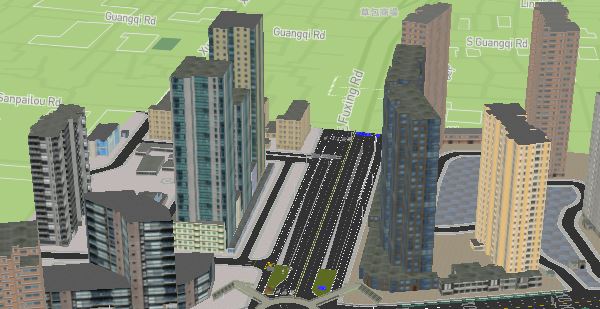
hi, I have successfully displayed the. Dae data by modifying the internal C++ code of mapbox gl native. My demo could run in linux , android, ios , windows.
you could think about that
https://docs.mapbox.com/mapbox-gl-js/example/add-3d-model
I reduced the resolution of the picture, the result picture is too large
leedejun
on 3 Apr 2020
Related issues
 13kz
·
3Comments
13kz
·
3Comments
 jmkiley
·
3Comments
jmkiley
·
3Comments
 Guardiola31337
·
4Comments
Guardiola31337
·
4Comments
 lamhuynh96
·
3Comments
lamhuynh96
·
3Comments
 friedbunny
·
3Comments
friedbunny
·
3Comments
Most helpful comment
@luoyechendian
hi, I have successfully displayed the. Dae data by modifying the internal C++ code of mapbox gl native. My demo could run in linux , android, ios , windows.
you could think about that
https://docs.mapbox.com/mapbox-gl-js/example/add-3d-model
I reduced the resolution of the picture, the result picture is too large