Mapbox-gl-native: New static checks in App Store submission
I started getting following warning when uploading build to App Store Connect.
"Missing Purpose String in Info.plist File. Your app's code references one or more APIs that access sensitive user data. The app's Info.plist file should contain a NSLocationAlwaysUsageDescription key with a user-facing purpose string explaining clearly and completely why your app needs the data. Starting spring 2019, all apps submitted to the App Store that access user data will be required to include a purpose string.If you're using external libraries or SDKs, they may reference APIs that require a purpose string. While your app might not use these APIs, a purpose string is still required. You can contact the developer of the library or SDK and request they release a version of their code that doesn't contain the APIs. Learn more (https://developer.apple.com/documentation/uikit/core_app/protecting_the_user_s_privacy)."
Not sure yet if this will actually fail the review. I would like to use Mapbox SDK without requesting always usage permission from users. Is there new version of Mapbox SDK coming that wouldn't reference
CLLocationManager requestAlwaysAuthorization()? Or is there other way to get around this.
 anttifinnair
All 11 comments
@anttifinnair iOS 11 now requires you to include the NSLocationWhenInUseUsageDescription. You can optionally include a NSLocationAlwaysAndWhenInUseUsageDescription, but the NSLocationWhenInUseUsageDescription is required if you are accessing or displaying the user's location on the map, even if you are not making use of that data while the application is in the background. This article has a good summary of what is required.
 captainbarbosa
on 30 Aug 2018
captainbarbosa
on 30 Aug 2018
I also ran into this when submitting a new binary to the App Store this week. My app does not need the "Always" authorization, but the App Store still flagged it as needing to provide a string for the NSLocationAlwaysUsageDescription info.plist key. I believe the app was flagged simply because the Mapbox Maps SDK includes a call to requestAlwaysAuthorization, and not because my app actually needs that permission.
Of note is the following excerpt from the error message:
If you're using external libraries or SDKs, they may reference APIs that require a purpose string. While your app might not use these APIs, a purpose string is still required. You can contact the developer of the library or SDK and request they release a version of their code that doesn't contain the APIs.
I added the requested string and resubmitted the app. The app was then accepted, but now my app shows the following prompt on first launch:
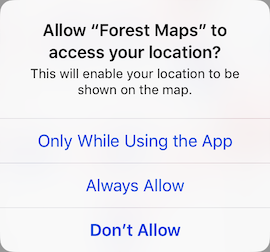
I'd rather my app not ask the user to "Always Allow", as that level of access is unnecessary and could raise undue concern. I'd much rather the user see the following prompt, which is the one shown when the app does not include the NSLocationAlwaysUsageDescription key in the info.plist:
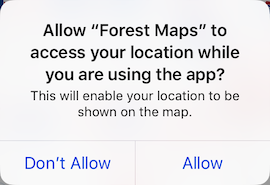
Any help from the Mapbox team to resolve this would be greatly appreciated.
 namannik
on 30 Aug 2018
namannik
on 30 Aug 2018
Hrm, thanks for the reports @anttifinnair and @namannik — it’s definitely not our intention to force developers to request unnecessary always permission and it’d be unfortunate if that’s the consequence here.
As far as I know we haven’t seen this yet ourselves, but we’ll start investigating.
 friedbunny
on 30 Aug 2018
friedbunny
on 30 Aug 2018
Thanks, @friedbunny.
As it turns out, there was one bit I overlooked in my first post. When I had updated my app's info.plist, I added both NSLocationAlwaysUsageDescription and NSLocationAlwaysAndWhenInUseUsageDescription. I've removed the NSLocationAlwaysAndWhenInUseUsageDescription key and resubmitted the app. The "Always Allow" prompt is now not shown, and the build was accepted without error.
I think this may be a non-issue.
namannik
on 31 Aug 2018
If you add NSLocationAlwaysUsageDescription to Info.plist it looks to me that on iOS 11 it won't call requestAlwaysAuthorization but on earlier versions of iOS it will.
anttifinnair
on 31 Aug 2018
@captainbarbosa That's how it used to be but just few days ago Apple has introduced more strict static checks to App Store Connect.
anttifinnair
on 31 Aug 2018
So far I haven’t been able to reproduce this — I successfully uploaded new builds of two whenInUse-only apps yesterday; one was approved for TestFlight distribution and the other is currently waiting for App Store review.
@anttifinnair It’d be useful to know more about how/when/where you got this warning:
- Which location usage description key(s) did/do you include in your app’s Info.plist? (This should be only
NSLocationWhenInUseUsageDescription.) - Xcode version (“Validate” didn’t trigger this warning in Xcode 9.4.1 or 10b6; apps submitted with 9.4.1 didn’t trigger).
- iOS deployment target (9.3 and 10 both didn’t trigger).
As @captainbarbosa pointed out, NSLocationAlwaysUsageDescription was deprecated in iOS 11 and replaced with NSLocationAlwaysAndWhenInUseUsageDescription. It’s interesting that the warning doesn’t tell you to add the latter, just the former:
The app's Info.plist file should contain a NSLocationAlwaysUsageDescription key with a user-facing purpose string explaining clearly and completely why your app needs the data.
That makes me think Apple’s warning is because they're seeing NSLocationAlwaysAndWhenInUseUsageDescription in the app’s Info.plist, the app targets iOS 10 or lower, but they don’t also see NSLocationAlwaysUsageDescription in the app’s Info.plist.
friedbunny
on 31 Aug 2018
@friedbunny I have pretty much the same setup except iOS deployment target is 9.0. I'm using Mapbox SDK version 3.7.8 at the moment. I'll test with newest version and deployment target 9.3.
I have only NSLocationWhenInUseUsageDescription in Info.plist
Xcode version 9.4.1
iOS deployment target 9.0
Mapbox SDK 3.7.8
Warning doesn't trigger when Xcode validates the build but it comes as email from Apple when they are processing uploaded build.
anttifinnair
on 3 Sep 2018
I tested now with latest Mapbox iOS SDK 4.3.0 and didn't get the warning. I guess older SDK did something different that started triggering the warning now.
anttifinnair
on 3 Sep 2018
@anttifinnair Thanks for looking into that — one more question for you: does your app have UIBackgroundModes.location enabled in Info.plist?
It seems we’re still missing an important bit of context and/or this is a new check that Apple has only partially rolled-out.
friedbunny
on 4 Sep 2018
No, I don't have location background mode in Info.plist.
anttifinnair
on 5 Sep 2018
Related issues
 xrayed
·
4Comments
xrayed
·
4Comments
 jmkiley
·
3Comments
jmkiley
·
3Comments
 LukasPaczos
·
3Comments
LukasPaczos
·
3Comments
 tobrun
·
3Comments
tobrun
·
3Comments
 michaelfomin
·
3Comments
michaelfomin
·
3Comments
Most helpful comment
Thanks, @friedbunny.
As it turns out, there was one bit I overlooked in my first post. When I had updated my app's info.plist, I added both
NSLocationAlwaysUsageDescriptionandNSLocationAlwaysAndWhenInUseUsageDescription. I've removed theNSLocationAlwaysAndWhenInUseUsageDescriptionkey and resubmitted the app. The "Always Allow" prompt is now not shown, and the build was accepted without error.I think this may be a non-issue.