Mapbox-gl-native: Adding marker to offline map only appears after movement
Platform: Android
Mapbox SDK version:5.0.2 and 5.5.1
Steps to trigger behavior
- Download map region
- Kill app and disconnect wifi
- Restart app
- Add marker
- Remove marker and add another marker
Expected behavior
Old marker gets removed and new marker gets displayed
Actual behavior
Old marker gets removed, new marker only gets displayed on the slightest map movement. Annotation manager shows correct number of annotations. (2, 1 for user location, 1 for marker)
Connecting back to internet shows marker.
 dsuresh-ap
All 6 comments
Thanks for reporting the issue @dsuresh-ap.
I was able to reproduce:
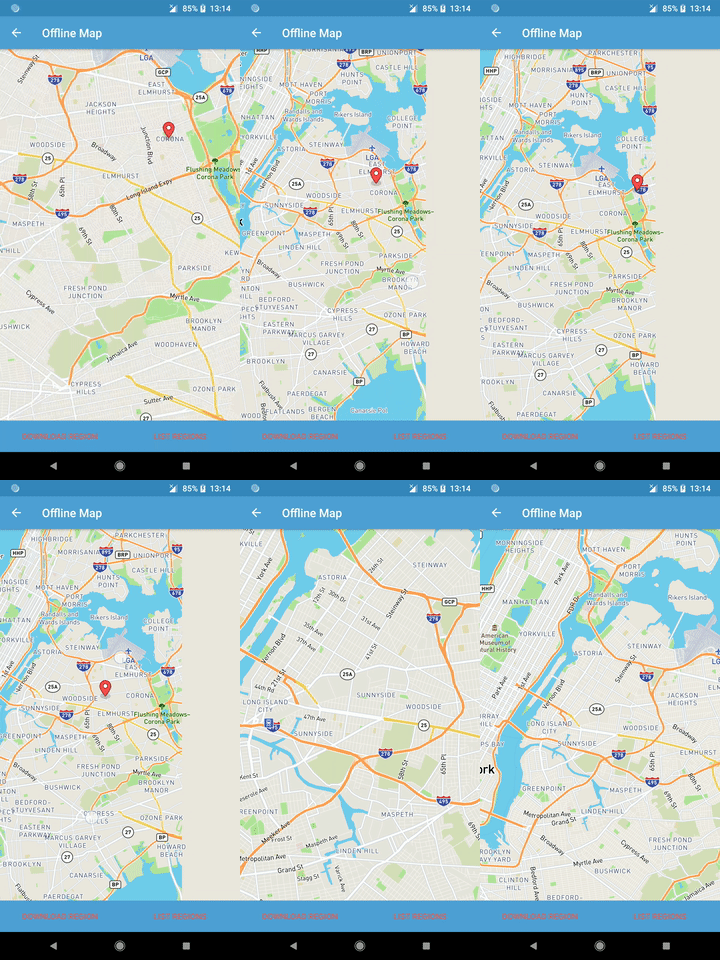
When the map is in the state that doesn't show markers after a click it's because there always exists a not fully rendered source here, which prevents markers invalidation here.
On both release-boba and release-agua a couple of DID_FINISH_RENDERING_FRAME events are delivered, but not followed up with a DID_FINISH_RENDERING_FRAME_FULLY_RENDERED.
An alternative would be using a SymbolLayer or Markers instead of MarkerViews.
 LukasPaczos
on 30 Mar 2018
LukasPaczos
on 30 Mar 2018
@LukasPaczos We intended to switch to SymbolLayers but right now is there any workaround to the issue?
We are adding the Marker using the following code:
marker = mapboxMap.addMarker(new MapBoxMarkerViewOptions()
                .position(latLng)
                .anchor(0.5f, 0.5f)
                .markerIcon(createMapBoxIcon())
                .title(mapObject.getLabelName()));
dsuresh-ap
on 30 Mar 2018
@dsuresh-ap At this point, if you are not performing any View specific operations on those markers, the only workaround I can see is using MarkerOptions instead of MarkerViewOptions and LocationLayerPlugin for displaying user's location instead of MyLocationView.
LukasPaczos
on 30 Mar 2018
@dsuresh-ap Noting, that a temporary workaround might also be using
mapboxMap.getMarkerViewManager().invalidateViewMarkersInVisibleRegion();
after adding a marker.
LukasPaczos
on 9 Apr 2018
Workaround for deprecated API given, follow up ticket tackling core side of things in https://github.com/mapbox/mapbox-gl-native/issues/11688.
 tobrun
on 16 Apr 2018
tobrun
on 16 Apr 2018
@LukasPaczos @tobrun The workaround works provided we postDelayed. Also we noticed the same during rotation.
dsuresh-ap
on 26 Apr 2018
Related issues
 cmxyzx
·
3Comments
cmxyzx
·
3Comments
 klblk
·
4Comments
klblk
·
4Comments
 JobGetabu
·
3Comments
JobGetabu
·
3Comments
 Guardiola31337
·
4Comments
Guardiola31337
·
4Comments
 lamhuynh96
·
3Comments
lamhuynh96
·
3Comments
Most helpful comment
@LukasPaczos @tobrun The workaround works provided we postDelayed. Also we noticed the same during rotation.