Mapbox-gl-js: fill-pattern and fill-extrusion-pattern size properties
Motivation
We would like to create a fill-extrusion-pattern which does not scale with zoom/stays at a fixed size. E.g. to create a 'bricked wall' effect on a building. Currently the fill pattern size will change at each zoom level. We could achieve this if there was a size property for the icon and if this could be used with expressions.
Design Alternatives
There's no alternative/workaround to this...except perhaps to use the custom layer interface.
Design
Adding fill-extrusion-pattern-size and fill-pattern-size with expression options should allow us to control the icon size by zoom level. An alternative might be a new property such as 'scale-pattern-with-zoom' which could be true or false.
Mock-Up
This would allow users to control the size of the fill pattern and potential make it a fixed size which does not scale with zoom levels.
 joedjc
All 6 comments
我也有同样的困扰,期待早日解决
English translation
I also have the same troubles and look forward to an early solution.
 nuancheng
on 19 Jun 2019
nuancheng
on 19 Jun 2019
Duplicate of #1831
 asheemmamoowala
on 2 Jul 2019
asheemmamoowala
on 2 Jul 2019
 likeswinds
on 8 Aug 2019
likeswinds
on 8 Aug 2019
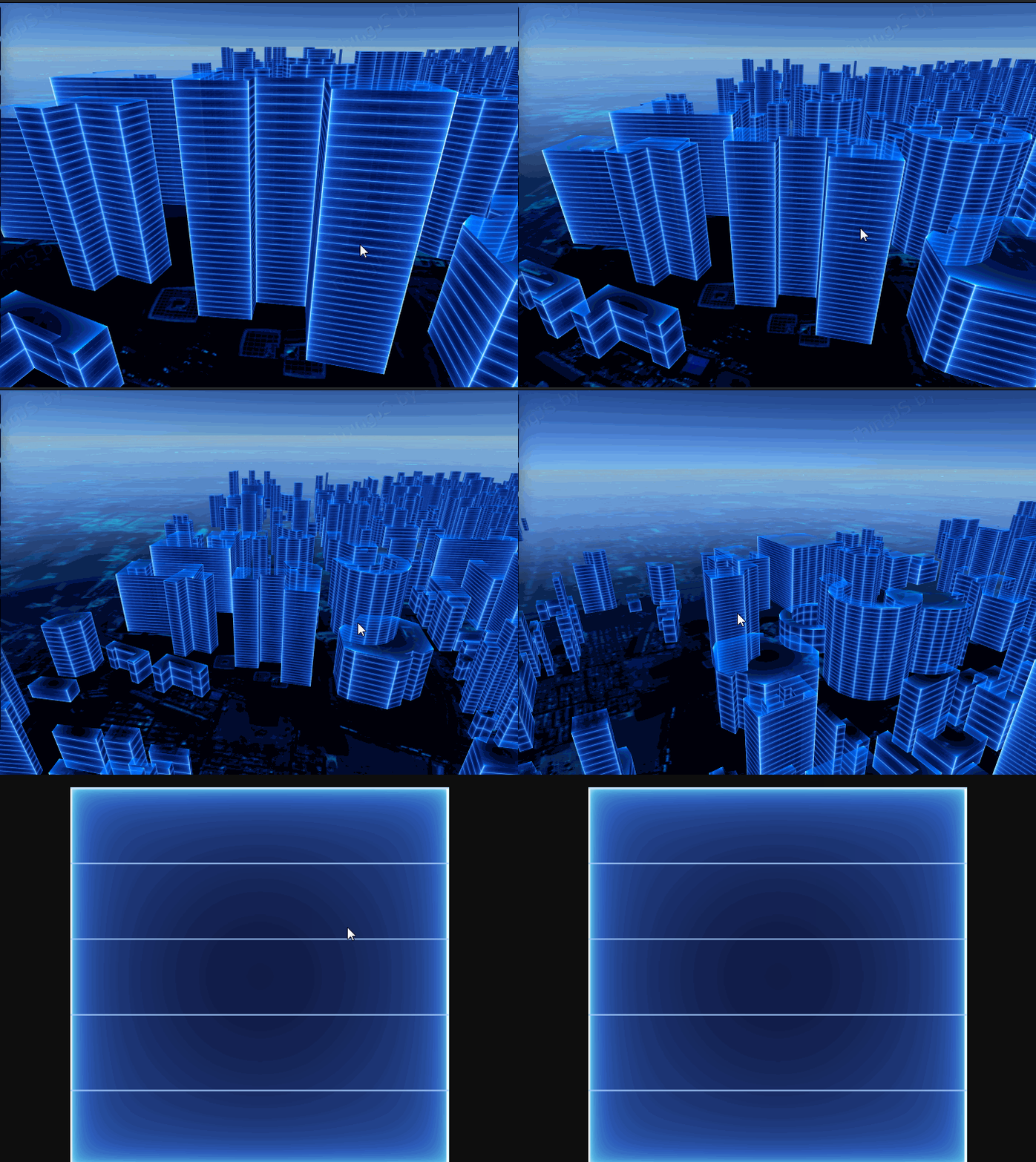
@likeswinds Looks great! I'm guessing thats not done in mapbox itself?
joedjc
on 8 Aug 2019
class Building {
  constructor(map) {
    this.map = map
  }
  add(data) {
    let map = this.map
    function assignUVs(geometry, len) {
      geometry.computeBoundingBox()
      const max = geometry.boundingBox.max
      const min = geometry.boundingBox.min
      const offset = new THREE.Vector2(0 - min.x, 0 - min.y)
      const range = new THREE.Vector2(max.x - min.x, max.y - min.y)
      const faces = geometry.faces
      geometry.faceVertexUvs[0] = []
      for (let i = 0; i < len * 2; i++) {
        let v1 = geometry.vertices[faces[i].a],
          v2 = geometry.vertices[faces[i].b],
          v3 = geometry.vertices[faces[i].c]
        geometry.faceVertexUvs[0].push([
          new THREE.Vector2((v1.x + offset.x) / range.x, (v1.y + offset.y) / range.y),
          new THREE.Vector2((v2.x + offset.x) / range.x, (v2.y + offset.y) / range.y),
          new THREE.Vector2((v3.x + offset.x) / range.x, (v3.y + offset.y) / range.y)
        ])
      }
      let faceuv = [new THREE.Vector2(0, 1), new THREE.Vector2(1, 1), new THREE.Vector2(1, 0), new THREE.Vector2(0, 0)]
      for (let i = len - 3; i < len * 4; i++) {
        geometry.faceVertexUvs[0][i * 2 + 0] = [faceuv[0], faceuv[1], faceuv[3]]
        geometry.faceVertexUvs[0][i * 2 + 1] = [faceuv[1], faceuv[2], faceuv[3]]
      }
      geometry.uvsNeedUpdate = true
    }
    map.addLayer({
      id: 'custom_layer2',
      type: 'custom',
      renderingMode: '3d',
      onAdd: function(map, mbxContext) {
        Threebox.prototype.defaultLights = function() {
          this.scene.add(new THREE.AmbientLight(0xccccff, 2))
          let sunlight = new THREE.DirectionalLight(0xffffff, 0.25)
          sunlight.position.set(0, 8000, 10000)
          sunlight.matrixWorldNeedsUpdate = true
          this.world.add(sunlight)
        }
        window.tb = new Threebox(map, mbxContext, { defaultLights: true })
        const extrudeSettings = {
          depth: 10,
          steps: 1,
          bevelEnabled: false
        }
        let bs = data.features[0].geometry.coordinates[0][0]
        let points = data.features[0].geometry.coordinates[0].map(item => {
          let x = (item[0] - bs[0]) * 3100
          let y = (item[1] - bs[1]) * 3100
          return new THREE.Vector2(x, y)
        })
        let rectShape = new THREE.Shape(points)
        let geometry = new THREE.ExtrudeGeometry(rectShape, extrudeSettings)
        let materialTop = new THREE.MeshLambertMaterial({
          transparent: true,
          opacity: 0.8,
          overdraw: true,
          map: new THREE.TextureLoader().load('map/image/building_top.png'),
          side: THREE.DoubleSide
        })
        let textureWall = new THREE.TextureLoader().load('map/image/building.png')
        textureWall.wrapS = THREE.RepeatWrapping
        textureWall.wrapT = THREE.RepeatWrapping

        let materialWall = new THREE.MeshPhongMaterial({
          color: 0x666666,
          transparent: true,
          opacity: 0.8,
          map: textureWall,
          overdraw: true,
          side: THREE.DoubleSide
        })
        const material = new THREE.MeshFaceMaterial([materialTop, materialWall])

        assignUVs(geometry, points.length)
        let mesh = new THREE.Mesh(geometry, material)
        mesh.rotateZ(Math.PI)
        tb.Object3D({ obj: mesh }).setCoords(bs)
        tb.add(mesh)
      },

      render: function(gl, matrix) {
        tb.update()
        map.triggerRepaint()
      }
    })
  }
}
@likeswinds How to solve the problem of building vibration when zooming in and panning the map?
 WebScholar
on 27 Jul 2020
WebScholar
on 27 Jul 2020
Related issues
 stevage
·
3Comments
stevage
·
3Comments
 aderaaij
·
3Comments
aderaaij
·
3Comments
 BernhardRode
·
3Comments
BernhardRode
·
3Comments
 rasagy
·
3Comments
rasagy
·
3Comments
 iamdenny
·
3Comments
iamdenny
·
3Comments
Most helpful comment