Mapbox-gl-js: Unexpected background of sdf icon when icon-halo-width more than some critical value.
mapbox-gl-js version: 0.48.0
browser: chrome
Steps to Trigger Behavior
- Add sdf icon
- Set icon-halo-width to some big value
Link to Demonstration
http://jsbin.com/heqadegucu/edit?html,output
Expected Behavior
We should not see an unexpected background of image. (In this example icon-halo-width has a value less than critical)
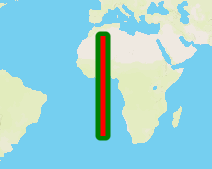
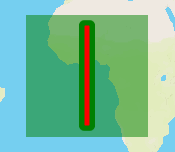
Actual Behavior
We can see an unexpected background of image.
Additional information
For some combination of values, everything is fine (e.g. icon-halo-width=2, icon-halo-blur=2, these are the same values as used in [icon-halo-blur/literal| https://github.com/mapbox/mapbox-gl-js/blob/8121e9db044533d7e44e0afc8c58e71b6d8ec260/test/integration/render-tests/icon-halo-blur/literal/style.json] test, also OK for 3/1, 3/2, 4/1 combinations of icon-halo-width, icon-halo-blur).
But for some combination of values of icon-halo-width/icon-halo-blur (e.g. 3/3, 4/2, 4/3, 4/4, 5/1, 6/0) there’s a semi-transparent fill for whole icon background. It seem to have different transparency depending on particular values, for some values the fill is almost invisible, for others it is hard to miss it even with the naked eye.
This seems like a bug, which makes icon halo unusable for some cases.
It could be reproduced using SDF icon (e.g. https://github.com/mapbox/mapbox-gl-js/blob/8121e9db044533d7e44e0afc8c58e71b6d8ec260/test/integration/image/line.sdf.png) or sprites (like in https://github.com/mapbox/mapbox-gl-js/blob/8121e9db044533d7e44e0afc8c58e71b6d8ec260/test/integration/render-tests/icon-halo-blur/literal/style.json test). The same effect happens in different browsers (Chrome, Firefox, Internet Explorer)
 atsarego
>All comments
This is a fun bug, thanks for the clear report @atsarego! Here's the relevant code:
You can see how "6" becomes a magic number with that 6.0 - halo_width / fontScale line. This is a little hard to follow at first, but what that buff variable represents is at what distance from the "edge" of the image to start drawing. We encode each point in the SDF with a value from 0-255, where "192" is "right on an edge", anything above 192 indicates "inside", and anything below 192 indicates "outside" (also in the shader the 0-255 value has been converted into a 0-1 float value). @kkaefer explained more about how this works at https://blog.mapbox.com/drawing-text-with-signed-distance-fields-in-mapbox-gl-b0933af6f817.
So as buff approaches 0, that means "as far away from the edge as our SDF encoding can represent". When the buff hits 0, all of a sudden the entire quad starts being drawn on, because nothing can have a "distance" further than 0. The partially translucent color you see in your example is a result of the blurring range (what shows up as gamma_scaled in the smoothstep line).
The best we can do in the shader is to clamp the buff so it doesn't reach 0, but that will leave you with a halo that's correctly drawn but not as wide as you requested. Unfortunately, there's no straightforward way to just draw a wider halo the way the rendering works -- the data to do it simply isn't there in the SDF. To get a bigger halo, you'd need to make a new (larger) SDF for the icon (I know that's surprising and not straightforward 😞). I think it might make sense to enforce a max halo width at style parsing time just to make this problem less confusing for people who run into it.
 ChrisLoer
on 18 Oct 2018
ChrisLoer
on 18 Oct 2018
Related issues
 infacq
·
3Comments
infacq
·
3Comments
 aaronlidman
·
3Comments
aaronlidman
·
3Comments
 iamdenny
·
3Comments
iamdenny
·
3Comments
 mollymerp
·
3Comments
mollymerp
·
3Comments
 samanpwbb
·
3Comments
samanpwbb
·
3Comments
Most helpful comment
This is a fun bug, thanks for the clear report @atsarego! Here's the relevant code:
https://github.com/mapbox/mapbox-gl-js/blob/58a61d6254129279f1d232d368e9c720a38d32ef/src/shaders/symbol_sdf.fragment.glsl#L34-L45
You can see how "6" becomes a magic number with that
6.0 - halo_width / fontScaleline. This is a little hard to follow at first, but what thatbuffvariable represents is at what distance from the "edge" of the image to start drawing. We encode each point in the SDF with a value from 0-255, where "192" is "right on an edge", anything above 192 indicates "inside", and anything below 192 indicates "outside" (also in the shader the 0-255 value has been converted into a 0-1 float value). @kkaefer explained more about how this works at https://blog.mapbox.com/drawing-text-with-signed-distance-fields-in-mapbox-gl-b0933af6f817.So as
buffapproaches 0, that means "as far away from the edge as our SDF encoding can represent". When the buff hits 0, all of a sudden the entire quad starts being drawn on, because nothing can have a "distance" further than 0. The partially translucent color you see in your example is a result of the blurring range (what shows up asgamma_scaledin thesmoothstepline).The best we can do in the shader is to clamp the
buffso it doesn't reach 0, but that will leave you with a halo that's correctly drawn but not as wide as you requested. Unfortunately, there's no straightforward way to just draw a wider halo the way the rendering works -- the data to do it simply isn't there in the SDF. To get a bigger halo, you'd need to make a new (larger) SDF for the icon (I know that's surprising and not straightforward 😞). I think it might make sense to enforce a max halo width at style parsing time just to make this problem less confusing for people who run into it.