Mapbox-gl-js: Add minimap that shows screen-view position.
Motivation
When you zoomed in on a map, you tend to get lost on where is your screen position and always have to zoom out in order to keep track were you are exactly.
Design
Mapbox could have minimap that keeps track of the screen-view location on the map, and shows that position on the minimap, located in the bottom - right or left corner.
If this kind of feature exists please tell me about it.
Mock-Up

Concepts
It could be placed under navigation control.
Implementation
Javascript:
Get the zoom level and center coordinates of the map, duplicate the map in a container in the bottom - right or left corner, and have a box with size depending on the zoom and the coordinates of the user when viewing the principle map.
We could have properties like what should the minimap zoom level be, map projection type, map style (satellite or streets), minimap border style, screen-view box style and any other properties that you could think of.
I also found these implementations from aesqe

and one using Leaflet
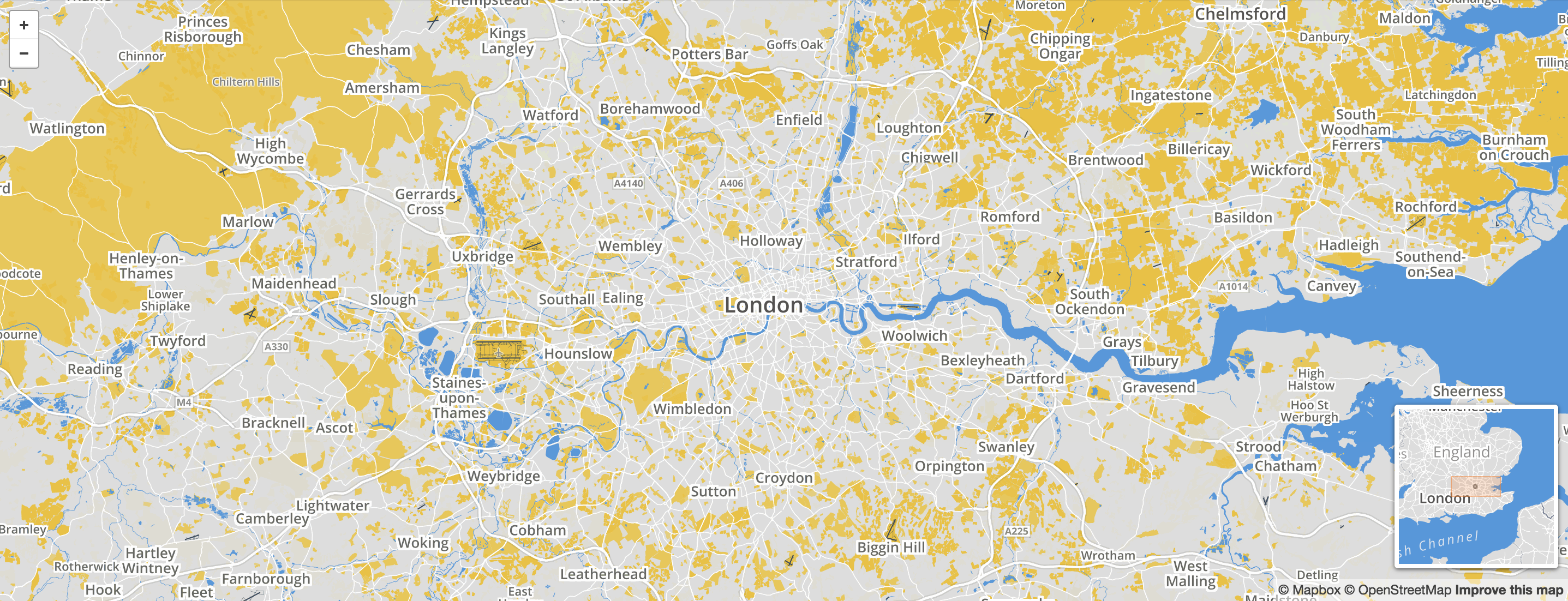
The one in Leaflet has a better design, but the other that is on github has a better implementation I belive. Anyway, the properties should be modifiable so that everyone can set what kind of minimap it wants.
 gabrielmoncea
All 12 comments
@gabrielmoncea Not sure if you've seen this already, but here is the minimap concept implemented as a third-party control: https://github.com/aesqe/mapboxgl-minimap
 DannyDelott
on 6 Jul 2018
DannyDelott
on 6 Jul 2018
Thanks. I added it as an implementation example. It would be nice if there was already a branch for this kind of built-in method.
gabrielmoncea
on 6 Jul 2018
Thanks for pointing out the mapboxgl-minimap repository, I wasn't aware of that. I've added it to the plugins page. I think a plugin is the best place for this functionality to be implemented. We frequently get requests to reduce the size of the library, so we like to keep things that some users might want, but not the majority, as separate components.
 jfirebaugh
on 6 Jul 2018
jfirebaugh
on 6 Jul 2018
@DannyDelott and @jfirebaugh i tried this third-party control. But the package is unmaintained and uses an older version of mapboxgl 0.18 while I use 0.46.
I get this error when trying to use it:
mapboxgl-control-minimap.js:17 Uncaught TypeError: Cannot read property 'inherit' of undefined
Line 17: Minimap.prototype = mapboxgl.util.inherit(mapboxgl.Control, { options
Could you help me debug it?
gabrielmoncea
on 11 Jul 2018
@DannyDelott and @jfirebaugh i tried this third-party control. But the package is unmaintained and uses an older version of mapboxgl
0.18while I use0.46.
I get this error when trying to use it:
mapboxgl-control-minimap.js:17 Uncaught TypeError: Cannot read property 'inherit' of undefined
Line 17: Minimap.prototype = mapboxgl.util.inherit(mapboxgl.Control, { optionsCould you help me debug it?
hello,did you solve this problem?Maybe,you can give me a hand!
 gisonjourney
on 28 Sep 2018
gisonjourney
on 28 Sep 2018
@gisonjourney yes. I did my own minimap component. Took it out of mapbox controls and used some of the logic of the third-party package to create my own minimap.
gabrielmoncea
on 28 Sep 2018
Hey guys.
Some months ago I was looking for this, and I used this old plugin as basis, and updated to the current mapbox gl js version.
Is someone is interested for me give the source code?
 nicolasca
on 15 Nov 2018
nicolasca
on 15 Nov 2018
@nicolasca I used the implementation from https://github.com/aesqe/mapboxgl-minimap, but I wrapped it into a React component and changed a lot of things because mapbox-controls didn't suit my needs, so not sure if it will suits you in this form. I can tell you that the logic was useful but a lot of the code was legacy
gabrielmoncea
on 16 Nov 2018
@gisonjourney yes. I did my own minimap component. Took it out of mapbox controls and used some of the logic of the third-party package to create my own minimap.
Thank you,I've solved this problem by taking reference of Openlayers!
gisonjourney
on 22 Nov 2018
@jfirebaugh how can I contribute to the mapbox-gl-js documentation? I would like to add something in the overview
gabrielmoncea
on 18 Feb 2019
@gabrielmoncea See https://github.com/mapbox/mapbox-gl-js/blob/master/CONTRIBUTING.md and https://github.com/mapbox/mapbox-gl-js/blob/master/docs/README.md
 ryanhamley
on 18 Feb 2019
ryanhamley
on 18 Feb 2019
@nicolasca Yes actually I would! I just started using mapbox and am not very experienced so I could use a hand.
 chevrandy
on 8 May 2019
chevrandy
on 8 May 2019
Related issues
 iamdenny
·
3Comments
iamdenny
·
3Comments
 shotor
·
3Comments
shotor
·
3Comments
 stevage
·
3Comments
stevage
·
3Comments
 mollymerp
·
3Comments
mollymerp
·
3Comments
 samanpwbb
·
3Comments
samanpwbb
·
3Comments
Most helpful comment
Thanks for pointing out the mapboxgl-minimap repository, I wasn't aware of that. I've added it to the plugins page. I think a plugin is the best place for this functionality to be implemented. We frequently get requests to reduce the size of the library, so we like to keep things that some users might want, but not the majority, as separate components.