Mapbox-gl-js: Error: RangeError: Maximum call stack size exceeded (potentially due to layer size/count)
Perhaps there's just an upper limit to the size/number of featureCollection layers that can be added to a map?...
mapbox-gl-js version: 0.44.0
Steps to Trigger Behavior
- Visit https://citystrides.com/users/5560/map with Safari or Chrome on a Mac (I don't have a Windows computer to test with, and the page loads successfully with Firefox)
- The base Mapbox map loads, but the red lines do not
- View the console & see the error
Compared to a functional page...
- Visit https://citystrides.com/users/1/map
- View base Mapbox map along with the red lines
Expected Behavior
A map should display with tons of red lines on it. The red lines are a bunch of encoded polyline layers.
Actual Behavior
The layers don't draw & the console contains an error.
Error as reported in Chrome:
evented.js:109 Error: RangeError: Maximum call stack size exceeded
    at Actor.receive (actor.js:81)
Evented.fire @ evented.js:109
Error as reported in Safari:
[Error] Error: RangeError: Maximum call stack size exceeded.
receive — actor.js:81
[native code]

    fire (mapbox-gl.js:521:1250)
    fire (mapbox-gl.js:521:1091)
    fire (mapbox-gl.js:521:1091)
    (anonymous function) (mapbox-gl.js:199:1411)
    (anonymous function) (mapbox-gl.js:199:2541)
    receive (mapbox-gl.js:501:894)
    (anonymous function)
Relevant Site Code
While all of this code is available within the page source itself, I've included the relevant section of code I'm using to generate this view below for easier review.
The <%= raw @encoded_polylines %>; bit is an array of many encoded polylines as constructed within my Rails app.
mapboxgl.accessToken = 'TOKEN';
var map = new mapboxgl.Map({
  container: 'map',
  style: 'mapbox://styles/mapbox/streets-v10',
  center: center_value,
  zoom: zoom_value
});
map.addControl(new mapboxgl.NavigationControl(), 'top-left');

var encodedPolylines  = <%= raw @encoded_polylines %>;
var arrayLength       = encodedPolylines.length;
var mapZoom           = null;
var mapCenter         = null;
var featureCollection = [];

for (var i = 0; i < arrayLength; i++) {
  featureCollection.push({
    type: 'Feature',
    geometry: polyline.toGeoJSON(encodedPolylines[i])
  });
}

map.on('style.load', function(){
  map.addSource('polylineCollection', {
    type: 'geojson',
    data: {
      type: 'FeatureCollection',
      features: featureCollection
    }
  });
  map.addLayer({
    id: 'polylineCollection',
    type: 'line',
    source: 'polylineCollection',
    layout: {
      'line-join': 'round',
      'line-cap': 'round'
    },
    paint: {
      'line-color': '#DD251E',
      'line-width': 2
    }
  });
});
Further Details
- Raw encoded polyline array for non-functional page: polylines.txt
- The user for the functional page linked above has more individual encoded polylines than the non-functional user, so it doesn't seem to be a count limit
- Since it's likely not a layer count issue, the only two possibilities I can think of are
- size - perhaps the non-functional user has larger individual encoded polylines than the functional user
- data integrity - perhaps the non-functional user has one/some encoded polylines that are 'broken' somehow
 JamesChevalier
All 28 comments
I played around with the for (var i = 0; i < arrayLength; i++) { line a bit, in order to walk through smaller portions of the overall data set. The arrayLength value was 327, so I swapped out a hard-coded value of _around_ half that at 150:
for (var i = 0; i < 150; i++) {
That also failed, so I backed down by roughly half again at 75:
for (var i = 0; i < 75; i++) {
This succeeded, so I chose a number ~halfway between 75-150 & repeated that approach for a bit... Eventually I got to a small enough range that I could step through them one by one without using the for loop & just setting specific hard-coded values of i. For example:
featureCollection.push({
  type: 'Feature',
  geometry: polyline.toGeoJSON(encodedPolylines[102])
});
I eventually found that there was a bogus encoded polyline value for that activity. So, it all points to bad data at this point. I don't know how long this activity will stay accessible (I may delete/recreate it), but for an example you can check out this activity. Its map ended up being an X'd out square off the coast of Ghana:

I still have the lingering question of whether or not encoded polylines / geoJSON data can be 'validated' somehow...
I decoded that polyline, and ended up with this data: decoded-polyline.txt
I manually built a map that used portions of that data, and found that the map didn't fail to draw until the 7th to last point was used (the map draws fine without error if I include everything up to that point in the code):
[1.0, 0.0], [0.0, 0.0], [0.0, 0.0], [0.0, 1.0], [1.0, 1.0], [1.0, 1.0], [1.0, 1.0]]
@JamesChevalier sorry to hear you ran into this issue! A couple of interesting things are at play here:
I still have the lingering question of whether or not encoded polylines / geoJSON data can be 'validated' somehow...
How are you encoding your polylines initially? I'd say as a general rule if you aren't able to roundtrip a valid polyline geometry from GeoJSON to an encoded polyline and back, there is probably a bug in the library you're using. If that's the case and you can verify that roundtripping a polyline returns a different result than the input, please open a bug report with that example in the relevant project. (Are you using mapbox/polyline (polyline on npm))?
that the map didn't fail to draw until the 7th to last point was used
The cryptic actor.js "maximum call stack" error is coming out of a worker thread: in this case it looks like it's coming from geojson-vt, which is responsible for tiling GeoJSON into vector tile-like data. Theoretically it should be able to tile any valid GeoJSON so this seem to be a bug there, though I'm not sure what the cause of such a call stack error would be. @mourner — does this sound like an issue you'd like opened in that repo or is there some gotcha about this GeoJSON feature that makes it impossible to tile?
 lbud
on 6 Feb 2018
lbud
on 6 Feb 2018
I don't have a clear roundtrip for a valid polyline in my app, unfortunately.
I'm creating the encoded polyline in the back end with the polylines gem:
points = coordinates.map { |item| [item.latitude.to_f, item.longitude.to_f] }
encoded_polyline = Polylines::Encoder.encode_points(points)
Then I'm converting the encoded polyline to GeoJSON with polyline js:
polyline.toGeoJSON(encodedPolyline)
I can't figure out how to do a valid roundtrip test using just polyline js. Every attempt I make, even with very simple two-value arrays, result in the == returning false ... and if I hand check them in the console they _are_ equal. I must be misunderstanding something...
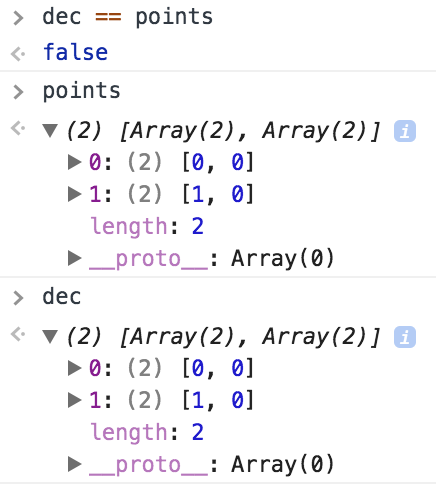
points = [[0,0], [1,0], ...]
var enc = polyline.encode(points)
var dec = polyline.decode(enc)
dec == points
This comparison returned false.
I truncated the first line because the array was massive (decoded-polyline.txt).
I also tested with integer and float values in the points array because I noticed that the encode & decode were translating them from floats to integers.
I compared dec & points through this code and unhelpfully got back ["0,0"]. 😬
JamesChevalier
on 9 Feb 2018
@JamesChevalier can you do JSON.stringify(featureCollection) on a sample that throws an error, save the result in a file and send us for testing?
Comparison returns false because arrays in JS are compared by reference, not by value. You have to use an utility function that's usually called deepEqual and is present in libraries like Lodash and Underscore.
 mourner
on 9 Feb 2018
mourner
on 9 Feb 2018
Oh, I see that you provided the data already. I'll try to see what geojson-vt says on this input.
mourner
on 9 Feb 2018
Ooh! Ooh! I found a thing!
Version 0.42.2 of Mapbox GL JS _works_, while each version after that produce the error. I've left version 0.42.2 in place, so you (and my site users 😄) can see the functional page:
- Visit https://citystrides.com/users/5560/map with Safari or Chrome on a Mac (I don't have a Windows computer to test with, and the page loads successfully with Firefox)
- The base Mapbox map loads, and so do the red lines
It's fairly easy for me to bounce back and forth between versions if you need to see those again, but I'd want to coordinate timing with you in order to minimize 'downtime'. If you'd like to head down that path, get in touch on Twitter (I'm @JamesChevalier).
JamesChevalier
on 1 Mar 2018
🕵️ thanks @JamesChevalier! Looks like this happened with the upgrade to geojson-vt 3.0.
lbud
on 2 Mar 2018
This issue is becoming more problematic for me.
I was just debugging a pan/zoom issue I have on iOS right now & found out that it's a bug that was resolved in v0.44.2. This 'Maximum call stack size exceeded' error is forcing me to stay on v0.42.2.
Is there anything I can do to help figure out this issue?
Or - I'm assuming not - is there a way for you to release v0.42.3 that includes the pan/zoom fix?
JamesChevalier
on 18 May 2018
Hi @mourner - anything I can do to help with this?
I'm starting to feel like a nag/pain, here. I'm going to look into what I can do within my code to filter out or reject those bad data points - I'm just worried it's going to be quite a large effort...
I can add some new details of an unsuccessful test:
Then I noticed that the master branch of mapbox-gl-js locks to a later version of geojson-vt (v3.1.2), so I decided to try that out by running...
git clone [email protected]:mapbox/mapbox-gl-js.gitcd mapbox-gl-jsyarn installyarn run build-minyarn run build-css
I then copied up the dist/mapbox-gl.css and dist/mapbox-gl.js files onto my server and gave it a shot. This didn't help, though - I still go the same Maximum call stack size exceeded error.
JamesChevalier
on 5 Jun 2018
Sorry for not looking into this earlier! I'm investigating it now and the latest geojson-vt version processes that bad polyline sample just fine. So the bug trigger must be somewhere on the GL JS side... I'll try debugging there.
mourner
on 11 Jun 2018
OK, I traced this back to geojson-vt simplify routine which gets too deep in recursion. This wasn't triggering on the sample in GeoJSON-VT debug page or Node because GL JS gets deeper and the stack is smaller at the point of indexing. Let's continue tracking this in https://github.com/mapbox/geojson-vt/issues/104 — I'm working on a fix.
mourner
on 12 Jun 2018
@JamesChevalier released the fix in geojson-vt v3.1.3. To test it out, run yarn upgrade in the repo (to update the dependencies), then yarn run build-min to test out a fresh build.
mourner
on 15 Jun 2018
🎉 🎉 🎉 🎉
https://citystrides.com/users/5560/map (with Safari or Chrome on a Mac)
That worked! Thanks!
JamesChevalier
on 16 Jun 2018
Hey @mourner / @lbud ... This issue is back in a _really weird_ way. It's wildly particular, so here we go... 😆 🤣
I went through a _bunch_ of debugging: a build off the master branch ... a build off the master branch after a yarn upgrade ... a build off the master branch after pinning geojson-vt to 3.1.3 ... older versions ... incognito/private window tests ... before/after nginx restarts ... 😰 😳
But then I found a lead ... sort of? ...
https://citystrides.com/users/6775/map just flat out doesn't work in Chrome or Safari ... it's the same issue because if you view the page in Firefox, you can see the wonky square in the bottom right of the map.
_however_
Our previous example page - https://citystrides.com/users/5560/map - does work in Firefox & Chrome, but _doesn't_ work in Safari ... unless you open Safari's JavaScript console and _then_ refresh the page.
😧 😲 😱
🤷♂️ I don't think there's anything else I can provide, but if there is - let me know & I'll grab it! I'm also up for testing builds, etc... I'll help out as much as I can here.
The site is using v0.48.0 right now - not a special build, just straight from:
https://api.tiles.mapbox.com/mapbox-gl-js/v0.48.0/mapbox-gl.js
JamesChevalier
on 6 Sep 2018
@JamesChevalier that's a good lead — thank you! On this particular page (6775), it's trying to load a really huge GeoJSON (38MB), but it certainly shouldn't crash — perhaps my fix didn't cover all the use cases.
mourner
on 6 Sep 2018
So, looks like this is no longer a geojson-vt issue (it slices the sample into tiles correctly) — now there must be another trigger on the GL JS side.
mourner
on 6 Sep 2018
Ooh! New info!
The page loads fine if the data is in mbtiles format served up from tileserver-gl running locally, but it has the same failure if the data is in geojson format.
The 72MB geojson file is available here: https://citystrides.com/6775.geojson
The 4.7MB mbtiles file is available here: https://citystrides.com/6775.mbtiles
I built the mbtiles file by running tippecanoe -o 6775.mbtiles 6775.geojson
Locally, I'm using this Docker image of TileServer GL: https://hub.docker.com/r/klokantech/tileserver-gl/ that I'm running with docker run --rm -it -v $(pwd):/data -p 8080:80 klokantech/tileserver-gl
I'm adding the mbtiles data to the map with:
map.addLayer({
    "id": "polylineCollection",
    "type": "line",
    "source": {
        "type": 'vector',
        "url": 'http://localhost:8080/data/6775.json'
    },
    "source-layer": "6775",
    "layout": {
        "line-join": "round",
        "line-cap": "round"
    },
    "paint": {
        "line-color": '#DD251E',
        "line-width": 2
    }
});
Just a quick update that this issue persists in v0.50.0
JamesChevalier
on 13 Oct 2018
Just a quick update that this issue persists in v0.51.0
JamesChevalier
on 9 Nov 2018
Just a quick update that this issue persists in v0.52.0
JamesChevalier
on 19 Dec 2018
Just a quick update that this issue persists in v0.53.0
JamesChevalier
on 7 Feb 2019
Just a quick update that this issue persists in v0.54.0
I'm unsure how to help resolve this issue @mourner .. should I take my discovery of the underlying data and work around it by not trying to use data shaped that way on the page?
Nobody else is chiming in with similar issues, so it _seems_ fairly isolated to my dataset (and based on some quick checks, it seems limited to Strava data) ... is it possible that this issue simply isn't worth fixing within Mapbox?
JamesChevalier
on 26 Apr 2019
We ran into a similar issue with a large 72000 point dataset where each feature in the collection is assigned an sequential feature.id (i.e. 1, 2, 3, ..., 72000). We narrowed the problem to the sort function in the worker. It seems that sorting an already sorted array using the quicksort algorithm is a worst-case scenario for performance.
We implemented a workaround for this issue by randomly shuffling the ids in the feature collection before sending the data to the map.
But I wonder if the sort function can be optimized with a different pivot?
 nickpeihl
on 11 Jul 2019
nickpeihl
on 11 Jul 2019
@nickpeihl wow, that's surprising! In theory that shouldn't be the case because the worst case for quicksort is when it partitions the array into a single element and the rest on every iteration, but with middle pivot which is used here, it will partition an already sorted array into 2 equal parts every time. Would you be able to provide a minimal consistently reproducible test case?
This is likely a different issue because that quicksort logic appeared long after this issue was reported.
mourner
on 11 Jul 2019
@mourner thanks for responding. I did not see that the sort function uses middle pivot. My apologies.
After more debugging, I am seeing duplicate ids being sent to the sort function in the web worker in Firefox (i.e. [0,1,2,...n,0,1,2,...n] where n is features.length - 1). Only the expected n features are being added in our source.setData function. Strangely, this does not happen in Chrome.
We'll do some more debugging in our app to see we can find out what is causing this.
nickpeihl
on 12 Jul 2019
Just a quick update that this issue persists in v1.4.0
JamesChevalier
on 5 Oct 2019
I've been able to track the cause of the X square activities back to incorrectly processing treadmill activities. I've also been able to figure out a way to clean up the bad data. Post-cleanup, one of the previously broken pages - https://citystrides.com/users/6775/map - is now functional across all browsers.
🤷♂ Maybe this should be closed, since it's such an isolated issue. I suppose there _is_ technically a bug somewhere in attempting to display many polylines that consist of ~hundreds of coordinates that all have one of four values (0,0 & 1,1 & 0,1 & 1,0) ... but ... maybe who cares?
JamesChevalier
on 11 Oct 2019
@JamesChevalier sorry for not getting to you earlier, and glad that you have found a workaround! I wanted to revisit this but it seems like the test cases in https://github.com/mapbox/mapbox-gl-js/issues/6086#issuecomment-420101482 aren't available anymore, and since you've fixed that map too, I no longer have a way to reproduce the issue. Let's close this for now but let me know if you can share a test case to look into.
mourner
on 22 Jan 2020
Related issues
 aendrew
·
3Comments
aendrew
·
3Comments
 yoursweater
·
3Comments
yoursweater
·
3Comments
 jfirebaugh
·
3Comments
jfirebaugh
·
3Comments
 bgentry
·
3Comments
bgentry
·
3Comments
 PBrockmann
·
3Comments
PBrockmann
·
3Comments