Mapbox-gl-js: Clarify layer's "minzoom" and "maxzoom" properties in documentation
mapbox-gl-js version: 0.43.0
I have a layer, served from a local Tessera server, that looks like this:
{
    id: 'rail-stations-points',
    type: 'circle',
    source: 'VMTRANS-tr_rail_infrastructure',
    'source-layer': 'tr_rail_infrastructure',
    paint: {
        'circle-radius': 30,
        'circle-color': 'red'
    },
     minzoom: 6,
},
No matter how far I zoom in, the points never appear.
Changing minzoom to 5 or lower, or removing it entirely, causes the layer to appear normally. I've seen something similar occur a couple of times with other layers.
Sorry this isn't a minimal repro case.
Happens in both Chrome and Firefox.
Also, no idea if related, but there is a strange behaviour in Firefox, when the minzoom property is removed: When the map first loads, this layer is not visible. As soon as I pan or zoom slightly, then the layer appears and behaves normally. I have seen this with other circle layers, too.
My uninformed hunch is that this has something to do with an inconsistent interpretation of what 'minzoom' means in the docs:
Minimum zoom level for which tiles are available, as in the TileJSON spec.
The minimum zoom level on which the layer gets parsed and appears on.
So maybe saying minzoom: 6, which I intend to mean "don't show this layer at levels below 6" is being interpreted as meaning "tiles are available from zoom level 6 and upwards", which isn't true...and then something goes wrong.
 stevage
All 14 comments
Could you make a repro case please? Thanks!
 jfirebaugh
on 29 Dec 2017
jfirebaugh
on 29 Dec 2017
Hmm, ok after a lot of digging around and experimenting and seeing lots of fairly broken looking behaviours, my overall conclusion is: when 'minzoom' is not set on a vector tile source, and there's no TileJSON available, then all kinds of stuff doesn't work right. Examples:
- this bug
- no labels appearing at certain zoom levels
- whole layer disappearing unpredictably when changing layout properties dynamically
symbol-spacingapparently having no effect.
My workflow is: shp2json -> tippecanoe -> tessera -> mapbox-gl-js.
I'm not sure what to do with this discovery. Maybe some clearer documentation about what mapbox-gl-js does with the 'maxzoom' property of a source, and how important it is to have that info available? Dunno - I guess in the case of Mapbox-hosted tiles, that always works right.
stevage
on 30 Dec 2017
Updated the title to maybe make it actionable. One concrete behaviour I have noticed with minzoom is in this situation:
- Tiles are available from zoom 12 and up from a local tile server with no TileJSON endpoint.
- Layer definition makes no references to zoom levels.
- With no
minzoom, if the user zooms in past 12, and then back out, the features appear, and then remain visible when zooming out. - With
"minzoom": 12, if the user zooms in past 12 and then back out, the features appear, and then disappear when zooming back out to less than 12. - Meanwhile, if the source does not have a
maxzoom(and one is not available from TileJSON), then withminzoom: 13(or numbers higher) on the layer, the layer never appears at all.
It's a bit hard to provide a repro case for this latter behaviour, because I would need to find a way of hosting a vector tile service publicly without a TileJSON endpoint.
stevage
on 2 Jan 2018
@stevage I'm currently also having some confusion regarding maxzoom:https://github.com/mapbox/mapbox-gl-js/issues/5975
My uninformed hunch is that this has something to do with an inconsistent interpretation of what 'minzoom' means in the docs:
Minimum zoom level for which tiles are available, as in the TileJSON spec.
The minimum zoom level on which the layer gets parsed and appears on.
The first one is the documentation for sources minzoom (vector, raster, raster-dem), while the latter one is for layer minzoom (link).
My current understanding is, that the intended use for minzoom for a source is to set a value different from the default 0, when NOT providing a "url" to a TileJSON resource or a url to a WMS server that supports EPSG:3857 as described here.
I was always wondering why in Mapbox Studio for a layer which is using a tileset having a zoom level range of e.g. 8-10 it is written "Source is visible starting at zoom 0".
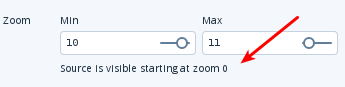
This makes now sense to me because there is no TileJSON "url" in the style and the default
for minzoom = 0.
For a layer the minzoom is the first zoom level (counting from 0) for which the layer starts getting visible on the map. If there is no minzoom, the layer will be visible for the first zoom level the source it uses has data for it.
Do you agree?
That raises the following questions:
When using a TileJSON "url" or a WMS:
Is the minzoom of the style ignored (there should be at least always the default value 0, even when minzoom is not explicitly set)?
What happens if TileJSON or WMS is used but there is no minzoom provided by them? Will there be a fallback to the style minzoom?
@jfirebaugh in the docs there is no minzoom for a GeoJSON source:
https://www.mapbox.com/mapbox-gl-js/style-spec/#sources-geojson
Is it missing in the docs or is there none?
 pathmapper
on 10 Jan 2018
pathmapper
on 10 Jan 2018
Yeah, probably a clear way to put it is:
minzoom/maxzoomin thesource(which override values expected to be provided by a TileJSON), and define the range of zooms at which tiles are available. Mapbox-GL-JS uses this information to know which tiles to request, and to overzoom if necessary.minzoom/maxzoomin thelayerdefine the range of zooms at which tiles are displayed.
I believe there is some strange undefined behaviour when a minzoom is defined in the layer, but not in a source or TileJSON.
stevage
on 10 Jan 2018
in the docs there is no minzoom for a GeoJSON source:
https://www.mapbox.com/mapbox-gl-js/style-spec/#sources-geojson
Is it missing in the docs or is there none?
Based on my understanding, there is no need for such a thing to exist. The whole GeoJSON file is in the browser, so it will be rendered into vector tiles with an implicitly generated minzoom/maxzoom, which the user will never have to worry about.
stevage
on 10 Jan 2018
@jfirebaugh in the docs there is no minzoom for a GeoJSON source:
https://www.mapbox.com/mapbox-gl-js/style-spec/#sources-geojson
Is it missing in the docs or is there none?
@pathmapper GeoJSON sources use https://github.com/mapbox/geojson-vt which doesn't support a custom minzoom it will pre-generate all possible tiles from zoom 0 to indexMaxZoom (by default 5) and then on demand up to maxZoom. So the minzoom for GeoJSON sources in GL JS fixed to 0.
 andrewharvey
on 10 Jan 2018
andrewharvey
on 10 Jan 2018
@stevage
minzoom/maxzoom,in the source (which override values expected to be provided by a TileJSON)
Based on my understanding from the docs there is always a value for minzoom/maxzoom in the style even when not explicitly set (the default values). If this is the case, what about overriding values provided by a TileJSON?
@andrewharvey
Thanks! What about the default 18 documented here: https://www.mapbox.com/mapbox-gl-js/style-spec/#sources-geojson-maxzoom ?
pathmapper
on 10 Jan 2018
Thanks! What about the default 18 documented here: https://www.mapbox.com/mapbox-gl-js/style-spec/#sources-geojson-maxzoom ?
@pathmapper Mapbox GL JS sets that default maxZoom for GeoJSON sources to 18 as you can see in the source
https://github.com/mapbox/mapbox-gl-js/blob/master/src/source/geojson_source.js#L90 but it doesn't set the indexMaxZoom, so it pre-generates from 0-5 and then on the fly from 6 up to maxZoom.
andrewharvey
on 10 Jan 2018
@andrewharvey thanks, got it now!
Overzooming for a GeoJSON source will happen based on a on-the-fly maxZoom tile or a pre-generated indexMaxZoom tile?
pathmapper
on 10 Jan 2018
Overzooming for a GeoJSON source will happen based on maxZoom or indexMaxZoom?
It would be based on maxZoom of the source. I don't even think you can set indexMaxZoom from GL JS as it's not exposed.
andrewharvey
on 10 Jan 2018
Sorry, I still don't really understand what the issue is here -- the discussion is pretty scattered. @stevage, could you please file a fresh issue with a minimal standalone example?
A layer without a minzoom property should be exactly equivalent to minzoom: 0.
jfirebaugh
on 10 Jan 2018
There are two issues:
- The documentation around
minzoom/maxzoomis unclear, and especially the ramifications of setting it at on either layer or source, as per discussions above. - There is (I believe) a bug or very unexpected behaviour in the situation explained above. It's not easy to create and share a minimal repro case for this, because it requires a tile server without a TileJSON endpoint.
stevage
on 10 Jan 2018
FWIW, I have written up my understanding of minzoom/maxzoom here: https://stackoverflow.com/questions/48197271/what-do-minzoom-and-maxzoom-do-in-mapbox-gl-js-exactly/48197272#48197272
stevage
on 10 Jan 2018
Related issues
 PBrockmann
·
3Comments
PBrockmann
·
3Comments
 aendrew
·
3Comments
jfirebaugh
·
3Comments
aendrew
·
3Comments
jfirebaugh
·
3Comments
 Scarysize
·
3Comments
stevage
·
3Comments
Scarysize
·
3Comments
stevage
·
3Comments
Most helpful comment
Yeah, probably a clear way to put it is:
minzoom/maxzoomin thesource(which override values expected to be provided by a TileJSON), and define the range of zooms at which tiles are available. Mapbox-GL-JS uses this information to know which tiles to request, and to overzoom if necessary.minzoom/maxzoomin thelayerdefine the range of zooms at which tiles are displayed.I believe there is some strange undefined behaviour when a
minzoomis defined in the layer, but not in a source or TileJSON.