Mapbox-gl-js: Incorrect rendering order with raster layer
mapbox-gl-js version:
Steps to Trigger Behavior
layers: [
        {
          id: 'img_w',
          type: 'raster',
          source: 'img_w',
        },
        {
          id: 'isobands',
          type: 'fill',
          source: 'isobands',
          paint: {
            'fill-color': 'blue',
            'fill-outline-color': 'green'
          }
        }]
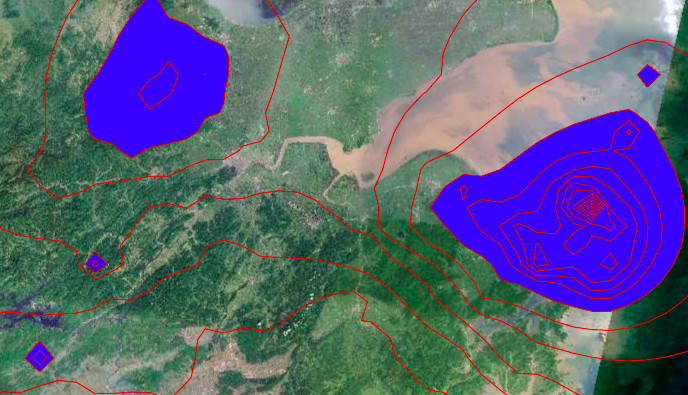
Expected Behavior
mapbox-gl-js 0.40.0
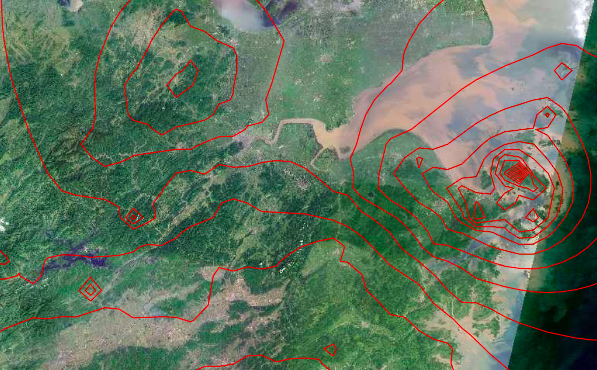
Actual Behavior
mapbox-gl-js 0.41.0
bug
 jingsam
👍1
All 2 comments
Thanks @jingsam! Confirmed; here is a fiddle to reproduce. Bisected to efd018f2df2ff99bd285d04e6ed7a56ddf666a8f. Disabling depth testing on raster layers causes this to suffer the same fate as https://github.com/mapbox/mapbox-gl-js/issues/2074. @mollymerp I'm not up to speed on that PR — is disabling depth testing required to achieve its end?
(Also, looking around in various draw_* functions makes me suspect we could reproduce this effect for a few other layer types as well…)
In the meantime if this is blocking anyone, a workaround is to set fill-opacity: 0.99 on the affected layer.
 lbud
on 19 Oct 2017
lbud
on 19 Oct 2017
👍2
Oooh thank you for the report @jingsam and for bisecting @lbud! I'll look into a fix for this.
 mollymerp
on 20 Oct 2017
mollymerp
on 20 Oct 2017
Was this page helpful?
0 / 5 - 0 ratings
Related issues
 rigoneri
·
3Comments
rigoneri
·
3Comments
 infacq
·
3Comments
infacq
·
3Comments
 aderaaij
·
3Comments
aderaaij
·
3Comments
 rasagy
·
3Comments
rasagy
·
3Comments
 bgentry
·
3Comments
bgentry
·
3Comments
Most helpful comment
Thanks @jingsam! Confirmed; here is a fiddle to reproduce. Bisected to efd018f2df2ff99bd285d04e6ed7a56ddf666a8f. Disabling depth testing on raster layers causes this to suffer the same fate as https://github.com/mapbox/mapbox-gl-js/issues/2074. @mollymerp I'm not up to speed on that PR — is disabling depth testing required to achieve its end?
(Also, looking around in various draw_* functions makes me suspect we could reproduce this effect for a few other layer types as well…)
In the meantime if this is blocking anyone, a workaround is to set
fill-opacity: 0.99on the affected layer.