Mapbox-gl-js: Add placement logic for a single centered line label?
A fairly common technique for formatting line geometries for text labeling is to create short lines that are intended to have just a single text label centered along the line. We currently use this technique for creating some of our marine labels in Mapbox Streets:

and @ajashton is looking to do this more widely in our next big Mapbox Streets data update. We've come across this need in other contexts too, such as these place labels in AJ's polar projection map :
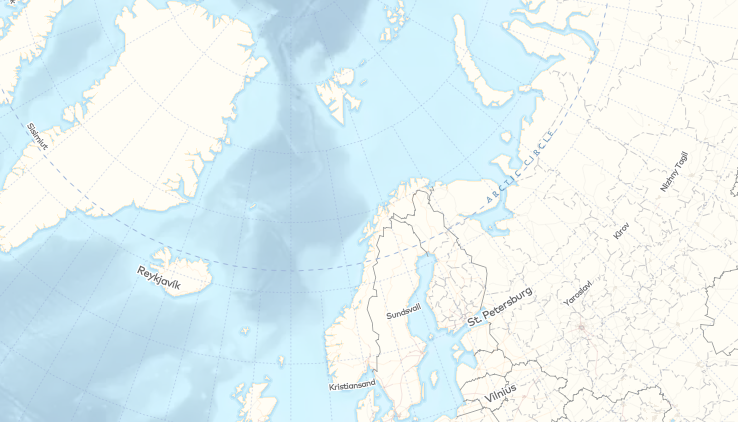
There isn't a great way to display these currently in our renderers: if you play around with text size, symbol spacing, etc, you can sometimes approximate this behavior, but not reliably, given the various logic we have in place to distribute multiple anchors as nicely as possible along a line. The labeling in the map linked above wasn't used in the final version because the placement wasn't reliable enough. The labeling for our marine labels in Streets only looks reasonable because of the sparsity of labels.
Add symbol-placement: line-center and disable clipping lines to tile boundaries?
However, we do already have logic to attempt placing an anchor at the center of a line if the first placement attempt fails. Perhaps we can implement a new value for symbol-placement called line-center that only uses the centering placement logic? (Or another property for defining placement along a line, but the former idea seems simpler).
In order to acheive the desired effect of a single label on a line regardless of tile boundaries, this could be implemented in conjunction with disabling the clipping lines to tile boundaries (assuming there is an adequate buffer in the vector tiles).
The reason we currently clip lines to tile boundaries, according to @ansis:
we've been clipping lines to tile boundaries because fallback tiles (api-gl) can't handle cross-tile placement for line labels. In order for cross-tile placement to work in api-gl it needs to place labels in the same spot in both tiles. Line labels get interpolated to get the anchors and this interpolation depends on where the line begins. Since both tiles would be clipping the line differently (even if there is padding) they wouldn't agree on anchor locations
Perhaps if we only disable clipping for layers that have symbol-placement: line-center, this would allow the majority of line labels to stay consistent between client-rendered GL maps and api-gl?
Side note: There are also other labeling needs related to placing a single label along a line – either centered, or at the begining or end of a line – for use cases like route labeling (as mentioned by @peterqliu). However, for lines that are much longer than the intended label, I'm not sure that these will be helped by the proposed solution above, because I'm guessing the buffers would need to be unreasonably large to acheive the effect.
Any thoughts on this idea or other suggestions for achieving this visual result?
/cc @ChrisLoer @ansis @mollymerp @jfirebaugh
 nickidlugash
All 14 comments
What would the ideal centering behavior for a "multi-tile" line? We could try to center based on everything visible in the viewport, but then the label would be constantly moving whenever you panned, which probably wouldn't look great. We could try to center based on all tiles being used for the current viewport position -- so that way the label position would only jump as your panning operation either added or removed tiles from the viewport.
 ChrisLoer
on 31 Jul 2017
ChrisLoer
on 31 Jul 2017
I would suggest we can avoid getting fancy and essentially ignore the multi-tile problem. This feature is not aimed at longer lines like roads and rivers, but at short, purpose-made lines.
For example: the lines in the marine labels layer of Mapbox Streets have been designed so that the entire length of the line fits within the buffer of the vector tiles it touches— each vector tile has a complete view of the entire line. The only cross-tile issue for this use case is the fact that the part of the line within a vector tile's buffer gets clipped off (per #1995).
 ajashton
on 31 Jul 2017
ajashton
on 31 Jul 2017
I would suggest we can avoid getting fancy and essentially ignore the multi-tile "problem"
Awesome.
Next question: does it work for the "center" to be derived in tile (i.e. flat) coordinates, even when the map is tilted and the tile-coordinate center won't look like the visual center of the line? If so, this probably isn't that hard to do.
ChrisLoer
on 31 Jul 2017
I would suggest we can avoid getting fancy and essentially ignore the multi-tile "problem"
would this mean that we would render multiple labels, for lines spanning multiple tiles? That might not accomplish the original desired behavior 🤔
 peterqliu
on 31 Jul 2017
peterqliu
on 31 Jul 2017
does it work for the "center" to be derived in tile (i.e. flat) coordinates, even when the map is tilted and the tile-coordinate center won't look like the visual center of the line?
Yes.
would this mean that we would render multiple labels, for lines spanning multiple tiles?
Yes and no. Combined with #1995 and a line layer such as marine_label where the lines are clipped to be within the vector tile buffers, there should be no repetition. If you were to apply this styling to the road_label on the other hand you would get multiple labels, but I think that's fine since that layer would not be designed for such labeling.
ajashton
on 31 Jul 2017
Noting another piece of logic to consider:
https://github.com/mapbox/mapbox-gl-js/blob/master/src/data/bucket/symbol_bucket.js#L593-L599
// To reduce the number of labels that jump around when zooming we need
        // to use a text-size value that is the same for all zoom levels.
        // This calculates text-size at a high zoom level so that all tiles can
        // use the same value when calculating anchor positions.
        let textMaxSize = this.layers[0].getLayoutValue('text-size', {zoom: 18}, feature);
        if (textMaxSize === undefined) {
            textMaxSize = layoutTextSize;
        }
We would either want to do something like let textMaxSize be the size at the current zoom level for this label placement option, or on the data side, make sure lines are all long enough to accommodate this. I think it would be better not to put the burden on the data creator.
nickidlugash
on 29 Sep 2017
@ChrisLoer @ansis @jfirebaugh Does this seem like a feature we want to consider implementing?
nickidlugash
on 11 Apr 2018
I think the simple version of this feature (place a single label at the tile-coordinate center of a line, tile placement still done separately) should be pretty straightforward. I think we could go either way on whether to use all the line geometry in the tile's buffers or whether to limit to geometry within the tile bounds, although I think the "least surprise" version (and most consistent with the rest of our line labeling) would stick to the tile bounds.
The danger of the simple version is that it introduces relatively tight cooperation with the data layer in order to get the results you expect (e.g. choosing at data generation time to only put one label for a line that cross multiple tiles). Introducing this into the style spec could be an invitation for users to shoot themselves in the foot.
The "big version" of this feature is part of a broad refactoring that shifts to global (or at least "global-aware") line label placement. The specific win for the style-spec would be that "line center" would map to user's visual expectations for what a "line" is. I am definitely interested in doing this broader refactoring, but I can't put a very good estimate on the scope right now -- all I know is it's "not small".
@lucaswoj any thoughts on the feasibility of adding the "simple version" to the style spec now and refining to a global aware version later?
ChrisLoer
on 13 Apr 2018
It would be great if the buffer could be taken into account in order to match the kind of ocean/sea label rendering we have in Mapnik raster tiles for Mapbox Streets.
it introduces relatively tight cooperation with the data layer in order to get the results you expect
We've always had that in some ways, such as the need to pre-generate center points for polygon labeling.
ajashton
on 14 Apr 2018
Is this feature currently being worked on? Can you give us any hint of ETA?
 daumann
on 16 May 2018
daumann
on 16 May 2018
Hi @daumann, it's not currently being worked on, but it's near the top of my backlog. Backlogs shift around so I can't make any kind of promise, but it is something I hope to start work on in the next couple months.
ChrisLoer
on 16 May 2018
Relatively minor question: what's the desired behavior if the the center location doesn't pass the text-max-angle requirement? Options I can think of are:
- Just don't show the label. Pretty straightforward semantically and easy to implement.
- Don't support
text-max-anglewithline-center. Easy to implement, but doesn't seem like what we want -- if a label ends up at a kink in the line, it'd be better to avoid drawing the label entirely than to draw a kinked/illegible label. - Implement resampling logic similar to the existing
lineplacement, which tries to do some approximate version of "find the closest position to the center that passes the check". This has the advantage of requiring the least amount of work/foresight for a style designer to handle line kinks, at the cost of (1) disobeying the "center" instruction in a somewhat hard-to-predict way, (2) adding some implementation complexity.
ChrisLoer
on 14 Jun 2018
@ChrisLoer Ideally a parameter could let the style designer decide whether to hide [option 1] or approximate [option 3] the label placement (with a performance cost). But having only the hide behavior as the first version would be fine as well.
daumann
on 14 Jun 2018
Implemented in #6821. Native port ticketed at: https://github.com/mapbox/mapbox-gl-native/issues/12300
ChrisLoer
on 5 Jul 2018
Related issues
 rasagy
·
3Comments
rasagy
·
3Comments
 shotor
·
3Comments
shotor
·
3Comments
 mollymerp
·
3Comments
mollymerp
·
3Comments
 bgentry
·
3Comments
bgentry
·
3Comments
 foundryspatial-duncan
·
3Comments
foundryspatial-duncan
·
3Comments
Most helpful comment
Implemented in #6821. Native port ticketed at: https://github.com/mapbox/mapbox-gl-native/issues/12300