Mapbox-gl-js: Fix rendering of long symbol text lines
I'm seeing a rendering issue associated with long single line labels.
Text anchored centered:

Text anchor left/right:

I thought this was a tile bounds issue, but decreasing the font size does not fix the issue.
Here is a copy of the style: https://cloudup.com/confY1gZ6Oe
 bsudekum
All 21 comments
/cc @ansis @kkaefer
bsudekum
on 23 Sep 2015
This was first encountered in gl-native, right? Is it an issue in both native and js?
 jfirebaugh
on 23 Sep 2015
jfirebaugh
on 23 Sep 2015
@jfirebaugh yes, these screenshots are in gl-js
bsudekum
on 23 Sep 2015
To clarify, the above screenshots are from a gl-js map.
bsudekum
on 20 Oct 2015
When the offset from the anchor is added to the buffers there aren't enough bits to store the full value so it ends up wrapping. https://github.com/mapbox/mapbox-gl-js/blob/971b956670d0e89039c22618410adb0d33cd1156/js/data/symbol_bucket.js#L45
maxOffset = 32768
unitsPerPixel = 64
referenceFontSize = 24
maximumTextMaxWidth = maxOffset / unitsPerPixel / referenceFontSize = 21.33
We could either:
- add a maximum max-text-width value of 21em
- reduce the subpixel precision (currently 1/64 pixels) to enable wider labels
@bsudekum do you actually need wider labels or is it ok to fix this with forced wrapping?
 ansis
on 25 Jan 2016
ansis
on 25 Jan 2016
@ansis FYI, even max-text-width value of 10 doesn't helps, at least with non-latin strings
 ramunasd
on 14 Jul 2016
ramunasd
on 14 Jul 2016
@ChrisLoer @ansis Is this fixed with recent text rendering changes?
jfirebaugh
on 1 Aug 2017
@jfirebaugh We've still got the same overflow issue in the rendering. Collision detection can now handle labels that are significantly wider than their tile, so if we were to fix the rendering issue by decreasing subpixel precision, I don't think we'd introduce a new collision problem.
 ChrisLoer
on 1 Aug 2017
ChrisLoer
on 1 Aug 2017
5150 has landed, so it's now possible for us to drop subpixel precision to support wider labels. I still don't know what the optimal trade off between max-label-width and minimum-precision is. Dropping from 1/64px to 1/32px in order to double the possible width of labels seems like it would probably be fine.
ChrisLoer
on 18 Oct 2017
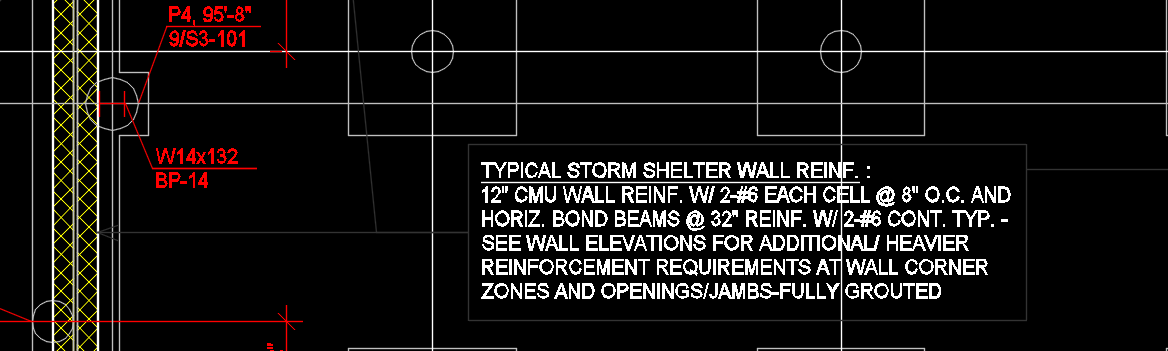
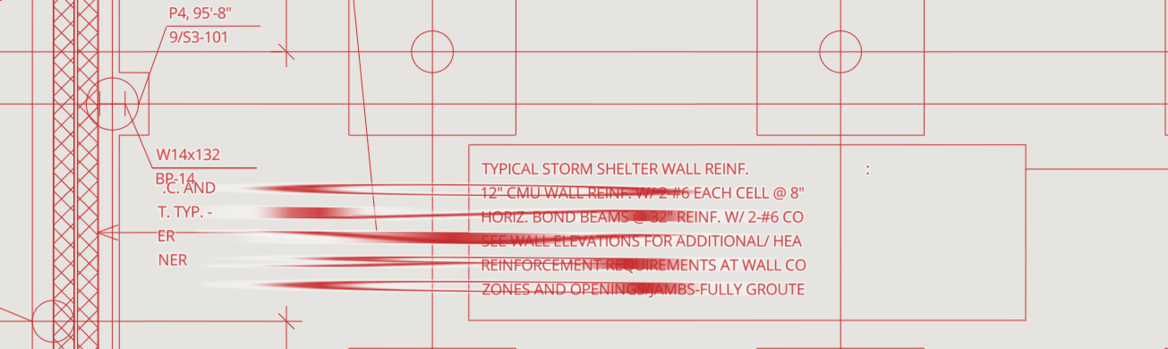
@ChrisLoer, here's an example (continuing from #6368). Our application displays design models in mapbox, but the models often contain longer lines of text, as seen above. The top image is from the model and the bottom image is of the same view in our app.
Doubling the possible width of labels would cover the majority of occurrences. Generally we see lines overflow by only a few characters (like the above example). And for the small number still too long, setting the max-width appropriately to wrap the line would be acceptable.
Is controlling the precision feasible for you all?
 james-wagner11
on 21 Mar 2018
james-wagner11
on 21 Mar 2018
That diagram looks cool -- I'm convinced. I'll try to put together a PR for this. I think it should be straightforward, but we'll see what problems turn up going from 1/64th pixel precision to 1/32nd pixel precision.
ChrisLoer
on 21 Mar 2018
I'm going to call this "fixed" with #6375, which doubles the supported label size. It's still possible to make labels that break, so we may run into this again, but I'm hoping this will be good enough and for now we don't have any plans to make further changes. Feel free to re-open.
ChrisLoer
on 22 Mar 2018
text-max-width invalid with a pure latin strings. https://jsfiddle.net/Vincent_Ting/8hm4r5cg/
Besides, I forked the fiddle of #6368 using version 0.52.0, but the problem reproduced agian when string length is greater than 79.
 initialdmg
on 5 Aug 2019
initialdmg
on 5 Aug 2019
I have test it against v1.2.0, showing that the limit is:
- Chinese character <= 42;
- Numbers characters <= 78;
- Alphabeta characters <= 92;
Maybe it is also related to fonts. It would be better we claim that if a text rendering length is greater than [512 px], there would be a rendering issue.
 jingsam
on 5 Aug 2019
jingsam
on 5 Aug 2019
@initialdmg The fiddle you provided has a text string with no spaces or punctuation that would allow a line break. Changing the text-field to "AAAAAAAA(bbbbbbbbbbbbbbbb)111111111111", for example breaks the the text across three lines.
@jingsam can you please share a fiddle of the issue with Chinese characters? Or better yet open a new ticket.
 asheemmamoowala
on 7 Aug 2019
asheemmamoowala
on 7 Aug 2019
@asheemmamoowala reproduce link: https://jsfiddle.net/jingsam/uw4dojyv/56/
The new limit is:
- Numbers < 79,
- Alphabeta < 92,
- Chinese < 353
Another question is that what characters are used to break words excpt space and \u200b?
jingsam
on 7 Aug 2019
Another question is that what characters are used to break words excpt space and
\u200b?
@jingsam you can find the breakable characters here https://github.com/mapbox/mapbox-gl-js/blob/master/src/symbol/shaping.js#L227-L245 Most of the line breaking logic follows this in the shaping.js file.
 ryanhamley
on 7 Aug 2019
ryanhamley
on 7 Aug 2019
@ryanhamley Thank you for the great tips. As Chinese do not have natural breakable space like english words, we usually use some hinting characters to break Chinese words, such as 中国|北京|天安门. On this case, line can only breaks at which | appear. I am sure mapbox-gl can handle that. The difference is that we need hidden the line break character |, so we want get this:
中国
北京
天安门
not this:
中国|
北京|
天安门
Although I can use \u200b instead of |, but it would make us harder to check the correctness of word segmentation.
PS: maybe we need create a new issue to address this problem.
jingsam
on 8 Aug 2019
Hi @ChrisLoer , i see this issue has been fixed in https://github.com/mapbox/mapbox-gl-js/pull/6375.
Is the fix also included in native (iOS SDK) release? Thanks.
 leen1218
on 12 Sep 2019
leen1218
on 12 Sep 2019
@leen1218 The native port was merged in https://github.com/mapbox/mapbox-gl-native/pull/11508 and is available in the iOS SDK v4+
asheemmamoowala
on 12 Sep 2019
I am still getting this issue with 1.10.0
https://jsfiddle.net/benderlio/hyo9n8ab/6/
 benderlidze
on 5 May 2020
benderlidze
on 5 May 2020
Related issues
 infacq
·
3Comments
jfirebaugh
·
3Comments
infacq
·
3Comments
jfirebaugh
·
3Comments
 mollymerp
·
3Comments
mollymerp
·
3Comments
 Scarysize
·
3Comments
Scarysize
·
3Comments
 samanpwbb
·
3Comments
samanpwbb
·
3Comments
Most helpful comment
That diagram looks cool -- I'm convinced. I'll try to put together a PR for this. I think it should be straightforward, but we'll see what problems turn up going from 1/64th pixel precision to 1/32nd pixel precision.