Manim: [BUG-General] Text not working properly on master compared to v0.1.0
Describe the bug
I have a method that reads a codefile, creates a Text / Paragraph object and colors it via tokens generated by pygments (through the set_color method on different ranges of the Text object e.g. Text[1:10]).
This is working very neat on version 0.1.0 as the manim image below shows:
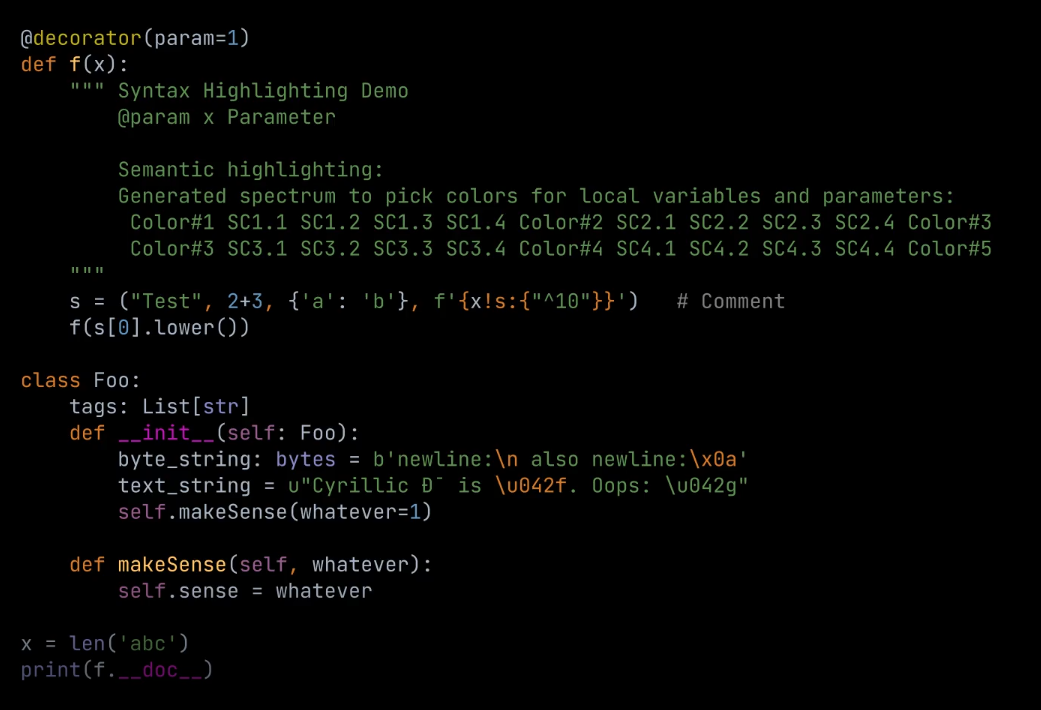
However, when I run the same code on the current master branch, I get the following output:
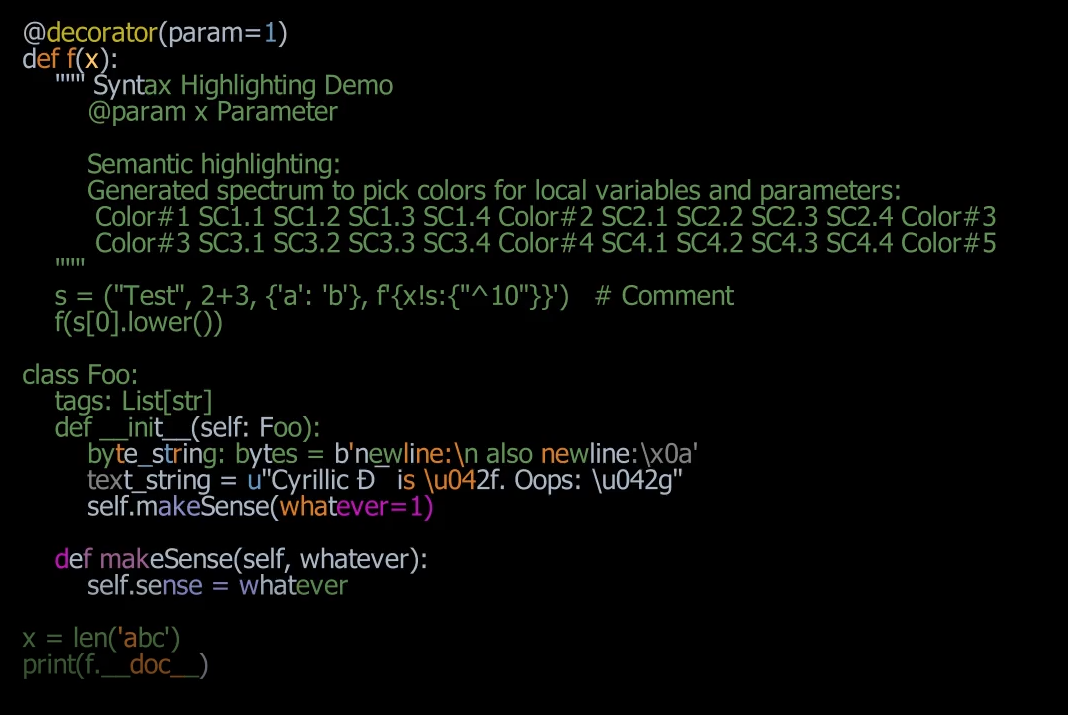
The first problem (resulting in the different style) is that the font is not detected anymore. The fontname is JetBrains Mono Regular and is installed on my PC.
The second problem (resulting in the weird coloring) is that the Text implementation seems to have changed to not include specific characters anymore. This can be seen on the next two images. The first shows v0.1.0 and the second the current version (latest master). It can be seen that the Text object is not of the same length as the raw string that was used to create the Text object.


Would really appreciate if you can provide some clarity about:
- Whether the Text stripping is intended and why it is done (and what gets stripped)
- Why the font is not detected anymore
System Specifications
System Details
- OS: Windows 10 v20H2
- RAM: 16 GB
- Python version): 3.8 (venv using Poetry)
Latex details
- Distribution: ManimLaTeX
- Installed packages: default (no new packages installed)
FFMPEG
Output of ffmpeg -version:
4.3.1
 ChristianCoenen
All 23 comments
Yeah, the backend has been changed to Pango and this needs some investigation.
 naveen521kk
on 13 Nov 2020
naveen521kk
on 13 Nov 2020
Hello! Thank you for your report.
So, both issues are caused by our recent switch of the text rendering engine from Cairo to Pango; if you want to restore functionality it should be sufficient to change Text(lines_str, **config) over here
https://github.com/ManimCommunity/manim/blob/a0548a7e5cd20a7fdd9c11734709569188ac2658/manim/mobject/svg/text_mobject.py#L393
to CairoText(lines_str, **config).
We also know that the characters that are being stripped from the text are the spaces; the coloring is applied to the code as if the spaces were still counted (which is why it looks so off).
I have no idea about why the font is not detected, however -- @naveen521kk, do you know?
 behackl
on 13 Nov 2020
behackl
on 13 Nov 2020
Maybe the family name be wrong?
I have no idea about it. Did you get any console warning saying that you may get ugly text? (If you are running on pycharm terminal please try and switch to cmd to see it).
Also, if it doesn't make any error message we can't figure it out we can't do anything because we dont have access to the C API underneath it.
Also, is it possible to add a link to the font so that we can try it?
naveen521kk
on 13 Nov 2020
I can confirm that in the past I've tried selecting a font that I know is installed in my system, but Pango will just use the default font without any kind of visible error message.
 leotrs
on 13 Nov 2020
leotrs
on 13 Nov 2020
Pango uses Fontconfig at the backend to select font(we literally has no access to its API). Maybe your font config is not configured properly to detect it?
@leotrs try running fc-list and check your font is there? If it is pass the exact family name and try again.
naveen521kk
on 13 Nov 2020
See #625
 huguesdevimeux
on 13 Nov 2020
huguesdevimeux
on 13 Nov 2020
@naveen521kk good recommendation. We should document somewhere that PangoText can only access fonts that are shown when you run fc-list.
leotrs
on 13 Nov 2020
The thing is windows users will not have fc-list because windows doesn't use Fontconfig to manage it's font. It uses its own font API.
naveen521kk
on 13 Nov 2020
Thanks for the quick responses. Using CairoText works for me. But I think I'll update my code then to colorize the PangoText correctly (I read that Cairo might be dropped in the future). I also didn't know about Code mobject. Will take a look at it.
Good to know about the font. JetBrains Mono is not listed when running fc-list.
@naveen521kk I was able to run fc-list on Windows
ChristianCoenen
on 13 Nov 2020
(that could be because you have installed full gtk.)
naveen521kk
on 13 Nov 2020
Its a fresh Windows installation with only PyCharm, Python, Poetry, GitKraken, manim dependencies, DaVinciResolve and Discord. There is nothing named gtk on it (not even a folder). But yeah, its probably due to some other dependency that made the command available (probably ManimLatex?).
Anyway, so the problem is that fonts which are not listed by fc-list are not found by Pango. So, is there any way to install the font on Windows in a specific way that it is listed? I haven't found anything about it.
ChristianCoenen
on 13 Nov 2020
Even I don't know. Usually installing the font will simply work out of the box.
Also, you may have installed one of manim dependency which contains that, especially if you would have followed tob, tutorials.
naveen521kk
on 14 Nov 2020
Found out on discussing with Pango developers that this is because of ligatures and can't be avoided. But Pango itself can handle colours but currently, our SVG parser doesn't support this. So, moving the Text class to not use the SVG parser may be one way but that requires a lot of work and the binding we use isn't complete. So, one now using CairoText would be a possible solution and also making the CodeMobject use CairoText.
https://github.com/leifgehrmann/pangocairocffi/issues/19
https://gitlab.gnome.org/GNOME/pango/-/issues/516
naveen521kk
on 18 Nov 2020
Ooooooh ligatures!! Yikes I wouldn't have thought of that. Thanks for the report @naveen521kk
So as far as I can tell, the actual fix is to fix our SVG parser so read SVGs output by Pango. This is of course a major task that we have been putting off for a while. OR we have to rewrite the way we are coloring words in PangoText.
So right now, if the user wants different fonts, they have to use PangoText, but if they want colored text, they have to use CairoText :thinking:
Thoughts? @eulertour @behackl @cobordism @huguesdevimeux
leotrs
on 18 Nov 2020
OR we have to rewrite the way we are coloring words in PangoText.
I would rather not use SVG here. Cairo can directly return NumPy arrays. So, using that will work but requires a full rewrite of Text class.
naveen521kk
on 18 Nov 2020
Or we can simply set a parameter like code where it renders character by character as in https://github.com/naveen521kk/manim/commit/ab239c22b326d6010957f0bb57289a0736a844ab if code is set to true, then everything would look good? What to you think?
naveen521kk
on 18 Nov 2020
Character-by-character would mean no ligatures no? Also perhaps no kerning, tracking, etc. That would make text render in a way that is not as intended. Also, I wonder if that would be considerably slower?
leotrs
on 18 Nov 2020
Character-by-character means no ligatures yes. I don't know whether it make it slow.
That would make text render in a way that is not as intended.
That's why I am saying it will be done only when a parameter is set to true.
Or rather than character by character we can use layout.set_markup("<span font_features='liga=0'>#This is some custom confl</span>") which will simply disable it. Note, if this is done for other languages which depend on ligatures heavily then this will render unexpected text. (For example Arabic in the code).
naveen521kk
on 18 Nov 2020
I see. Yeah, there are a few ways of patching it. But no easy way of actually fixing it it seems :sweat:
At this point I'm looking forward to hearing what others think. I'm not leaning either way right now.
leotrs
on 18 Nov 2020
I don't have a lot to add since I haven't had a part in the recent font developments, but from the issues I've seen on the discord and problems like this I think it'd be best for Cairo to be the default for rendering fonts and Pango to have opt-in APIs like PangoText and an optional installation.
This and the windows installation problem are both hard to debug and don't have good solutions even when they have been. It feels like a huge step backward in terms of stability.
 eulertour
on 19 Nov 2020
eulertour
on 19 Nov 2020
Is there any plan to address this? I'd rather not cut a new release with a known regression from the previous one.
eulertour
on 21 Nov 2020
I tend to agree. CairoText seems more stable, we should use it as default for a bit longer.
Development of PangoText should not stop, by any means, and all the work by @naveen521kk should not go to waste. Anyone want to pick up or help him finish ironing out the details?
leotrs
on 21 Nov 2020
It looks like reverting #609 is the first step, is everyone okay with that?
eulertour
on 21 Nov 2020
Related issues
naveen521kk
·
5Comments
huguesdevimeux
·
4Comments
 ackxolotl
·
4Comments
ackxolotl
·
4Comments
 Ammar34
·
6Comments
huguesdevimeux
·
7Comments
Ammar34
·
6Comments
huguesdevimeux
·
7Comments
Most helpful comment
I tend to agree. CairoText seems more stable, we should use it as default for a bit longer.
Development of PangoText should not stop, by any means, and all the work by @naveen521kk should not go to waste. Anyone want to pick up or help him finish ironing out the details?