Manim: Deprecated CLI flag is advertised on our github front page
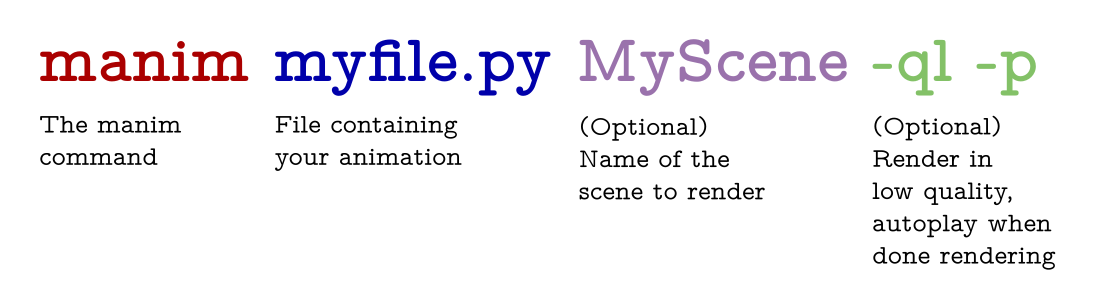
The main picture on our github landing page is
manim file.py Scene -pl
We should change it to manim myFile.py myScene -p -ql ... or even manimce if that is what we decide on as an entrypoint.
 cobordism
All 11 comments
Adding this to #148
 leotrs
on 19 Oct 2020
leotrs
on 19 Oct 2020
How was that picture even created?
 eulertour
on 20 Oct 2020
eulertour
on 20 Oct 2020
This has been there since The Beginning.
leotrs
on 20 Oct 2020
shall we make one with manim?
https://discord.com/channels/581738731934056449/581738732646957057/765182589807624192
cobordism
on 20 Oct 2020
Yeah, that'd be perfect
eulertour
on 20 Oct 2020
class cliExample(Scene):
    def construct(self):
        def myTex(*args, **kwargs):
            return Tex(
                *args,
                tex_template=TexFontTemplates.latin_modern_tw,
                background_stroke_width=0,
                **kwargs
            )

        cmd = myTex(
            r"\textbf{manim}",
            r"\textbf{  myfile.py}",
            r"\textbf{  MyScene}",
            r"\textbf{  -ql -p}",
        ).shift(1.5 * UP)
        cmd.set_color_by_tex("manim", "#AA0000")
        cmd.set_color_by_tex("file", "#0000AA")
        cmd.set_color_by_tex("Scene", PURPLE)
        cmd.set_color_by_tex("ql", GREEN)

        e1 = (
            myTex(r"The manim\\command", color=BLACK, tex_environment=None)
            .scale(0.4)
            .align_to(cmd[0], LEFT, alignment_vect=LEFT)
            .set_y(cmd[1].get_y(direction=DOWN) - 0.15, direction=UP)
        )
        e2 = (
            myTex(r"File containing\\your animation", color=BLACK, tex_environment=None)
            .scale(0.4)
            .align_to(cmd[1], LEFT, alignment_vect=LEFT)
            .set_y(cmd[1].get_y(direction=DOWN) - 0.15, direction=UP)
        )
        e3 = (
            myTex(
                r"(Optional) \\Name of the\\ scene to render",
                color=BLACK,
                tex_environment=None,
            )
            .scale(0.4)
            .align_to(cmd[2], LEFT, alignment_vect=LEFT)
            .set_y(cmd[2].get_y(direction=DOWN) - 0.15, direction=UP)
        )
        e4 = (
            myTex(
                r"(Optional) \\Render in \\low quality,\\ autoplay when\\ done rendering",
                color=BLACK,
                tex_environment=None,
            )
            .scale(0.4)
            .align_to(cmd[3], LEFT, alignment_vect=LEFT)
            .set_y(cmd[3].get_y(direction=DOWN) - 0.15, direction=UP)
        )

        self.add(cmd, e1, e2, e3, e4)
        self.wait(1)
^^ UPDATED SCRIPT ^^
cobordism
on 20 Oct 2020
How was that picture even created?
@eulertour in case you were still curious, I made that with Google Drawings 😆
 safinsingh
on 23 Oct 2020
safinsingh
on 23 Oct 2020

Two things to note here: myscene should not have the .py ending and further, it should be CamelCase.
I updated the script:
class cliExample(Scene):
    def construct(self):
        def myTex(*args, **kwargs):
            return Tex(
                *args,
                tex_template=TexFontTemplates.latin_modern_tw,
                background_stroke_width=0,
                **kwargs
            )

        cmd = myTex(
            r"\textbf{manim}",
            r"\textbf{  myfile.py}",
            r"\textbf{  MyScene}",
            r"\textbf{  -ql -p}",
        ).shift(1.5 * UP)
        cmd.set_color_by_tex("manim", "#AA0000")
        cmd.set_color_by_tex("file", DARK_BLUE)
        cmd.set_color_by_tex("MyScene", PURPLE)
        cmd.set_color_by_tex("ql", GREEN)

        e1 = (
            myTex(r"The manim\\command", color=BLACK, tex_environment=None)
                .scale(0.4)
                .align_to(cmd[0], LEFT, alignment_vect=LEFT)
                .set_y(cmd[1].get_y(direction=DOWN) - 0.15, direction=UP)
        )
        e2 = (
            myTex(r"File containing\\your animation", color=BLACK, tex_environment=None)
                .scale(0.4)
                .align_to(cmd[1], LEFT, alignment_vect=LEFT)
                .set_y(cmd[1].get_y(direction=DOWN) - 0.15, direction=UP)
        )
        e3 = (
            myTex(
                r"(Optional) \\Name of the\\ scene to render",
                color=BLACK,
                tex_environment=None,
            )
                .scale(0.4)
                .align_to(cmd[2], LEFT, alignment_vect=LEFT)
                .set_y(cmd[2].get_y(direction=DOWN) - 0.15, direction=UP)
        )
        e4 = (
            myTex(
                r"(Optional) \\Render in \\low quality,\\ autoplay when\\ done rendering",
                color=BLACK,
                tex_environment=None,
            )
                .scale(0.4)
                .align_to(cmd[3], LEFT, alignment_vect=LEFT)
                .set_y(cmd[3].get_y(direction=DOWN) - 0.15, direction=UP)
        )

        self.add(cmd, e1, e2, e3, e4)
        self.wait(1)
 kolibril13
on 24 Oct 2020
kolibril13
on 24 Oct 2020
cobordism
on 24 Oct 2020
It's worth note, you can combine the options -ql and -p into -pql
 jsonvillanueva
on 28 Oct 2020
jsonvillanueva
on 28 Oct 2020
@jsonvillanueva yes, but separating them is better for explanation
leotrs
on 28 Oct 2020
Related issues
 XorUnison
·
6Comments
XorUnison
·
6Comments
 ChristianCoenen
·
5Comments
ChristianCoenen
·
5Comments
 huguesdevimeux
·
4Comments
huguesdevimeux
·
4Comments
 nilaybhatia
·
7Comments
nilaybhatia
·
7Comments
 PgBiel
·
5Comments
PgBiel
·
5Comments
Most helpful comment