Manim: Exception: Latex error converting to dvi.
Hi. When I installed Manim, I first tried to render an animation to see if it works. I first issued the command below to render the _Square to Circle_ example, and it did well.
python3 ./manim.py example_scenes.py SquareToCircle -pl
But, whenever I try to render the other examples provided, it always makes the same error.
Exception: Latex error converting to dvi. See log output above or the log file: media/Tex/664e80e8d8d98482.log
Command issued : sudo -H python3 -m manim example_scenes.py OpeningManimExample -pl
This is the complete console log :
Media will be written to ./media/. You can change this behavior with the --media_dir flag.
latex: warning: running with administrator privileges

Sorry, but latex did not succeed.

The log file hopefully contains the information to get MiKTeX going again:

  /var/root/Library/Application Support/MiKTeX/texmfs/data/miktex/log/latex.log


Traceback (most recent call last):
  File "/Users/mac/Downloads/manim-master/manimlib/extract_scene.py", line 155, in main
    scene = SceneClass(**scene_kwargs)
  File "/Users/mac/Downloads/manim-master/manimlib/scene/scene.py", line 53, in __init__
    self.construct()
  File "example_scenes.py", line 20, in construct
    title = TextMobject("This is some \\LaTeX")
  File "/Users/mac/Downloads/manim-master/manimlib/mobject/svg/tex_mobject.py", line 147, in __init__
    SingleStringTexMobject.__init__(
  File "/Users/mac/Downloads/manim-master/manimlib/mobject/svg/tex_mobject.py", line 42, in __init__
    file_name = tex_to_svg_file(
  File "/Users/mac/Downloads/manim-master/manimlib/utils/tex_file_writing.py", line 20, in tex_to_svg_file
    dvi_file = tex_to_dvi(tex_file)
  File "/Users/mac/Downloads/manim-master/manimlib/utils/tex_file_writing.py", line 70, in tex_to_dvi
    raise Exception(
Exception: Latex error converting to dvi. See log output above or the log file: media/Tex/664e80e8d8d98482.log
I tried to search on google for any help, but all the that I read was about the same issue but on Windows, and I'm on mac. However, I continued searching and found this on StackOverflow :
That answer is no longer useful now because Manim has already solved that problem. So this may be due to two things: To give us a hint of what is wrong, go to the manimlib folder with the terminal and run the following:
latex tex_template.tex
We distinguish the two possible errors:Recognized the latex command but the compilation could not be completed because you are missing libraries, to solve this you can install the missing packages indicated by the terminal.
That LaTeX is not recognized as a command, in this case surely the PATH variable is not set correctly, here is the solution.
So I went to the manimlib folder and issued the following : latex tex_template.tex. And judging by the console log, it doesn't seem like its the second option because the latex command was recognized, but there is no further information about what's missing. This is the complete console log :
MacBook-Pro-de-MAC:manimlib mac$ latex tex_template.tex
log4cxx: setFile(/Users/mac/Library/Application Support/MiKTeX/texmfs/data/miktex/log/latex.log,true) call failed.
log4cxx: IO Exception : status code = 13
log4cxx: No output stream or file set for the appender named [RollingLogFile].
This is pdfTeX, Version 3.14159265-2.6-1.40.20 (MiKTeX 2.9.7250)

Sorry, but latex did not succeed.

The log file hopefully contains the information to get MiKTeX going again:

  /Users/mac/Library/Application Support/MiKTeX/texmfs/data/miktex/log/latex.log
MacBook-Pro-de-MAC:manimlib mac$ latex tex_template.tex
log4cxx: setFile(/Users/mac/Library/Application Support/MiKTeX/texmfs/data/miktex/log/latex.log,true) call failed.
log4cxx: IO Exception : status code = 13
log4cxx: No output stream or file set for the appender named [RollingLogFile].
This is pdfTeX, Version 3.14159265-2.6-1.40.20 (MiKTeX 2.9.7250)

Sorry, but latex did not succeed.

The log file hopefully contains the information to get MiKTeX going again:

  /Users/mac/Library/Application Support/MiKTeX/texmfs/data/miktex/log/latex.log
MacBook-Pro-de-MAC:manimlib mac$ latex tex_template.tex
This is pdfTeX, Version 3.14159265-2.6-1.40.20 (MiKTeX 2.9.7250)

Sorry, but latex did not succeed.

The log file hopefully contains the information to get MiKTeX going again:

  /Users/mac/Library/Application Support/MiKTeX/texmfs/data/miktex/log/latex.log
So I went to see what's on the latex.log file, and found this :
2020-01-28 21:28:52,077+0100 INFO  texworks - starting: MiKTeX TeXworks 0.6.3 (MiKTeX 2.9.7250)
2020-04-08 17:31:28,130+0100 INFO  latex - starting with command line: latex tex_template.tex
2020-04-08 17:31:28,135+0100 INFO  latex - allowing known shell commands
2020-04-08 17:31:28,135+0100 INFO  latex - enabling input (output) from (to) processes
2020-04-08 17:31:28,151+0100 INFO  latex - going to create file: latex.fmt
2020-04-08 17:31:29,772+0100 ERROR latex - /usr/local/bin/initexmf did not succeed; exitCode: 1
2020-04-08 17:31:29,772+0100 ERROR latex - output:
2020-04-08 17:31:29,772+0100 ERROR latex - log4cxx: setFile(/Users/mac/Library/Application Support/MiKTeX/texmfs/data/miktex/log/initexmf.log,true) call failed.
log4cxx: IO Exception : status code = 13
log4cxx: No output stream or file set for the appender named [RollingLogFile].

Sorry, but "MiKTeX Configuration Utility" did not succeed.

The log file hopefully contains the information to get MiKTeX going again:

  /Users/mac/Library/Application Support/MiKTeX/texmfs/data/miktex/log/initexmf.log

2020-04-08 17:31:29,774+0100 FATAL latex - The memory dump file could not be found.
2020-04-08 17:31:29,774+0100 INFO  latex - finishing with exit code 1
But I have no clue what to do. So please Help me. And also, I'm sorry for my probably bad english, I'm french so, be kind ^^
 xvetisky
All 12 comments
Got some other information on the initexmf.logfile :
020-04-08 19:28:22,695+0100 INFO  initexmf - starting: MiKTeX Configuration Utility 2.9.7259 (MiKTeX 2.9.7250)
2020-04-08 19:28:22,697+0100 INFO  initexmf - Operating on the private (per-user) MiKTeX setup
2020-04-08 19:28:22,697+0100 INFO  initexmf - starting with command line: initexmf --dump-by-name=latex --engine=pdftex
2020-04-08 19:28:22,699+0100 INFO  initexmf - running: miktex-makefmt --engine=pdftex --dest-name=latex --no-dump latex.ini --engine-option=-tcx=cp227.tcx --miktex-disable-maintenance
2020-04-08 19:28:23,144+0100 FATAL initexmf - Permission denied: path="/Users/mac/Library/Application Support/MiKTeX/texmfs/data/miktex/log/miktex-makefmt_2020-04-08-192823.out"
只需要对texlive进行更新即可
tlmgr update --self --all --reinstall-forcibly-removed
 liyiliuxingyu
on 9 Apr 2020
liyiliuxingyu
on 9 Apr 2020
@xvetisky did it worked.
 Mathoholic
on 14 Apr 2020
Mathoholic
on 14 Apr 2020
No
I had this error, I think it has to do with some network issues, not sure
MacBook-Pro-de-MAC:~ mac$ tlmgr update --self --all --reinstall-forcibly-removed

/Library/TeX/texbin/tlmgr: unexpected return value from verify_checksum: -5
MacBook-Pro-de-MAC:~ mac$
@liyiliuxingyu
xvetisky
on 15 Apr 2020
@xvetisky try reinstalling Latex.
But before you reinstall it, remove latex completely, then reinstall it.
Mathoholic
on 16 Apr 2020
I had a same problem with you. And I fix that by adding package
\usepackage{ucs} in tex file tex_template (manimlib/tex_template). I hope that help you fix this.
 tai9856
on 21 Apr 2020
tai9856
on 21 Apr 2020
@xvetisky were you able to try @tai9856's suggestion?
 leotrs
on 9 May 2020
leotrs
on 9 May 2020
Latex error converting to dvi has more than one thread in this repo. I tried every option which is mentioned here on git and the final solution was to use other distribution then MiKTeX (https://www.latex-project.org/get/), concretely TeX Live. After uninstall of MiKTeX, install Tex Live and restart my computer, everything works fine.
 DaliborCimr
on 25 May 2020
DaliborCimr
on 25 May 2020
@DaliborCimr Hmm let me try it...
 dipamsen
on 18 Jun 2020
dipamsen
on 18 Jun 2020
@leotrs Yes, but it didn't work. Currently trying to reinstall LaTeX.
xvetisky
on 26 Jul 2020
You need to add LaTeX to the path.
For me, this is was the path. C:\Program Files\MiKTeX\miktex\bin\x64
 AtaTrkgl
on 4 Sep 2020
AtaTrkgl
on 4 Sep 2020
Ok so for one MAC OS Solution. I'm currently using Catalina, and in some of the documentation within the Latext directory I found the following pdf. (See screenshot)
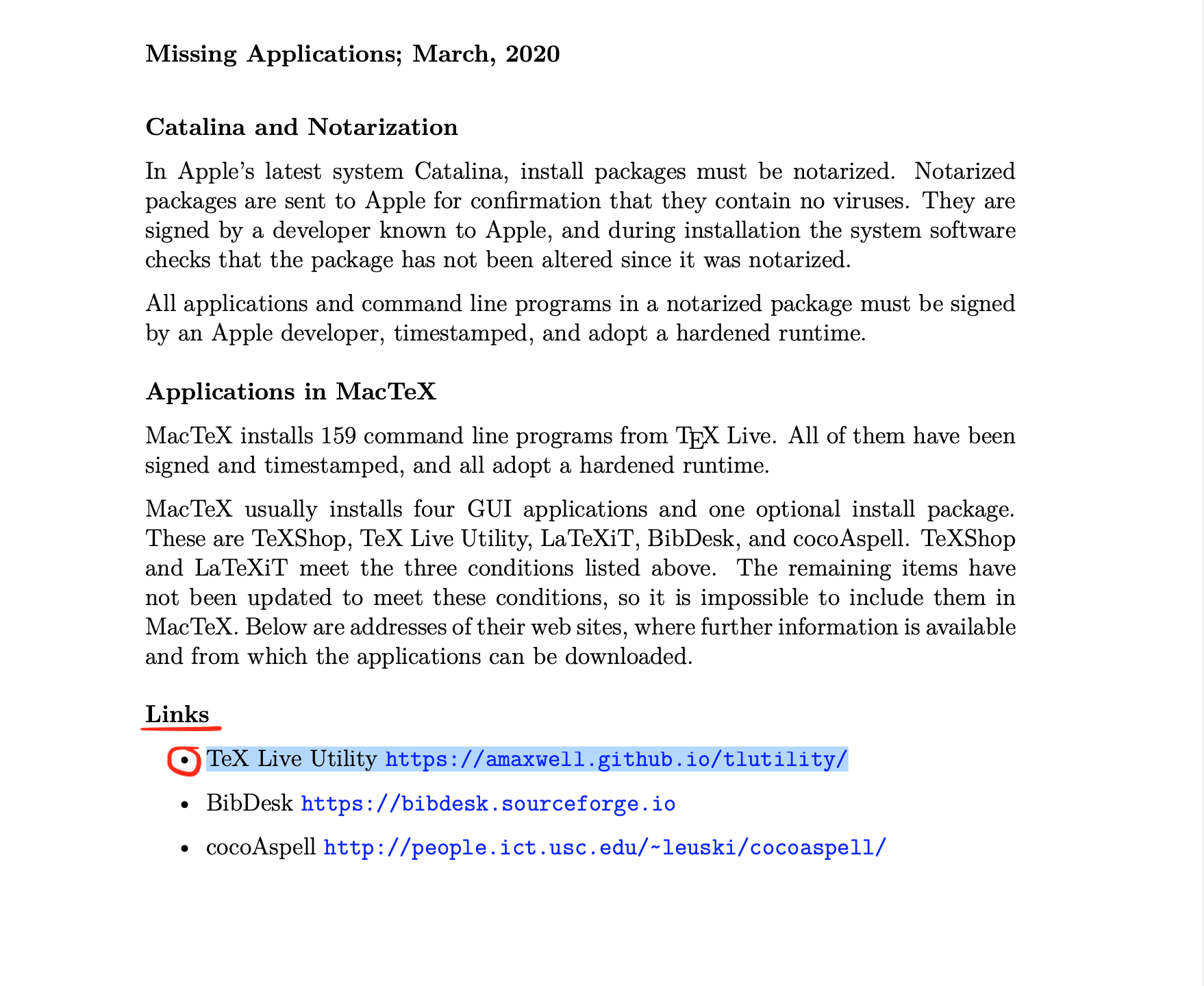
So from what I've understood, MACTEXT doesn't install TextLive. It has to be installed separately, so I did that by going to the link I pointed out. This is the first time I installed Latext and my frustration was enormous seeing that TextLive required us to install around 4000+ packages (btw u'll be given an option to install via a program with a lion and another via terminal. Choose the Terminal option). TextLive took around 7 GB of my storage, I was oblivious, I search on google why people in academia accept this bull$%t, why do they even like Latex?,
I was around 1000/4998 pkg., it was installing packages with the most mundane names, like "bib.archelogy or "learn_latex101" and shit like that...Anyhow, I opened a new shell and I decided to try again the command with just 1001/4998...packages installed into my computer.
python3 -m manim example_scenes.py WriteStuff -pl
And it worked, it fucking works! I decided to terminate the installation of TextLive and I hope this shit doesn't cause me any more problems in the near future.
I hope this can help someone and wish you all a great path of MANIM Learning. This is my first GitHub post and English is my second language. (Sorry for my Grammatical errors)
Cheers from Bolivia.
p.s. given that TextLive has eaten around 7 GB of my storage I'll try to delete these mundane packages little by little hoping that it doesn't affect my workflow with MANIM, I believe is just one file that is helping us fix the main issue that's why I'll try to search for that file and just keep that one/ones in my computer and delete the rest.
Cheers
 viccctv26
on 8 Jan 2021
viccctv26
on 8 Jan 2021
Related issues
 Planeuge
·
6Comments
Planeuge
·
6Comments
 liangpu597
·
5Comments
liangpu597
·
5Comments
 Elteoremadebeethoven
·
6Comments
Elteoremadebeethoven
·
6Comments
 BhupalaSriHari
·
5Comments
BhupalaSriHari
·
5Comments
 Glidos
·
5Comments
Glidos
·
5Comments
Most helpful comment
Latex error converting to dvi has more than one thread in this repo. I tried every option which is mentioned here on git and the final solution was to use other distribution then MiKTeX (https://www.latex-project.org/get/), concretely TeX Live. After uninstall of MiKTeX, install Tex Live and restart my computer, everything works fine.