Manim: Experimental use of Tikz on MacOS Sierra
Hello everyone, my problem is that when I use the tikz package in Windows and GNU/Linux they works well. However, when I want to use it on a MacOS Sierra, or use a similar package one (circuitikz, listings, etc.) it does not recognize the drawings, but in the other operating systems it works correctly. This is the error. If I compile it directly with PDFLaTeX, it works normally. Thank you.
Writing "\centering \begin{tikzpicture}
            \draw(0,0)--(3,3);
            \draw(0,0)--(1,4);
            \end{tikzpicture}" to /Users/raulvazquez/Documents/Daniel/manim_3b1b/manim-master/manimlib/files/Tex/219303c0b522abfb.tex


Traceback (most recent call last):
  File "/Users/raulvazquez/Documents/Daniel/manim_3b1b/manim-master/manimlib/extract_scene.py", line 155, in main
    scene = SceneClass(**scene_kwargs)
  File "/Users/raulvazquez/Documents/Daniel/manim_3b1b/manim-master/manimlib/scene/scene.py", line 52, in __init__
    self.construct()
  File "example_scenes.py", line 103, in construct
    """).set_stroke(WHITE,5)
  File "/Users/raulvazquez/Documents/Daniel/manim_3b1b/manim-master/manimlib/mobject/svg/tex_mobject.py", line 146, in __init__
    self.break_up_by_substrings()
  File "/Users/raulvazquez/Documents/Daniel/manim_3b1b/manim-master/manimlib/mobject/svg/tex_mobject.py", line 183, in break_up_by_substrings
    sub_tex_mob.move_to(self.submobjects[last_submob_index], RIGHT)
IndexError: list index out of range
On Arch Linux:

TikzMobject is the same that TextMobject but the stroke is 5.
 Elteoremadebeethoven
All 8 comments
I had the same problem. I'm under High Sierra macOS system. This is what I found so far:
First, you must add some object (for example, text) in the TexMobject (but this is perhaps I use a december 2018 version of manim).
class TikZ(Scene):
    def construct(self):
        tikzcode = TexMobject("hello\\tikz\\draw[red] (0,0) -- (1,2) -- (2,1);world")
        self.add(tikzcode)
Without it, I encounter the same error message:
sub_tex_mob.move_to(self.submobjects[last_submob_index], RIGHT)
IndexError: list index out of range
But with this above code, I don't have the TikZ graphism displayed:

In the file utils/tex_file_writing.py, we found 2 methods: tex_to_dvi and dvi_to_svg. The latter use dvisvgm and options -n -v 0.
According to https://tex.stackexchange.com/questions/51757/how-can-i-use-tikz-to-make-standalone-svg-graphics/71648#71648, dvisvgm -l must return a line beginning with ps. It's not my case.
According to https://dvisvgm.de/FAQ/, in paragraph "Why is dvisvgm’s PostScript support disabled on my machine?", I enter dvisvgm -h in terminal to see if option --libgs is here (it's my case).
So I must call dvisvgm with --libgs="Path/to/libgs.dylib" option.
In my case, it's --libgs="/opt/local/lib/libgs.dylib" (I have installed ghostscript with macports).
So in utils/tex_file_writing.py, I add in line 95, after the line 94 (in the current version, it's the line 88, after the line 87, so the old line 88 become 89 etc.):
"--libgs='/opt/local/lib/libgs.dylib'", # line added in order to convert DVI to SVG with TikZ objects
So, with the code:
class TikZ(Scene):
    def construct(self):
        tikzcode = TexMobject("\\text{hello}\\tikz\\draw[red] (0,0) -- (1,2) -- (2,1);\\text{world}")
        self.add(tikzcode)
The SVG file outputted (in manim/files/TeX) is yet correct:
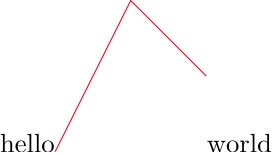
But not the final output from manim:

I don't know why.
I hope this can help you.
 quark67
on 16 Apr 2019
quark67
on 16 Apr 2019
Thank you, I gonna try it.
Elteoremadebeethoven
on 16 Apr 2019
THANKS, In my case, it works!!
"--libgs='/usr/local/Cellar/ghostscript/9.26_1/lib/libgs.dylib'"
The reason the manim version looks like a triangle instead of a pair of lines has to do with the default configuration of how SVG objects are drawn. Use set_fill to set the opacity of the line to zero and make sure you have a non-zero stroke_width and a stroke_color set. I think this will give you the manim output you want.
 zimmermant
on 4 May 2019
zimmermant
on 4 May 2019
@zimmermant I have tested this:
class TikZ(Scene):
    CONFIG = {
        "stroke_width" : 0.5,
        "stroke_color" : YELLOW
        }
    def construct(self):
        tikzcode = TexMobject("\\text{hello}\\tikz\\draw[red] (0,0) -- (1,2) -- (2,1);\\text{world}")
        tikzcode.set_fill(opacity=0)
        self.add(tikzcode)
This give only a black screen.
Can you give a more complete explanation?
And if I set a color, the color used in the tikz code is not used? The SVG output as however the correct (tikz) colors.
quark67
on 4 May 2019
@quark67 try this:
class TikZ2(Scene):
    CONFIG = {
        "stroke_width" : 0.5,
        "stroke_color" : YELLOW
        }
    def construct(self):
        tikzcode = TexMobject("\\text{hello}",
            "\\tikz\\draw[red] (0,0) -- (1,2) -- (2,1);",
            "\\text{world}")
        tikzcode[1].set_fill(opacity=0)
        tikzcode[1].set_stroke(None,2)
        tikzcode[1].set_color(RED)
        self.add(tikzcode)
We can't set the color by TeX commands, so, we have to set the color with commands of manim.
I like more this code:
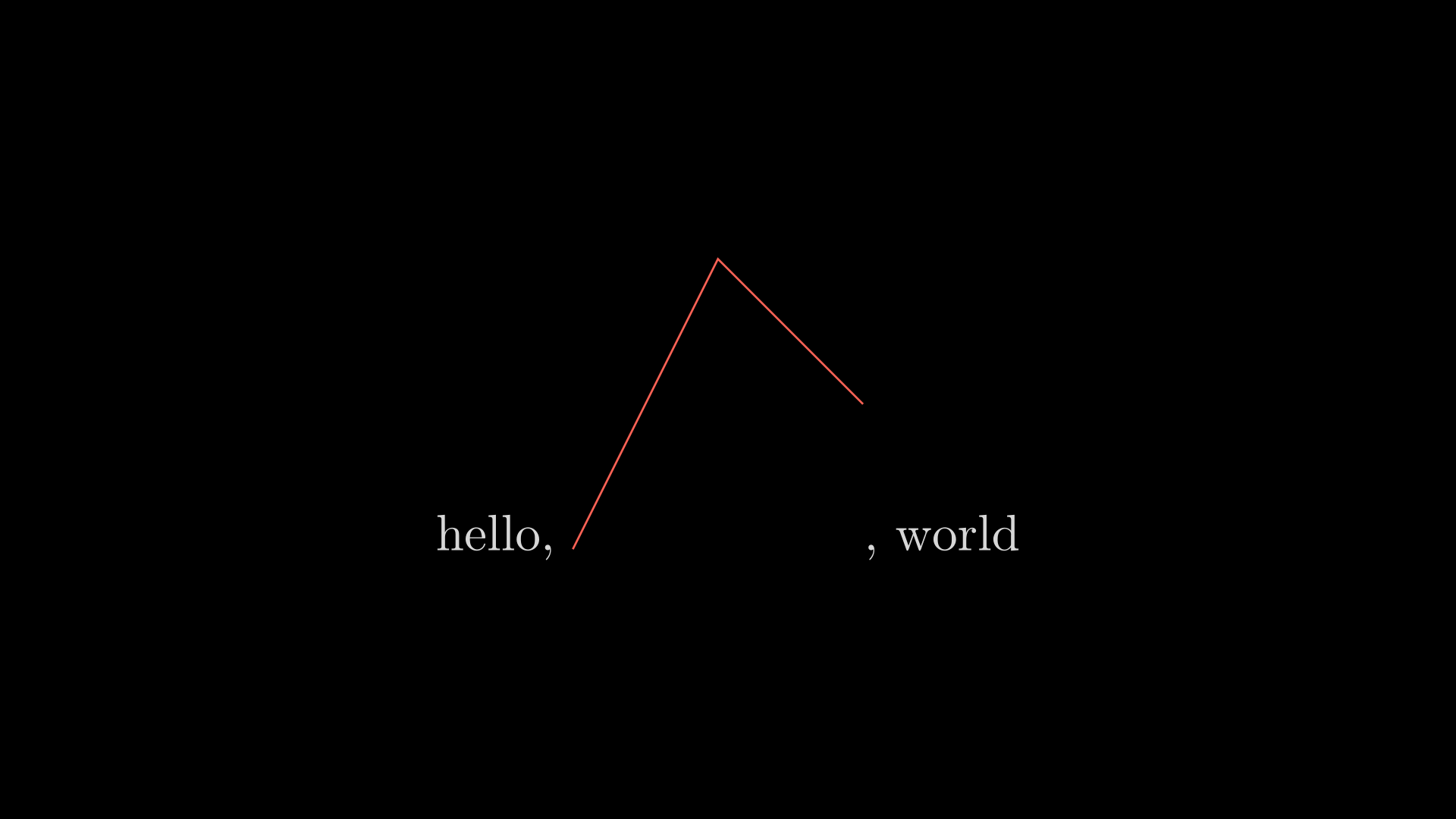
class TikZ3(Scene):
    def construct(self):
        tikzcode = TextMobject(r"""hello,
            \begin{tikzpicture}
            "\draw (0,0) -- (1,2) -- (2,1);
            \end{tikzpicture},
            world""")
        tikzcode[6:-6].set_fill(None,0) \
                      .set_stroke(None,2) \
                      .set_color(RED)
        self.add(tikzcode)
Result:
Elteoremadebeethoven
on 5 May 2019
The TikZ2 scene don't display as expected here. Probably because a use a December 2018 version of manim, and many change and break code occurs since.
Anyway, the TikZ3 scene is correct and display fine.
By the way, why does the file manim/manimlib/tex_template.tex have the line 16:
\usepackage{xcolor}
if the color isn't really used?
Example of non working code:
class TexColor(Scene):
    def construct(self):
        coloredText = TextMobject("Hello \\color{red}rouge \\color{blue}bleu")
        self.add(coloredText)

quark67
on 5 May 2019
I really do not know, maybe in old versions of manim it worked.
Elteoremadebeethoven
on 6 May 2019
Related issues
 lucyliu2016
·
6Comments
lucyliu2016
·
6Comments
 samsamson33
·
5Comments
samsamson33
·
5Comments
 GrouperTamaki
·
5Comments
GrouperTamaki
·
5Comments
 Planeuge
·
6Comments
Planeuge
·
6Comments
 ZQiu233
·
3Comments
ZQiu233
·
3Comments