Manageiq: VMware VMRC Console Not Available
I am unable to use VMware VMRC consoles on VMware VMs. The Console Access button is greyed out.
 agrare
All 9 comments
@agrare did you set up the separate credentials in the VMRC tab of the provider edit form?
 skateman
on 18 Feb 2019
skateman
on 18 Feb 2019
I think this is the problem, and as there's no other item enabled in the dropdown for the Access, the whole dropdown gets disabled so you can't hover over the VM Console and see the cause of this issue.

@martinpovolny, @terezanovotna possible issue with the toolbars, if nothing is enabled in a toolbar, you're not able to see the cause why they are disabled as you cannot hover on the sub-elements.
skateman
on 18 Feb 2019
I see two possible solutions:
- have dropdowns always enabled, so allow them to expand even if all their children are disabled
- include the tooltips of the children to the dropdown if it is disabled so the user can see the causes there
skateman
on 18 Feb 2019
have dropdowns always enabled, so allow them to expand even if all their children are disabled
That is the behavior that we had until recently.
We have recently implemented disabling drop downs in all buttons under it are disabled: https://github.com/ManageIQ/ui-components/pull/357
This change was done based on a "regression" and "test blocker" BZ: https://bugzilla.redhat.com/show_bug.cgi?id=1633727
We need the UX @terezanovotna and maybe product management actually decide what is the expected behavior of the toolbar buttons and DOCUMENT it.
FYI: @h-kataria
 martinpovolny
on 18 Feb 2019
martinpovolny
on 18 Feb 2019
There needs to be some notification why such action cannot be completed and what to do. I suggest using hover message. What do you think?If we agree, we can add it to documentation.
Do we have more specific data/message to display on hover?
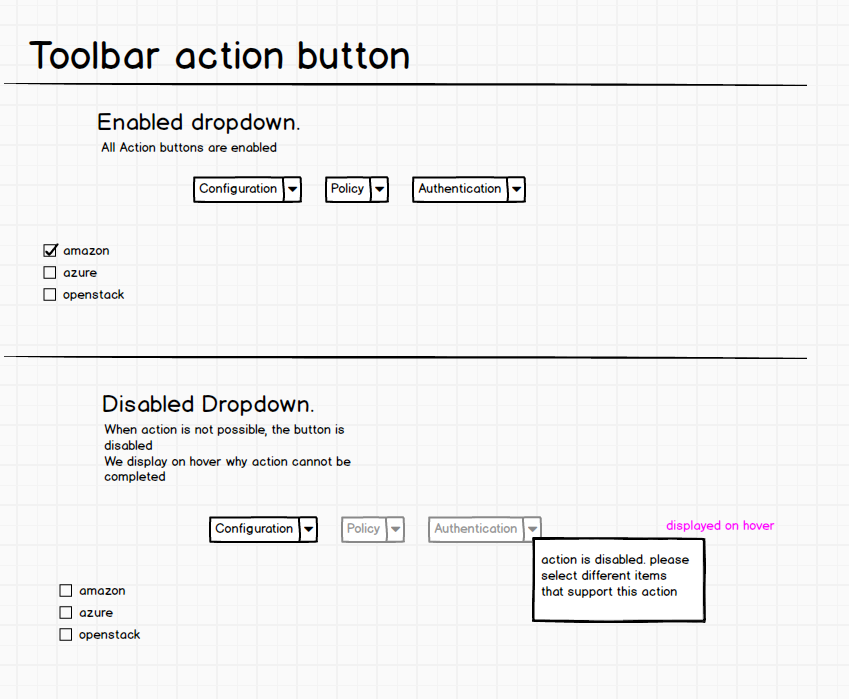
 terezanovotna
on 18 Feb 2019
terezanovotna
on 18 Feb 2019
did you set up the separate credentials in the VMRC tab of the provider edit form?
I didn't know that I needed them (which is sad because now I remember the PRs that added that :laughing:)
It also wasn't obvious from the VM page that there were other options for remote console that could be selected from the settings page. Without knowing already I assumed I could select if I wanted to use VNC, VMRC, or WebMKS from that drop-down on the VM page.
agrare
on 18 Feb 2019
@terezanovotna I think you did not understand the issue completely, so let's go deeper. There's a dropdown button called Access with 2 sub-items VM Console and Web Console. The enabledness of these two depend on some conditions and they have appropriate tooltips if they're not enabled, that's not a problem. The conditions are independent from each other, so the reasons of being disabled can be completely different for the two. The issue kicks in if none of these two are enabled and therefore their parent gets disabled as well. You cannot expand the Access dropdown, i.e. you're not able to hover on its children to see in their tooltip why they are disabled.
skateman
on 18 Feb 2019
How about we disable the parent button and then show all the "why it cannot be completed messages" on hover? Basically squashing the tooltips into one parent location.
terezanovotna
on 14 Mar 2019
@miq-bot close_issue
skateman
on 19 Mar 2019
Related issues
 ahrechushkin
·
8Comments
ahrechushkin
·
8Comments
 jrafanie
·
4Comments
jrafanie
·
4Comments
 chessbyte
·
5Comments
chessbyte
·
5Comments
 jvlcek
·
4Comments
jvlcek
·
4Comments
 durandom
·
8Comments
durandom
·
8Comments