Makie.jl: Plot functions on changing meshes
Hi,
I want to plot functions on changing meshes without re-creating the scene, but I don't know how to lift both of mesh and function to update the plot.
Here is an MWE which demonstrates the problem.
I can plot changing meshes just by lifting the mesh parameter in Makie.mesh!
I can change the function values by lifting the color parameter..
But how to do both at once ? The simple test fails, as both lifts trigger separate redraws.
Re-creating the scene is not an option as I want to have this in 3D, the changing mesh shall be a plane section controlled by a slider.
Jürgen
 j-fu
j-fu
All 26 comments
I'll take a look tomorrow! ;)
 SimonDanisch
on 10 Dec 2020
SimonDanisch
on 10 Dec 2020
Ok, this is not perfect, but works:
using Triangulate
using GLMakie
using GeometryBasics

"""
    Create triangular mesh
"""
function trimesh(;vol=0.1)
    tio=TriangulateIO()

    tio.pointlist=Cdouble[0 0;
              1 0;
              1 1;
              0 1]'

    tio.segmentlist=[1 2;
                     2 3;
                     3 4;
                     4 1;]'

    tri,voro=triangulate("pAqa$(vol)",tio)
    tri
end

"""
  Create mesh from triangulation
"""
function make_mesh(tio, fac)
    coord=tio.pointlist
    cellnodes=tio.trianglelist
    npoints=size(coord,2)
    nfaces=size(cellnodes,2)

    points=Vector{Point2f0}(undef,npoints)
    for i=1:npoints
        points[i]=Point2f0(coord[1,i],coord[2,i])
    end
    faces=Vector{GLTriangleFace}(undef,nfaces)
    for i=1:nfaces
        faces[i]=TriangleFace(cellnodes[1,i],cellnodes[2,i],cellnodes[3,i])
    end
    coord = tio.pointlist
    f(x,y)=sinpi(fac*x)*cospi((fac+1)*y)
    cmap = to_colormap("hot")
    func = [f(coord[:,i]...) for i=1:size(coord,2)]
    ext = extrema(func)
    colors = AbstractPlotting.interpolated_getindex.((cmap,), func, (ext,))
    GeometryBasics.Mesh(meta(points, color=colors), faces)
end

"""
     Plot changing function on finer and finer meshes
"""
function test12()
    grid=trimesh(vol=1.0e-3)
    fac=1.0
    mnode=GLMakie.Node(make_mesh(grid, fac))
    scene=GLMakie.Scene()
    GLMakie.mesh!(scene, mnode)
    display(scene)
    vol=0.1
    for i=1:50
        fac=fac+0.05
        vol=vol*0.9
        grid=trimesh(vol=vol)
        tmesh=make_mesh(grid, fac)
        mnode[]=tmesh
        yield()
    end
end
test12()
Yeah, works, just replaced
yield
by
Makie.update!(scene)
Makie.display(scene)
Makie.sleep(1.0e-2)
This now shows an instance of each mesh with the function on it.
For me these are the the essential lines:
ext = extrema(func)
colors = Makie.AbstractPlotting.interpolated_getindex.((cmap,), func, (ext,))
GeometryBasics.Mesh(meta(points, color=colors), faces)
I had the suspicion that something like this would be the way to go, but was not able to figure it out.
j-fu
on 10 Dec 2020
Works also in the envisioned 3D context :)
j-fu
on 10 Dec 2020
How to set lighting and material in this context ? Seems to have different defaults now.
j-fu
on 10 Dec 2020
Nooo!
Makie.update!(scene)
Makie.display(scene)
Makie.sleep(1.0e-2)
This is wrong, you should __never__ call display in a loop!
Update only needs to be called if you want to update the limits - if the limits don't change, you won't need it.
sleep should only be used, when you want to slow things down.
SimonDanisch
on 10 Dec 2020
How to set lighting and material in this context ? Seems to have different defaults now.
Can you show that? Shading shouldn't really be different :D
SimonDanisch
on 10 Dec 2020
Nooo!
Makie.update!(scene)
Makie.display(scene)
Makie.sleep(1.0e-2)
This is wrong, you should never call display in a loop!
Update only needs to be called if you want to update the limits - if the limits don't change, you won't need it.
sleepshould only be used, when you want to slow things down.
Ok I tend to understand. In this case I really need to slow things down in order to see the evolution, just as a characteristics of this example.
j-fu
on 11 Dec 2020
How to set lighting and material in this context ? Seems to have different defaults now.
Can you show that? Shading shouldn't really be different :D
Was kind of in my imagination.... The normals were missing anyway, figured them out now...
EDIT: how to enable two-sided lighting ?
j-fu
on 11 Dec 2020
Two sided lighting is not a thing anymore, but you can turn up ambient::Vec3f0 to increase the base brightness of a plot.
 ffreyer
on 11 Dec 2020
ffreyer
on 11 Dec 2020
Yeah sure.... oh the good old times of OpenGL 1.1...
j-fu
on 11 Dec 2020
I think we can close this - thanks for helping. There may be more questions which should have their own issue...
j-fu
on 11 Dec 2020
Bringing that back would be a ~2 line change. Maybe we can activate it if shading=:twosided or so!
SimonDanisch
on 11 Dec 2020
Or maybe a backlight::Float32 uniform, so you can control the strength? I could set that up again over the weekend.
ffreyer
on 11 Dec 2020
Bringing that back would be a ~2 line change. Maybe we can activate it if
shading=:twosidedor so!.
This would be really useful. I am working on visualization on 3D tetmeshes where you can interactively
slice through the data. So I reopen...
So far I have the outer box stuff going:
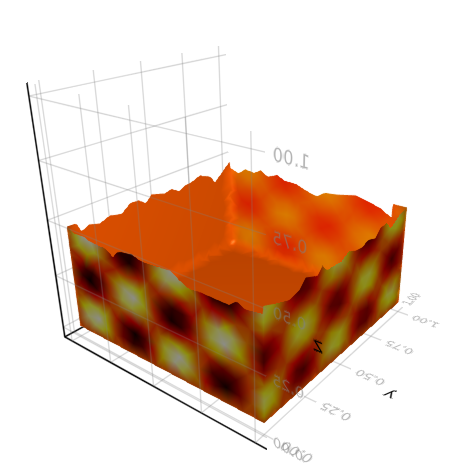
Here you see that we get nice lighting on the inner side, but not on the outer side. Two-sided really makes sense here.
Next is marching tets on the intersection plane(s). Did this some time ago already for gltools so just need to lift the C code...
This currently lands in ExtendableGrids, I will see how this will evolve. Would like to make this as generic as possible, and OTOH ready to be used also with PyPlot or MeshCat (and yeah WGLMakie from Pluto, but this has some serious perfomance issues. Talking with @fonsp about this as well.)
I might file a downstripped example to MakieGallery if I find time.
j-fu
on 11 Dec 2020
The dream would be to just be able to add lights... I guess we could use a fixed size array of lights, and then recompile the shader for different lengths of that array .... But if that's too much, I like backlight much more than shading=:twosided
(and yeah WGLMakie from Pluto, but this has some serious perfomance issues. Talking with @fonsp about this as well.)
Depending on how you do it, it could be lighting fast though ;) If you use JSServe.Slider and observables, it should be very fast.
SimonDanisch
on 11 Dec 2020
Btw, the speed problem when not using JSServe.Slider for Pluto + Makie needs to be resolved in Makie...
SimonDanisch
on 11 Dec 2020
I think so, too. I did some first tests with both WGLMakie and MeshCat. Each Makie figure keeps one core spinning at 100%, while this is not the case for MeshCat. I can clean these and provide them.
@fonsp criticises the use of another port for both (he may have a point with this, in particular when interfacing a remote machine), but this solving this issue seems to be another story.
j-fu
on 11 Dec 2020
Yeah, I actually just asked @fonsp about a possibility to use the same webserver ;)
Each Makie figure keeps one core spinning at 100%
Ok, so this for a "static" plot and has nothing todo with pluto or anything, is that right? WGLMakie may rerender at vsync speed by default, which could be the issue here...
SimonDanisch
on 11 Dec 2020
The dream would be to just be able to add lights... I guess we could use a fixed size array of lights, and then recompile the shader for different lengths of that array .... But if that's too much, I like
backlightmuch more thanshading=:twosided
backlight would be something we can add really quickly. Multiple lights via shader recompilation shouldn't be that hard either, I think, but requires some thought on what to do with diffuse and specular (and maybe ambient too). It would be nice to split these up into a Material and a Light as well. Otherwise each light would need to have attributes based on material * light, which would be weird if you actually want to mess with stuff like lightcolor.
ffreyer
on 11 Dec 2020
Yeah lets keep it simple for now ;)
SimonDanisch
on 11 Dec 2020
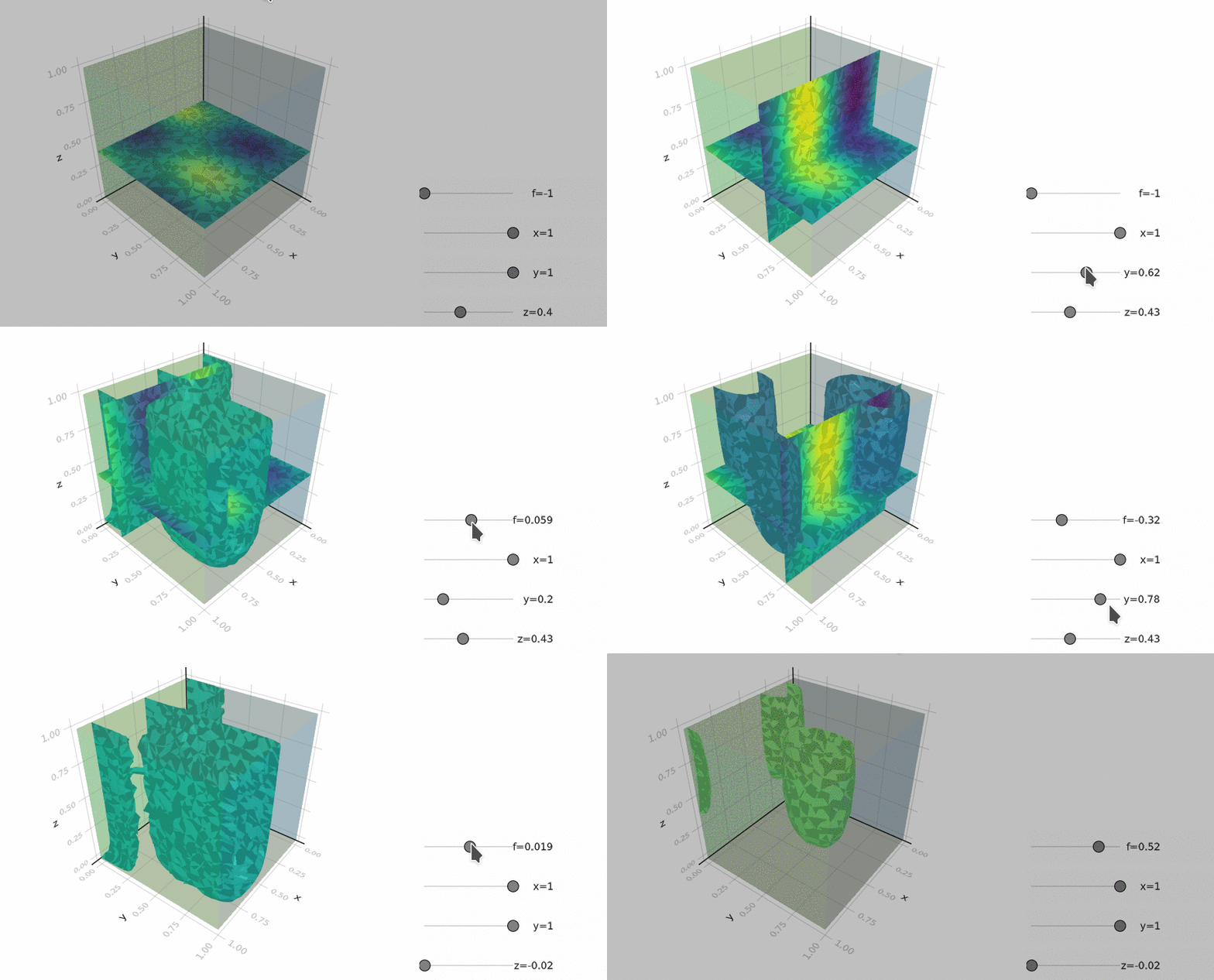
.... really need to fix the lighting...
j-fu
on 12 Dec 2020
That would be fixed with backlight=1f0, though it's more a mesh issue. It looks like you either have two meshes at the same position here, one with outside-facing normals and one with inside-facing normals, or that the normals flip directions between faces. If you don't specify the normals yourself make sure that the winding direction of each face is the same. (For example TriangleFace(1,2,3) and TriangleFace(1,3,2) would have opposite winding and generate normals in opposite directions.)
ffreyer
on 12 Dec 2020
Sure this is the reason.
However doing this here would require quite a lot of additional computational steps. The triangles come as they are from a marching tetrahedra algorithm. Each tet intersection consists of one or two triangles. In order to fix the orientations I would have to link all of them, i.e. identify the plane/isosurface intersection points of neigboring tets. Then I could sort out the orientations.
Doable of course but relatively expensive (needs to run on each move of the slider).
So two the plane - edge intersection point on each given grid edge comes in several instances (as many as there are adjacent tets) into the mesh, and IMHO this is completely sufficient for visualization. So the backlight thing is really the way to go here, and no need to worry about the "superfluous" points.
This works on meshes of \approx 10^6 tets:
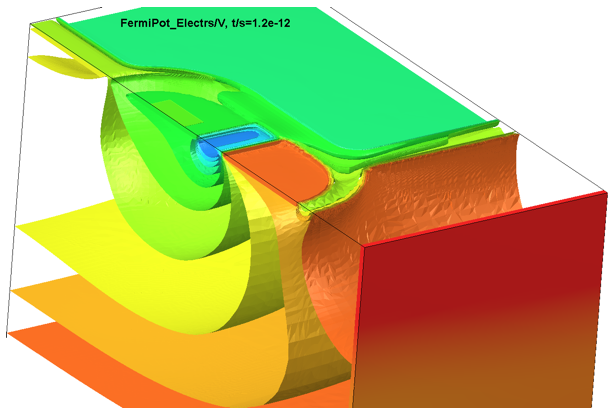
(I did the visualiazation core for this, OpenGL 1.0 based)
j-fu
on 12 Dec 2020
https://github.com/JuliaRegistries/General/pull/26275
Alright let us know if that works for you;)
SimonDanisch
on 12 Dec 2020
:+1:
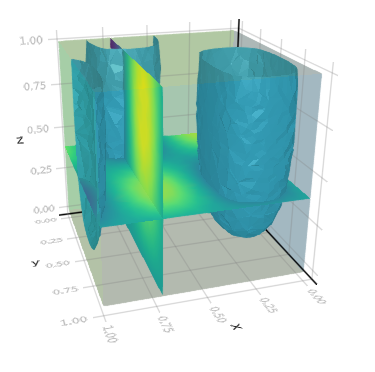
j-fu
on 12 Dec 2020
Related issues
 asinghvi17
·
5Comments
asinghvi17
·
5Comments
 Photonico
·
3Comments
Photonico
·
3Comments
 fa-bien
·
3Comments
fa-bien
·
3Comments
 daviehh
·
3Comments
daviehh
·
3Comments
 EricForgy
·
5Comments
EricForgy
·
5Comments
Most helpful comment
Yeah lets keep it simple for now ;)