Makie.jl: High resolution scenes get cropped when saving to PNG
I'm not sure if this is a bug, but it's something I need to find a workaround for. I posted to discourse here but so far no responses.
Slight modification of the line demo in the docs to save to a high resolution PNG:
using Makie

x = range(0, stop = 2pi, length = 40)
f(x) = sin.(x)
y = f(x)
scene = lines(x, y, color = :blue; resolution=(5000,3000));
Makie.save("out.png", scene)
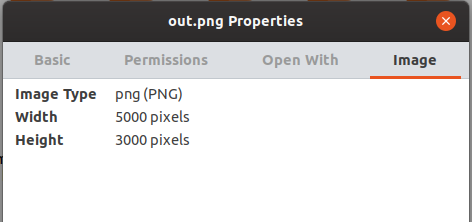
The resulting PNG is cropped to 3844x2124 (roughly my screen resolution) and shows just the lower left of the full scene. If I display the scene in a window I get the full scene rescaled to my screen resolution. Same result in 0.9.5 and master.
If this is a bug, can you suggest a workaround for how I can save scenes (actually produced using GeoMakie) to an image at very high resolution?
 niclasmattsson
All 13 comments
On what os is this?
 SimonDanisch
on 18 Feb 2020
SimonDanisch
on 18 Feb 2020
Forgot to mention, sorry. Windows 10, Julia 1.3.1.
niclasmattsson
on 18 Feb 2020
Can't reproduce on linux + REPL...Where are you executing this?
SimonDanisch
on 18 Feb 2020
I've tried this example in the REPL and similar GeoMakie code inside a project of mine, same result.
niclasmattsson
on 18 Feb 2020
Hm, I can test later on windows
SimonDanisch
on 18 Feb 2020
OK, thanks. I just confirmed that saving large PNGs using Images.jl works fine, so the problem does appear to be in the Makie/Plotting ecosystem somewhere.
using Images
img = Gray.(rand(5000,3000))
save("gray.png", img)
can reproduce this on windows... Will try to take a look later!
SimonDanisch
on 18 Feb 2020
https://discourse.glfw.org/t/can-i-create-a-window-larger-than-the-monitor-resolution/951/2
Hm, seems like the window manager is allowed to overwrite this... I'll need to figure out how the answer can be applied in Makie...
SimonDanisch
on 18 Feb 2020
SimonDanisch
on 18 Feb 2020
Thanks for the quick bugfix work! To use it, do I just add GLMakie#master and sit back or are other steps needed?
niclasmattsson
on 19 Feb 2020
Yep, that's all you have to do.
 asinghvi17
on 19 Feb 2020
asinghvi17
on 19 Feb 2020
Let me know if that fixes it
SimonDanisch
on 19 Feb 2020
It did, thank you again!
niclasmattsson
on 19 Feb 2020
Related issues
 SebastianM-C
·
3Comments
SebastianM-C
·
3Comments
 AlexisRenchon
·
3Comments
AlexisRenchon
·
3Comments
 tshort
·
5Comments
tshort
·
5Comments
 phlavenk
·
6Comments
phlavenk
·
6Comments
 mschauer
·
4Comments
mschauer
·
4Comments