SOLUTION: https://github.com/linuxserver/reverse-proxy-confs/pull/154
TO-DO:
- [x] [Reverse-proxy](https://github.com/Mailu/Mailu/issues/1459#issuecomment-618424103)
- [x] Fix login fail to webmail, seems to be a 301 nginx error
Im using this image: https://hub.docker.com/r/linuxserver/letsencrypt/
And im trying to create a mailu.subfolder.conf or even better a mailu.subdomain.conf, but first i am trying to do it with a subfolder, because of the wiki https://mailu.io/1.7/reverse.html
Now my problem, i have 0 idea of how to create a reverse proxy and the wiki its confusing for me, because i have tried almost every issue open or close here talking about reverse proxy and i have nothing only this page showing:

I would like to get help and create a mailu.subfolder.conf and add it to https://github.com/linuxserver/reverse-proxy-confs to avoid getting the same errors.
i have tried too to edit a pre-configured reverse-proxy i took as example adminer:
# adminer does not require a base url setting, but the container needs to be named adminer

location /adminer {
    return 301 $scheme://$host/adminer/;
}
location ^~ /adminer/ {
    # enable the next two lines for http auth
    #auth_basic "Restricted";
    #auth_basic_user_file /config/nginx/.htpasswd;

    # enable the next two lines for ldap auth, also customize and enable ldap.conf in the default conf
    #auth_request /auth;
    #error_page 401 =200 /login;

    include /config/nginx/proxy.conf;
    resolver 127.0.0.11 valid=30s;
    set $upstream_app adminer;
    set $upstream_port 8080;
    set $upstream_proto http;
    proxy_pass $upstream_proto://$upstream_app:$upstream_port;
And did this (i have tried first to get working atleast /admin and them make works /webmail, but i couldnt 😢 ):
# adminer does not require a base url setting, but the container needs to be named adminer

location /admin{
    return 301 $scheme://$host/admin/;
}
location ^~ /admin/ {
    include /config/nginx/proxy.conf;
    resolver 127.0.0.11 valid=30s;
    set $upstream_app front;
    set $upstream_port 8080;
    set $upstream_proto http;
    proxy_pass $upstream_proto://$upstream_app:$upstream_port/admin;

}
Got same error
And i dont know what to test more, because i have trying this 4 days, if someone could help me would be amazing, because i dont want to rent another VPS to only host Mailu.
I creating the files at:
Proxy-confs folder:
/nginx/proxy-confs

Nginx Folder:
/nginx/

 vinanrra
All 46 comments
Solution:
Replace front with your service name
location /admin{
return 301 $scheme://$host/admin/;
}
location ^~ /admin/ {
include /config/nginx/proxy.conf;
resolver 127.0.0.11 valid=30s;
set $upstream_app front;
set $upstream_port 80;
set $upstream_proto http;
proxy_pass $upstream_proto://$upstream_app:$upstream_port;
}
location /webmail{
return 301 $scheme://$host/webmail/;
}
location ^~ /webmail/ {
include /config/nginx/proxy.conf;
resolver 127.0.0.11 valid=30s;
set $upstream_app front;
set $upstream_port 80;
set $upstream_proto http;
proxy_pass $upstream_proto://$upstream_app:$upstream_port;
}
vinanrra
on 23 Apr 2020
Now im facing this error:
2020/04/23 15:51:36 [info] 11#11: *55 upstream sent invalid response: "NO [AUTHENTICATIONFAILED] Authentication failed." while reading response from upstream, client: 172.18.0.18, server: 0.0.0.0:10143, login: "[email protected]", upstream: 172.18.0.15:143
With this conf, i CANT access to webmail, but i can access to admin panel:
location /admin{
return 301 $scheme://$host/admin/;
proxy_redirect https://localhost https://XXXXXXXXX.XX;
}
location ^~ /admin/ {
include /config/nginx/proxy.conf;
resolver 127.0.0.11 valid=30s;
set $upstream_app front;
set $upstream_port 80;
set $upstream_proto http;
proxy_pass $upstream_proto://$upstream_app:$upstream_port;
proxy_redirect https://localhost https://XXXXXXXXX.XX; ## Dunno if need it
}
location /webmail{
return 301 $scheme://$host/webmail/;
proxy_redirect https://localhost https://XXXXXXXX.XX;
}
location ^~ /webmail/ {
include /config/nginx/proxy.conf;
resolver 127.0.0.11 valid=30s;
set $upstream_app front;
set $upstream_port 80;
set $upstream_proto http;
proxy_pass $upstream_proto://$upstream_app:$upstream_port;
proxy_redirect https://localhost https://XXXXXXXXX.XX; ## Dunno if need it
}
TO-DO:
- [x] [Reverse-proxy](https://github.com/Mailu/Mailu/issues/1459#issuecomment-618424103)
- [x] Fix login fail to webmail, seems to be a 301 nginx error
vinanrra
on 23 Apr 2020
mailu.env
# Mailu main configuration file
#
# This file is autogenerated by the configuration management wizard for compose flavor.
# For a detailed list of configuration variables, see the documentation at
# https://mailu.io
###################################
# Common configuration variables
###################################
# Set to a randomly generated 16 bytes string
SECRET_KEY=XXXXXXXXXXXXXXXXXXXXXX
# Subnet of the docker network. This should not conflict with any networks to which your system is connected. (Internal and external!)
SUBNET=192.168.203.0/24
# Main mail domain
DOMAIN=XXXXXXX.XXX
# Hostnames for this server, separated with comas
HOSTNAMES=mail.XXXXXX.XX
# Postmaster local part (will append the main mail domain)
POSTMASTER=admin
# Choose how secure connections will behave (value: letsencrypt, cert, notls, mail, mail-letsencrypt)
TLS_FLAVOR=mail
# Authentication rate limit (per source IP address)
AUTH_RATELIMIT=10/minute;1000/hour
# Opt-out of statistics, replace with "True" to opt out
DISABLE_STATISTICS=False
###################################
# Optional features
###################################
# Expose the admin interface (value: true, false)
ADMIN=true
# Choose which webmail to run if any (values: roundcube, rainloop, none)
WEBMAIL=roundcube
# Dav server implementation (value: radicale, none)
WEBDAV=radicale
# Antivirus solution (value: clamav, none)
#ANTIVIRUS=clamav
###################################
# Mail settings
###################################
# Message size limit in bytes
# Default: accept messages up to 50MB
# Max attachment size will be 33% smaller
MESSAGE_SIZE_LIMIT=50000000
# Networks granted relay permissions
# Use this with care, all hosts in this networks will be able to send mail without authentication!
RELAYNETS=
# Will relay all outgoing mails if configured
RELAYHOST=
# Fetchmail delay
FETCHMAIL_DELAY=600
# Recipient delimiter, character used to delimiter localpart from custom address part
RECIPIENT_DELIMITER=+
# DMARC rua and ruf email
DMARC_RUA=admin
DMARC_RUF=admin
# Welcome email, enable and set a topic and body if you wish to send welcome
# emails to all users.
WELCOME=false
WELCOME_SUBJECT=Welcome to your new email account
WELCOME_BODY=Welcome to your new email account, if you can read this, then it is configured properly!
# Maildir Compression
# choose compression-method, default: none (value: bz2, gz)
COMPRESSION=
# change compression-level, default: 6 (value: 1-9)
COMPRESSION_LEVEL=
###################################
# Web settings
###################################
# Path to redirect / to
WEBROOT_REDIRECT=/webmail
# Path to the admin interface if enabled
WEB_ADMIN=/admin
# Path to the webmail if enabled
WEB_WEBMAIL=/webmail
# Website name
SITENAME=XXXXXXXX - Webmail
# Linked Website URL
WEBSITE=https://XXXXXX.XX
###################################
# Advanced settings
###################################
# Log driver for front service. Possible values:
# json-file (default)
# journald (On systemd platforms, useful for Fail2Ban integration)
# syslog (Non systemd platforms, Fail2Ban integration. Disables `docker-compose log` for front!)
# LOG_DRIVER=json-file
# Docker-compose project name, this will prepended to containers names.
COMPOSE_PROJECT_NAME=mailu
# Default password scheme used for newly created accounts and changed passwords
# (value: BLF-CRYPT, SHA512-CRYPT, SHA256-CRYPT, MD5-CRYPT, CRYPT)
PASSWORD_SCHEME=BLF-CRYPT
# Header to take the real ip from
REAL_IP_HEADER=
# IPs for nginx set_real_ip_from (CIDR list separated by commas)
REAL_IP_FROM=
# choose wether mailu bounces (no) or rejects (yes) mail when recipient is unknown (value: yes, no)
REJECT_UNLISTED_RECIPIENT=
# Log level threshold in start.py (value: CRITICAL, ERROR, WARNING, INFO, DEBUG, NOTSET)
LOG_LEVEL=WARNING
###################################
# Database settings
###################################
DB_FLAVOR=mysql
DB_USER=XXXXX
DB_PW=XXXXXXXXXXXX
DB_HOST=db
DB_NAME=XXXXX
Okay i have fixed everything here are the files:
This conf files are meant to be used with:
https://github.com/linuxserver/docker-letsencrypt
subdomain:
# make sure that your dns has a cname set for mailu and that your mailu front container is named front
server {
listen 443 ssl;
listen [::]:443 ssl;
server_name mail.*;
include /config/nginx/ssl.conf;
client_max_body_size 0;
# enable for ldap auth, fill in ldap details in ldap.conf
#include /config/nginx/ldap.conf;
location / {
# enable the next two lines for http auth
#auth_basic "Restricted";
#auth_basic_user_file /config/nginx/.htpasswd;
# enable the next two lines for ldap auth
#auth_request /auth;
#error_page 401 =200 /login;
include /config/nginx/proxy.conf;
resolver 127.0.0.11 valid=30s;
set $upstream_app front;
set $upstream_port 80;
set $upstream_proto http;
proxy_pass $upstream_proto://$upstream_app:$upstream_port;
}
}
# mailu does not require a base url setting, but the container needs to be named front
location /admin{
return 301 $scheme://$host/admin/;
}
location ^~ /admin/ {
# enable the next two lines for http auth
#auth_basic "Restricted";
#auth_basic_user_file /config/nginx/.htpasswd;
# enable the next two lines for ldap auth, also customize and enable ldap.conf in the default conf
#auth_request /auth;
#error_page 401 =200 /login;
include /config/nginx/proxy.conf;
resolver 127.0.0.11 valid=30s;
set $upstream_app front;
set $upstream_port 80;
set $upstream_proto http;
proxy_pass $upstream_proto://$upstream_app:$upstream_port;
}
location /webmail{
return 301 $scheme://$host/webmail/;
}
location ^~ /webmail/ {
# enable the next two lines for http auth
#auth_basic "Restricted";
#auth_basic_user_file /config/nginx/.htpasswd;
# enable the next two lines for ldap auth, also customize and enable ldap.conf in the default conf
#auth_request /auth;
#error_page 401 =200 /login;
include /config/nginx/proxy.conf;
resolver 127.0.0.11 valid=30s;
set $upstream_app front;
set $upstream_port 80;
set $upstream_proto http;
proxy_pass $upstream_proto://$upstream_app:$upstream_port;
}
Hello @vinanrra
i tried as you to set up nginx as reverse proxy but i have an error 502 bad gateway.
in the reverse conf file i have specified my docker service name instead of 'front'
set $upstream_app front; --> set $upstream_app mailu;
but always the same error.
i have an another question, how you transmit the certs files to mailu?
i see you do not use TLS_CERT_FILENAME and TLS_KEYPAIR_FILENAME in your mailu.env.
Thank you
 jericho63
on 25 Apr 2020
jericho63
on 25 Apr 2020
Hello @vinanrra
i tried as you to set up nginx as reverse proxy but i have an error 502 bad gateway.
in the reverse conf file i have specified my docker service name instead of 'front'
set $upstream_app front; --> set $upstream_app mailu;
but always the same error.i have an another question, how you transmit the certs files to mailu?
i see you do not use TLS_CERT_FILENAME and TLS_KEYPAIR_FILENAME in your mailu.env.Thank you
Can u share your docker compose service names?
And take a look at the example docker-compose that i have use it to make it works
Forgot the link: https://github.com/linuxserver/reverse-proxy-confs/pull/154
vinanrra
on 25 Apr 2020
here my docker-compose for mailu front service
services:
letsencrypt:
image: linuxserver/letsencrypt
container_name: letsencrypt
cap_add:
- NET_ADMIN
environment:
- PUID=1000
- PGID=1000
- TZ=Europe/Paris
- URL=mydomain.tld
- SUBDOMAINS=nas,mailserver,
- VALIDATION=http
- [email protected]
- DHLEVEL=4096
volumes:
- /data/mailu/testlets/:/config
ports:
- "443:443"
- "80:80"
restart: unless-stopped
# External dependencies
redis:
image: redis:alpine
restart: always
volumes:
- "/data/mailu/redis:/data"
# Core services
front:
image: ${DOCKER_ORG:-mailu}/${DOCKER_PREFIX:-}nginx:${MAILU_VERSION:-1.7}
restart: always
env_file: mailu.env
logging:
driver: json-file
ports:
- 8080:80
- 8443:443
- 25:25
- 465:465
- 587:587
- 110:110
- 995:995
- 156:143:143
- 993:993
volumes:
- "/data/mailu/certs:/certs"
- "/data/mailu/overrides/nginx:/overrides"
i have not understand at the begin, my service name is front.
but i have always error 502...
i don't see what's wrong..
how is your mailu.env?
i have
TLS_FLAVOR=mail
i tried to use :
TLS_CERT_FILENAME=cert.pem
TLS_KEYPAIR_FILENAME=privkey.pem
finally i have commented them.
jericho63
on 25 Apr 2020
You service it is called front not mailu
So set $upstream_app to:
set $upstream_app front;
Or change your service name here:
front: <- HERE
image: ${DOCKER_ORG:-mailu}/${DOCKER_PREFIX:-}nginx:${MAILU_VERSION:-1.7}
restart: always
env_file: mailu.env
logging:
driver: json-file
ports:
- 8080:80
- 8443:443
- 25:25
- 465:465
- 587:587
- 110:110
- 995:995
- 156:143:143
- 993:993
volumes:
- "/data/mailu/certs:/certs"
- "/data/mailu/overrides/nginx:/overrides"
I had that problem too that i couldnt connect even with proper configuration, try:
sudo docker-compose down && sudo docker-compose up -d
To stop container, remove networks and recreate container and networks.
If it still not working try with docker-compose down -v, it will remove all volumes too, so be carefull.
Important:
I just notice something, is that your WHOLE docker-compose.yml, because there are missing some CORE services of mailu, where is admin, webmail, smtp, imap???
vinanrra
on 25 Apr 2020
I have correct the service name but always error 502.
i use docker-compose down at each time.
here my docker-compose.yml
`# This file is auto-generated by the Mailu configuration wizard.
Please read the documentation before attempting any change.
Generated for compose flavor
version: '3'
services:
letsencrypt:
image: linuxserver/letsencrypt
container_name: letsencrypt
cap_add:
- NET_ADMIN
environment:
- PUID=1000
- PGID=1000
- TZ=Europe/Paris
- URL=domain.tld
- SUBDOMAINS=nas,mailserver,
- VALIDATION=http
- [email protected]
- DHLEVEL=4096
volumes:
- /data/mailu/testlets/:/config
ports:
- "443:443"
- "80:80"
restart: unless-stopped
# External dependencies
redis:
image: redis:alpine
restart: always
volumes:
- "/data/mailu/redis:/data"
# Core services
front:
image: ${DOCKER_ORG:-mailu}/${DOCKER_PREFIX:-}nginx:${MAILU_VERSION:-1.7}
restart: always
env_file: mailu.env
logging:
driver: json-file
ports:
- 8080:80
- 8443:443
- 25:25
- 465:465
- 587:587
- 110:110
- 995:995
- 143:143
- 993:993
volumes:
- "/data/mailu/certs:/certs"
- "/data/mailu/overrides/nginx:/overrides"
admin:
image: ${DOCKER_ORG:-mailu}/${DOCKER_PREFIX:-}admin:${MAILU_VERSION:-1.7}
restart: always
env_file: mailu.env
volumes:
- "/data/mailu/data:/data"
- "/data/mailu/dkim:/dkim"
depends_on:
- redis
imap:
image: ${DOCKER_ORG:-mailu}/${DOCKER_PREFIX:-}dovecot:${MAILU_VERSION:-1.7}
restart: always
env_file: mailu.env
volumes:
- "/data/mailu/mail:/mail"
- "/data/mailu/overrides:/overrides"
depends_on:
- front
smtp:
image: ${DOCKER_ORG:-mailu}/${DOCKER_PREFIX:-}postfix:${MAILU_VERSION:-1.7}
restart: always
env_file: mailu.env
volumes:
- "/data/mailu/overrides:/overrides"
depends_on:
- front
antispam:
image: ${DOCKER_ORG:-mailu}/${DOCKER_PREFIX:-}rspamd:${MAILU_VERSION:-1.7}
restart: always
env_file: mailu.env
volumes:
- "/data/mailu/filter:/var/lib/rspamd"
- "/data/mailu/dkim:/dkim"
- "/data/mailu/overrides/rspamd:/etc/rspamd/override.d"
depends_on:
- front
# Optional services
antivirus:
image: ${DOCKER_ORG:-mailu}/${DOCKER_PREFIX:-}clamav:${MAILU_VERSION:-1.7}
restart: always
env_file: mailu.env
volumes:
- "/data/mailu/filter:/data"
# Webmail
webmail:
image: ${DOCKER_ORG:-mailu}/${DOCKER_PREFIX:-}roundcube:${MAILU_VERSION:-1.7}
restart: always
env_file: mailu.env
volumes:
- "/data/mailu/webmail:/data"
depends_on:
- imap
networks:
default:
driver: bridge
ipam:
driver: default
config:
- subnet: 192.168.203.0/24
`
jericho63
on 25 Apr 2020
That's work!
why i don't know , i have modified nothing since my last message!
Thank for your work and your help!
jericho63
on 25 Apr 2020
That's work!
why i don't know , i have modified nothing since my last message!
Thank for your work and your help!
One more thing to be able to receive email, because i had that problem change:
front:
image: ${DOCKER_ORG:-mailu}/${DOCKER_PREFIX:-}nginx:${MAILU_VERSION:-1.7}
restart: always
env_file: mailu.env
logging:
driver: json-file
ports:
- 8080:80
- 8443:443
- 25:25 <- CHANGE THIS
- 465:465
- 587:587
- 110:110
- 995:995
- 143:143
- 993:993
To - "Your_External_IP:25:25"
Check it with ifconfig
vinanrra
on 25 Apr 2020
thank you, i will do it!
jericho63
on 25 Apr 2020
thank you, i will do it!
And you can check all with: https://mxtoolbox.com/
vinanrra
on 25 Apr 2020
hello @vinanrra .
i receive email and i can send via relay smtp.
but i imap don't work...
i have tried with thunderbird and K9.
firewall and nat ok,
Thats work for you?
Thank you
jericho63
on 26 Apr 2020
hello @vinanrra .
i receive email and i can send via relay smtp.
but i imap don't work...
i have tried with thunderbird and K9.
firewall and nat ok,
Thats work for you?Thank you
Im going to test it.
Not working, tomorrow i will check it.
vinanrra
on 26 Apr 2020
@jericho63
Here is what i did to fix it:
front:
image: ${DOCKER_ORG:-mailu}/${DOCKER_PREFIX:-}nginx:${MAILU_VERSION:-1.7}
container_name: mailu_front
restart: always
env_file: mailu.env
logging:
driver: json-file
ports:
#- 8080:80 <- You can comment this if u use reverse-proxy
#- 8443:443 <- You can comment this if u use reverse-proxy
- "YOUR_EXTERNAL_IP:25:25"
- "YOUR_EXTERNAL_IP:465:465"
- "YOUR_EXTERNAL_IP:587:587"
- "YOUR_EXTERNAL_IP:110:110"
- "YOUR_EXTERNAL_IP:995:995"
- "YOUR_EXTERNAL_IP:143:143"
- "YOUR_EXTERNAL_IP:993:993"
volumes:
- "./Mailu/certs:/certs"
- "./Mailu/overrides/nginx:/overrides"
To fix TLS certificates use at mailu.env:
TLS_FLAVOR=mail-letsencrypt
I hope all it is fixed, if not just metion me :)
vinanrra
on 27 Apr 2020
@vinanrra
thank you, that work.
just a question, the certifcat at the name of the mailserver : "mailserver.mydomaine.tld" is created by mailu dor smtp and imap?
So, it's not necessary to specify "mailserver" as subdomain in letsencrypt container, right?
jericho63
on 27 Apr 2020
@vinanrra
thank you, that work.
just a question, the certifcat at the name of the mailserver : "mailserver.mydomaine.tld" is created by mailu dor smtp and imap?
So, it's not necessary to specify "mailserver" as subdomain in letsencrypt container, right?
Yes, it is created by mailu, i have both activated, but i do not know if is going to give any conflicts, rigth now seems fine, just test it.
I am going to test it and see how goes, and i hope there is no more to fix it.
vinanrra
on 27 Apr 2020
Hello,
I'm also running Mailu behind nginx-proxy with letsencrypt-nginx-proxy-companion. In order to get it working, I have this is my mailu.env:
# Choose how secure connections will behave (value: letsencrypt, cert, notls, mail, mail-letsencrypt)
#
TLS_FLAVOR=mail
#TLS_FLAVOR=cert
#
# Override certificate and key file names
#
TLS_CERT_FILENAME=fullchain.pem
TLS_KEYPAIR_FILENAME=key.pem
#TLS_CERT_FILENAME=cert.pem
#TLS_KEYPAIR_FILENAME=privkey.pem
As you can see, I'm using the fullchain.pem with the key.pem file. These are NOT generated by Mailu, but from letsencrypt-nginx-proxy-companion.
Kind regards
Jens
 jheinitz
on 27 Apr 2020
jheinitz
on 27 Apr 2020
Hello,
I'm also running Mailu behind nginx-proxy with letsencrypt-nginx-proxy-companion. In order to get it working, I have this is my mailu.env:
# Choose how secure connections will behave (value: letsencrypt, cert, notls, mail, mail-letsencrypt)
#
TLS_FLAVOR=mail
#TLS_FLAVOR=cert
#
# Override certificate and key file names
#
TLS_CERT_FILENAME=fullchain.pem
TLS_KEYPAIR_FILENAME=key.pem
#TLS_CERT_FILENAME=cert.pem
#TLS_KEYPAIR_FILENAME=privkey.pemAs you can see, I'm using the fullchain.pem with the key.pem file. These are NOT generated by Mailu, but from letsencrypt-nginx-proxy-companion.
Kind regards
Jens
Thanks for sharing your configuration, if i have any errors, i will try with yours.
vinanrra
on 27 Apr 2020
so wait and see!
thank both
jericho63
on 27 Apr 2020
@jheinitz where did you place those files? at root mailu folder?
vinanrra
on 27 Apr 2020
Hi,
good question. My last post was uncomplete in terms of this. I change the docker-compose.yml for the nginx-proxy and added this to have the certificates stored in a directory that I can access later from the mailu docker-compose.yml file:
volumes:
certs-volume:
driver: local
driver_opts:
type: none
o: bind
device: /opt/www-proxy/certs
In the docker-compose.yml for mailu, I changed this in the front: section:
volumes:
- "/opt/www-proxy/certs/host.domain.tld/:/certs"
#- "mailu-certs:/certs"
``
I hope that this helps.
Best regards
Jens
jheinitz
on 27 Apr 2020
Hi,
good question. My last post was uncomplete in terms of this. I change the docker-compose.yml for the nginx-proxy and added this to have the certificates stored in a directory that I can access later from the mailu docker-compose.yml file:
volumes:
certs-volume:
driver: local
driver_opts:
type: none
o: bind
device: /opt/www-proxy/certsIn the docker-compose.yml for mailu, I changed this in the front: section:
volumes:
- "/opt/www-proxy/certs/host.domain.tld/:/certs"
#- "mailu-certs:/certs"
``I hope that this helps.
Best regards
Jens
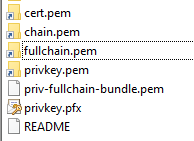
I have this at my cert folder is privkey same as key?
vinanrra
on 27 Apr 2020
@vinanrra
i think yes. i use privkey aas key and that seem to work.
jericho63
on 29 Apr 2020
@vinanrra
i think yes. i use privkey aas key and that seem to work.
I am not able to make it works, can you share your folder structure?, because maybe i am not sharing well folders.
vinanrra
on 30 Apr 2020
here my structure and the front docker-compose

# Core services
  front:
    image: ${DOCKER_ORG:-mailu}/${DOCKER_PREFIX:-}nginx:${MAILU_VERSION:-1.7}
    restart: always
    env_file: mailu.env
    logging:
      driver: json-file
    ports:
     # - 8080:80
     # - 8443:443
      - "10.28.201.155:25:25"
      - "10.28.201.155:465:465"
      - "10.28.201.155:587:587"
      - "10.28.201.155:110:110"
      - "10.28.201.155:995:995"
      - "10.28.201.155:143:143"
      - "10.28.201.155:993:993"
    volumes:
      - "/data/mailu/letsencrypt/etc/letsencrypt/archive/domain.tld:/certs"
      - "/data/mailu/overrides/nginx:/overrides"
jericho63
on 30 Apr 2020
@vinanrra
Hi, is there any chance to see the full final configuration? That is:
- docker-compose.yml
- mailu.env
- dockerfile(s) for any additional service (e.g. nginx) and related extra files?
 m121212
on 4 Jun 2020
m121212
on 4 Jun 2020
@vinanrra
Hi, is there any chance to see the full final configuration? That is:
* docker-compose.yml * mailu.env * dockerfile(s) for any additional service (e.g. nginx) and related extra files?
Here is everything:
The certs of letsencrypt container are created at config/etc/letsencrypt/live/XXX.XX
mailu.env.txt
mailu.subdomain.conf.sample.txt
mailu.subfolder.conf.sample.txt
docker-compose.yml.txt
vinanrra
on 4 Jun 2020
@vinanrra
Hi, is there any chance to see the full final configuration? That is:* docker-compose.yml * mailu.env * dockerfile(s) for any additional service (e.g. nginx) and related extra files?Here is everything:
The certs of letsencrypt container are created at
config/etc/letsencrypt/live/XXX.XXmailu.env.txt
mailu.subdomain.conf.sample.txt
mailu.subfolder.conf.sample.txt
docker-compose.yml.txt
Thank you. I am going to try it now "out-of-the-shelf" (typing details in mailu.env).
I will let you know if it does work!
m121212
on 4 Jun 2020
What do you mean by:
Core services
front:
image: ${DOCKER_ORG:-mailu}/${DOCKER_PREFIX:-}nginx:${MAILU_VERSION:-1.7}
container_name: mailu_front
restart: always
env_file: mailu.env
logging:
driver: json-file
ports:
#- 8080:80
#- 8443:443
- "YOUR_EXTERNAL_IP:25:25"
- "YOUR_EXTERNAL_IP:465:465"
- "YOUR_EXTERNAL_IP:587:587"
- "YOUR_EXTERNAL_IP:110:110"
- "YOUR_EXTERNAL_IP:995:995"
- "YOUR_EXTERNAL_IP:143:143"
- "YOUR_EXTERNAL_IP:993:993"
volumes:
# You must copy the certs from the lestencrypt manually
# Mailu does not accept symlinks
- ./certs:/certs
- ./overrides/nginx:/overrides
In addition:
- Where do mailu.subdomain.conf.sample.txt mailu.subfolder.conf.sample.txt need to be placed?
m121212
on 4 Jun 2020
I tried your config with all info properly set.
And:
Creating network "test_default" with driver "bridge"
ERROR: Pool overlaps with other one on this address space
m121212
on 4 Jun 2020
What do you mean by:
Core services
front:
image: ${DOCKER_ORG:-mailu}/${DOCKER_PREFIX:-}nginx:${MAILU_VERSION:-1.7}
container_name: mailu_front
restart: always
env_file: mailu.env
logging:
driver: json-file
ports:- 8080:80
- 8443:443
- "YOUR_EXTERNAL_IP:25:25"
- "YOUR_EXTERNAL_IP:465:465"
- "YOUR_EXTERNAL_IP:587:587"
- "YOUR_EXTERNAL_IP:110:110"
- "YOUR_EXTERNAL_IP:995:995"
- "YOUR_EXTERNAL_IP:143:143"
- "YOUR_EXTERNAL_IP:993:993"
volumes:
# You must copy the certs from the lestencrypt manually # Mailu does not accept symlinks- ./certs:/certs
- ./overrides/nginx:/overrides
In addition:
* Where do mailu.subdomain.conf.sample.txt mailu.subfolder.conf.sample.txt need to be placed?
First use the "Inser Code" to avoid markdown.
Second there you must place your external IP, check it with some webpage or with ifconfig
The reverse-proxy need to be placed without .sample.txt at /config/nginx/proxy-confs/
Google your error, i dont know why do u have this error: ERROR: Pool overlaps with other one on this address space
Check this maybe help: https://github.com/maxking/docker-mailman/issues/85
vinanrra
on 4 Jun 2020
Regarding: ERROR: Pool overlaps with other one on this address space
You need to check if there were extra networks with driver "bridge":
docker network ls
And eventually remove them.
@vinanrra what about the unbound resolver service? The networks element is not actually used in the docker-compose.yml. Maybe because it belongs to the unbounded resolver service which was deleted?
m121212
on 4 Jun 2020
Regarding: ERROR: Pool overlaps with other one on this address space
You need to check if there were extra networks with driver "bridge":
docker network lsAnd eventually remove them.
@vinanrra what about the unbound resolver service? The networks element is not actually used in the docker-compose.yml. Maybe because it belongs to the unbounded resolver service which was deleted?
Going to check it, because i had deleted the other services i use.
Checked: You need to do that, because at mailu.env i have specify the subnet and with that change at docker-compose you set up the subnet to same IP: 192.168.203.0/24
vinanrra
on 4 Jun 2020
Thank you!
And what about this last point in the letsencrypt service, regarding certs:
You must copy the certs from the lestencrypt manually
Mailu does not accept symlinks
What do you mean by "compying the certs manually"? And what about the auto-renewal process? Will it be hindered?
m121212
on 4 Jun 2020
Regarding: ERROR: Pool overlaps with other one on this address space
You need to check if there were extra networks with driver "bridge":
docker network ls
And eventually remove them.
@vinanrra what about the unbound resolver service? The networks element is not actually used in the docker-compose.yml. Maybe because it belongs to the unbounded resolver service which was deleted?Going to check it, because i had deleted the other services i use.
Checked: You need to do that, because at mailu.env i have specify the subnet and with that change at docker-compose you set up the subnet to same IP: 192.168.203.0/24
So if one needs also the unbound resolver, it can be simply added to the docker-compose, right?
m121212
on 4 Jun 2020
Thank you!
And what about this last point in the letsencrypt service, regarding certs:
You must copy the certs from the lestencrypt manually Mailu does not accept symlinksWhat do you mean by "compying the certs manually"? And what about the auto-renewal process? Will it be hindered?
To be able to use your certs created by the "linuxserver/letsencrypt" you MUST copy the certs at config/etc/letsencrypt/live/XXX.XX to the mailu cert folder, because if you choose to mailu to auto-create certs you can have conflits, you just need to create a script to check if there is change and replace certs at mailu.
vinanrra
on 4 Jun 2020
Thank you!
And what about this last point in the letsencrypt service, regarding certs:
You must copy the certs from the lestencrypt manually Mailu does not accept symlinks
What do you mean by "compying the certs manually"? And what about the auto-renewal process? Will it be hindered?To be able to use your certs created by the "linuxserver/letsencrypt" you MUST copy the certs at
config/etc/letsencrypt/live/XXX.XXto the mailu cert folder, because if you choose to mailu to auto-create certs you can have conflits, you just need to create a script to check if there is change and replace certs at mailu.
Thank you for your patience.
It works perfectly.
So now, to add my web services (and proxy them correctly) which file do I have to modify? mailu.subfolder.conf or mailu.subdomain.conf, right?
Eventually, do you have the script to copy the certs automatically?
m121212
on 4 Jun 2020
Thank you!
And what about this last point in the letsencrypt service, regarding certs:
You must copy the certs from the lestencrypt manually Mailu does not accept symlinks
What do you mean by "compying the certs manually"? And what about the auto-renewal process? Will it be hindered?To be able to use your certs created by the "linuxserver/letsencrypt" you MUST copy the certs at
config/etc/letsencrypt/live/XXX.XXto the mailu cert folder, because if you choose to mailu to auto-create certs you can have conflits, you just need to create a script to check if there is change and replace certs at mailu.Thank you for your patience.
It works perfectly.
So now, to add my web services (and proxy them correctly) which file do I have to modify? mailu.subfolder.conf or mailu.subdomain.conf, right?Eventually, do you have the script to copy the certs automatically?
If you want to use reverse proxy check /config/nginx/proxy-confs/ and remove .sample and them restart the container to activate the reverse-proxy.
No, i dont have any script, i have installed mailu just for curiosity, but should not be hard to create one.
vinanrra
on 4 Jun 2020
@vinanrra
Btw, I don't get the need to let mailu see letsencrypt certificates (generated for both mail and www). If mailu cert is limited to imap and smtp, one can simply expose 80 and 443 ports of mailu, without publishing them, and let whatever top-level nginx server (acting as a proxy) doing the proxy pass for either main domain and the mail subdomain.
What do you think about it?
m121212
on 4 Jun 2020
Do not know
El jue., 4 jun. 2020 a las 22:09, Marcello Montanino (<
[email protected]>) escribió:
@vinanrra https://github.com/vinanrra
Btw, I don't get the need to let mailu see letsencrypt certificates
(generated for both mail and www). If mailu cert is limited to imap and
smtp), one can simply expose 80 and 443 ports of mailu, without publishing
them, and let whatever top-level nginx server (acting as a proxy) doing the
proxy pass for either main domain and the mail subdomain.
What do you think about it?—
You are receiving this because you were mentioned.
Reply to this email directly, view it on GitHub
https://github.com/Mailu/Mailu/issues/1459#issuecomment-639089475, or
unsubscribe
https://github.com/notifications/unsubscribe-auth/ABAM5EZM4CMU3YKXT7R2MB3RU75P5ANCNFSM4MO5E7MQ
.
vinanrra
on 4 Jun 2020
Unfortunately, after following all your steps and countless other tries, I'm still not able to get rid of 502 Bad Gateway.
 shakesac
on 17 Jul 2020
shakesac
on 17 Jul 2020
Unfortunately, after following all your steps and countless other tries, I'm still not able to get rid of 502 Bad Gateway.
Shar ALL your docker-compose and your maili.env, but REMEMBER TO DELETE SENSITIVE CONTENT.
But first of all remove unused networks and containers, with docker system prune, to avoid any errors.
vinanrra
on 20 Jul 2020
Unfortunately, after following all your steps and countless other tries, I'm still not able to get rid of 502 Bad Gateway.
Shar ALL your docker-compose and your maili.env, but REMEMBER TO DELETE SENSITIVE CONTENT.
But first of all remove unused networks and containers, with docker system prune, to avoid any errors.
Thanks A LOT for your help.
After many tries and comparing my files with every files you posted, I was able to get rid of 502 error.
Now I have an Internal Server Error when accessing /admin and the container mailu/admin:1.7 showing unhealthy. But I believe that's an issue for another thread I guess.
shakesac
on 30 Jul 2020
Related issues
 v1ru535
·
4Comments
v1ru535
·
4Comments
 SJS28092018
·
3Comments
SJS28092018
·
3Comments
 fabiorauber
·
3Comments
fabiorauber
·
3Comments
 hoellen
·
4Comments
hoellen
·
4Comments
 Yermo
·
3Comments
Yermo
·
3Comments
Most helpful comment
here my structure and the front docker-compose

# Core services
  front:
    image: ${DOCKER_ORG:-mailu}/${DOCKER_PREFIX:-}nginx:${MAILU_VERSION:-1.7}
    restart: always
    env_file: mailu.env
    logging:
      driver: json-file
    ports:
     # - 8080:80
     # - 8443:443
      - "10.28.201.155:25:25"
      - "10.28.201.155:465:465"
      - "10.28.201.155:587:587"
      - "10.28.201.155:110:110"
      - "10.28.201.155:995:995"
      - "10.28.201.155:143:143"
      - "10.28.201.155:993:993"
    volumes:
      - "/data/mailu/letsencrypt/etc/letsencrypt/archive/domain.tld:/certs"
      - "/data/mailu/overrides/nginx:/overrides"