Mailspring: Bug: New lines in text/plain email
Describe the bug
After the Feb 25, 2020 update ( to version 1.7.4 ), I started to notice that the contents of some emails are appearing in a single line without the new line breaks. These were all text/plain emails.
To Reproduce
Steps to reproduce the behavior:
Send a text/plan email with multiple new lines to your address configured in mailspring. When the mail is received, open and view the email.
Expected behavior
The line breaks in the original text/plain email should show as is in the mailspring email view.
Setup: (please complete the following information):
- OS: Linux Mint
- OS Version 19
- Mailspring Version: 1.7.4
 Kladizkov
All 15 comments
I've noticed this as well!
Ubuntu 18.04
Mailspring Version 1.7.4
 sarajcev
on 12 Mar 2020
sarajcev
on 12 Mar 2020
I can confirm as well that after the update to 1.7.4 new lines are not shown as expected.
 rsalevsky
on 17 Mar 2020
rsalevsky
on 17 Mar 2020
Also, when I try to compose a new email, sometimes it goes in plain text mode (which also removes the signature), even when the configuration is set to rich text.
Only closing and reopening Mailspring solve this.
 paulocoghi
on 18 Mar 2020
paulocoghi
on 18 Mar 2020
Present on Windows 10, 1.7.4.
When an email arrives that contains ONLY a plaintext MIME part, Mailspring now displays it in the app in plain text with display:pre formatting so newlines are preserved. I think this will make the mailing list reading experience much better.
Noticed this in the comment announcing plaintext support. Is there a chance that this is responsible/a way to temporarily disable this feature?
 chipbuster
on 22 Mar 2020
chipbuster
on 22 Mar 2020
I have the same problem on Windows 10, ver. 1.7.4
 ondrej-petr
on 15 Apr 2020
ondrej-petr
on 15 Apr 2020
Also, when I try to compose a new email, sometimes it goes in plain text mode (which also removes the signature), even when the configuration is set to rich text.
Only closing and reopening Mailspring solve this.
This particular issue was solved on 1.7.5! :tada: :tada: :tada: :tada: :tada:
paulocoghi
on 16 Apr 2020
Hey folks! Thanks for reporting this, we fixed a bug in 1.7.5 that caused the app to author all new drafts in plaintext mode (ironically it got confused and thought you were holding the Alt key indefinitely...) This sounds like it may be a bit different though—let me take a look today and I'll keep you posted.
 bengotow
on 17 Apr 2020
bengotow
on 17 Apr 2020
I upgraded to 1.7.5, but I still have the new line issues. My problem is not during the composing stage. It is the mails that I receive that doesn't have new lines appearing in it. It all comes in one single line.
Kladizkov
on 18 Apr 2020
The fixes brought in version 1.7.5 addressed other issues _(like the one I reported in my first message)_ and were excellent.
@bengotow is working on this one now, and I confirm that the problem of new lines in text/plain received emails still remains.
paulocoghi
on 18 Apr 2020
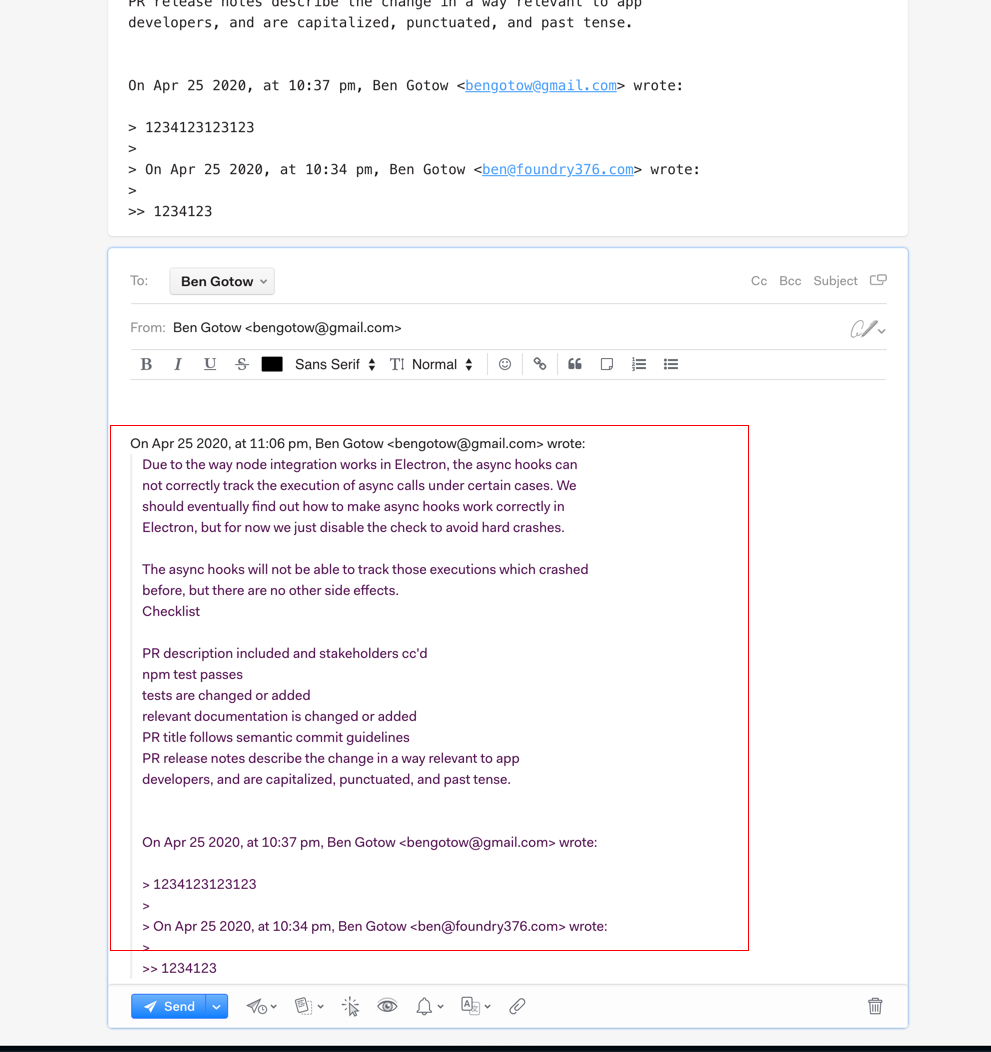
Hey! I believe the problem with new lines should be fixed in the next release. I hadn't realized that you were referring (I think) to the whitespace in the reply text? I was able to reproduce a problem where this text outlined in red below would all be on one line if you were replying in rich text and the incoming email was in plain text.
Will ship this fix in the next release!
bengotow
on 26 Apr 2020
Hi Ben,
i beleive that the bug was refering to entire incoming message (at least in my case).
Regards
Ondřej
On dub 26 2020, at 8:51 am, Ben Gotow notifications@github.com wrote:
>
>
Hey! I believe the problem with new lines should be fixed in the next release. I hadn't realized that you were referring (I think) to the whitespace in the reply text? I was able to reproduce a problem where this text outlined in red below would all be on one line if you were replying in rich text and the incoming email was in plain text.
Will ship this fix in the next release!—
You are receiving this because you commented.
Reply to this email directly, view it on GitHub (https://github.com/Foundry376/Mailspring/issues/1853#issuecomment-619495583), or unsubscribe (https://github.com/notifications/unsubscribe-auth/ACL4BEAREW2IQQNNML3I2KDROPKW7ANCNFSM4LFOSJTQ).
ondrej-petr
on 26 Apr 2020
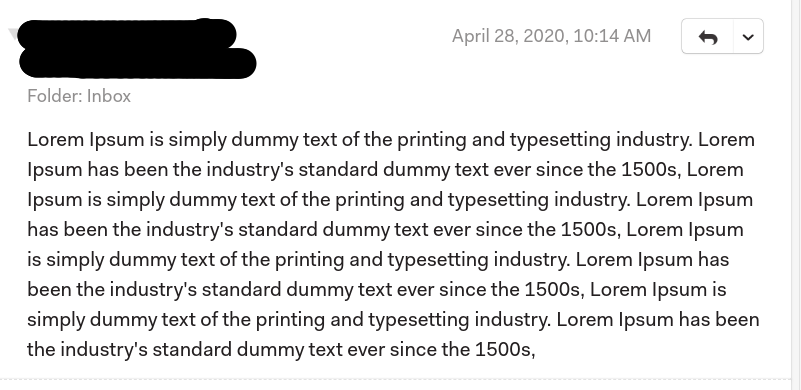
Hi Ben, here is an example of an single line incoming message:

rsalevsky
on 27 Apr 2020
I think this is something about the content-type. When the Content-Type is "multipart/mixed" it appears in one line, but when it is "multipart/alternative" ( or something else ) it works. I'm not an expert in email headers. But maybe that helps you find the bug easily.
Try sending an email with this email headers.
From: [email protected]
Subject: MyEmail
To: [email protected]
Date: Tue, 28 Apr 2020 10:14:29 +0530 (IST)
MIME-Version: 1.0
Content-Type: multipart/mixed; boundary="bound1588023280"

This is a multi-part message in MIME format.

--bound1588023280
Content-type: text/plain

Lorem Ipsum is simply dummy text of the printing and typesetting industry. Lorem Ipsum has been the industry's standard dummy text ever since the 1500s,

Lorem Ipsum is simply dummy text of the printing and typesetting industry. Lorem Ipsum has been the industry's standard dummy text ever since the 1500s,
Lorem Ipsum is simply dummy text of the printing and typesetting industry. Lorem Ipsum has been the industry's standard dummy text ever since the 1500s,


Lorem Ipsum is simply dummy text of the printing and typesetting industry. Lorem Ipsum has been the industry's standard dummy text ever since the 1500s,

--bound1588023280--
It will appear like this
Kladizkov
on 28 Apr 2020
After upgrading to 1.7.8, I see this issue fixed.
Kladizkov
on 29 May 2020
I also confirm this issue is solved on 1.7.8
paulocoghi
on 30 May 2020
Related issues
 psivesely
·
3Comments
psivesely
·
3Comments
 liam-wiltshire
·
3Comments
liam-wiltshire
·
3Comments
 purefan
·
3Comments
purefan
·
3Comments
 DylanC
·
3Comments
DylanC
·
3Comments
 3v1n0
·
3Comments
3v1n0
·
3Comments
Most helpful comment
Hey folks! Thanks for reporting this, we fixed a bug in 1.7.5 that caused the app to author all new drafts in plaintext mode (ironically it got confused and thought you were holding the Alt key indefinitely...) This sounds like it may be a bit different though—let me take a look today and I'll keep you posted.