Mailspring: Bug: White Screen / Account Doesn't Add
Submitting a ticket I got an automated response so I'm reporting issue here. Looks like others are experiencing similar problems. As a customer who has paid for the annual upgrade I hope there's a fix for this soon...
I've added a Gmail account without any issues as you can see in this screenshot - https://www.screencast.com/t/wi5zbZLzIVj8
However, I also test and I am unable to add am @outlook.com and email account using the mailserver on a cPanel server to Mailspring. This email account is hosted through a server using cPanel and I've tested IMAP/SMTP connections successfully with this email account using other email clients; Shift, Kiwi, Outlook and Thunderbird.
Is there a fix for this or is this a known bug and will it be fixed/addressed in the near future?
Note: I'm using Windows version of Mailspring.
Two Scenarios:
1) When I attempt to add a non-Gmail to Mailspring it loads a blank white screen. This occurs when there are no other (existing) accounts added into Mailspring.
Video: https://www.screencast.com/t/i7ByYwTDlM
2) When I attempt to add the non-Gmail account with another email account already added into Mailspring. It loads as if the add was successful, but then the account doesn't get added into Mailspring.
Video: https://www.screencast.com/t/RogNYmiTNM
I've also uninstalled Mailspring and deleted the data in C:Users
 greggslist
All 34 comments
@greggslist Had the same issue, what worked for me (worth a try until a fix is out) was deleting Mailspring then downloading 1.7.2 from here: https://github.com/Foundry376/Mailspring/releases/tag/1.7.2
Add all your email accounts on 1.7.2 then run the updater to go from 1.7.2 -> 1.7.4
 20Web
on 9 Mar 2020
20Web
on 9 Mar 2020
@greggslist Had the same issue, what worked for me (worth a try until a fix is out) was deleting Mailspring then downloading 1.7.2 from here: https://github.com/Foundry376/Mailspring/releases/tag/1.7.2
Add all your email accounts on 1.7.2 then run the updater to go from 1.7.2 -> 1.7.4
@20Web Awesome, thanks. This worked!
greggslist
on 9 Mar 2020
when are you planning to fix it as I suppose someone gets paid for subscriptions right?
 evaldsurtans
on 10 Mar 2020
evaldsurtans
on 10 Mar 2020
Same issue on Ubuntu 18.04.4 LTS
 jefflenz
on 13 Mar 2020
jefflenz
on 13 Mar 2020
Same issue Linux Mint 19.3
 dylanhiemstra
on 14 Mar 2020
dylanhiemstra
on 14 Mar 2020
Temp solution. Install an older version located here.
 pythonInRelay
on 14 Mar 2020
pythonInRelay
on 14 Mar 2020
Same issue on Ubuntu 19.10
 dllz
on 18 Mar 2020
dllz
on 18 Mar 2020
Same issue with version '1.7.4-d54ff730' on Ubuntu 18.04.2 LTS.
 hajk1
on 18 Mar 2020
hajk1
on 18 Mar 2020
Same on OS X 10.16.6
Mailspring Version 1.7.4 (1.7.4)
 lucian303
on 19 Mar 2020
lucian303
on 19 Mar 2020
Confirming issue on Windows 10 1909 with Mailspring 1.7.4.
 campfred
on 20 Mar 2020
campfred
on 20 Mar 2020
Same on Linux Mint 19.3. Ideapad s340, Ryzen 5. I would love to use mailspring.
 bboennemann
on 22 Mar 2020
bboennemann
on 22 Mar 2020
Same thing,
rijndael@rd:~$ mailspring -v
1.7.4-d54ff730
Operating System: Kubuntu 19.10
KDE Plasma Version: 5.18.3
KDE Frameworks Version: 5.67.0
Qt Version: 5.12.4
Kernel Version: 5.3.0-42-generic
OS Type: 64-bit
Processors: 8 × Intel® Core™ i7-7700HQ CPU @ 2.80GHz
Memory: 15,5 GiB of RAM
 vlopp
on 22 Mar 2020
vlopp
on 22 Mar 2020
Same on Linux Mint 19.3. Ideapad s340, Ryzen 5. I would love to use mailspring.
BTW, downloading the older version as suggested by @pythonInRelay works!
Link here: https://github.com/Foundry376/Mailspring/releases/tag/1.7.2
bboennemann
on 22 Mar 2020
It's also not possible to add a non-gmail account AFTER you already setup mailspring with a gmail-account.
I got an "Finished" screen, but my account is still missing.. I'd like to use snap for autoupdate and version 1.7.2 is not there.. So a downgrade is not that easy for me :/
 tarantelklient
on 23 Mar 2020
tarantelklient
on 23 Mar 2020
ditto,
os: 5.3.0-42-generic #34~18.04.1-Ubuntu SMP Fri Feb 28 13:42:26 UTC 2020 x86_64 x86_64 x86_64 GNU/Linux
mailpring -v:
Gtk-Message: Failed to load module "canberra-gtk-module"
Gtk-Message: Failed to load module "canberra-gtk-module"
1.7.4-d54ff730
 imuxin
on 24 Mar 2020
imuxin
on 24 Mar 2020
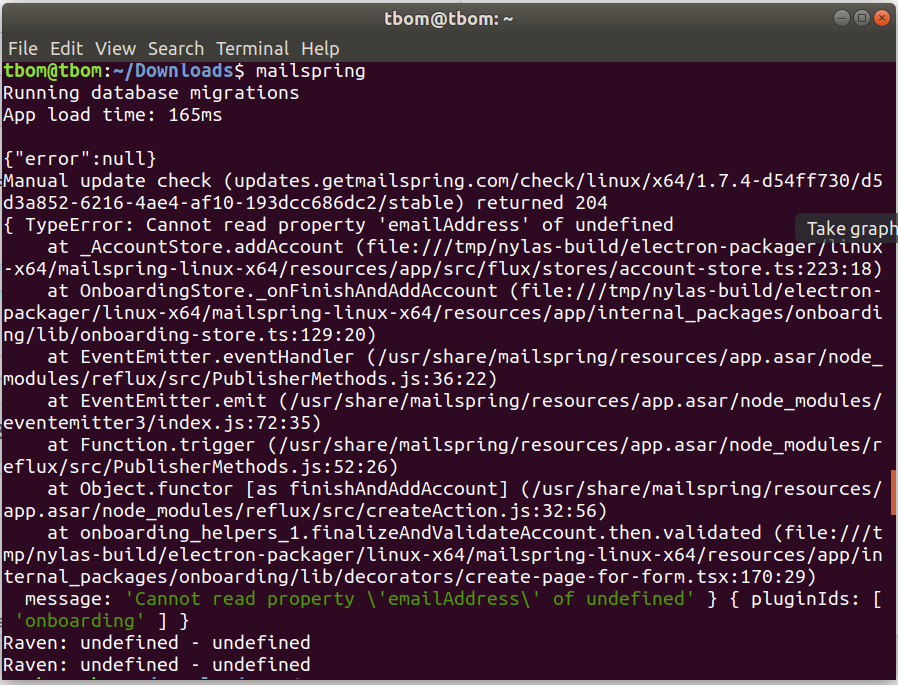
Had the same issue with fresh install on Ubuntu18.04. When it goes to white blank, it returns this in terminal.
 tennom
on 27 Mar 2020
tennom
on 27 Mar 2020
Same issue on Ubuntu 18.04 LTS
 joao-pedrozo
on 29 Mar 2020
joao-pedrozo
on 29 Mar 2020
@greggslist Had the same issue, what worked for me (worth a try until a fix is out) was deleting Mailspring then downloading 1.7.2 from here: https://github.com/Foundry376/Mailspring/releases/tag/1.7.2
Add all your email accounts on 1.7.2 then run the updater to go from 1.7.2 -> 1.7.4
Good.What I thought is the same.
 Alexander-Huang
on 30 Mar 2020
Alexander-Huang
on 30 Mar 2020
That's a working workaround.
Although, I'm still pretty sure we shouldn't need to do that in order to use the app. I could be mistaken but the experience should simply be to be able to install the app, setup our account(s) and off we go with using it.
campfred
on 30 Mar 2020
@Kozzi11 fixed this issue in this pull request: https://github.com/Foundry376/Mailspring/pull/1876. It's already merged.
 sudoman281
on 30 Mar 2020
sudoman281
on 30 Mar 2020
Same problem. Windows 10.
 restructor1
on 3 Apr 2020
restructor1
on 3 Apr 2020
@greggslist Had the same issue, what worked for me (worth a try until a fix is out) was deleting Mailspring then downloading 1.7.2 from here: https://github.com/Foundry376/Mailspring/releases/tag/1.7.2
Add all your email accounts on 1.7.2 then run the updater to go from 1.7.2 -> 1.7.4
Worked for me! Using Ubuntu 19.10
 mwikala
on 4 Apr 2020
mwikala
on 4 Apr 2020
@greggslist Had the same issue, what worked for me (worth a try until a fix is out) was deleting Mailspring then downloading 1.7.2 from here: https://github.com/Foundry376/Mailspring/releases/tag/1.7.2
Add all your email accounts on 1.7.2 then run the updater to go from 1.7.2 -> 1.7.4
Fixed it for me! Using Windows 10.
 zalameedi
on 8 Apr 2020
zalameedi
on 8 Apr 2020
It's fixed in 1.7.5. If you're on Ubuntu and you're using snap to install the app, try updating it from the edge channel.
 aigoncharov
on 8 Apr 2020
aigoncharov
on 8 Apr 2020
i cant see any release here, Am i seeing wrong? https://github.com/Foundry376/Mailspring/releases
 tayfunyasar
on 8 Apr 2020
tayfunyasar
on 8 Apr 2020
i cant see any release here, Am i seeing wrong? https://github.com/Foundry376/Mailspring/releases
No, you're right. Latest release is 1.7.4. Confirmed by the green « Latest release » badge.
campfred
on 8 Apr 2020
It's available as a snap. Probably, it's an automated nightly build from master or something like it.
aigoncharov
on 8 Apr 2020
That could be it. I haven't looked into snaps yet. Fingers crossed it'll be available in the release tab soon so that I can keep using it instead of Outlook!
campfred
on 8 Apr 2020
Can confirm it is available at the link provided.
For anyone wondering how to access it on Linux if you are already using 1.7.4:
sudo snap switch mailspring --edge
sudo snap refresh
dllz
on 8 Apr 2020
I've just updated to 1.7.5 and still have white screen when press "Update connection settings". Ubuntu 19.10.
Here is what I get in console:
{ Error: Attempting to toJSON AttributeDateTime which is not a date: authedAt = 1970-01-01T00:00:00.000Z
    at AttributeDateTime.toJSON (file:///tmp/nylas-build/electron-packager/linux-x64/mailspring-linux-x64/resources/app/src/flux/attributes/attribute-datetime.ts:15:13)
    at Account.toJSON (file:///tmp/nylas-build/electron-packager/linux-x64/mailspring-linux-x64/resources/app/src/flux/models/model.ts:115:40)
    at Account.toJSON (file:///tmp/nylas-build/electron-packager/linux-x64/mailspring-linux-x64/resources/app/src/flux/models/account.ts:126:24)
    at Account.clone (file:///tmp/nylas-build/electron-packager/linux-x64/mailspring-linux-x64/resources/app/src/flux/models/model.ts:82:38)
    at new Composed (file:///tmp/nylas-build/electron-packager/linux-x64/mailspring-linux-x64/resources/app/internal_packages/onboarding/lib/decorators/create-page-for-form.tsx:36:39)
    at Ag (/snap/mailspring/443/usr/share/mailspring/resources/app.asar/node_modules/react-dom/cjs/react-dom.production.min.js:135:201)
    at $g (/snap/mailspring/443/usr/share/mailspring/resources/app.asar/node_modules/react-dom/cjs/react-dom.production.min.js:157:149)
    at eh (/snap/mailspring/443/usr/share/mailspring/resources/app.asar/node_modules/react-dom/cjs/react-dom.production.min.js:171:13)
    at ai (/snap/mailspring/443/usr/share/mailspring/resources/app.asar/node_modules/react-dom/cjs/react-dom.production.min.js:202:255)
    at bi (/snap/mailspring/443/usr/share/mailspring/resources/app.asar/node_modules/react-dom/cjs/react-dom.production.min.js:203:271)
    at Fi (/snap/mailspring/443/usr/share/mailspring/resources/app.asar/node_modules/react-dom/cjs/react-dom.production.min.js:218:174)
    at Gi (/snap/mailspring/443/usr/share/mailspring/resources/app.asar/node_modules/react-dom/cjs/react-dom.production.min.js:217:174)
    at ii (/snap/mailspring/443/usr/share/mailspring/resources/app.asar/node_modules/react-dom/cjs/react-dom.production.min.js:214:252)
    at xg (/snap/mailspring/443/usr/share/mailspring/resources/app.asar/node_modules/react-dom/cjs/react-dom.production.min.js:212:94)
    at Object.enqueueSetState (/snap/mailspring/443/usr/share/mailspring/resources/app.asar/node_modules/react-dom/cjs/react-dom.production.min.js:133:223)
    at InjectedComponentSet.Component.setState (/snap/mailspring/443/usr/share/mailspring/resources/app.asar/node_modules/react/cjs/react.development.js:373:16)
    at ComponentRegistry._componentUnlistener.mailspring_exports_1.ComponentRegistry.listen (file:///tmp/nylas-build/electron-packager/linux-x64/mailspring-linux-x64/resources/app/src/components/injected-component-set.tsx:114:12)
    at EventEmitter.eventHandler (file:///tmp/nylas-build/electron-packager/linux-x64/mailspring-linux-x64/resources/app/src/global/mailspring-store.ts:128:23)
    at EventEmitter.emit (events.js:187:15)
    at EventEmitter.emit (domain.js:442:20)
    at ComponentRegistry.trigger (file:///tmp/nylas-build/electron-packager/linux-x64/mailspring-linux-x64/resources/app/src/global/mailspring-store.ts:141:26)
    at ComponentRegistry.triggerDebounced.underscore_1.default.debounce (file:///tmp/nylas-build/electron-packager/linux-x64/mailspring-linux-x64/resources/app/src/registries/component-registry.ts:197:44)
    at later (/snap/mailspring/443/usr/share/mailspring/resources/app.asar/node_modules/underscore/underscore.js:828:25)
  message:
   'Attempting to toJSON AttributeDateTime which is not a date: authedAt = 1970-01-01T00:00:00.000Z' } { url:
   '/snap/mailspring/443/usr/share/mailspring/resources/app.asar/node_modules/react-dom/cjs/react-dom.production.min.js',
  line: 217,
  column: 372,
  pluginIds: [ 'onboarding' ] }
 heaviss
on 9 Apr 2020
heaviss
on 9 Apr 2020
Linux Mint 19.3 Cinnamon
cevher@NT00782:~$ mailspring
Running database migrations
App load time: 1720ms

Running Setup
{"error":null}
{ TypeError: Cannot read property 'emailAddress' of undefined
    at _AccountStore.addAccount (file:///tmp/nylas-build/electron-packager/linux-x64/mailspring-linux-x64/resources/app/src/flux/stores/account-store.ts:223:18)
    at OnboardingStore._onFinishAndAddAccount (file:///tmp/nylas-build/electron-packager/linux-x64/mailspring-linux-x64/resources/app/internal_packages/onboarding/lib/onboarding-store.ts:129:20)
    at EventEmitter.eventHandler (/snap/mailspring/440/usr/share/mailspring/resources/app.asar/node_modules/reflux/src/PublisherMethods.js:36:22)
    at EventEmitter.emit (/snap/mailspring/440/usr/share/mailspring/resources/app.asar/node_modules/eventemitter3/index.js:72:35)
    at Function.trigger (/snap/mailspring/440/usr/share/mailspring/resources/app.asar/node_modules/reflux/src/PublisherMethods.js:52:26)
    at Object.functor [as finishAndAddAccount] (/snap/mailspring/440/usr/share/mailspring/resources/app.asar/node_modules/reflux/src/createAction.js:32:56)
    at onboarding_helpers_1.finalizeAndValidateAccount.then.validated (file:///tmp/nylas-build/electron-packager/linux-x64/mailspring-linux-x64/resources/app/internal_packages/onboarding/lib/decorators/create-page-for-form.tsx:170:29)
  message: 'Cannot read property \'emailAddress\' of undefined' } { pluginIds: [ 'onboarding' ] }
^Ccevher@NT00782:~$ mailspring
Running database migrations
App load time: 192ms
 cevheri
on 11 Apr 2020
cevheri
on 11 Apr 2020
Same issue on Debian 10
 dmatob
on 13 Apr 2020
dmatob
on 13 Apr 2020
Same issue on KDE Neon.
Installed from Snap. trying edge channel next
Edit:
Edge channel worked for me
 MrSunshyne
on 15 Apr 2020
MrSunshyne
on 15 Apr 2020
Hey folks—thanks for filing this, this is a pretty serious bug. It was reported in a handful of other issues and we shipped a fix for it yesterday in version 1.7.5.
You can download the update from GitHub releases or from https://getmailspring.com/download, and the app should also auto-update if you have been using it. Sorry for the delay getting a fix out for this one, I appreciate everyone's help debugging and triaging the problem!
 bengotow
on 17 Apr 2020
bengotow
on 17 Apr 2020
Related issues
 psivesely
·
3Comments
psivesely
·
3Comments
 applesea2
·
3Comments
applesea2
·
3Comments
 DylanC
·
3Comments
DylanC
·
3Comments
 purefan
·
3Comments
purefan
·
3Comments
 3v1n0
·
3Comments
3v1n0
·
3Comments
Most helpful comment
@greggslist Had the same issue, what worked for me (worth a try until a fix is out) was deleting Mailspring then downloading 1.7.2 from here: https://github.com/Foundry376/Mailspring/releases/tag/1.7.2
Add all your email accounts on 1.7.2 then run the updater to go from 1.7.2 -> 1.7.4