Mailspring: Bug: "Write a plain text reply"
Describe the bug
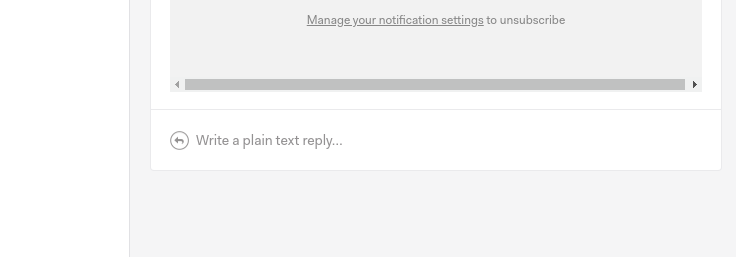
Since version 1.7.4 when I'm about to respond to an email or compose a new one, sometimes I'm only able to do that in plain text mode. The messages I'm trying to respond to are html emails. This worked fine in version 1.7.4.
To Reproduce
Steps to reproduce the behavior:
- Go to Inbox
- Click on one of the emails
- Scroll down to the "Reply" box at the bottom of the email
- It says "Write a plain text reply"
Expected behavior
It should say "Write a reply" and the editor (bold, italic, etc) should appear.
Screenshots
Setup: (please complete the following information):
- OS: Elementary OS
- OS Version: 5.1.2. Hera
- Mailspring Version: 1.7.4.
Additional context
This doesn't seem to be a permanent issue. Sometimes it says "Write a reply" and the html editor (bold, italic, etc.) appears, sometimes it says "Write a plain text reply" for no apparent reason.
Sometimes when I restart the app it starts working again. For the same email, before restarting the app it said "Write a plain text reply", after restart it says "Write a reply" and the html editor appears. Restarting the app doesn't always help. Sometimes I leave the app open, come back after 10 minutes and the text changes to "Write a reply".
 pszucs
All 15 comments
I can confirm that I have this same issue. It started since the most recent update.
 nolteb
on 1 Mar 2020
nolteb
on 1 Mar 2020
Agree, this has started occurring since 1.7.4. I haven't changed my process, when I hit reply it often seams to default to txt, not html.
If I open the same email in a separate window by double clicking the message, I can reply in html.
 angusscown
on 1 Mar 2020
angusscown
on 1 Mar 2020
Also having the issue. It's unclear what causes this, I close/open the application and sometimes it replies as html.
@angusscown Double clicking the message and clicking reply seems to work more realiably. Thank you.
 Rendse
on 2 Mar 2020
Rendse
on 2 Mar 2020
I've looked at the source code and it seems to me it's something to do with the "Alt" key.
By default, if you press the "Alt" key and click on the reply box, it will load the plain text reply functionality.
I've just tried pressing the "Alt" key twice, and it switched back to "Write a reply".
pszucs
on 2 Mar 2020
+1 on this.
In general, the plain text implementation is pretty clunky and in many cases has forced me into a plain text compose that I didn't want. Suggested improvement could be to ad a preference item to "never compose in plain text"
 palefire19
on 2 Mar 2020
palefire19
on 2 Mar 2020
I can confirm this issue also. Forwarded emails are also plain text
 chemicalkosek
on 2 Mar 2020
chemicalkosek
on 2 Mar 2020
+1 here
This is incredibly frustrating, as my annual renewal payment for Mailspring was just processed and then this upgrade and bug began. It might seem like a small thing, but it happens dozens of times a day and every time I have to close the app and re-open it (sometimes several times), and sometimes I must rebuild the cache as well before it will work properly.
 artsgirl
on 3 Mar 2020
artsgirl
on 3 Mar 2020
:+1: In this issue
It is constant when this happens, however, I have found some specific cases when that happens and it is when it is trying to connect again with the account. I don't know why, but when my machine has made this process I have the "Write a plain text replay" message. When this happens I have to close the app and re-open (sometimes several times) but most of the time it fix when I press F5 to synchronize my email accounts again.
I hope you can fix, it is small but it is true that it is really annoying when you are pretty happy with the option that gives Mailspring to decorate your messages (Loves the signature and code feature btw :heart:)
 jrmejiaa
on 5 Mar 2020
jrmejiaa
on 5 Mar 2020
As @pszucs wrote, there is a pretty simple workaround.
"HTML <--> Plain text" is toggled with the Alt key. Once you press Alt + tab, Mailspring receives the keyDown event, but not the keyUp event. So it is stuck in Plain text reply mode.
Clicking Alt with Mailspring in focus should perform the keyUp event, and the text will change back from "Write a plain text reply..." to "Write a text reply...".
Rendse
on 5 Mar 2020
Unfortunately @Rendse, that is not exactly true. Sometimes I am able to toggle it with alt, but more often I have to hold down the alt key while I click reply (which is still in plain text), close and delete that reply, and then when I get back to the main window I have the "Write a reply" option available instead of the plain text option. Doing it this way also introduces the mail persists in emptied trash bug, which is only resolved through a cache reset, so there's a whole cascade of tiny issues here and it becomes death by a thousand cuts to productivity.
artsgirl
on 5 Mar 2020
I've switched to thunderbird until this and the performance issues are sorted out. I had to create a command that would kill mailspring's pid if I am running on battery and haven't used it in a few minutes, because of CPU utilization killing my battery. This reply being in plaintext thing is the last straw.
nolteb
on 5 Mar 2020
Same problem.
Going into Preferences > Clear cache exits from the plain text mode.
Opening a reply box by clicking on an email in chromium puts again mailspring in plain text reply mode.
 macrophone
on 6 Mar 2020
macrophone
on 6 Mar 2020
I'm also having this issue on Ubuntu 18.04. When I hit ctrl-alt up to move between workspaces It gets stuck on plain text reply. When I move back to that workspace I can to hit either ctrl or alt and it fixes the issue. Kinda annoying.
 hariscodes
on 14 Mar 2020
hariscodes
on 14 Mar 2020
If you have set Mailspring as a default email composer, it makes things even more problematic. The composer opens in a random state, and I need to be lucky to get default HTML editor. There is even not switch between HTML <> Plain text, so I have to close the composer, go back to Mailspring, play with Alt key, then go back and click on an email link in another app.
My suggestion:
- Make a Setting to enable/disable global support for plain text at all. I don't believe there is a huge share of plain text users nowadays. It's just a share of specific users who can enable this if they want.
- Create a switch in Composer (HTML <> Plain), if the setting mentioned above is enabled.
- Unbind this from Alt key. It's too frequently used key.
 ipa1981
on 21 Mar 2020
ipa1981
on 21 Mar 2020
Hey folks! Sorry for the delay—I'm not sure how I missed this but it's a dup of 1894 and was fixed in the 1.7.6 release last week. I think we'll switch this to an in-editor option fairly soon, the "hold alt for plaintext" was sort of a stopgap to get us there and caused more problems than expected because 1) the alt key state is difficult to track accurately due to the app being backgrounded, etc. and 2) the alt key is used a lot more on Windows / Linux than it is on macOS (where I personally use Mailspring).
Thanks for all the constructive feedback, I appreciate it! Stay tuned for more improvements on this front—
 bengotow
on 26 Apr 2020
bengotow
on 26 Apr 2020
Related issues
 dgattey
·
3Comments
dgattey
·
3Comments
 vsanchez
·
3Comments
vsanchez
·
3Comments
 scooby
·
3Comments
scooby
·
3Comments
 enoversum
·
3Comments
enoversum
·
3Comments
 psivesely
·
3Comments
psivesely
·
3Comments
Most helpful comment
I've looked at the source code and it seems to me it's something to do with the "Alt" key.
By default, if you press the "Alt" key and click on the reply box, it will load the plain text reply functionality.
I've just tried pressing the "Alt" key twice, and it switched back to "Write a reply".