Mailspring: Dock icon badges missing and no notifications on macOS Catalina
Are there any related issues?
None that I can see.
What operating system are you using?
macOS Catalina Beta 7 19A546d but I noticed it effected all previous betas too
What version of Mailspring are you using?
Version 1.6.3 (1.6.3)
Bug
The email unread count is missing from the badge, even though the option is enabled and there are unread emails. Also there are no notifications for mail received.
Is this an email sync or connection issue?
Nope.
Is the issue related to a specific email provider (Gmail, Exchange, etc.)?
Nope.
Is the issue reproducible with a particular attachment, message, signature, etc?
Any message.
 sampotts
All 7 comments
This may be helpful. Apparently the process has changed for Catalina... https://developer.apple.com/documentation/devicemanagement/notifications/notificationsettingsitem
sampotts
on 1 Sep 2019
Can confirm this - @bengotow, is there anything that we can do on our side?
 perteraul
on 6 Sep 2019
perteraul
on 6 Sep 2019
They seem to be back for me on beta 9 👍
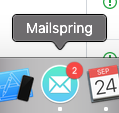
Don't have a notification to show but they also seem to show up ok.
sampotts
on 24 Sep 2019
Hey! This may be related to #1467 and fixed in the next release. Will do some testing and see!
 bengotow
on 9 Oct 2019
bengotow
on 9 Oct 2019
thanks @bengotow! any update on when the next release will be shipped?
perteraul
on 14 Oct 2019
Hey folks! This shipped today in 1.7.2 - you can download the update from our website at getmailspring.com/download or choose "Check for Updates" in the app's menu. Enjoy the update!
bengotow
on 22 Oct 2019
That works, thanks for the update!
Sent with GitHawk
perteraul
on 23 Oct 2019
Related issues
 DanielRios549
·
3Comments
DanielRios549
·
3Comments
 tuxmachine
·
3Comments
tuxmachine
·
3Comments
 vsanchez
·
3Comments
vsanchez
·
3Comments
 DylanC
·
3Comments
DylanC
·
3Comments
 imbrn
·
3Comments
imbrn
·
3Comments
Most helpful comment
Hey folks! This shipped today in 1.7.2 - you can download the update from our website at getmailspring.com/download or choose "Check for Updates" in the app's menu. Enjoy the update!