Mailspring: Pre 1.6 tray icon looked better on KDE
I'm running KDE Neon. The new tray icon looks too big and out of place. The old icon looked fine on KDE.

 tobias-kuendig
All 21 comments
Hey! Ahh man here we go - it seems that there is no good solution to this. On Ubuntu the old icon (16x16) was pixelated and blurry, and it appears that some platforms like KDE Neon can't scale down the image (?!) so now it appears too large.
@arkraft do you have any thoughts on how we could handle this? I honestly don't know too much about the Linux ecosystem except what I've learned maintaining Mailspring. Can we detect which distro the user is on and just start using different icon sizes?
 bengotow
on 18 Mar 2019
bengotow
on 18 Mar 2019
For whatever it's worth, it looks better for me now on Ubuntu 18.10 gnome.
Also, perhaps os.release() https://nodejs.org/api/os.html might help narrow down specific linux distros? Never used before so cannot confirm, though.
 harm0nic
on 18 Mar 2019
harm0nic
on 18 Mar 2019
+1 here. Tray icon before upgrading to 1.6.0 was fine. Looks very same to @tobias-kuendig's issue.
@harm0nic It's got to do with Desktop Environment, more than Linux distro. I'm running Antergos with KDE.
Before:

After:

 shrestaz
on 18 Mar 2019
shrestaz
on 18 Mar 2019
Exact same issue on Manjaro KDE. Seems like a problem for KDE users.
 vtruong68
on 19 Mar 2019
vtruong68
on 19 Mar 2019
With default KDE plasma theme even worse, white on white ;)

 habl
on 19 Mar 2019
habl
on 19 Mar 2019
@bengotow We could detect the current DE by using the DESKTOP_SESSION environment variable. There is also the XDG_CURRENT_DESKTOP environment variable, but this is only for X11 i believe and with Wayland coming up it would be safe to use the first one.
I thought the icon size is managed by electron itself, but it seems to only work on OSX as there are also HiDPI versions of the icon in the directory.
@habl It was also white on the pre 1.6 release, there is also an issue for that (#884) The problem here is to detect the color of the panel because there is no gloabl setting for a theme variant and there are light themes using a dark tray.
 arkraft
on 19 Mar 2019
arkraft
on 19 Mar 2019
We could detect the current DE by using the
DESKTOP_SESSIONenvironment variable. There is also theXDG_CURRENT_DESKTOPenvironment variable, but this is only for X11 i believe and with Wayland coming up it would be safe to use the first one.
@arkraft This is a good solution. And for now, this workaround is good for X11 because Wayland and KDE aren't two things that play very well together so this isn't a problem.
 Funeoz
on 19 Mar 2019
Funeoz
on 19 Mar 2019
Could someone using KDE tell me what the output of echo $DESKTOP_SESSION and echo $XDG_CURRENT_DESKTOPis? I am not sure if its "plasma" or "kde".
arkraft
on 20 Mar 2019
@arkraft
$ echo $DESKTOP_SESSION
/usr/share/xsessions/plasma

$ echo $XDG_CURRENT_DESKTOP
KDE

$ lsb_release -a
No LSB modules are available.
Distributor ID: neon
Description:    KDE neon User Edition 5.15
Release:        18.04
Codename:       bionic
Thanks! Will try to get it ready this week. Btw., sorry for the inconvenience i caused you guys with my merge request, i only checked Gnome and Mate with the new icons.
arkraft
on 20 Mar 2019
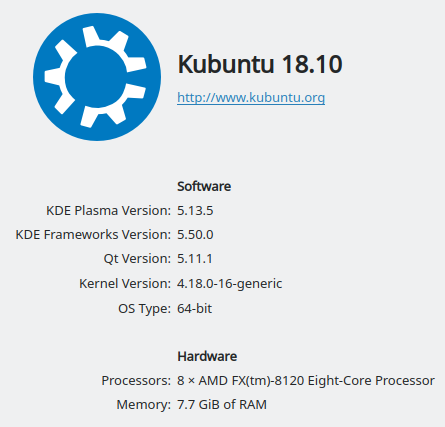
This might have to do with screen resolution as well or something. I'm running KDE on Kubuntu, and while it still looks a bit large for my tastes, it looks a lot better on mine than on thjose screenshots above:

echo $DESKTOP_SESSION
plasma

echo $XDG_CURRENT_DESKTOP
KDE

lsb_release -a
No LSB modules are available.
Distributor ID: Ubuntu
Description:    Ubuntu 18.10
Release:        18.10
Codename:       cosmic
 Bugsbane
on 26 Mar 2019
Bugsbane
on 26 Mar 2019
Good thinking! Unfortunately, I'm seeing the same (too large) icon when running on 1920x1080 and 3840x2160 (I did not reboot, just changed the resolution on-the-fly).
tobias-kuendig
on 26 Mar 2019
@tobias-kuendig Interesting... I'm on 1920x1080, too, so it's not screen resolution, and it's not all KDE installations... I wonder if it could be down to the version of KDE libs (libplasma)?
Bugsbane
on 27 Mar 2019
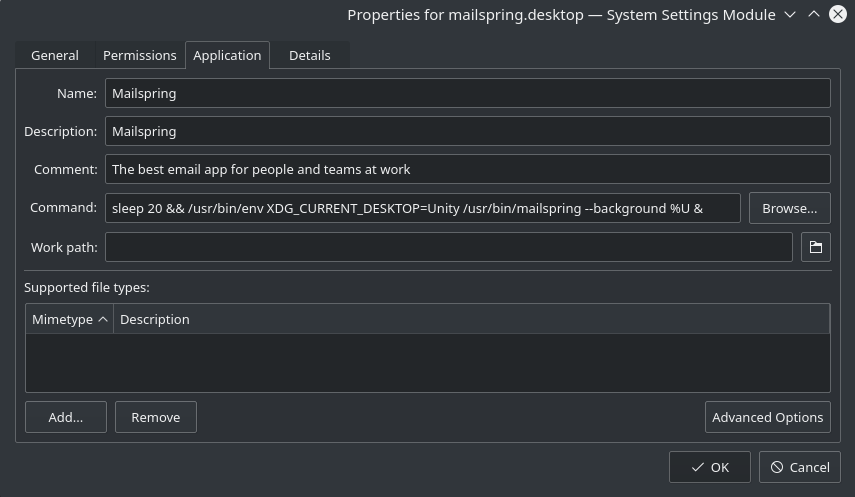
As a workaround, you can set /usr/bin/env XDG_CURRENT_DESKTOP=Unity in the desktop file.
If you have mailspring in autostart applications you will also need to add the same to autostart line.

 IevgenSobko
on 4 Apr 2019
IevgenSobko
on 4 Apr 2019
As a workaround, you can set
/usr/bin/env XDG_CURRENT_DESKTOP=Unityin the desktop file.
If you have mailspring in autostart applications you will also need to add the same to autostart line.
Where did you put this line? I can't figure out how to do that.
Funeoz
on 4 Apr 2019
For autostart:
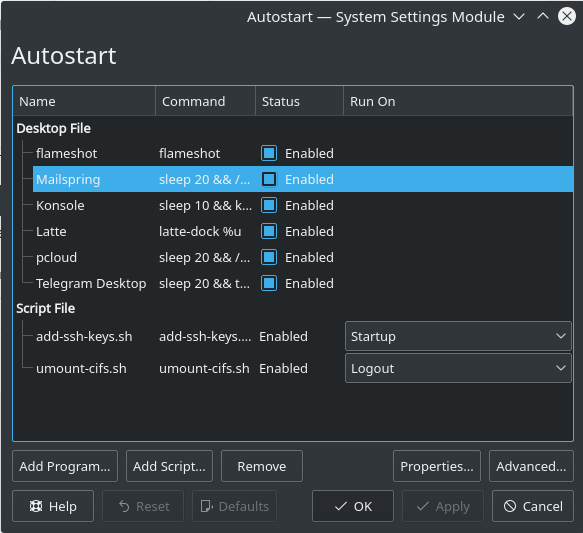
Double click mailspring entry and edit Command. You can skip sleep 20 && in the beginning and & in the and of line. It is for delayed start of mailspring to make start of system easier and avoid issues with late WiFi connection.
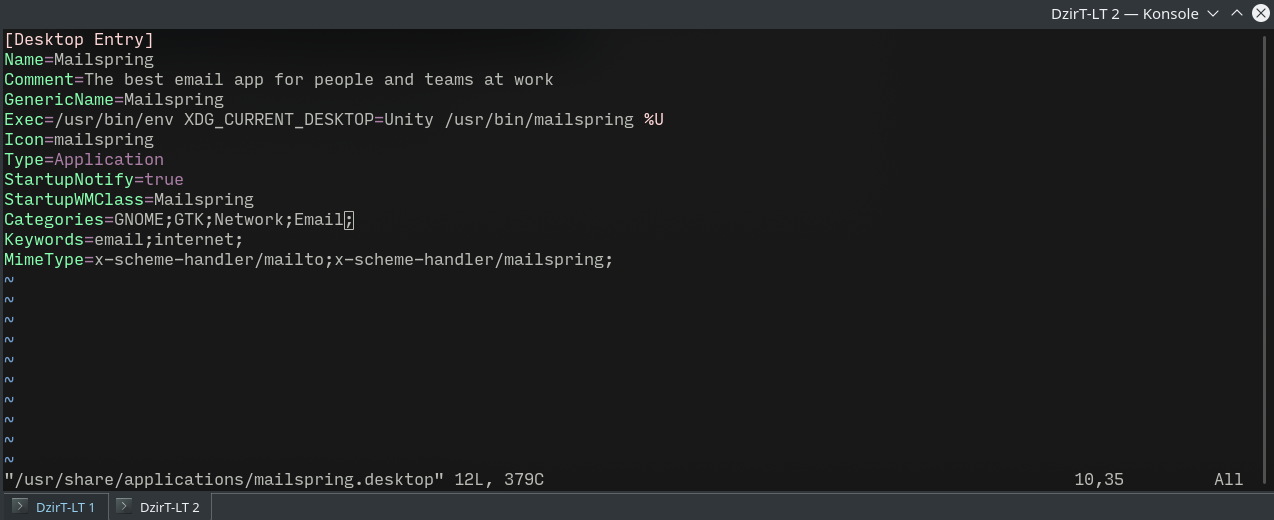
For general system if you are using installers edit desktop file
sudo vim /usr/share/applications/mailspring.desktop
IevgenSobko
on 4 Apr 2019
Thanks ! It worked.
Funeoz
on 4 Apr 2019
Can confirm this bug as fixed in 1.6.1 :+1:
tobias-kuendig
on 5 Apr 2019
There is something about the try icon in KDE in the electron change log: https://electronjs.org/releases/stable#release-notes-for-v412
Fixed issue on KDE where tray icons would be displayed incorrectly as a 22x22 version of the provided tray image but cropped from the center. #17497
Could it be that this solved the problem?
arkraft
on 5 Apr 2019
This issue seems to be solved, you may want to close it @bengotow.
 omerfarukdogan
on 24 May 2020
omerfarukdogan
on 24 May 2020
This is how it looks on my updated Arch machine. :crying_cat_face: Anything specific package that I maybe missing out on?

 theGeekyLad
on 1 Jan 2021
theGeekyLad
on 1 Jan 2021
Related issues
 tuxmachine
·
3Comments
tuxmachine
·
3Comments
 DylanC
·
3Comments
DylanC
·
3Comments
 scooby
·
3Comments
scooby
·
3Comments
 enoversum
·
3Comments
enoversum
·
3Comments
 applesea2
·
3Comments
applesea2
·
3Comments