Mailspring: Formatting multiple lines as code adds extra line breaks
Are there any related issues?
Don't believe so.
What operating system are you using?
MacOS 10.14.3
What version of Mailspring are you using?
1.5.5
--
Bug?
Is this an email sync or connection issue?
No.
Is the issue related to a specific email provider (Gmail, Exchange, etc.)?
No.
Is the issue reproducible with a particular attachment, message, signature, etc?
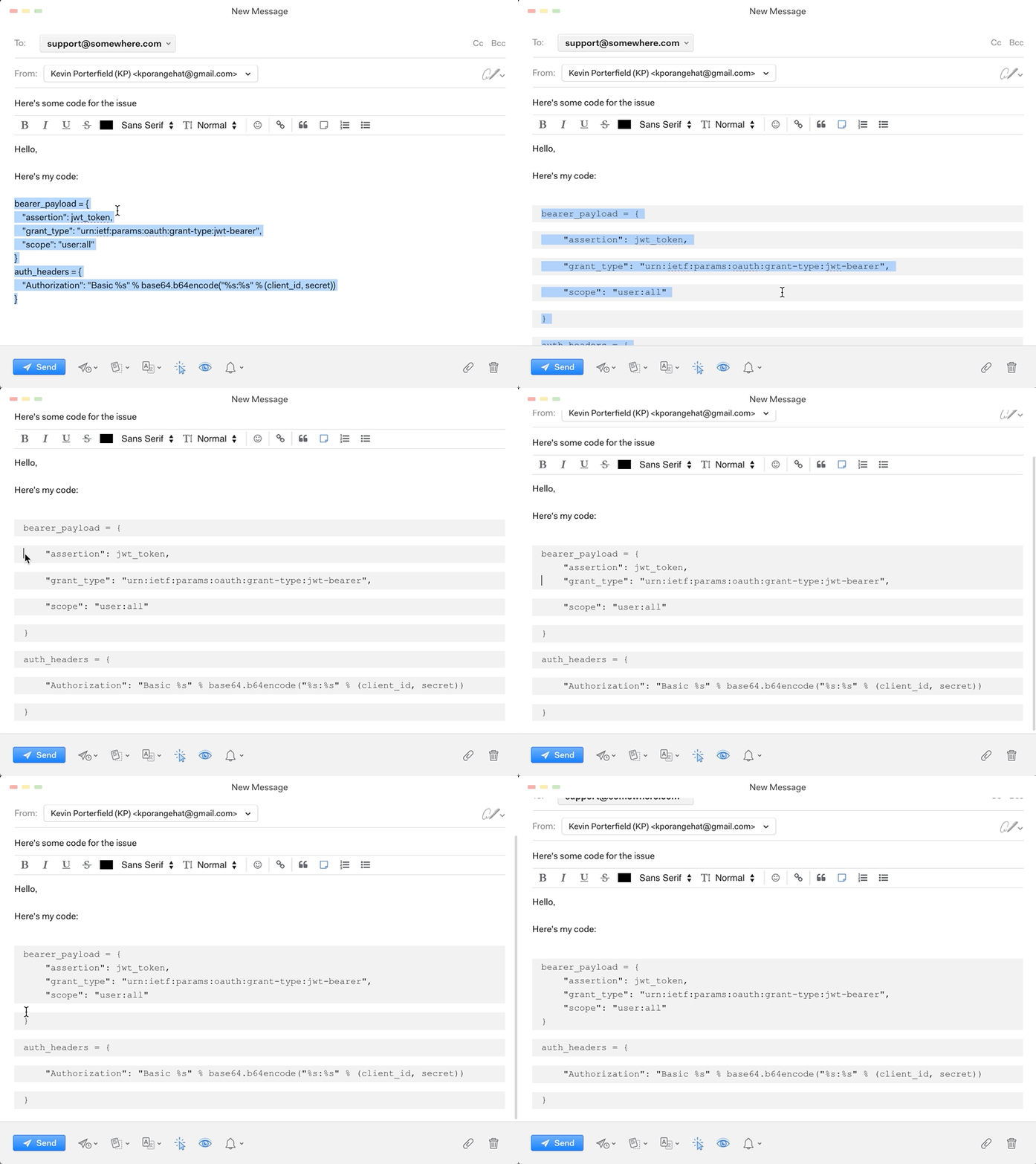
I often am pasting code snippets in my emails. The main issue is that when I format the multi-line text as code, Mailspring treats each line as a separate code block and I have to manually edit each line to get it to format well. This feels incorrect to me, especially if I'm selecting the entire block of text to format at once.
Feature Request?
Does this feature exist in another mail client or tool you use?
...
 kporangehat
All 4 comments
Wow that is super not cool. I'll get this fixed in the next release 👍 I think this is happening because code blocks implement "soft newlines" which is a different concept in our editor.
 bengotow
on 5 Feb 2019
bengotow
on 5 Feb 2019
Hey! This has been fixed in 1.6.0 which shipped today. The app should auto-update, but you can also get the new version manually from https://getmailspring.com/download. Thanks - enjoy the app!
bengotow
on 18 Mar 2019
I'd like to report that as of version 1.6.1 this is still an issue. Easy to test by pasting any codeblock (for example from Visual Studio Code) into a new email.
 Ragura
on 12 May 2019
Ragura
on 12 May 2019
Agreed. It looks like maybe this is a regression in v1.6.1?
- When copy/pasting from the terminal (iTerm2)
- When copy/pasting from VSCode (which also copies color formatting). I can post screens if desired.
kporangehat
on 15 May 2019
Related issues
 justindoran
·
3Comments
justindoran
·
3Comments
 psivesely
·
3Comments
psivesely
·
3Comments
 3v1n0
·
3Comments
3v1n0
·
3Comments
 applesea2
·
3Comments
applesea2
·
3Comments
 dgattey
·
3Comments
dgattey
·
3Comments