Mailspring: problem to add a Yahoo account
Windows 10 x64 + Mailspring 151
1/ I click on add a account, main interface menu
2/ I click on the Yahoo logo
3/ an error message is displayed

it's a new installation with the latest version. There were no previous versions installed
 franco27
All 43 comments
the error message displays a connection error. impossible to connect to the server.
in file log, there is only write "IMAP" after it's empty
franco27
on 29 Oct 2018
Hey! Thanks for reporting this—could you try enabling "Less Secure Apps" in Yahoo's settings (which allows you to sign in with your email / password via IMAP), or create an app password for Mailspring? Here's a bit more info: https://blog.context.io/yahoos-less-secure-app-setting-2203fcef54f.
I'll see if I can get these tips in to the actual log as well!
 bengotow
on 3 Nov 2018
bengotow
on 3 Nov 2018
I solved this problem:
1 / I uninstalled version 1.5.1
2/ I installed version 1.4.2 and added my mail account laposte and yahoo #1193
3/I upgraded to 1.5.0 and then version 1.5.1
franco27
on 3 Nov 2018
There is this parameter in my Yahoo account. On another computer, Mailspring is installed with the same Yahoo account. (It was added before version 1.5 )
franco27
on 3 Nov 2018
Hi,
I'm posting here because I have the same problem (Mac Mini 2018, Mailspring 1.5.4)
I first tried with my Yahoo settings (Account Key on and app password).
Error message as above.
Then I tried disabling the Yahoo Account Key to access the Less Secure Apps setting and enabled it.
Tested with account password:
Ce compte n'est pas valide ou Mailspring n'a pas pu trouver le dossier Boîte de réception ou Tous les messages. http://support.getmailspring.com/hc/en-us/articles/115001881912 (SMTP)View Log
then with app password to be sure:
Erreur d'authentification - Vérifiez votre nom d'utilisateur et votre mot de passe. (IMAP)View Log
Do I really have to uninstall (I have 4 other accounts), install Mailspring 1.4 and so on?
 MarcoAix
on 30 Dec 2018
MarcoAix
on 30 Dec 2018
I'm too experiencing the same problem. Mailspring version 1.6.3. Cannot add a new Yahoo account on a new Mailspring installation. The log file says:
13780 [2019-08-07 14:04:29.924] [main] [info] Identity created at 1565207027 - using ID Schema 1
13780 [2019-08-07 14:04:29.925] [main] [info] ------------- Starting Sync (**@yahoo.com.br) ---------------
13780 [2019-08-07 14:04:29.928] [metadata] [info] Metadata delta stream starting...
13780 [2019-08-07 14:04:29.929] [background] [info] Marking all folders asbusy
13780 [2019-08-07 14:04:29.929] [background] [info] Syncing folder list...
13780 [2019-08-07 14:04:32.487] [background] [critical] Stack trace:
raise
abort
terminate
wcsstr
wcsstr
RtlInterlockedCompareExchange64
RtlInterlockedCompareExchange64
KiUserExceptionDispatcher
_CxxThrowException
** _o_iswdigit
 josiasmat
on 7 Aug 2019
josiasmat
on 7 Aug 2019
I have the same problem.
A first installation (version 1.6.3) works well and then failed when I tried to configure my account in a second installation (same version) in another pc
Erreur d'authentification - Vérifiez votre nom d'utilisateur et votre mot de passe. (IMAP)View Log
 Dahouo
on 21 Sep 2019
Dahouo
on 21 Sep 2019
The issue still remains in version 1.6.3.
Tried the previous solution with the downgrade to 1.4.2 but no luck.
 TheDechev
on 13 Oct 2019
TheDechev
on 13 Oct 2019
The issue persists in version 1.7.1.
josiasmat
on 15 Oct 2019
Just making a comment that under the latest version as of today ( 8/12/2019) I also faced the same issue. Solved it by changing the outgoing port in the IMAP configuration to 587.
 AlexmograineThird
on 8 Dec 2019
AlexmograineThird
on 8 Dec 2019
Tried the solution suggested by AlexmograineThird (change IMAP port to 587), but it didn't work for me.
Using version 1.7.2, and the problem persists. This issue is preventing me from installing MailSpring in a new computer. But it appears that no one in the MailSpring team cares about it.
josiasmat
on 8 Dec 2019
Tried the solution suggested by AlexmograineThird (change IMAP port to 587), but it didn't work for me.
Using version 1.7.2, and the problem persists. This issue is preventing me from installing MailSpring in a new computer. But it appears that no one in the MailSpring team cares about it.
Sorry to hear it didnt work. I tried once more today. So those were the steps that got me to make it work.
When adding a yahoo account you first have to generate a password for third party apps, this can be done using the following link: https://help.yahoo.com/kb/SLN15241.html?guccounter=1
( It is provided under the instructions to add you a yahoo account on the springmail program)
After having generated that password, on the "connect an email account" page of springmail, you select IMAP/SMTP you enter your informations, and change ports for the " Outgoing mail" part to 587 and secutiry should switch to STARTTLS on its own.
That's how I got it to work, hope it helps you in the end.
Regards Steven.
AlexmograineThird
on 9 Dec 2019
Hello, i am also not able to login using Yahoo, i tried everything and yes i did a app password.
 lukasdeveloper
on 10 Dec 2019
lukasdeveloper
on 10 Dec 2019
Just to be clear here: the issue is that it is not possible to add a new Yahoo Mail account to MailSpring. I have a Yahoo Mail account working in MailSpring which I added some time ago, probably when MailSpring was at version 1.2 or 1.3. Even though I have this account working, when I try to add another Yahoo Mail account, be it in this same installation or in another computer, it doesn't work, failing in fetching folders and emails. It doesn't even show under Inbox. Tried adding a "Yahoo Mail" account and a custom IMAP/SMTP account; both fail. Changing port as suggested by AlexmograineThird doesn't work either. And yes, I also did an app password...
josiasmat
on 10 Dec 2019
^
lukasdeveloper
on 11 Dec 2019
Issue still there on Mailspring version downloaded today. In fact, the client says that authentication was successful (using app-specific password from Yahoo, and the default Yahoo IMAP settings in Mailspring), but the "new account" window then simply disappears without the Yahoo account being added to the list of accounts.
The same issue reported in #1672 is sadly closed without comment - pity, as it's a show-stopper for anyone with a Yahoo account who might like to make the switch to Mailspring!
Any comment (even if not a fix!) from the developers as to why Yahoo's IMAP is breaking Mailspring... ?
 mystinen
on 29 Feb 2020
mystinen
on 29 Feb 2020
@mystinen i can approve you! I used app password, and i was able to log in, but as soon as i logged in everything disappeared and only a while view is showing and nothing else.
I tried quiting and reopening the app and logging back again but no luck.
If anyone finds something useful please leave a comment!
 aureliangavrila
on 2 Apr 2020
aureliangavrila
on 2 Apr 2020
Version 1.7.6: this issue persists.
Come on devs... don't you want users of Yahoo Mail to use your app?
josiasmat
on 23 Apr 2020
Hi All
This issue is still occurring in 1.7.6 as I have encountered it today
Some other details
- I used 1.7.2 to install mailspring in March 2020
- I found I had issues with white screen with 1.7.4 (Getting 1.7.2 fixed this and then I could upgrade)
- Over the week starting 1 May I had constant connection issues to my yahoo mail
- There was a significant crash that created error reports 6 May 2020 that was sent to dev's
- 8 May 2020 the mailspring application stopped updating/sync-ing altogether
- I have uninstalled and re-installed 1.72, 1.74 and 1.76 and all have the same IMAP error in the set up screens
07, changing any of the ports to the available options DO NOT resolve the issues with the IMAP error - all of the installs have the yahoo app password set up as part of the configuration
- Yahoo has published a notice about IMAP security and preventing older apps from connecting but I do not know the date of the post - linked: https://nz.help.yahoo.com/kb/SLN27791.html
- Issue has been submitted today 8 May as part of the issue reported
*I wonder if the issue is at the Yahoo end and dev's have a bigger issue to address??*
 GeorgeB5555
on 8 May 2020
GeorgeB5555
on 8 May 2020
Same problem here, version 1.7.6. Since yesterday Yahoo! Mail doesn't connect, so I removed the account and added it again and now it gives this same error message, since I use a unique password for apps. Until yesterday it worked perfectly.
 BiNh0X
on 8 May 2020
BiNh0X
on 8 May 2020
Same issue in ver. 1.7.6, The error message says "Connection Error - Unable to connect to the server / port you provided. (IMAP)". I tried manually setup IMAP ports according to Yahoo's doc but didn't work.
 ZhirenXu
on 8 May 2020
ZhirenXu
on 8 May 2020
I also have version 1.7.6 and since yesterday 2020-05-07 Yahoo no longer works. I created a new app password in Yahoo and it did not work, I also tried setting up IMAP email using Yahoo specs and that doesn't work either. Why only Yahoo???
 gordynorth
on 8 May 2020
gordynorth
on 8 May 2020
This problem only occurs in Mailspring, as I also use Thunderbird and there is no problem logging in to Yahoo.
BiNh0X
on 8 May 2020
Hi All
I have been in touch with Yahoo and all the IMAP settings in Mailspring , either 465/587 for the outgoing mail, are correct
Yahoo provided the below re settings as confirmation after setting up your app password
After finishing generate your third-party app passwords, follow the instructions below for the IMAP server setting:
Your login info
Email address - Your full email address ([email protected])
Password - The generate third-party app passwords (16 characters without space)
Requires authentication - Yes
Incoming Mail (IMAP) Server
Server - imap.mail.yahoo.com
Port - 993
Requires SSL - Yes
Outgoing Mail (SMTP) Server
Server - smtp.mail.yahoo.com
Port - 465 or 587
Requires SSL - Yes
Requires authentication - Yes
If you need specific instructions for your mail client or app, reach out to its manufacturer.
GeorgeB5555
on 8 May 2020
further update - could the issue be that the outgoing mail "requires authentication" configuration has been removed in mailspring?
Would be good for feedback on this from developers and the most recent changes to Mailspring
GeorgeB5555
on 8 May 2020
final note from me until devs look into this - 1.7.6 had a change in the preferences and authentication settings, I believe this to be the cause of the issue but need one of the 12 contributors to look into that ... hopefully soon as the app is great when it is working
GeorgeB5555
on 9 May 2020
I'm in the same boat here. I know that does not help but reporting so Mailspring support understands that it is not limited to only a few people.
 jrbastien
on 9 May 2020
jrbastien
on 9 May 2020
Well, after months not being able to create a new Yahoo account, and now unable to use the Yahoo account which I was already using, and for all this time being simply ignored by the Mailspring devs, as if it wasn't a serious bug that their MAIL APP doesn't work with a MAJOR MAIL PROVIDER, I'm going back to Thunderbird.
josiasmat
on 10 May 2020
Yeah this is annoying. I can't understand what the team is up to. I only realized I was losing mail because other clients are still working correctly.
 HaoZeke
on 10 May 2020
HaoZeke
on 10 May 2020
I'm having the same problem... if this isn't resolved soon I will have to switch to Thunderbird.. would be a pitty since I love Mailspring, it's much prettier than Thunderbird; but without connection to my Yahoo account it loses all its value :/.
 olikugel
on 10 May 2020
olikugel
on 10 May 2020
I am also returning to Thunderbird until they resolve this issue, as my primary email account is Yahoo ...
BiNh0X
on 10 May 2020
Same issue in version 1.7.6, The error message says "Connection Error - Unable to connect to the server / port you provided. (IMAP)". I tried manually setup IMAP ports according to Yahoo's doc but didn't work.
 pete00
on 14 May 2020
pete00
on 14 May 2020
Having the same issue. I'm using version 1.7.6 on Manjaro. I have tried all workarounds without success.
 vik-tor
on 16 May 2020
vik-tor
on 16 May 2020
This problem should be resolved by installing the new version 1.7.7
Windows:
https://mailspring-builds.s3.amazonaws.com/client/5b438be9/win-ia32/MailspringSetup.exe
Linux:
https://mailspring-builds.s3.amazonaws.com/client/5b438be9/linux/mailspring-1.7.7-amd64.deb
https://mailspring-builds.s3.amazonaws.com/client/5b438be9/linux/mailspring-1.7.7-0.1.x86_64.rpm
Linux Snap:
snap install mailspring --beta
(See issue #1974)
 maneandrea
on 20 May 2020
maneandrea
on 20 May 2020
Yes, it works finally!
josiasmat
on 21 May 2020
Yes, it works finally!
Wrong... Existing accounts do work normally now, but I am unable to add a new Yahoo account yet.
josiasmat
on 21 May 2020
Refreshed Mailspring using --beta on Linux and I was able to add my Yahoo account and it seems to be refreshing.
So far all is good
gordynorth
on 21 May 2020
Works for me now.
On May 21 2020, at 1:37 pm, gordynorth notifications@github.com wrote:
>
>
Refreshed Mailspring using --beta on Linux and I was able to add my Yahoo account and it seems to be refreshing.
So far all is good—
You are receiving this because you commented.
Reply to this email directly, view it on GitHub (https://link.getmailspring.com/link/[email protected]/0?redirect=https%3A%2F%2Fgithub.com%2FFoundry376%2FMailspring%2Fissues%2F1193%23issuecomment-632090739&recipient=cmVwbHkrQUJCQ1VUNkZFVjYzSVpTVTU3UkxPNUY0MkpTU0ZFVkJOSEhCTVczQkw0QHJlcGx5LmdpdGh1Yi5jb20%3D), or unsubscribe (https://link.getmailspring.com/link/[email protected]/1?redirect=https%3A%2F%2Fgithub.com%2Fnotifications%2Funsubscribe-auth%2FABBCUT6BUS4EP4JFK2LU75DRSUVCFANCNFSM4F757M6Q&recipient=cmVwbHkrQUJCQ1VUNkZFVjYzSVpTVTU3UkxPNUY0MkpTU0ZFVkJOSEhCTVczQkw0QHJlcGx5LmdpdGh1Yi5jb20%3D).
HaoZeke
on 21 May 2020
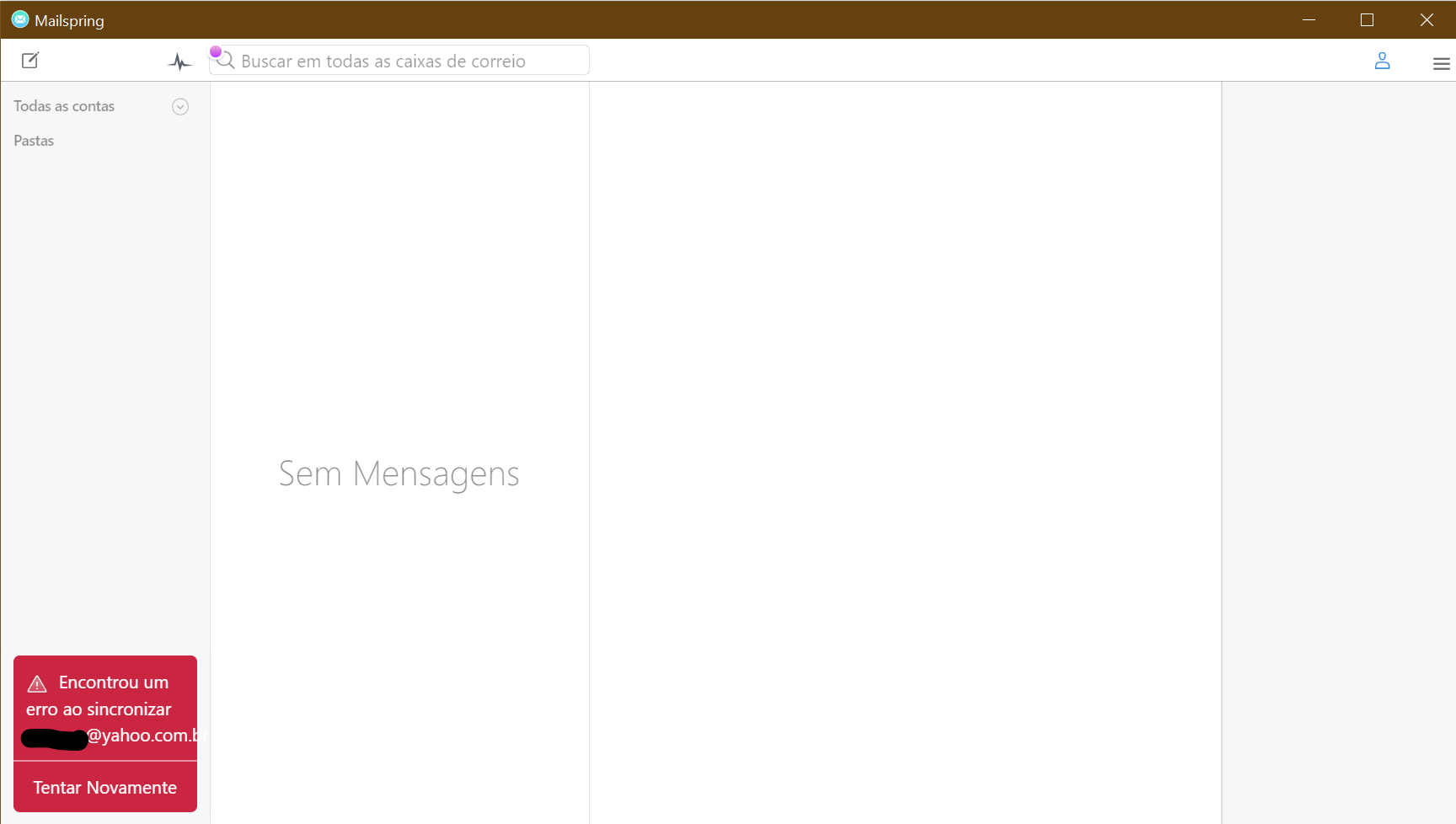
For me, the existing account works. But tried to add a Yahoo Mail account in a refreshed MailSpring installation and it does not work. The account is added, but MailSpring can not get the folders list. Log:
16408 [2020-05-21 10:58:50.838] [main] [info] Identity created at 1565207027 - using ID Schema 1
16408 [2020-05-21 10:58:50.840] [main] [info] ------------- Starting Sync (******@yahoo.com.br) ---------------
16408 [2020-05-21 10:58:50.848] [background] [info] Marking all folders as busy
16408 [2020-05-21 10:58:50.848] [background] [info] Syncing folder list...
16408 [2020-05-21 10:58:52.286] [metadata] [info] Metadata delta stream starting...
16408 [2020-05-21 10:58:53.409] [background] [critical]
***
*** Mailspring Sync
*** A C++ exception occurred during program execution:
*** UNIQUE constraint failed: Folder.id
***
Note that the mail domain is yahoo.com.br.
josiasmat
on 21 May 2020
I am now able to add a new Yahoo account, and mail operations are working normally. Had downloaded version 1.7.7-71504f2c from the website, running on Windows 10.
Thank you!
mystinen
on 25 May 2020
Can confirm successful login and operations with the Yahoo account with Mailspring v1.7.8 under Ubuntu 20.04.
 jambocurious
on 25 May 2020
jambocurious
on 25 May 2020
For me it still doesn't work. Tried to add another yahoo mail account to a clean install (v. 1.7.8). But now the log has different info:
Important: Yahoo requires that you create a unique app password for email apps like Mailspring. Follow these instructions to create one and then paste it below.
https://help.yahoo.com/kb/SLN15241.html?guccounter=1

----------IMAP----------
connect <mailcore::IMAPSession:010FF9CC>
* OK [CAPABILITY IMAP4rev1 SASL-IR AUTH=PLAIN AUTH=XOAUTH2 AUTH=OAUTHBEARER ID MOVE NAMESPACE XYMHIGHESTMODSEQ UIDPLUS LITERAL+ CHILDREN X-MSG-EXT OBJECTID] IMAP4rev1 Hello
ssl connect imap.mail.yahoo.com 993 2
OpenSSL version: OpenSSL 1.1.0f  25 May 2017
connect ok
login
1 LOGIN "*********@yahoo.com.br" *********
1 OK LOGIN completed
2 CAPABILITY
* CAPABILITY IMAP4rev1 ID MOVE NAMESPACE XYMHIGHESTMODSEQ UIDPLUS LITERAL+ CHILDREN X-MSG-EXT UNSELECT OBJECTID
2 OK CAPABILITY completed
3 NAMESPACE
* NAMESPACE (("" "/")) NIL NIL
3 OK NAMESPACE completed
login ok
4 LIST "" "*"
* LIST (\Archive \HasChildren) "/" "Archive"
* LIST (\HasNoChildren) "/" "************"
* LIST (\HasNoChildren) "/" "************"
* LIST (\HasNoChildren) "/" "************"
* LIST (\HasNoChildren) "/" "************"
* LIST (\HasNoChildren) "/" "************"
* LIST (\HasNoChildren) "/" "************"
* LIST (\Junk \HasNoChildren) "/" "Bulk Mail"
* LIST (\Drafts \HasNoChildren) "/" "Draft"
* LIST (\HasChildren) "/" "Inbox"
* LIST (\HasNoChildren) "/" "Inbox/*****************"
* LIST (\HasNoChildren) "/" "Inbox/***********"
* LIST (\HasNoChildren) "/" "Inbox/*********"
* LIST (\HasNoChildren) "/" "Inbox/*******"
* LIST (\HasNoChildren) "/" "Inbox/********************"
* LIST (\HasNoChildren) "/" "Inbox/*********************"
* LIST (\HasNoChildren) "/" "Inbox/********************"
* LIST (\HasChildren) "/" "Mailspring"
* LIST (\HasNoChildren) "/" "Mailspring/Snoozed"
* LIST (\Sent \HasNoChildren) "/" "Sent"
* LIST (\Trash \HasNoChildren) "/" "Trash"
4 OK LIST completed


----------SMTP----------


SASL_PATH:

SMTP Last Response Code: 0
SMTP Last Response:


mailsmtp Last Error Code: 3
mailsmtp Last Error Explanation: MAILSMTP_ERROR_STREAM
mailsmtp Last Error Location: 5
mailsmtp Last Auth Type: 0
Note that I do created an "unique app password", so this isn't the problem.
Could it be an issue related to addresses that contain country-specific domains (as mine which is yahoo.com.br)?

josiasmat
on 25 May 2020
@josiasmat Sorry you're still having issues... if it's any help, the Yahoo account I tested with is also on a country-specific domain (i.e. it is not @yahoo.com) - so unless this issue is specific to yahoo.com.br, I don't think that's the cause.
Thanks for confirming you used an 'app password' - I forgot to mention that I had done so as well.
mystinen
on 25 May 2020
Related issues
 tuxmachine
·
3Comments
tuxmachine
·
3Comments
 justindoran
·
3Comments
justindoran
·
3Comments
 applesea2
·
3Comments
applesea2
·
3Comments
 k4rli
·
3Comments
k4rli
·
3Comments
 3v1n0
·
3Comments
3v1n0
·
3Comments
Most helpful comment
Well, after months not being able to create a new Yahoo account, and now unable to use the Yahoo account which I was already using, and for all this time being simply ignored by the Mailspring devs, as if it wasn't a serious bug that their MAIL APP doesn't work with a MAJOR MAIL PROVIDER, I'm going back to Thunderbird.