Mailspring: Blue tray icon badge appears after every mail sync regardless of new unread email
Are there any related issues?
- Possibly #692
What operating system are you using?
Windows 10 x64
What version of Mailspring are you using?
1.4.0-549b7968
--
Bug?
Every time the client syncs new email, regardless of whether or not there is new email a tiny blue badge appears on the tray icon.
I believe this indicator should only appear when there is new unread email since, when you click and open the window, the badge disappears until the next sync.
Badge after mail sync:
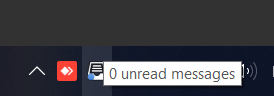
Regular state:

Is this an email sync or connection issue?
No
Is the issue related to a specific email provider (Gmail, Exchange, etc.)?
No
Is the issue reproducible with a particular attachment, message, signature, etc?
No
 mko-mx
All 12 comments
me too (blue dot on every sync) and it only works if mailspring is minimized NOT closed to tray, Also the actual blue dot is so small i cant even see it without Kmag.
Manjaro KDE
 JackDinn
on 24 Aug 2018
JackDinn
on 24 Aug 2018
I've installed Mailspring on Ubuntu 14 and this happens on Linux too. It was driving me mad seeing a blue dot on the notification icon but then (after spending a few minutes hunting around the 4 IMAP accounts that I connect to) came across this thread and it's related bug in Mailspring.
However, I'm hanging in with Mailspring as I think it's the neatest and easiest to use across the board. I do like their (monthly subscription based) option of tracking emails that are sent / opened, although I'm not using it presently.
 D4V3M0NK
on 4 Sep 2018
D4V3M0NK
on 4 Sep 2018
I think I see the issue: https://github.com/Foundry376/Mailspring/blob/master/app/internal_packages/system-tray/lib/system-tray-icon-store.es6#L54
return isWindowBlurred
      ? { iconPath: INBOX_UNREAD_ALT_ICON, isTemplateImg: false }
      : { iconPath: INBOX_UNREAD_ICON, isTemplateImg: true };
I assume isWindowBlurred is true, and so it always sets the iconPath to be INBOX_UNREAD_ALT_ICON which is set on line 15.
However this goes against what @JackDinn said:
it only works if mailspring is minimized NOT closed to tray
If it's minimized, it will also probably say that the window is blurred.
 Harvzor
on 31 Oct 2018
Harvzor
on 31 Oct 2018
when i said "it only works if mailspring is minimized NOT closed to tray" i meant that the unread mail icon (blue badge) only works when mailspring is minimized although it has this error of showing with every sync. However the blue unread badge does not show at all if i have mailspring closed to tray.
JackDinn
on 31 Oct 2018
I have inverse case. Blue bage not shows
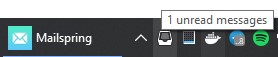
Windows 10 x64
 memboc
on 7 Feb 2019
memboc
on 7 Feb 2019
Can confirm on Windows 10 x64. I always get a blue dot after a sync, even with 0 unread messages.
 chris-ayala
on 13 Feb 2019
chris-ayala
on 13 Feb 2019
Can confirm on Linux Mint 19.1 Cinnamon. Icon keeps turning blue, no new mail.
 Ax3man
on 17 Jun 2019
Ax3man
on 17 Jun 2019
Same here. Blue dot while there is no new mail.
It could be great to disable this, and have a email counter badge instead.
(Windows 10 x64)
 mickaellecolazet
on 27 Jun 2019
mickaellecolazet
on 27 Jun 2019
This issue is supposed to be fixed by #1206
 mkhazov
on 3 Jul 2019
mkhazov
on 3 Jul 2019
Any progress on this? Have been having this issue in Ubuntu 19.10. I think a solution was given in #1206 but hasn't been committed to master.
 JDecunha
on 1 Nov 2019
JDecunha
on 1 Nov 2019
I have Mailspring 1.7.2 with Ubuntu 18.04. I do not see a blue dot on the tray icon, but the whole tray icon which is white randomly turns into blue.
 saber7165
on 4 Nov 2019
saber7165
on 4 Nov 2019
Mailspring version 1.7.4-d54ff730 on ubuntu 19.10 has the same issue.
 popovas
on 20 Mar 2020
popovas
on 20 Mar 2020
Related issues
 k4rli
·
3Comments
k4rli
·
3Comments
 dgattey
·
3Comments
dgattey
·
3Comments
 DanielRios549
·
3Comments
DanielRios549
·
3Comments
 enoversum
·
3Comments
enoversum
·
3Comments
 jerry79
·
3Comments
jerry79
·
3Comments
Most helpful comment
me too (blue dot on every sync) and it only works if mailspring is minimized NOT closed to tray, Also the actual blue dot is so small i cant even see it without Kmag.
Manjaro KDE