Mailspring: duplicate in sent folder - outlook.com
Are there any related issues?
No
What operating system are you using?
MacOS 10.13.5
What version of Mailspring are you using?
Version 1.2.2 (1.2.2) 96fb3a99
--
Bug?
Do you have any third-party plugins installed? If so, which ones?
No
Is the issue related to a specific email provider (Gmail, Exchange, etc.)?
Outlook.com
Is the issue reproducible with a particular attachment, message, signature, etc?
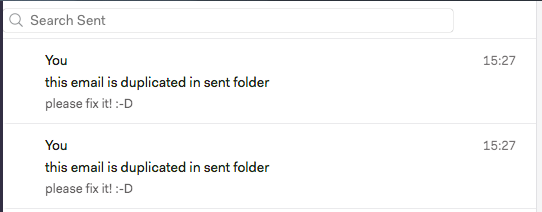
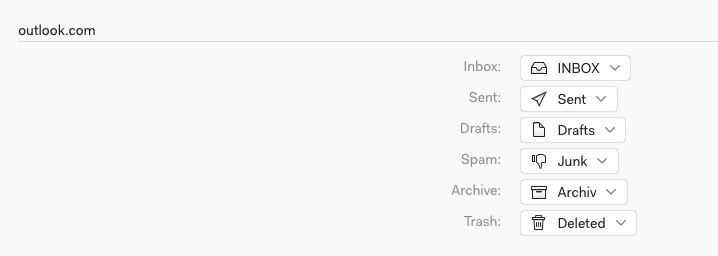
Everytime I send a mail via outlook.com, i have this email twice in my send folder.
In other apps you can set the option - not to save a sent email in sent folder. This would be necessary here.
 weissi29
All 35 comments
Having the same error here. Fix would be appreciated. Thanks!
 conlaoch1
on 15 Jun 2018
conlaoch1
on 15 Jun 2018
I seem to also be sending double emails on some occasions, though not on others. I'm on Gmail though. Not sure what's going on here.
 qlfwyyd
on 20 Jun 2018
qlfwyyd
on 20 Jun 2018
Same issue. Please fix!
 clonzana
on 20 Jun 2018
clonzana
on 20 Jun 2018
Same issue here, this makes mailspring useless because it will spam double emails each time.
I would suggest an option, as Thunderbird offers, to disable the duplication of sent emails.
 Kiailandi
on 31 Jul 2018
Kiailandi
on 31 Jul 2018
Any news on this??? This reaaaaaaalllllyy sucks...
@bengotow
weissi29
on 21 Aug 2018
Still waiting for this fix.. :(
conlaoch1
on 21 Aug 2018
Same here... Any news on this issue? It's really anoying, I would'nt buy a subscription if this is not corrected :/
 TizeN85
on 11 Sep 2018
TizeN85
on 11 Sep 2018
This is a major bug and prevents me from using it until it's fixed.
 Emonadeo
on 24 Sep 2018
Emonadeo
on 24 Sep 2018
Is fixing it really hard?
 berkaydedeoglu
on 14 Oct 2018
berkaydedeoglu
on 14 Oct 2018
same here, please fix...
 ChengweiWang0
on 15 Oct 2018
ChengweiWang0
on 15 Oct 2018
For those worried that it might actually spam a double email to the receiver, I've been testing this with a friend, and the duplicate seems to be strictly _sender-side_.
I'd still like to see this fixed of course, but at least we can stay assured that it won't really double spam the receiver each time we reply through Mailspring :)
 ChuangTseu
on 18 Oct 2018
ChuangTseu
on 18 Oct 2018
could this be related to #1086?
using office365 the issue is recipient-side (in fact I do not have multiple copies in sent folders), reply-all results in 2 or more copies of the same email to one or more recipients.
happens only with office365 accounts and reply-all.
My tests showed independence on send later feature, happens with or without it.
Happens on multiple different OS.
version v1.4.2-f587b7b7, no plugins installed
this issue prevents all office365 users from using Mailspring as nobody wants to spam his recipients, right?
 ghost
on 19 Oct 2018
ghost
on 19 Oct 2018
Can confirm that the emails seem to be sent only once, even though there are duplicate emails in the sent folder. Tested by sending from Gsuite to another Gsuite account. Annoying nevertheless.
 mnylen
on 15 Nov 2018
mnylen
on 15 Nov 2018
Still waiting for it to be fixed.
 m7rcelo
on 14 Dec 2018
m7rcelo
on 14 Dec 2018
This has been frustrating me as well. (Win 10, ver 1.5.4 of MailSpring).
I was also getting duplicate emails in the sent folder for outlook accounts (sending to multiple addressees).
When I disabled the "After sending enable undo for: ___ sec" this problem went away- no more duplicates - (at least for now).
 watgrad
on 3 Jan 2019
watgrad
on 3 Jan 2019
This is still an issue as of March 14th 2019. I'm seeing this on my Office365 email account.
 UnixMonky
on 14 Mar 2019
UnixMonky
on 14 Mar 2019
I have some problem:
First email has: Message-ID: <HE1PR06MB3865B5C499DB0DA1D549B62B8F4B0@HE1PR06MB3865.eurprd06.prod.outlook.com>
Second email has: Message-ID: <[email protected]>
Duplicated in Mailspring server
 phnx47
on 15 Mar 2019
phnx47
on 15 Mar 2019
Hey folks—this should fixed in the latest release (at least, I'm not able to reproduce with our test Office 365 account). Let me know if you still see this in 1.6.0. I'm checking to see if there's any sort of mailbox configuration that could cause this as well.
 bengotow
on 22 Mar 2019
bengotow
on 22 Mar 2019
Yes it seems ok now for me :) Thanks !
TizeN85
on 24 Mar 2019
What operating system are you using?
Manjaro Linux KDE 18.0.4
What version of Mailspring are you using?
v 1.6.1
--
Bug?
Is the issue related to a specific email provider (Gmail, Exchange, etc.)?
Office 365
Is the issue reproducible with a particular attachment, message, signature, etc?
When I am sending emails using Mailspring, emails are saved twice in the sent folder. When sending emails from the Office 365 webmail, sent emails are showing only once. When I delete emails in the sent folder using Mailspring, the deleted sent emails still have one copy on the webmail.
For Microsoft Outlook client, there is an option to change the settings - Do not save copies of sent items. However, Mailspring has no such settings to turn off "duplicate sent items". Please help. Thanks.
 giswqs
on 13 Apr 2019
giswqs
on 13 Apr 2019
Same Problem here. I actually switched today from Thunderbird to Mailspring because this was annoying me and i thought this problem is specifig to Thunderbird since i did some testing and when sending mails using the outlook website i didn't get duplicates in sent folder. But apparently now with Mailspring i have the same problem. Maybe this problem is caused by some piece of software thats used by both Thunderbird and Mailspring? I am using latest Manjaro 18.0.4 (Illyria) with a normal outlook account with Mailspring 1.6.1
 bullsei
on 4 Jun 2019
bullsei
on 4 Jun 2019
@bullsei in thunderbird you have the option to disable it, just go to the account settings, "copies & folders" and disable the "place a copy in" "sent folder" option.
I'd love to see the same option for mailspring.
Kiailandi
on 8 Jun 2019
I've noticed in further use that this happens when I'm replying to a distro that I'm a member of. Normal replies to people/groups I'm not a member of don't seem to have the duplication, it's only when I'm in a group on the to/cc fields that I get the duplicate email.
Logically I understand why this occurs, but it doesn't happen with O365 web client, so they may be doing some fancy checking for deduplication.
UnixMonky
on 10 Jun 2019
This is still an issue on 1.7.1 - only happens for outlook. I hope there will be a fix soon.
 linean
on 21 Oct 2019
linean
on 21 Oct 2019
Happens with Outlook on 1.7.2. Can't use until this is fixed.
 kmancobhc
on 22 Oct 2019
kmancobhc
on 22 Oct 2019
It looks like isn't a problem about Hotmail or other providers but is about IMAP.
The mail app logs the sent item, the IMAP service shows it sent and you get 2 mail.
To fix it, it should be necessary to have check box where we can set to save/un-save a copy of sent items in the sent folder.
 toboko
on 24 Oct 2019
toboko
on 24 Oct 2019
Any updates here? Just trying Mailspring out for the first time and came across this same issue with my Outlook.com email address.
 vb543
on 27 Jan 2020
vb543
on 27 Jan 2020
Awaiting to be fixed!! Same issue here for Ubuntu 18.04 Mailspring 1.7.2-4522b259
 yidingww
on 14 Feb 2020
yidingww
on 14 Feb 2020
@bengotow This is still an issue in 1.7.4-d54ff730. Mailspring should have a toggle to either save or not save a copy of sent emails to the sent folder, similar to outlook.
I would be willing to attempt a fix but I am not familiar with the Mailspring codebase. Looking through the logs, it looks like the MailSync server handles adding a copy of the email into the sent folder.
116168 [2020-03-25 10:29:38.330] [foreground] [info] - Sending draft [email protected]
116168 [2020-03-25 10:29:38.330] [foreground] [info] -- Identifiedsentfolder: Sent
116168 [2020-03-25 10:29:38.331] [foreground] [info] -- Sending a single message body to all recipients:
116168 [2020-03-25 10:29:39.739] [foreground] [info] -- No messages found. Sleeping 1 to wait for sent folder to settle...
116168 [2020-03-25 10:29:40.863] [foreground] [info] -- No messages found. Sleeping 1 to wait for sent folder to settle...
116168 [2020-03-25 10:29:41.975] [foreground] [info] -- No messages found. Sleeping 2 to wait for sent folder to settle...
116168 [2020-03-25 10:29:44.107] [foreground] [info] -- No messages matching the message-id were found in the Sent folder.
116168 [2020-03-25 10:29:44.107] [foreground] [info] -- Placing a new message withselfbody in the sent folder.
116168 [2020-03-25 10:29:44.300] [foreground] [info] -- Syncing sent message (UID 1906) to the local mail store
116168 [2020-03-25 10:29:44.435] [foreground] [info] -- Synced sent message (Sent UID 1906 = Local ID jV4Wk14P958J9oiqpHZcpA3ppEZth7AcNDdEvnbfY)
116168 [2020-03-25 10:29:44.440] [foreground] [info] [local-ed8a677f-23d5] -- Succeeded. Changing status tocomplete``
AFAIK, the MailSync server is closed source, so I wouldn't be able to modify the code anyways. It looks like the server is checking to see if there is already a copy in the sent folder, then only making a new copy if it cannot find one. However, it looks like it isn't waiting long enough. After Mailsync creates a copy, the second copy appears from the SMTP server... Just increasing this delay may be an easy fix if we are trying to avoid complex configuration options.
 OctopusProteins
on 25 Mar 2020
OctopusProteins
on 25 Mar 2020
Same Problem still remains.
Mailspring: 1.7.8 / OS: Ubuntu 20.04 / Mail provider: outlook.com
Please fix. I think a checkbox to decide wether mails are saved in sent folder or not would be the best solution.
 DevZky
on 28 May 2020
DevZky
on 28 May 2020
I'm also having the same problem
Mailspring: 1.7. 8/ OS: Windows 10 Pro / Mail provider: outlook.com
 WoutDebacker
on 10 Jul 2020
WoutDebacker
on 10 Jul 2020
I'm having the exact same problem. I'm on Windows 10 with an Outlook account using Mailspring.
This does not happen when I'm using my Gmail account in Mailspring to send email -- it only happens when I switch to my Outlook account for sending.
As others have mentioned, the duplicate email issue seems to happen only on the sender's side! That is, the receiver will still receive one and only one email from you the whole time.
@bengotow Please kindly have a look. I find this a pretty serious issue regarding usability.
 ianpan870102
on 10 Aug 2020
ianpan870102
on 10 Aug 2020
As per above, latest ubuntu & current mailspring app version...
@bengotow Please have a look at the suggestion from @OctopusProteins above
 darthvinyll
on 9 Sep 2020
darthvinyll
on 9 Sep 2020
Same Problem, Mailspring 1.7.8, Ubuntu 20.04.1 LTS, Outlook Mail Account.
 Haini
on 16 Sep 2020
Haini
on 16 Sep 2020
same problem in windows 10 and manjaro KDE, mailspring 1.7.8-1. Outlook mail accounts
 Vicvitoria
on 11 Nov 2020
Vicvitoria
on 11 Nov 2020
Related issues
 dgattey
·
3Comments
dgattey
·
3Comments
 LeandroStanger
·
3Comments
LeandroStanger
·
3Comments
 k4rli
·
3Comments
k4rli
·
3Comments
 spartero
·
3Comments
spartero
·
3Comments
 liam-wiltshire
·
3Comments
liam-wiltshire
·
3Comments
Most helpful comment
For those worried that it might actually spam a double email to the receiver, I've been testing this with a friend, and the duplicate seems to be strictly _sender-side_.
I'd still like to see this fixed of course, but at least we can stay assured that it won't really double spam the receiver each time we reply through Mailspring :)