Mailspring: Cannot read property 'includes' of null after reading a few mails
Steps which result in the error:
- Start Mailspring
click some mails in the inbox while in the background the cache is updated/mails are synced ("Caching recent mail" is shown)
Suddenly when clicking a mail I get the error message:
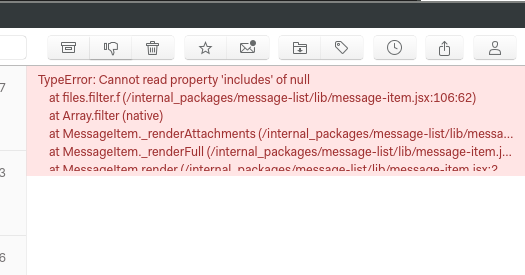
One this message is shown, is sticks there and no mails can be read. A restart of Mailspring fixes the problem temporarily. After some usage the message is shown again.
Full Error stacktrace
TypeError: Cannot read property 'includes' of null
    at files.filter.f (/internal_packages/message-list/lib/message-item.jsx:106:62)
    at Array.filter (native)
    at MessageItem._renderAttachments (/internal_packages/message-list/lib/message-item.jsx:106:33)
    at MessageItem._renderFull (/internal_packages/message-list/lib/message-item.jsx:289:19)
    at MessageItem.render (/internal_packages/message-list/lib/message-item.jsx:298:66)
    at h (/usr/share/mailspring/resources/app.asar/node_modules/react-dom/cjs/react-dom.production.min.js:130:280)
    at beginWork (/usr/share/mailspring/resources/app.asar/node_modules/react-dom/cjs/react-dom.production.min.js:133:485)
    at d (/usr/share/mailspring/resources/app.asar/node_modules/react-dom/cjs/react-dom.production.min.js:161:93)
    at f (/usr/share/mailspring/resources/app.asar/node_modules/react-dom/cjs/react-dom.production.min.js:161:417)
    at g (/usr/share/mailspring/resources/app.asar/node_modules/react-dom/cjs/react-dom.production.min.js:162:149)
    at m (/usr/share/mailspring/resources/app.asar/node_modules/react-dom/cjs/react-dom.production.min.js:169:173)
    at w (/usr/share/mailspring/resources/app.asar/node_modules/react-dom/cjs/react-dom.production.min.js:168:413)
    at z (/usr/share/mailspring/resources/app.asar/node_modules/react-dom/cjs/react-dom.production.min.js:167:32)
    at u (/usr/share/mailspring/resources/app.asar/node_modules/react-dom/cjs/react-dom.production.min.js:165:441)
    at Object.enqueueSetState (/usr/share/mailspring/resources/app.asar/node_modules/react-dom/cjs/react-dom.production.min.js:108:299)
    at MessageList.A.setState (/usr/share/mailspring/resources/app.asar/node_modules/react/cjs/react.production.min.js:12:357)
    at MessageStore.MessageList._onChange (/internal_packages/message-list/lib/message-list.jsx:353:10)
    at EventEmitter.eventHandler (/src/global/mailspring-store.es6:125:23)
    at emitOne (events.js:120:20)
    at EventEmitter.emit (events.js:210:7)
    at MessageStore.trigger (/src/global/mailspring-store.es6:137:26)
    at query.then.items (/src/flux/stores/message-store.es6:298:12)
    at <anonymous>
What operating system are you using?
Arch Linux x64
What version of Mailspring are you using?
1.2.1
Bug?
Do you have any third-party plugins installed? If so, which ones?
No
Is the issue related to a specific email provider (Gmail, Exchange, etc.)?
Unknown, I'm using plain IMAP and GMail accounts
Is the issue reproducible with a particular attachment, message, signature, etc?
Any message, once occurred no message can be read.
 jbbr
jbbr
All 7 comments
I'm having the same issue. This seems to mainly happen when rapidly switching through old messages in a large mailbox (at least for me).
 DarkSpyro003
on 19 Apr 2018
DarkSpyro003
on 19 Apr 2018
Same problem here.
TypeError: Cannot read property 'includes' of null
    at files.filter.f (/internal_packages/message-list/lib/message-item.jsx:106:62)
    at Array.filter (native)
    at MessageItem._renderAttachments (/internal_packages/message-list/lib/message-item.jsx:106:33)
    at MessageItem._renderFull (/internal_packages/message-list/lib/message-item.jsx:289:19)
    at MessageItem.render (/internal_packages/message-list/lib/message-item.jsx:298:
Same mailspring version, no plugins installed. Only using a gmail account. Using Linux Mint 18.3
 feliarana
on 4 May 2018
feliarana
on 4 May 2018
Same issue here.
 simtrax
on 15 May 2018
simtrax
on 15 May 2018
same issue.
 gustoune
on 21 May 2018
gustoune
on 21 May 2018
Until this is resolved, users should know that just closing the Mailspring window (Ctrl-W) won't fix the symptoms, at least for me. You have to completely quit the app (Ctrl-Q) and restart it to be able to see your emails correctly again.
 curtisgibby
on 23 May 2018
curtisgibby
on 23 May 2018
Hey folks, thanks for reporting this - I've tracked this down and it'll be fixed in the next release, which should go out in a day or two. 👍 Sorry for the wait!
 bengotow
on 8 Jul 2018
bengotow
on 8 Jul 2018
Hey folks—this shipped in version 1.3.0. The app should have auto-updated by now, but if not you can download the latest release from https://www.getmailspring.com/download. Enjoy!
bengotow
on 2 Aug 2018
Related issues
 DanielRios549
·
3Comments
DanielRios549
·
3Comments
 dgattey
·
3Comments
dgattey
·
3Comments
 tuxmachine
·
3Comments
tuxmachine
·
3Comments
 scooby
·
3Comments
scooby
·
3Comments
 applesea2
·
3Comments
applesea2
·
3Comments
Most helpful comment
I'm having the same issue. This seems to mainly happen when rapidly switching through old messages in a large mailbox (at least for me).