Mailspring: Icon not working in notification
The notification for a new mail uses the default OS icon, not the icon of Mailspring (or even better, the profile pic from the person sending it).

Are there any related issues?
No
What operating system are you using?
Deepin Linux 15.5
What version of Mailspring are you using?
1.1.5
Bug?
Do you have any third-party plugins installed? If so, which ones?
No
Is the issue related to a specific email provider (Gmail, Exchange, etc.)?
No
 brentthierens
All 9 comments
Hey! Wow this is pretty interesting—I'm actually not sure what we need to do to fix this. I think this icon is automatically based on the application icon. I wonder if our icon needs to be a specific size for this.
Are you using the Snapcraft release?
 bengotow
on 24 Mar 2018
bengotow
on 24 Mar 2018
Hi
No, I installed it via apt, it is included via the Deepin repository.
I don't think it depends on the icon size, the notifications of my Python GTK app work fine with an svg image which has no specific size.
If you can give me a minimal working code example of a notification with the library you use, I am happy to test/debug to resolve this issue.
On Mar 24 2018, at 6:50 pm, Ben Gotow notifications@github.com wrote:
>
Hey! Wow this is pretty interesting—I'm actually not sure what we need to do to fix this. I think this icon is automatically based on the application icon. I wonder if our icon needs to be a specific size for this.
Are you using the Snapcraft release?
—
You are receiving this because you authored the thread.
Reply to this email directly, view it on GitHub (https://link.getmailspring.com/link/[email protected]/0?redirect=https%3A%2F%2Fgithub.com%2FFoundry376%2FMailspring%2Fissues%2F782%23issuecomment-375911870&recipient=cmVwbHkrMDIzZjE0MzA1Mjc5NDI1ZTI1NTA5NDQwMTBkM2NmMWZmZjAzOGFlOGE0MzhiOThiOTJjZjAwMDAwMDAxMTZjZTUxZjI5MmExNjljZTEyNWFhMWExQHJlcGx5LmdpdGh1Yi5jb20%3D), or mute the thread (https://link.getmailspring.com/link/[email protected]/1?redirect=https%3A%2F%2Fgithub.com%2Fnotifications%2Funsubscribe-auth%2FAj8UMEQ0C830Fd3pCZlYsqlxHHoWRf7Oks5thodygaJpZM4S4StD&recipient=cmVwbHkrMDIzZjE0MzA1Mjc5NDI1ZTI1NTA5NDQwMTBkM2NmMWZmZjAzOGFlOGE0MzhiOThiOTJjZjAwMDAwMDAxMTZjZTUxZjI5MmExNjljZTEyNWFhMWExQHJlcGx5LmdpdGh1Yi5jb20%3D).
brentthierens
on 24 Mar 2018
+1 I've got this issue too on Mac OS X High Sierra (10.13.3) - using the latest version of MailSpring

 Coysh
on 29 Mar 2018
Coysh
on 29 Mar 2018
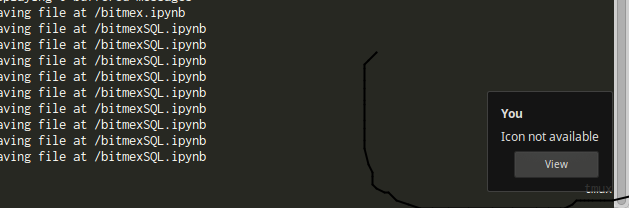
I can confirm this issue on Ubuntu 16.04.3 LTS (elementary OS). Strangely, it's always using the IOTA icon.
 iuvbio
on 4 Apr 2018
iuvbio
on 4 Apr 2018
Same here
 monasoratairu
on 27 May 2018
monasoratairu
on 27 May 2018
I too am experiencing this on Ubuntu 18.04. After a bit of debugging, it looks like the notification payload sent to notify-send is missing some key information:
'actions': dbus.Array([dbus.String(u'default'), dbus.String(u'View')], signature=dbus.Signature('s')),
 'app_icon': dbus.String(u''),
 'app_name': dbus.String(u'Electron'),
 'body': dbus.String(u'Pingdom Monthly Report 2018-05-01 to 2018-05-31'),
 'expire_timeout': dbus.Int32(-1),
 'hints': dbus.Dictionary({}, signature=dbus.Signature('sv')),
 'replaces_id': dbus.UInt32(1229L),
 'summary': dbus.String(u'Pingdom')
A good 1st step here would be to include an app_icon in the notification payload:
- either a generic
emailstring, that would be mapped by the notification daemon with the current icon theme's default icon for an email app - or an absolute path to a PNG/SVG icon that comes bundled with Mailspring
Seeing as how other email clients deal with this in Linux, Geary for example, looks for a gravatar for a contact and base64 encodes their image in the payload itself - making the new email notification icon display the actual contact's image.
Besides this the payload could also be improved to specify the proper app_name.
Hope this helps, thanks!
 rtud
on 3 Jun 2018
rtud
on 3 Jun 2018
I was having this on macOS but was able to fix it by cleaning iconcache and iconservices. See here https://apple.stackexchange.com/questions/307861/wrong-generic-mac-dock-application-icon
 igor-krupenja
on 19 Jul 2018
igor-krupenja
on 19 Jul 2018
Getting this as well on Arch with deepin. Updating the icon cache didn't change anything.
 fictitiousexistence
on 15 Jan 2019
fictitiousexistence
on 15 Jan 2019
Kubuntu 16.04 as well. The little blue dot is very helpful but it doesn't work. The blue dot works only if Mailspring is minimized and not closed. Sometimes doesn't work when it is minimized as well (if there are unread messages inside Mailspring)
 makkasi
on 17 Jan 2019
makkasi
on 17 Jan 2019
Related issues
 applesea2
·
3Comments
applesea2
·
3Comments
 KristerV
·
3Comments
KristerV
·
3Comments
 ghost
·
3Comments
ghost
·
3Comments
 DylanC
·
3Comments
DylanC
·
3Comments
 vsanchez
·
3Comments
vsanchez
·
3Comments