Mailspring: [Feature Request] Color Code for Account and Favorites Labels/Folders
Two features that exist in Spark:
- Color code for diferent accounts
- Possibility to add favorite folders/labels (for gmail)
Are there any related issues?
...
What operating system are you using?
...
What version of Mailspring are you using?
...
--
Bug?
Do you have any third-party plugins installed? If so, which ones?
...
Is the issue related to a specific email provider (Gmail, Exchange, etc.)?
...
Is the issue reproducible with a particular attachment, message, signature, etc?
...
--
Feature Request?
Does this feature exist in another mail client or tool you use?
...
 lowercase00
All 19 comments
+1 for that!
customizing the left sidebar would be a big plus:
- hiding some default folders: "Starred", "Unread", etc...
- adding some custom imap folders/gmail labels that you want to check regularly (+ unread folder/label counter to see if there is a new message).
for example i get newsletters all day from my suppliers, but i have a gmail filter running that puts them to "news" and skips inbox to have a clear inbox and see really important mails.
in the morning or after work i check the news folder and unread mails if there is something interesting. a intelligent folder option would be nice. for example: set a special folder with the option "only unread mails" and got it added to the sidebar.
of course you can expand the accounts and see all labels. but they wont get checked for new emails till you click it. if you have 3 accounts with lots of labels there is a lot of scrolling needed. most labels you dont need on a daily base.
 killtux
on 23 Feb 2018
killtux
on 23 Feb 2018
Yes, +1 to both requests!
- I don't use Archive at all, so the ability to hide the folders would be great. Also, I don't need my SPAM folder to be that prominent.
- The ability to put favorite folders in the top section for Office 365 would also be great. There are some folders that are in a particular place in the folder tree logically but that I either check frequently or file documents into frequently. Having them as favorites at the top makes both easier.
 readsquirrel
on 2 Mar 2018
readsquirrel
on 2 Mar 2018
Having customizable account colors -- such that each email in the combined inbox has a little corresponding account color bar next to it, or similar -- is huge for those of us who deal with multiple email accounts! Please implement.
 aulbricht
on 29 Nov 2018
aulbricht
on 29 Nov 2018
+1
 CarlosRebolledoA
on 29 Nov 2018
CarlosRebolledoA
on 29 Nov 2018
+1
 artsgirl
on 18 Feb 2019
artsgirl
on 18 Feb 2019
Just set Mailspring up and this was the first thing I noticed wasn't a thing. C'mon.
 no-boot-device
on 26 Jun 2019
no-boot-device
on 26 Jun 2019
I agree. This is a feature in SparkMail which is a wonderful helper. I would liek to see this added to MailSpring.
 eclectic-coding
on 4 Oct 2019
eclectic-coding
on 4 Oct 2019
+1
 gatiba
on 6 Oct 2019
gatiba
on 6 Oct 2019
+1 favorite folders and colored accounts would be wonderful
 math-uzh
on 16 Jan 2020
math-uzh
on 16 Jan 2020
+1
 meesrutten
on 2 Mar 2020
meesrutten
on 2 Mar 2020
+1
 intheravine
on 23 Apr 2020
intheravine
on 23 Apr 2020
+1
 skobylite
on 10 May 2020
skobylite
on 10 May 2020
+1 Color code for different accounts.
 ChitranshuV
on 19 May 2020
ChitranshuV
on 19 May 2020
+1 in color coding different accounts. That is a feature in Spark, a iOS and MacOS based client, and it works beautifully.
 jesi-rgb
on 22 Jun 2020
jesi-rgb
on 22 Jun 2020
+1 plus the ability to customize the color of labels.
 moatus
on 5 Oct 2020
moatus
on 5 Oct 2020
I will have some time at the beginning of next year and would like to try working on this feature. This is something which is most important for me with my mail clients, and I would love to give it a shot. I think the following two issues are bascially asking for similar functionality as well:
- https://github.com/Foundry376/Mailspring/issues/1738
- https://github.com/Foundry376/Mailspring/issues/2184
I am thinking about the following:
- In Settings > Accounts add a selector (e.g. color picker) for the account color.
- In the main view adjust the background color of the e-mail preview tile accordingly
Are there any important things that I should keep in mind (in addition to https://github.com/Foundry376/Mailspring/blob/master/CONTRIBUTING.md)? Any pointers to the code that may be helpful are also totally welcome.
 Phylu
on 6 Dec 2020
Phylu
on 6 Dec 2020
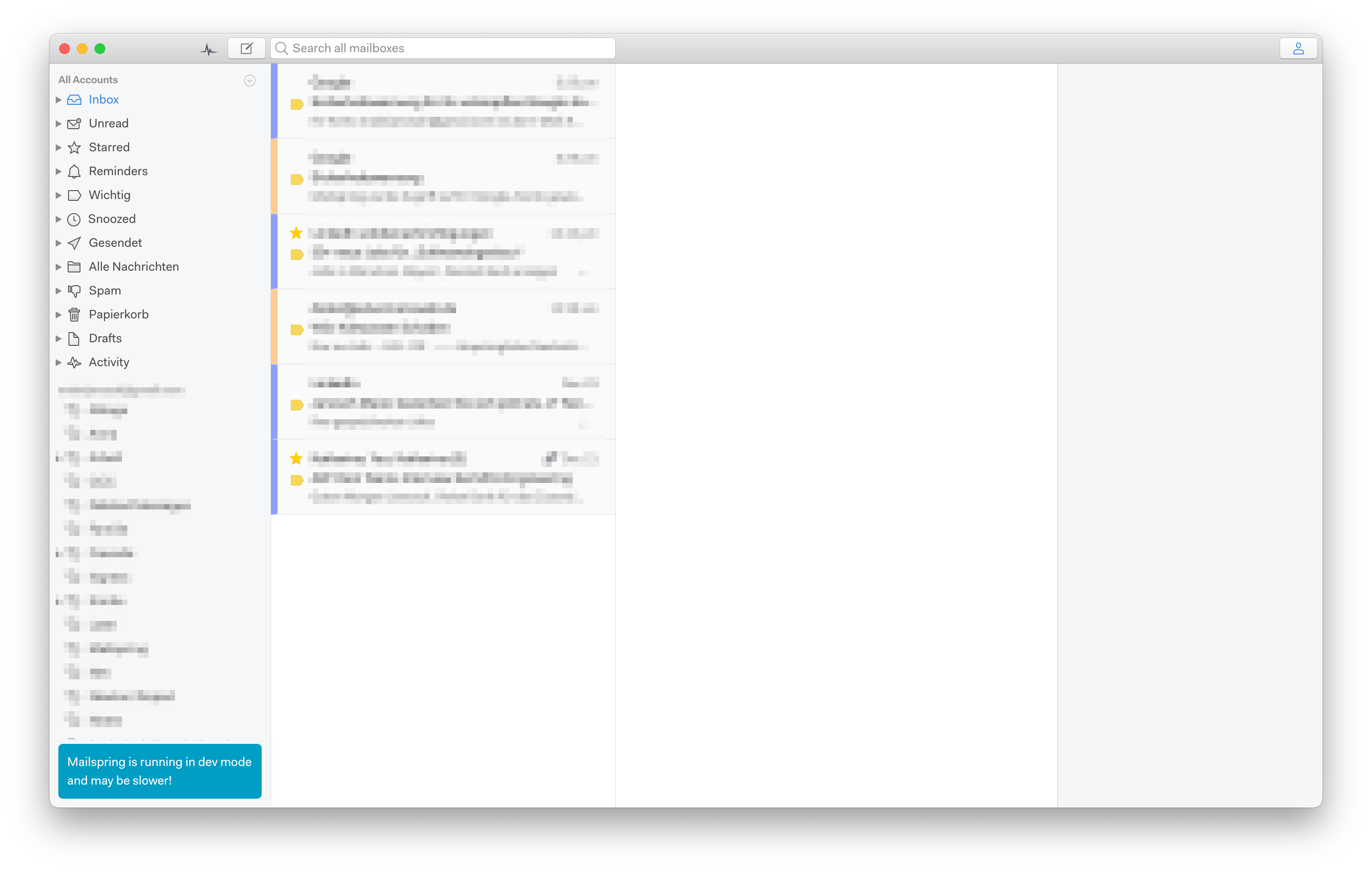
I managed to get a first prototype working (https://github.com/Phylu/Mailspring/tree/feature/526-colorize-accounts). I am happy to receive some feedback on it.

Phylu
on 26 Dec 2020
@Phylu Well done and thank you for working on this.
The label design you have here is on the full left border, which means that from a design hierarchy, it is ambiguous whether the label is within the message box versus part of the parent component.
This becomes an important distinction when we include the message list "swipe functions":
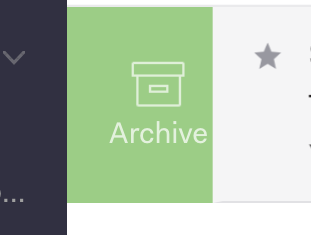
screen capture of current swipe UI
The swipe UI - the green archive - is not inside of the message box, but sort of underneath it. That star (in the same img above) is clearly inside the message box, so it is clear that it is tied to that message box (and when swiped to the archive, will go along with it).

mockup of account label with swipe UI. It's ambiguous whether the account label is part of the message box, the swipe action, or another message list feature
With swipe actions, it becomes important to distinguish which UI elements are included inside the message box versus which aren't. The account label should be included with that specific message box (and when swiped, is swiped along with the rest).
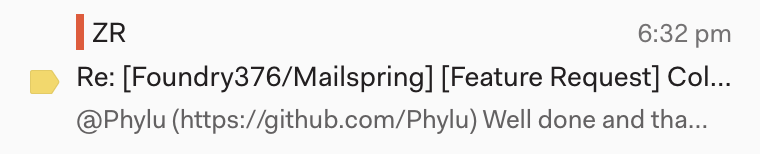
That is why it might be best to follow something similar to spark where it is a smaller color indication inside the message box:

Alternatively, since I like the way your mockup looks, you can add a strong left border, reduce the label height by a few pixels on both top/bottom, which will make the label appear to be part of the message...
 ZachariahRosenberg
on 27 Dec 2020
ZachariahRosenberg
on 27 Dec 2020
@ZachariahRosenberg Thanks for the design hint. I think having it similar to spark is looking better than adding a border left of the element (and easier to implement as well). have updated this accordingly:
Phylu
on 27 Dec 2020
Related issues
 psivesely
·
3Comments
psivesely
·
3Comments
 KristerV
·
3Comments
KristerV
·
3Comments
 tuxmachine
·
3Comments
tuxmachine
·
3Comments
 DanielRios549
·
3Comments
DanielRios549
·
3Comments
 ghost
·
3Comments
ghost
·
3Comments
Most helpful comment
Having customizable account colors -- such that each email in the combined inbox has a little corresponding account color bar next to it, or similar -- is huge for those of us who deal with multiple email accounts! Please implement.