Mailspring: in the "new message" window, inserting a link is problematic
Hello
Windows 10 x64 and Mailspring 1.0.11
I can reproduce this problem.
1/ I answer a message
2/ I click on

3/ I write my answer
4/ in the body of the message, I select text
5/ this popup window opens:

6/I click on the button to insert a link (button framed in red), this popup window replaces the previous one

7/ but this window disappears immediately and I can not insert a link
I tried with ctrl+k option to make the text a link, the window is not kept displayed
 franco27
All 4 comments
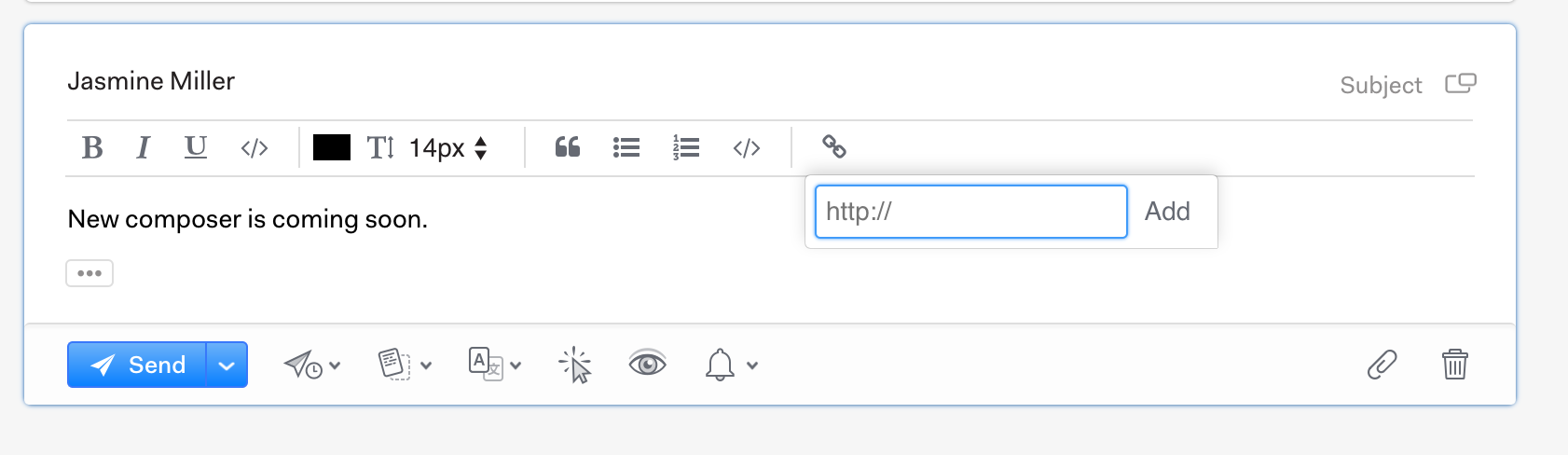
Hey! Thanks for filing this - I totally agree this is... sorta wonky. I'm collecting all these composer issues and I'm gonna try to replace the editor itself with a new one that addresses a lot of the common concerns. (WIP screenshot below). Stay tuned!
 bengotow
on 20 Dec 2017
bengotow
on 20 Dec 2017
yes, I will wait for this improvement with impatience
maybe add a button or an entry in the contextual menu (by the right click), to insert an image since a file in the body of the message
(keeping the function insert an image from the clipboard)
franco27
on 20 Dec 2017
Hey folks—thanks for reporting this! Version 1.1.0 shipped today which fixes this issue and includes an overhauled composer with support for RTL text, font colors, sizes and styles, improved markdown shortcuts and lots more. You can grab the latest version from https://getmailspring.com/download.
bengotow
on 23 Jan 2018
I confirm this problem is solved with the 1.1.0
franco27
on 23 Jan 2018
Related issues
 justindoran
·
3Comments
justindoran
·
3Comments
 spartero
·
3Comments
spartero
·
3Comments
 jerry79
·
3Comments
jerry79
·
3Comments
 enoversum
·
3Comments
enoversum
·
3Comments
 dgattey
·
3Comments
dgattey
·
3Comments
Most helpful comment
Hey! Thanks for filing this - I totally agree this is... sorta wonky. I'm collecting all these
composerissues and I'm gonna try to replace the editor itself with a new one that addresses a lot of the common concerns. (WIP screenshot below). Stay tuned!