Mailspring: Snap version does not have indicator on 17.10 and 18.04
Mailspring when installed through the snap store, does not render the app indicator in panel on Ubuntu 17.10+. I can make it work by running mailspring from command like like env XDG_CURRENT_DESKTOP=Unity mailspring.
In 17.10, the default desktop session name was changed to ubuntu:GNOME. However, this still supports the existing indicator and launcher APIs.
Are there any related issues?
I don't think so
What operating system are you using?
Ubuntu 17.10 and 18.04
What version of Mailspring are you using?
1.0.10
--
Bug?
No.
Is the issue related to a specific email provider (Gmail, Exchange, etc.)?
No
Is the issue reproducible with a particular attachment, message, signature, etc?
No
Feature Request?
Does this feature exist in another mail client or tool you use?
Yes
 owais
owais
All 11 comments
Hey! This is interesting - it might be good to see what the folks at http://forum.snapcraft.io/ think about this. It might be a regression in snapd or something that needs to be changed there?
 bengotow
on 19 Dec 2017
bengotow
on 19 Dec 2017
I'm pretty sure it is a change Electron needs to make upstream. They need to enable Unity appindicator and launcher API not only when XDG_CURRENT_DESKTOP is set to Unity but also when it is set to ubuntu:GNOME as both environments support the same APIs.
I don't know what mailspring can do here. Probably try to submit patches or try influence upstream to make the change?
Similar upstream issues: https://github.com/electron/electron/issues/10887
owais
on 19 Dec 2017
Ahhh interesting - that definitely seems like it'd do it. Sounds like we may be able to update to Electron 1.8 to fix this. Unfortunately there are a lot of other changes between the versions, but I'll see how easy it'd be to update and test.
bengotow
on 19 Dec 2017
Thanks
owais
on 19 Dec 2017
I'm shipping a new version of Mailspring based on Electron 1.8.2-beta4 later today which should resolve this - stay tuned!
bengotow
on 28 Jan 2018
The bug is fixed in Mailspring 1.1.1 (136)! :D :D :D
Thanks to the nature of snappy, soon everyone will be on the fixed version!
 Ads20000
on 29 Jan 2018
Ads20000
on 29 Jan 2018
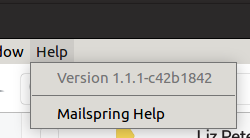
I'm running 1.1.1-c42b1842 but still no indicator on 18.04
owais
on 29 Jan 2018
Hey folks—the fix for this has been shipped in 1.1.1, which now uses Electron 1.8.2 (which recognizes ubuntu:GNOME and uses the correct settings.) The app will autoupdate in the next few hours, or you can download the new version directly from https://getmailspring.com/download.
@owais I'm not sure why you're not seeing the app indicator in 1.1.1 - I'm gonna leave this open and see if we can collect more reports. I'm gonna reset my Ubuntu 18 VM and see if I can reproduce later today.
bengotow
on 29 Jan 2018
@bengotow The indicator is working. I had forgotten that I was testing a new experimental theme which requires me to run an entirely different session and that session had changed the values of XDG_CURRENT_DESKTOP env variable. Moving back to the default session fixed it. I think this can be closed.
Thanks.
owais
on 29 Jan 2018
Great! Thanks for the reply @owais I really appreciate it.
bengotow
on 3 Feb 2018
@bengotow Thanks for the feature. It now works on stock Ubuntu. However, I recently came to know that checking for XDG_CURRENT_DESKTOP is the not right way to this. The correct foolproof way to check if indicators are support (across linux platform) is to check if org.kde.StatusNotifierWatcher DBus interface DBUS interface is present. If it is present it means the desktop supports indicators. All desktops that support indicators like KDE, Ubuntu's Gnome, Unity, Mate, etc rely on this interface so it's the source of truth.
Just thought you might want to know. Thanks.
examples: https://github.com/pithos/pithos/blob/master/pithos/plugins/notification_icon.py
owais
on 3 Feb 2018
Related issues
 psivesely
·
3Comments
psivesely
·
3Comments
 imbrn
·
3Comments
imbrn
·
3Comments
 k4rli
·
3Comments
k4rli
·
3Comments
 purefan
·
3Comments
purefan
·
3Comments
 scooby
·
3Comments
scooby
·
3Comments
Most helpful comment
The bug is fixed in Mailspring 1.1.1 (136)! :D :D :D
Thanks to the nature of snappy, soon everyone will be on the fixed version!